本文為英文版的機器翻譯版本,如內容有任何歧義或不一致之處,概以英文版為準。
在 Connect Customer 中使用客戶第一次回呼模式
當您設定佇列回撥時,您可以選擇使用先回撥給客服人員模式還是先回撥給客戶模式。
-
先回撥給客服人員模式為預設值。在撥打電話給客戶之前,回撥會提供給客服人員接受或拒絕。
-
客戶第一個回呼模式僅適用於 Connect Customer 執行個體。在此模式中,Connect Customer 會先撥打電話給客戶,而且只有在客戶接聽他們收到的回撥時,才會提供回撥給客服人員。
重要
-
如果您在啟用並開始使用客戶第一次回撥後從 Connect Customer 切換,則客戶第一次回撥也會停用。
先回撥給客戶的生命週期
先回撥給客戶的生命週期分散在三個不同的聯絡中,如下圖所示。
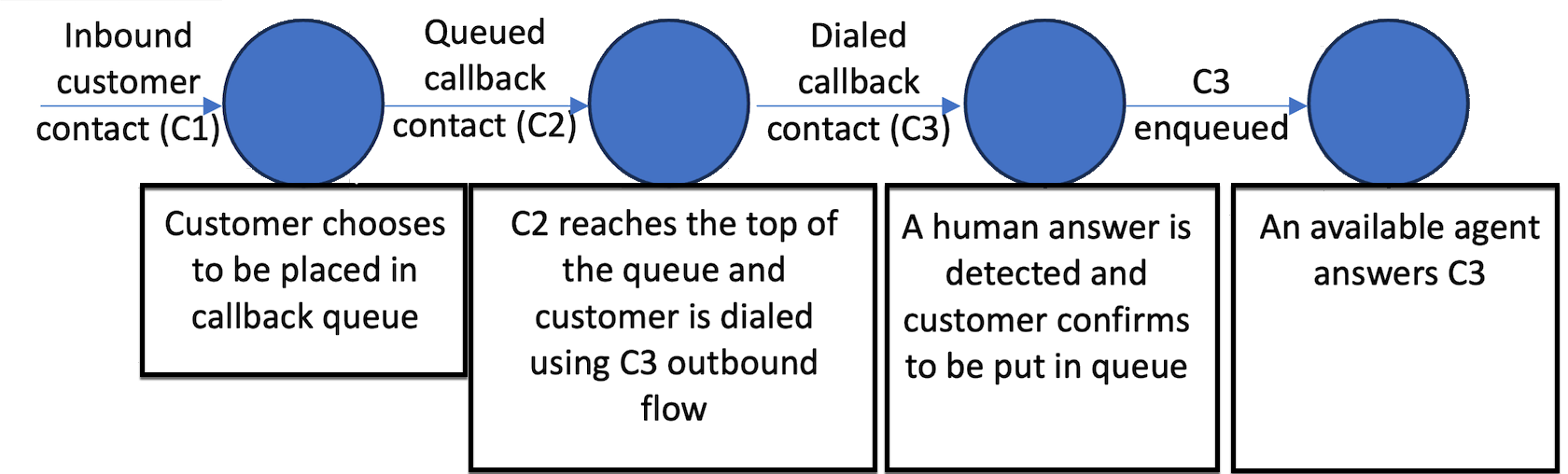
以下是每個聯絡的說明。
-
傳入客戶聯絡 (C1) 是傳入語音聯絡。它看起來像其他所有傳入客戶聯絡。
-
佇列回撥聯絡 (C2) 是先回撥給客戶的佇列分段。它具有新的 CALLBACK_CUSTOMER_FIRST_QUEUED 啟動方法。
-
撥打回撥聯絡 (C3) 是先回撥給客戶的撥打分段。它具有新的 CALLBACK_CUSTOMER_FIRST_DIALED 啟動方法。
-
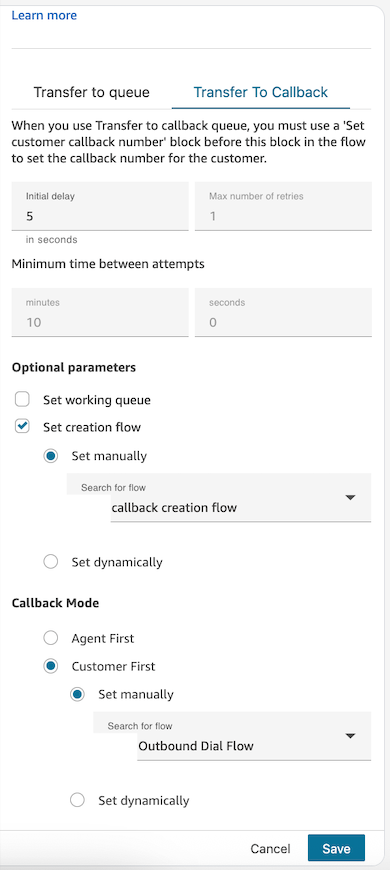
C3 會觸發您在 轉接至佇列 流程區塊中指定的必要傳出回撥流程。您只指定先回撥給客戶模式的傳出回撥流程,而不是先回撥給客服人員模式。
-
對於先回撥給客戶,您可以根據 檢查通話進度 流程區塊的輸出,在為 C3 指定的傳出流程中設定嘗試之間的重試次數和時間。這樣做的目的是判斷聯絡是否已透過語音信箱或人類語音接聽。
-
確認客戶的存在後,C3 的流程應設定 轉接至佇列 流程區塊,將聯絡放在其佇列中,以尋找下一個可用的客服人員。
-
您可以使用 設定轉接條件 或 改變轉接優先順序 / 存在時間 區塊,在流程中自訂此聯絡的轉接優先順序。
-
注意
客戶第一次回撥的重試次數
客戶第一次回呼的重試行為與客服人員第一次回呼明顯不同。重試是在撥打的回撥聯絡人 (C3) 上設定,而不是在排入佇列的回撥聯絡人 (C2) 上設定。
重試的運作方式
-
C2 不支援重試。轉接至佇列 區塊中重試次數上限和嘗試次數設定之間的最短時間僅適用於客服人員第一次回撥。
-
對於客戶第一次回呼,重試是在為 C3 指定的傳出回呼流程中設定。
-
需要重試時 (例如偵測到語音信箱),會建立新的撥回回聯絡人 – C4 –。C4 會繼承在 C3 上設定的使用者定義屬性。
使用檢查通話進度設定重試
使用 C3 傳出流程中的 檢查通話進度區塊,偵測人員或語音信箱是否接聽通話。根據輸出,設定流程,如下所示:
-
偵測到語音信箱 (
VOICEMAIL_BEEP、VOICEMAIL_NO_BEEP) – 在 C3 上設定retry屬性,然後重新建立回呼聯絡人 (C4)。 -
偵測到人為 (
HUMAN_ANSWERED) – 轉接至佇列,以便客服人員可以加入通話。 -
其他或未解決的狀態 – 視需要設定備用處理。
C3 聯絡記錄上的 AnsweringMachineDetectionStatus 欄位會擷取完整的答錄機偵測結果。可能的值包括:
HUMAN_ANSWERED | VOICEMAIL_BEEP |
VOICEMAIL_NO_BEEP | AMD_UNANSWERED |
AMD_UNRESOLVED | AMD_NOT_APPLICABLE |
SIT_TONE_BUSY | SIT_TONE_INVALID_NUMBER |
SIT_TONE_DETECTED | FAX_MACHINE_DETECTED |
AMD_ERROR
調整重試聯絡人的優先順序
若要確保重試聯絡人路由正確,請使用建立 C4 聯絡人時執行的回呼建立流程。建議的方法為:
-
在 C3 上設定重試屬性 – 在重新建立回呼聯絡人之前,請在 C3 傳出流程中使用設定聯絡人屬性區塊來新增使用者定義的屬性 (例如,
retry = true)。 -
C4 繼承 C3 的使用者定義屬性 – 建立 C4 聯絡人時,會自動繼承 C3 中的所有使用者定義屬性,包括
retry屬性。 -
檢查 C4 回呼建立流程中的重試屬性 – 在為 C4 設定的回呼建立流程中,使用檢查聯絡屬性區塊來評估
retry屬性是否存在。 -
如果重試,請調整轉接優先順序 – 如果
retry屬性存在,請在進入工作佇列之前,使用 設定轉接條件或 改變轉接優先順序 / 存在時間區塊以調整後的優先順序來查詢聯絡人。
使用此方法,您可以區分第一次嘗試回呼與重試,並套用自訂優先順序邏輯,而無需依賴外部狀態。
注意
重試聯絡人 (C4) 會放置在佇列的背面 – 他們不會保留原始位置。您可以透過調整 C4 回呼建立流程中的路由優先順序或路由存留期來彌補此問題,如上所述。
注意
設定轉接條件 區塊可用於傳出流程,以動態增加重試嘗試的優先順序 (例如,使用重試計數器屬性的優先順序 5 到 3 到 1)。優先順序變更會在聯絡案例重新進入佇列時生效。
控制重試計時
根據預設,客戶第一次回呼的重試時間不會由系統控制 – 您可以完全控制何時開始重試。
若要在重試嘗試之間引入延遲,請在 C4 建立流程中新增等待區塊,然後再轉移至佇列。使用等待區塊,您可以定義特定的間隔 (例如,等待 5 分鐘再排入佇列),防止立即back-to-back撥號嘗試。
具有計時控制的典型重試流程如下所示:
-
檢查通話進度 – 偵測到語音信箱。
-
設定聯絡屬性 – 設定
retry = true(以及選擇性遞增重試計數器)。 -
建立回呼 – 將聯絡人重新建立為 C4。
-
等待區塊 – 佇列前所需的間隔。
先回撥給客戶的指標
您可以在佇列效能儀表板或使用 GetMetricDataV2 API 存取下列指標。
先回撥給客戶的範例聯絡人記錄
以下是範例聯絡人記錄,顯示先回撥給客戶的 C2 和 C3 分段會儲存哪些資訊。
範例 C2 排入佇列的先回撥給客戶聯絡人記錄
InitialContactId : C1 (Inbound contact)
ContactId : C2 (this contact)
PreviousContactId : C1 (Inbound contact)
NextContactId : C3 (Dialed customer first callback contact)
Channel : VOICE,
InitiationMethod : CALLBACK_CUSTOMER_FIRST_QUEUED,

ConnectedToSystemTimeStamp : time // Timestamp when callback creation flow got started

CustomerEndpoint : customer phone number endpoint

DisconnectTimestamp : time // Timestamp indicating contact is disconnected and customer will be dialed

DisconnectReason : // Disconnect reason code

InitiationTimeStamp : time // Timestamp indicating customer first callback has been created in connect systems

QueueInfo : {
    Arn : arn // Queue arn representing customer first callback queue
    EnqueueTimeStamp : time // Timestamp indicating customer first callback has been put in queue and waiting out to dial.
    DequeueTimeStamp : time // Timestamp indicating customer first callback has been taken out from queue to dial out end customer.
    Duration : time // total time it took connect systems to dial out end customer.
}
範例 C3 撥打先回撥給客戶聯絡
InitialContactId : C1 (Inbound contact)
ContactId : C3 (this contact)
PreviousContactId : C2 (Queued customer first callback contact)
Channel : VOICE,
InitiationMethod : CALLBACK_CUSTOMER_FIRST_DIALED,

ConnectedToSystemTimeStamp : time // Timestamp when the outbound call associated with callback was connected with customer.

CustomerEndpoint : customer phone number endpoint

SystemEndpoint : Outbound caller id assigned to the outbound queue

Agent : {
    // All agent information associated with the outbound call.
    // Like Agent Arn, ConnectToAgentTimestamp, ACW duration etc.
}

AgentConnectionAttempts : number

DisconnectTimestamp : time // Timestamp indicating outbound call for the callback is disconnected

DisconnectReason : // Disconnect reason code

SegmentAttributes : {
    'connect:TrafficType' : 'CUSTOMER_FIRST_CALLBACK'
},

AnsweringMachineDetectionStatus : HUMAN_ANSWERED|VOICEMAIL_BEEP|VOICEMAIL_NO_BEEP|AMD_UNANSWERED|AMD_UNRESOLVED|AMD_NOT_APPLICABLE|SIT_TONE_BUSY|SIT_TONE_INVALID_NUMBER|SIT_TONE_DETECTED|FAX_MACHINE_DETECTED|AMD_ERROR|AMD_UNRESOLVED_SILENCE(WIP)

CustomerVoiceActivity : {
    GreetingStartTimestamp : timestamp
    GreetingEndTimestamp : timestamp
}

InitiationTimeStamp : time // Timestamp indicating start of outbound call to customer

QueueInfo : {
    Arn : arn // Queue arn representing customer first callback queue
    EnqueueTimeStamp : time // Timestamp indicating customer first callback has been put in queue to join with agent.
    DequeueTimeStamp : time // Timestamp indicating customer first callback has been taken out from queue to join with agent.
    Duration : time // total time it took connect systems to join dialed end customer with agent.
    CallbackTotalQueueDuration : time // total time the customer first callback spent in queue (Includes the total queued time for C2 and C3.)
}
先回撥給客戶的範例流程
下列範例流程示範如何為先回撥給客戶設定流程。
範例傳入通話流程
下圖顯示流程中的 轉接至佇列 區塊。
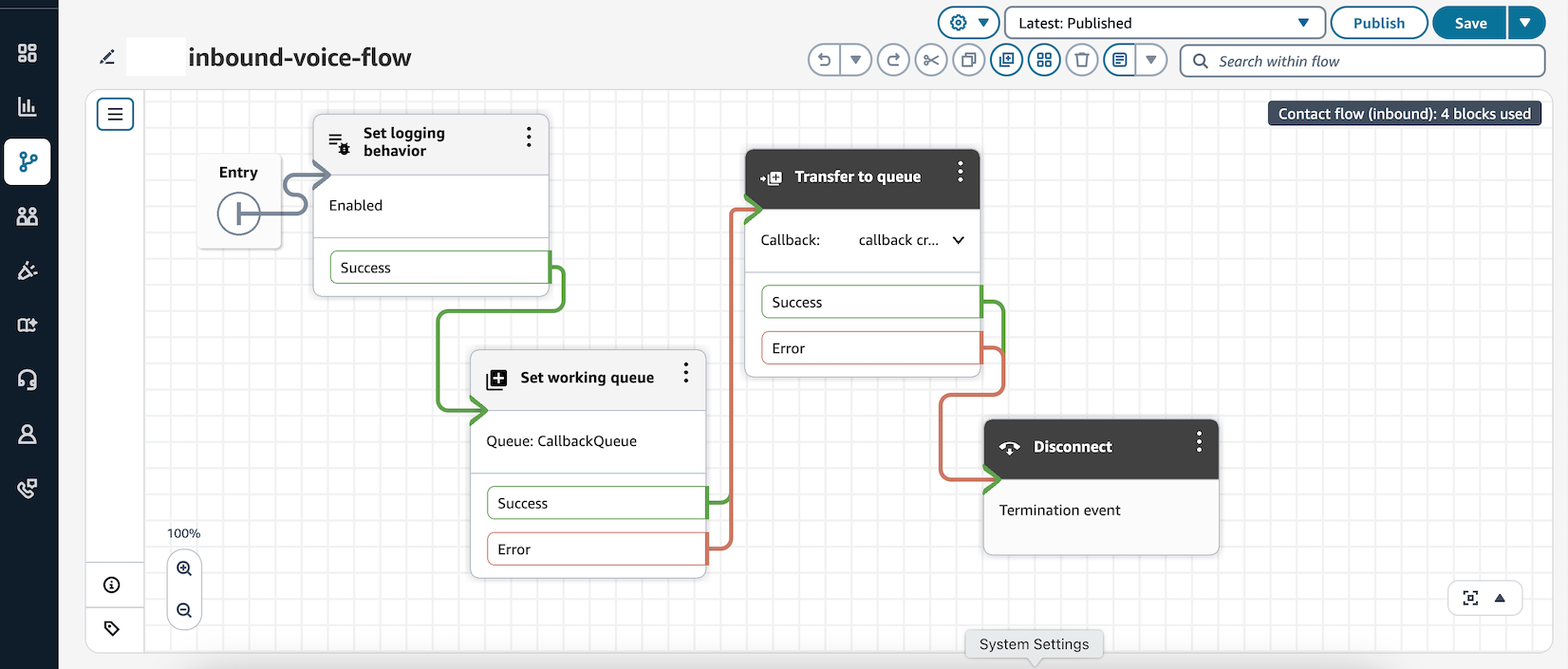
在此流程中,轉接至佇列 已設定了設定建立流程,並指定了傳出撥號流程。
範例回撥建立流程組態
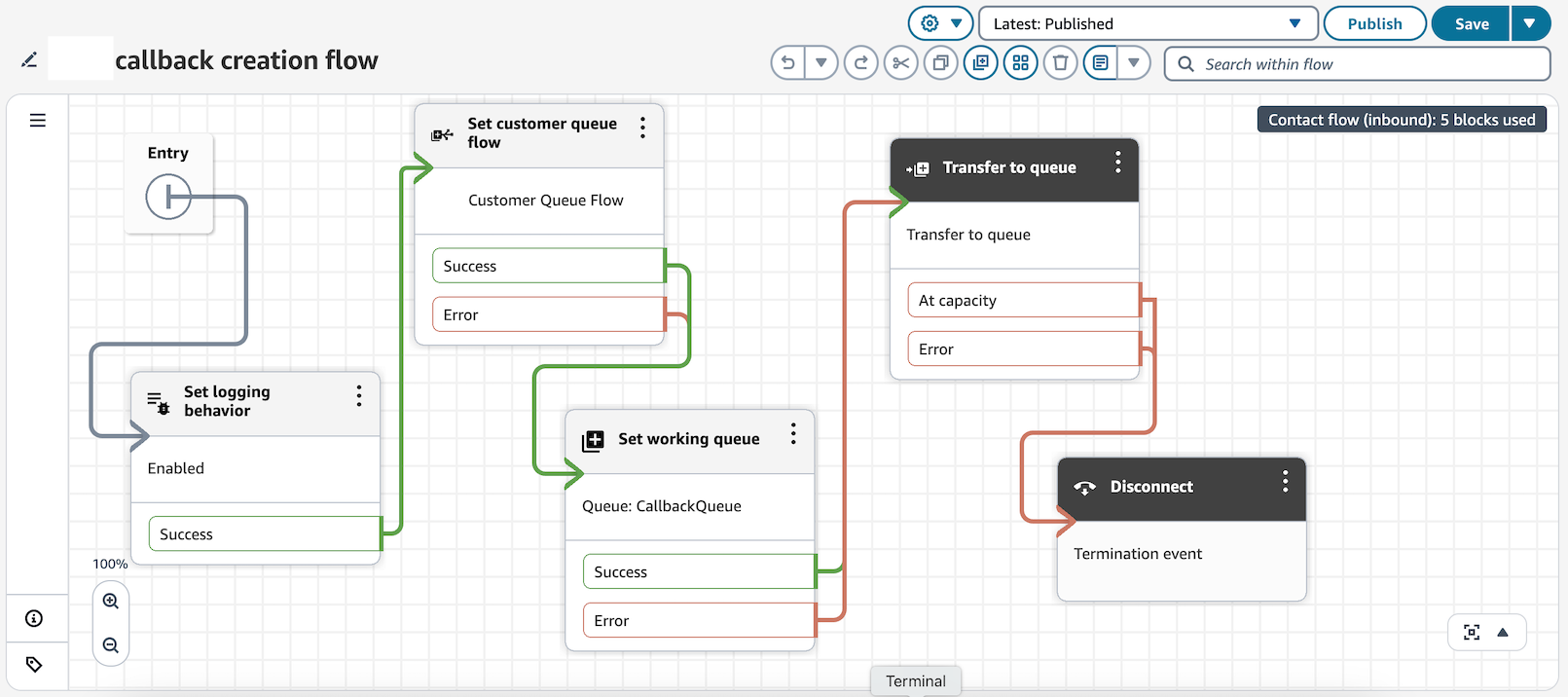
下圖顯示範例回撥建立流程。已設定 設定客戶佇列流程 區塊,因此客戶佇列流程會在回撥聯絡在佇列中等待客服人員可以撥出給客戶時執行。
回撥的範例傳出撥號流程
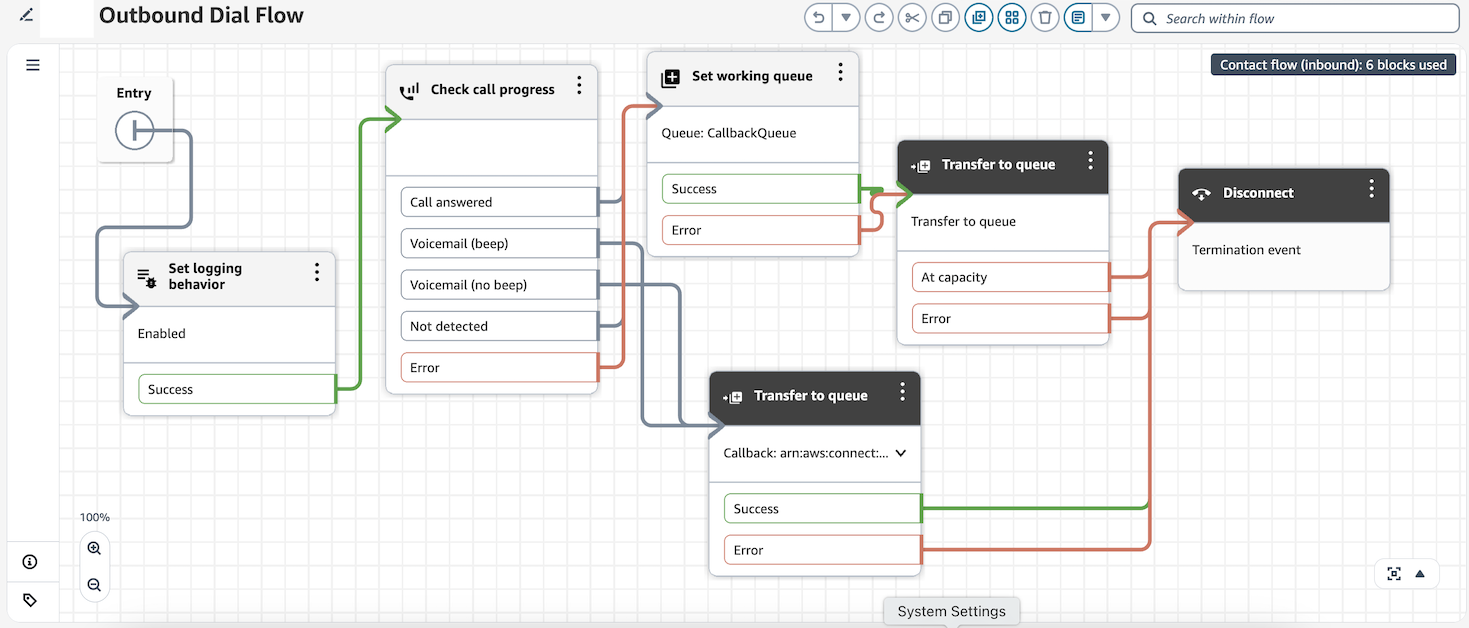
在下圖所示的外撥撥號流程中,Connect Customer 會使用 檢查通話進度區塊來評估客戶的存在。如果偵測到語音信箱,則會重新建立回撥聯絡。如果在通話的另一端偵測到客戶,則通話會轉接到佇列,讓客服人員加入客戶。