本文属于机器翻译版本。若本译文内容与英语原文存在差异,则一律以英文原文为准。
在 “连接客户” 中使用客户优先回拨模式
设置排队回拨时,您可以额外选择是使用座席优先回拨模式,还是客户优先回拨模式。
-
座席优先回拨模式为默认值。会将回拨提供给座席,由其在拨打给客户之前选择接受或拒绝。
-
客户优先回拨模式仅在 Connect 客户实例中可用。在此模式下,Connect Customer 首先拨打客户,并且只有在客户回复他们收到的回拨时才向代理提供回拨服务。
重要
-
如果您在激活并开始使用客户优先回传之后从 Connect Customer 切换,则客户优先回传也会被禁用。
客户优先回拨的生命周期
客户优先回拨的生命周期分布在三种不同的联系中,如下图所示。
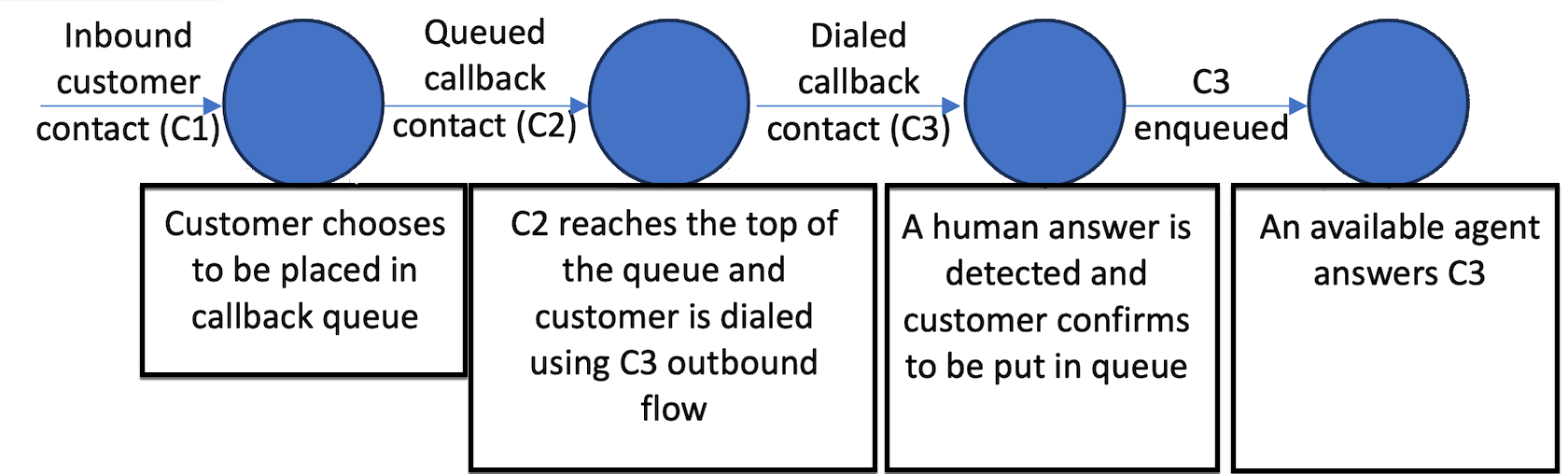
以下是对每种联系的描述。
-
入站客户联系(C1)为入站语音联系。它类似于所有其他入站客户联系。
-
排队回拨联系(C2)为客户优先回拨的排队环节。它有一个新的启动方法,即 CALLBACK_CUSTOMER_FIRST_QUEUED。
-
已拨打回拨联系(C3)为客户优先回拨的已拨打环节。它有一个新的启动方法,即 CALLBACK_CUSTOMER_FIRST_DIALED。
-
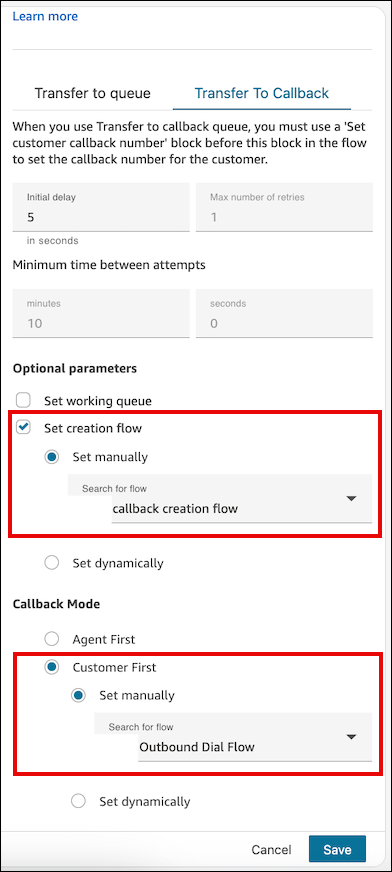
C3 会触发您在转接队列流数据块中指定的所需出站回拨流。您只能为客户优先回拨模式指定出站回拨流,而不是为座席优先回拨模式指定出站回拨流。
-
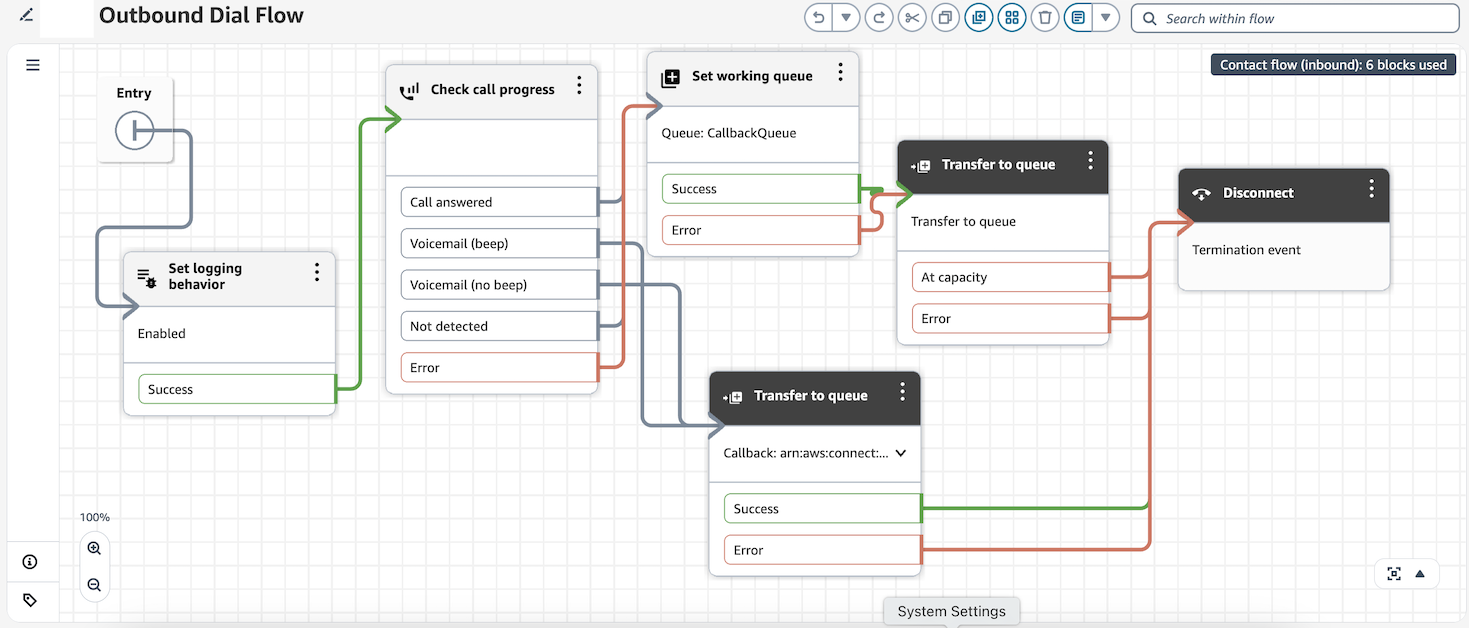
对于客户优先回拨,您可以根据检查呼叫进度流数据块的输出,在为 C3 指定的出站流中配置重试和不同尝试之间的时间。这样做的目的是,确定联系人是通过语音邮件回复的,还是通过人声回复的。
-
在确认客户存在后,C3 的流应该有一个转接队列流数据块,此数据块配置为将联系置于其队列中,以寻找下一个可用的座席。
-
您可以通过使用设置路由标准或更改路由优先级/龄期数据块在流中自定义此联系的路由优先级。
-
注意
客户首次回传的重试次数
客户首次回调的重试行为与代理首次回调的重试行为有很大不同。重试是在拨打的回拨联系人 (C3) 上配置的,而不是在排队的回拨联系人 (C2) 上配置的。
重试的工作原理
-
C2 不支持重试。转接队列区块中的 “最大重试次数” 和 “最小尝试间隔时间” 设置仅适用于代理首次回调。
-
对于客户首次回传,重试是在为 C3 指定的出站回调流程中配置的。
-
当需要重试(例如,检测到语音信箱)时,会创建一个新的拨打的回拨联系人 C4。C4 继承在 C3 上设置的用户定义属性。
使用 “检查呼叫进度” 配置重试
使用 C3 出站流中的检查呼叫进度区块来检测是否有人接听了呼叫或语音信箱。根据输出,按如下方式配置流程:
-
检测到语音信箱 (
VOICEMAIL_BEEP,VOICEMAIL_NO_BEEP) — 在 C3 上设置一个retry属性,然后重新创建回拨联系人 (C4)。 -
Human d
HUMAN_ANSWEREDetected () — 转到队列以便代理可以加入呼叫。 -
其他或未解决的状态 -根据需要配置回退处理。
C3 联系人记录上的AnsweringMachineDetectionStatus字段捕获了完整的答录机检测结果。可能的值包括:
HUMAN_ANSWERED | VOICEMAIL_BEEP |
VOICEMAIL_NO_BEEP | AMD_UNANSWERED |
AMD_UNRESOLVED | AMD_NOT_APPLICABLE |
SIT_TONE_BUSY | SIT_TONE_INVALID_NUMBER |
SIT_TONE_DETECTED | FAX_MACHINE_DETECTED |
AMD_ERROR
调整重试联系人的优先级
为确保正确路由重试联系人,请使用创建 C4 联系人时运行的回调创建流程。推荐的方法是:
-
在 C3 上设置重试属性 — 在重新创建回拨联系人之前,使用 C3 出站流程中的 “设置联系人属性” 块来添加用户定义的属性(例如,)。
retry = true -
C4 继承 C3 的用户定义属性 — 创建 C4 接触时,它会自动继承 C3 的所有用户定义属性,包括该属性。
retry -
在 C4 的回调创建流程中检查重试属性 — 在为 C4 配置的回调创建流程中,使用检查联系人属性块来评估该
retry属性是否存在。 -
如果重试,则调整路由优先级 -如果该
retry属性存在,则在联系人进入工作队列之前,使用设置路由标准或更改路由优先级/龄期块以调整后的优先级将联系人排队。
使用这种方法,您可以区分首次尝试回调和重试,并在不依赖外部状态的情况下应用自定义优先级逻辑。
注意
重试联系人 (C4) 位于队列的后面,他们不保留其原始位置。如上所述,您可以通过调整 C4 回调创建流程中的路由优先级或路由时长来弥补这一点。
注意
该设置路由标准区块可以在出站流中用于动态提高重试尝试的优先级(例如,使用重试计数器属性将优先级 5 到 3 到 1)。优先级更改在联系人重新进入队列时生效。
控制重试时间
默认情况下,客户首次回调的重试时间不受系统控制,您可以完全控制何时启动重试。
要在两次重试尝试之间造成延迟,请在传输到队列之前在 C4 创建流程中添加一个等待区块。使用 Wa it 区块,您可以定义特定的间隔(例如,等待 5 分钟后再排队),以防止立即尝试连续拨号。
带有定时控制的典型重试流程如下所示:
-
检查呼叫进度— 检测到语音信箱。
-
设置联系人属性 — 设置
retry = true(并可选择增加重试计数器)。 -
创建回调 — 将联系人重新创建为 C4。
-
等待区块 — 等待所需的间隔,然后再排队。
客户优先回拨的指标
您可以在队列性能控制面板中访问以下指标,也可以使用 GetMetricDataV2 API 访问以下指标。
客户优先回拨的示例联系记录
以下是示例联系记录,用于展示针对客户优先回拨的 C2 和 C3 阶段存储了哪些信息。
示例 C2 排队客户优先回拨联系记录
InitialContactId : C1 (Inbound contact)
ContactId : C2 (this contact)
PreviousContactId : C1 (Inbound contact)
NextContactId : C3 (Dialed customer first callback contact)
Channel : VOICE,
InitiationMethod : CALLBACK_CUSTOMER_FIRST_QUEUED,

ConnectedToSystemTimeStamp : time // Timestamp when callback creation flow got started

CustomerEndpoint : customer phone number endpoint

DisconnectTimestamp : time // Timestamp indicating contact is disconnected and customer will be dialed

DisconnectReason : // Disconnect reason code

InitiationTimeStamp : time // Timestamp indicating customer first callback has been created in connect systems

QueueInfo : {
    Arn : arn // Queue arn representing customer first callback queue
    EnqueueTimeStamp : time // Timestamp indicating customer first callback has been put in queue and waiting out to dial.
    DequeueTimeStamp : time // Timestamp indicating customer first callback has been taken out from queue to dial out end customer.
    Duration : time // total time it took connect systems to dial out end customer.
}
示例 C3 拨打客户优先回拨联系
InitialContactId : C1 (Inbound contact)
ContactId : C3 (this contact)
PreviousContactId : C2 (Queued customer first callback contact)
Channel : VOICE,
InitiationMethod : CALLBACK_CUSTOMER_FIRST_DIALED,

ConnectedToSystemTimeStamp : time // Timestamp when the outbound call associated with callback was connected with customer.

CustomerEndpoint : customer phone number endpoint

SystemEndpoint : Outbound caller id assigned to the outbound queue

Agent : {
    // All agent information associated with the outbound call.
    // Like Agent Arn, ConnectToAgentTimestamp, ACW duration etc.
}

AgentConnectionAttempts : number

DisconnectTimestamp : time // Timestamp indicating outbound call for the callback is disconnected

DisconnectReason : // Disconnect reason code

SegmentAttributes : {
    'connect:TrafficType' : 'CUSTOMER_FIRST_CALLBACK'
},

AnsweringMachineDetectionStatus : HUMAN_ANSWERED|VOICEMAIL_BEEP|VOICEMAIL_NO_BEEP|AMD_UNANSWERED|AMD_UNRESOLVED|AMD_NOT_APPLICABLE|SIT_TONE_BUSY|SIT_TONE_INVALID_NUMBER|SIT_TONE_DETECTED|FAX_MACHINE_DETECTED|AMD_ERROR|AMD_UNRESOLVED_SILENCE(WIP)

CustomerVoiceActivity : {
    GreetingStartTimestamp : timestamp
    GreetingEndTimestamp : timestamp
}

InitiationTimeStamp : time // Timestamp indicating start of outbound call to customer

QueueInfo : {
    Arn : arn // Queue arn representing customer first callback queue
    EnqueueTimeStamp : time // Timestamp indicating customer first callback has been put in queue to join with agent.
    DequeueTimeStamp : time // Timestamp indicating customer first callback has been taken out from queue to join with agent.
    Duration : time // total time it took connect systems to join dialed end customer with agent.
    CallbackTotalQueueDuration : time // total time the customer first callback spent in queue (Includes the total queued time for C2 and C3.)
}
客户优先回拨的示例流
以下示例流显示了如何能够为客户优先回拨配置流。
示例入站呼叫流
下图显示了流中的转接队列数据块。
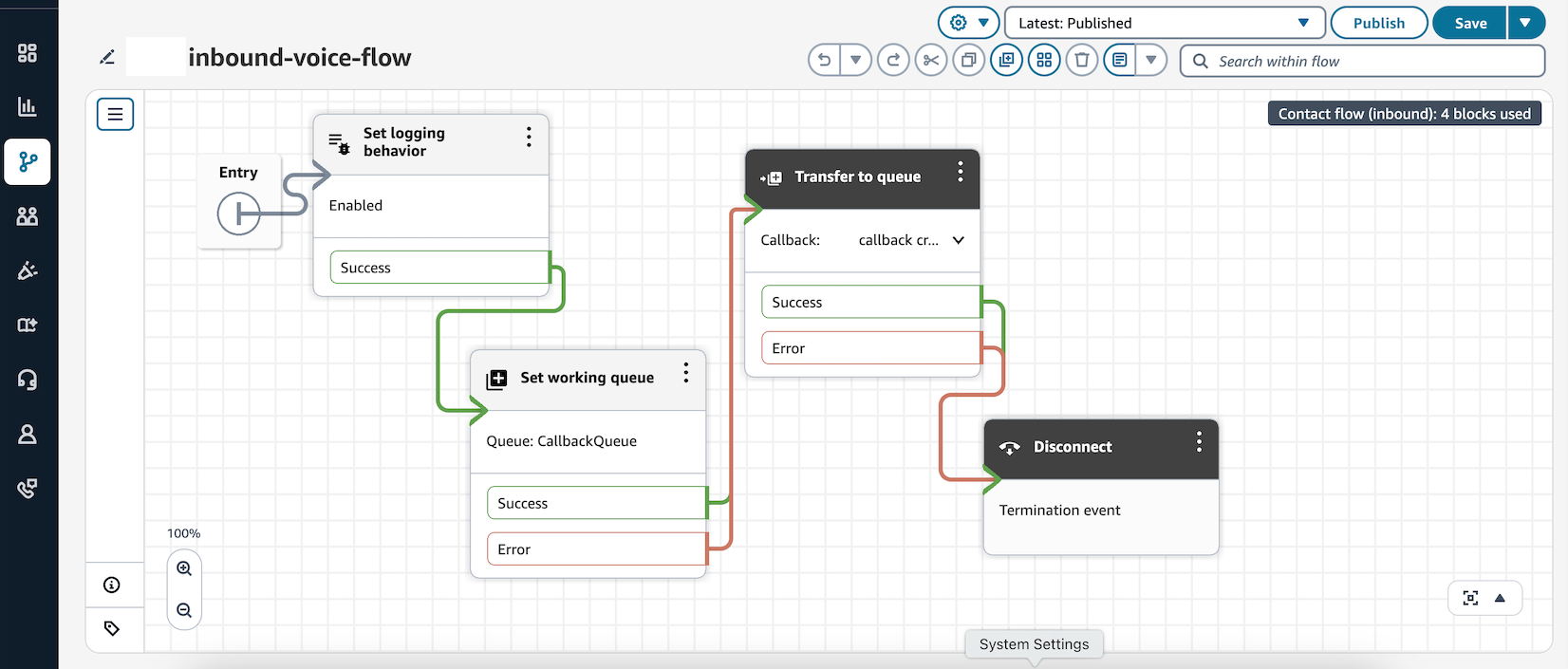
在此流中,转接队列已配置设置创建流,并指定了出站拨号流。
示例回拨创建流配置
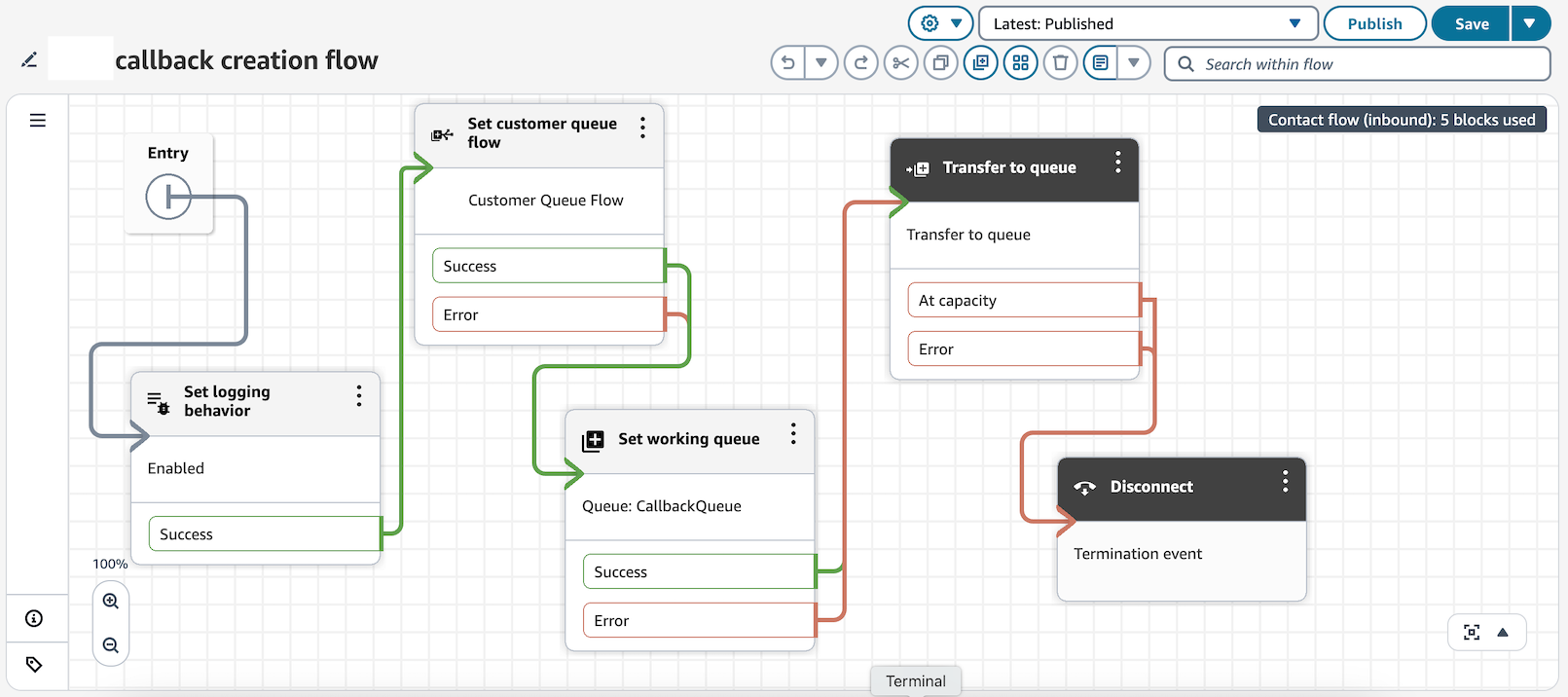
下图显示了示例回拨创建流。已配置设置客户队列流块,因此当回拨联系人在队列中等待座席有空向客户拨出号码时,客户队列流会运行。
回拨的示例出站拨号流
在下图所示的出站拨号流程中,Connect Customer使用检查呼叫进度区块来评估客户的存在。如果检测到语音邮件,则会重新创建回拨联系。如果在呼叫的另一端检测到客户,则该呼叫将转接到队列中,以便座席可加入该客户。