本文為英文版的機器翻譯版本,如內容有任何歧義或不一致之處,概以英文版為準。
為 Amazon SageMaker AI 調整您的自有推論容器
如果您無法將 預先建置的 SageMaker AI Docker 映像 Amazon SageMaker AI 列出的任何映像用於使用案例,您可以建置自己的 Docker 容器,並在 SageMaker AI 內使用該容器進行訓練和推論。若要相容於 SageMaker AI,您的容器必須具有下列特性:
-
您的容器必須在連接埠
8080上列出 Web 伺服器。 -
您的容器必須接受對
/invocations和/ping即時端點的POST請求。您傳送至這些端點的請求必須 60 秒傳回一般回應,8 分鐘傳回串流回應,大小上限為 25 MB。
如需如何使用 SageMaker AI 建置自己的 Docker 容器以進行訓練和推論的更多資訊和範例,請參閱建立您自有的演算法容器
下列指南說明如何搭配使用 Amazon SageMaker Studio Classic 和 JupyterLab 空間來調整推論容器,以使用 SageMaker AI 託管。此範例使用 NGINX Web 伺服器、Gunicorn 作為 Python Web 伺服器閘道介面,以及 Flask 作為 Web 應用程式架構。您可以使用不同的應用程式來調整容器,只要容器符合先前列出的要求即可。如需進一步了解如何使用您的自有推論程式碼,請參閱 具託管服務的自訂推論程式碼。
調整您的推論容器
請透過下列步驟調整您的自有推論容器,以使用 SageMaker AI 託管。下列步驟中的範例使用預先訓練的具名實體辨識 (NER) 模型Python 和下列項目的 spaCy
-
Dockerfile 用於建置包含 NER 模型的容器。
-
提供 NER 模型的推論指令碼。
如果您針對使用案例調整此範例,則您必須使用部署和提供模型所需的 Dockerfile 和推論指令碼。
-
(選用) 使用 Amazon SageMaker Studio Classic 建立 JupyterLab 空間。
您可以使用任何筆記本來執行指令碼,以使用 SageMaker AI 託管來調整推論容器。此範例說明如何使用 Amazon SageMaker Studio Classic 中的 JupyterLab 空間,來啟動隨附於 SageMaker AI Distribution 映像的 JupyterLab 應用程式。如需詳細資訊,請參閱SageMaker JupyterLab。
-
上傳 Docker 檔案和推論指令碼。
-
在主目錄中建立新的資料夾。如果您使用的是 JupyterLab,請在左上角選擇新增資料夾圖示,然後輸入資料夾名稱以包含您的 Dockerfile。在此範例中,資料夾稱為
docker_test_folder。 -
將 Dockerfile 文字檔案上傳至您的新資料夾。以下範例 Dockerfile 從 spaCy
建立具預先訓練具名實體辨識 (NER) 模型 的 Docker 容器,這是執行範例所需的應用程式和環境變數: FROM python:3.8 RUN apt-get -y update && apt-get install -y --no-install-recommends \ wget \ python3 \ nginx \ ca-certificates \ && rm -rf /var/lib/apt/lists/* RUN wget https://bootstrap.pypa.io/get-pip.py && python3 get-pip.py && \ pip install flask gevent gunicorn && \ rm -rf /root/.cache #pre-trained model package installation RUN pip install spacy RUN python -m spacy download en # Set environment variables ENV PYTHONUNBUFFERED=TRUE ENV PYTHONDONTWRITEBYTECODE=TRUE ENV PATH="/opt/program:${PATH}" COPY NER /opt/program WORKDIR /opt/program在先前的程式碼範例中,環境變數
PYTHONUNBUFFERED會防止 Python 緩衝標準輸出串流,以便更快速地將日誌交付給使用者。環境變數PYTHONDONTWRITEBYTECODE可防止 Python 寫入編譯的位元碼.pyc檔案,這種檔案對此使用案例來說並無必要。環境變數PATH用於識別train和serve程式在調用容器時的位置。 -
在新資料夾中建立新目錄,以包含提供模型的指令碼。此範例使用名為
NER的目錄,其中包含執行此範例所需的下列指令碼:-
predictor.py– Python 指令碼,其中包含使用模型載入和執行推論的邏輯。 -
nginx.conf– 用來設定 Web 伺服器的指令碼。 -
serve– 啟動推論伺服器的指令碼。 -
wsgi.py– 提供模型的協助程式指令碼。
重要
如果您將推論指令碼複製到結尾為
.ipynb的筆記本並重新命名,則指令碼可能包含防止端點部署的格式字元。反之,請建立文字檔案並將其重新命名。 -
-
上傳指令碼,讓您的模型可用於推論。以下是名為
predictor.py的指令碼範例,其使用 Flask 提供/ping和/invocations端點:from flask import Flask import flask import spacy import os import json import logging #Load in model nlp = spacy.load('en_core_web_sm') #If you plan to use a your own model artifacts, #your model artifacts should be stored in /opt/ml/model/ # The flask app for serving predictions app = Flask(__name__) @app.route('/ping', methods=['GET']) def ping(): # Check if the classifier was loaded correctly health = nlp is not None status = 200 if health else 404 return flask.Response(response= '\n', status=status, mimetype='application/json') @app.route('/invocations', methods=['POST']) def transformation(): #Process input input_json = flask.request.get_json() resp = input_json['input'] #NER doc = nlp(resp) entities = [(X.text, X.label_) for X in doc.ents] # Transform predictions to JSON result = { 'output': entities } resultjson = json.dumps(result) return flask.Response(response=resultjson, status=200, mimetype='application/json')如果正確載入模型,上一個指令碼範例中的
/ping端點會傳回200的狀態程式碼;如果錯誤載入模型,則404。/invocations端點會處理格式為 JSON 的請求、擷取輸入欄位,並使用 NER 模型來識別和儲存變數實體中的實體。Flask 應用程式會傳回包含這些實體的回應。有關這些必要運作狀態要求的詳細資訊,請參閱 容器對運作狀態檢查 (Ping) 請求應有的回應方式。 -
上傳指令碼以啟動推論伺服器。下列指令碼範例呼叫
serve,其使用 Gunicorn 作為應用程式伺服器,Nginx 作為 Web 伺服器:#!/usr/bin/env python # This file implements the scoring service shell. You don't necessarily need to modify it for various # algorithms. It starts nginx and gunicorn with the correct configurations and then simply waits until # gunicorn exits. # # The flask server is specified to be the app object in wsgi.py # # We set the following parameters: # # Parameter Environment Variable Default Value # --------- -------------------- ------------- # number of workers MODEL_SERVER_WORKERS the number of CPU cores # timeout MODEL_SERVER_TIMEOUT 60 seconds import multiprocessing import os import signal import subprocess import sys cpu_count = multiprocessing.cpu_count() model_server_timeout = os.environ.get('MODEL_SERVER_TIMEOUT', 60) model_server_workers = int(os.environ.get('MODEL_SERVER_WORKERS', cpu_count)) def sigterm_handler(nginx_pid, gunicorn_pid): try: os.kill(nginx_pid, signal.SIGQUIT) except OSError: pass try: os.kill(gunicorn_pid, signal.SIGTERM) except OSError: pass sys.exit(0) def start_server(): print('Starting the inference server with {} workers.'.format(model_server_workers)) # link the log streams to stdout/err so they will be logged to the container logs subprocess.check_call(['ln', '-sf', '/dev/stdout', '/var/log/nginx/access.log']) subprocess.check_call(['ln', '-sf', '/dev/stderr', '/var/log/nginx/error.log']) nginx = subprocess.Popen(['nginx', '-c', '/opt/program/nginx.conf']) gunicorn = subprocess.Popen(['gunicorn', '--timeout', str(model_server_timeout), '-k', 'sync', '-b', 'unix:/tmp/gunicorn.sock', '-w', str(model_server_workers), 'wsgi:app']) signal.signal(signal.SIGTERM, lambda a, b: sigterm_handler(nginx.pid, gunicorn.pid)) # Exit the inference server upon exit of either subprocess pids = set([nginx.pid, gunicorn.pid]) while True: pid, _ = os.wait() if pid in pids: break sigterm_handler(nginx.pid, gunicorn.pid) print('Inference server exiting') # The main routine to invoke the start function. if __name__ == '__main__': start_server()先前的指令碼範例會定義訊號處理常式函式
sigterm_handler,該函式會在接收SIGTERM訊號時關閉 Nginx 和 Gunicorn 子程序。start_server函式會啟動訊號處理常式、啟動和監控 Nginx 和 Gunicorn 子程序,以及擷取日誌串流。 -
上傳指令碼以設定您的 Web 伺服器。下列指令碼範例稱為
nginx.conf,其使用 Gunicorn 作為應用程式伺服器來設定 Nginx Web 伺服器,將您的模型用於推論:worker_processes 1; daemon off; # Prevent forking pid /tmp/nginx.pid; error_log /var/log/nginx/error.log; events { # defaults } http { include /etc/nginx/mime.types; default_type application/octet-stream; access_log /var/log/nginx/access.log combined; upstream gunicorn { server unix:/tmp/gunicorn.sock; } server { listen 8080 deferred; client_max_body_size 5m; keepalive_timeout 5; proxy_read_timeout 1200s; location ~ ^/(ping|invocations) { proxy_set_header X-Forwarded-For $proxy_add_x_forwarded_for; proxy_set_header Host $http_host; proxy_redirect off; proxy_pass http://gunicorn; } location / { return 404 "{}"; } } }先前的指令碼範例會將 Nginx 設為在前景中執行、設定擷取
error_log的位置,並將upstream定義為 Gunicorn 伺服器的通訊端。伺服器會將伺服器區塊設為接聽連接埠8080,並設定用戶端請求內文大小和逾時值的限制。伺服器區塊會將包含/ping或/invocations路徑的請求轉送至 Gunicornserver http://gunicorn,並傳回其他路徑的404錯誤。 -
上傳提供模型所需的任何其他指令碼。此範例需要下列名為
wsgi.py的指令碼範例,以協助 Gunicorn 尋找您的應用程式:import predictor as myapp # This is just a simple wrapper for gunicorn to find your app. # If you want to change the algorithm file, simply change "predictor" above to the # new file. app = myapp.app
從資料夾
docker_test_folder中,您的目錄結構應包含 Dockerfile 和資料夾 NER。NER 資料夾應包含檔案nginx.conf、predictor.py、serve和wsgi.py,如下所示: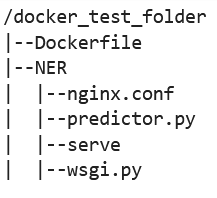
-
-
建置您自有的容器。
從資料夾
docker_test_folder中建置您的 Docker 容器。下列命令範例將建置在您的 Dockerfile 中設定的 Docker 容器:! docker build -t byo-container-test .先前的命令會在目前的工作目錄中建置名為
byo-container-test的容器。如需 Docker 建置參數的詳細資訊,請參閱建置引數。 注意
如果您收到以下錯誤訊息,表示 Docker 找不到 Dockerfile,請確認 Dockerfile 的名稱正確,且已存入目錄。
unable to prepare context: unable to evaluate symlinks in Dockerfile path:
lstat /home/ec2-user/SageMaker/docker_test_folder/Dockerfile: no such file or directory
Docker 會在當前目錄中查找名稱為 Dockerfile 且不含任何副檔名的檔案。如果您將其命名為其他名稱,則可以使用 -f 標記手動輸入文件名稱。例如,如果您將 Dockerfile 命名為 Dockerfile-text.txt,請使用後面接有檔案的
-f標記來建置您的 Docker 容器,如下所示:! docker build -t byo-container-test -f Dockerfile-text.txt . -
推送 Docker 映像至 Amazon Elastic Container Registry (Amazon ECR)
在筆記本儲存格中,將 Docker 映像推送至 ECR。下列程式碼範例示範如何在本機建置容器、登入並將其推送至 ECR:
%%sh
# Name of algo -> ECR
algorithm_name=sm-pretrained-spacy

#make serve executable
chmod +x NER/serve
account=$(aws sts get-caller-identity --query Account --output text)
# Region, defaults to us-west-2
region=$(aws configure get region)
region=${region:-us-east-1}
fullname="${account}.dkr.ecr.${region}.amazonaws.com/${algorithm_name}:latest"
# If the repository doesn't exist in ECR, create it.
aws ecr describe-repositories --repository-names "${algorithm_name}" > /dev/null 2>&1
if [ $? -ne 0 ]
then
    aws ecr create-repository --repository-name "${algorithm_name}" > /dev/nullfi
# Get the login command from ECR and execute it directly
aws ecr get-login-password --region ${region}|docker login --username AWS --password-stdin ${fullname}
# Build the docker image locally with the image name and then push it to ECR
# with the full name.

docker build  -t ${algorithm_name} .
docker tag ${algorithm_name} ${fullname}

docker push ${fullname}
上一個範例示範如何執行以下必要步驟,將範例 Docker 容器推送至 ECR:
-
將演算法名稱定義為
sm-pretrained-spacy。 -
確保可執行 NER 資料夾內的
serve檔案。 -
設定 AWS 區域。
-
如果尚無 ECR,請建立 ECR。
-
登入 ECR。
-
在本機建置 Docker 容器。
-
將 Docker 映像推送至 ECR
-
-
設定 SageMaker AI 用戶端
如果您想要使用 SageMaker AI 託管服務進行推論,則必須建立模型
、建立端點組態 和建立端點 。若要從端點取得推論,您可以使用 SageMaker AI boto3 執行期用戶端來調用端點。下列程式碼說明如何使用 SageMaker AI boto3 用戶端 設定 SageMaker AI 用戶端和 SageMaker 執行期用戶端: import boto3 from sagemaker import get_execution_role sm_client = boto3.client(service_name='sagemaker') runtime_sm_client = boto3.client(service_name='sagemaker-runtime') account_id = boto3.client('sts').get_caller_identity()['Account'] region = boto3.Session().region_name #used to store model artifacts which SageMaker AI will extract to /opt/ml/model in the container, #in this example case we will not be making use of S3 to store the model artifacts #s3_bucket = '<S3Bucket>' role = get_execution_role()先前的程式碼範例不使用 Amazon S3 儲存貯體,而是將其插入為註解,以示範如何儲存模型成品。
如果您在執行先前的程式碼範例後收到許可錯誤,您可能需要將許可新增至 IAM 角色。如需關於 IAM 角色的詳細資訊,請參閱Amazon SageMaker 角色管理器。如需了解如何將許可新增至目前角色,請參閱 AWS Amazon SageMaker AI 的 受管政策。
-
建立您的模型。
如果您要使用 SageMaker AI 託管服務進行推論,您必須在 SageMaker AI 中建立模型。下列程式碼範例示範如何在 SageMaker AI 內建立 spaCy NER 模型:
from time import gmtime, strftime

model_name = 'spacy-nermodel-' + strftime("%Y-%m-%d-%H-%M-%S", gmtime())
# MODEL S3 URL containing model atrifacts as either model.tar.gz or extracted artifacts.
# Here we are not
#model_url = 's3://{}/spacy/'.format(s3_bucket)

container = '{}.dkr.ecr.{}.amazonaws.com/sm-pretrained-spacy:latest'.format(account_id, region)
instance_type = 'ml.c5d.18xlarge'

print('Model name: ' + model_name)
#print('Model data Url: ' + model_url)
print('Container image: ' + container)

container = {
'Image': container
}

create_model_response = sm_client.create_model(
    ModelName = model_name,
    ExecutionRoleArn = role,
    Containers = [container])

print("Model Arn: " + create_model_response['ModelArn'])
先前的程式碼範例顯示,如果您要使用步驟 5 中註解的 Amazon S3 儲存貯體,則該如何使用
s3_bucket定義model_url,以及定義容器映像的 ECR URI。先前的程式碼範例將ml.c5d.18xlarge定義為執行個體類型。您也可以選擇不同的執行個體類型。如需可用執行個體類型的詳細資訊,請參閱 Amazon EC2 執行個體類型。 在先前的程式碼範例中,
Image金鑰指向容器映像 URI。create_model_response定義使用create_model method來建立模型,並傳回模型名稱、角色和包含容器資訊的清單。上一個指令碼的輸出範例如下:
Model name: spacy-nermodel-YYYY-MM-DD-HH-MM-SS Model data Url: s3://spacy-sagemaker-us-east-1-bucket/spacy/ Container image: 123456789012.dkr.ecr.us-east-2.amazonaws.com/sm-pretrained-spacy:latest Model Arn: arn:aws:sagemaker:us-east-2:123456789012:model/spacy-nermodel-YYYY-MM-DD-HH-MM-SS -
-
設定及建立端點
若要使用 SageMaker AI 託管進行推論,您還必須設定和建立端點。SageMaker AI 將使用此端點進行推論。下列組態範例示範如何使用您先前定義的執行個體類型和模型名稱來產生和設定端點:
endpoint_config_name = 'spacy-ner-config' + strftime("%Y-%m-%d-%H-%M-%S", gmtime())
print('Endpoint config name: ' + endpoint_config_name)

create_endpoint_config_response = sm_client.create_endpoint_config(
    EndpointConfigName = endpoint_config_name,
    ProductionVariants=[{
        'InstanceType': instance_type,
        'InitialInstanceCount': 1,
        'InitialVariantWeight': 1,
        'ModelName': model_name,
        'VariantName': 'AllTraffic'}])

print("Endpoint config Arn: " + create_endpoint_config_response['EndpointConfigArn'])
在先前的組態範例中,
create_endpoint_config_response會將model_name與使用時間戳記建立的唯一端點組態名稱endpoint_config_name建立關聯。上一個指令碼的輸出範例如下:
Endpoint config name: spacy-ner-configYYYY-MM-DD-HH-MM-SS Endpoint config Arn: arn:aws:sagemaker:us-east-2:123456789012:endpoint-config/spacy-ner-config-MM-DD-HH-MM-SS如需有關端點錯誤的詳細資訊,請參閱當我建立或更新端點時,為什麼 Amazon SageMaker AI 端點進入失敗狀態?
-
建立端點並等待端點處於服務狀態。
下列程式碼範例使用先前組態範例中的組態來建立端點和部署模型:
%%time

import time

endpoint_name = 'spacy-ner-endpoint' + strftime("%Y-%m-%d-%H-%M-%S", gmtime())
print('Endpoint name: ' + endpoint_name)

create_endpoint_response = sm_client.create_endpoint(
    EndpointName=endpoint_name,
    EndpointConfigName=endpoint_config_name)
print('Endpoint Arn: ' + create_endpoint_response['EndpointArn'])

resp = sm_client.describe_endpoint(EndpointName=endpoint_name)
status = resp['EndpointStatus']
print("Endpoint Status: " + status)

print('Waiting for {} endpoint to be in service...'.format(endpoint_name))
waiter = sm_client.get_waiter('endpoint_in_service')
waiter.wait(EndpointName=endpoint_name)
在先前的程式碼範例中,
create_endpoint方法會使用先前程式碼範例中建立的產生端點名稱來建立端點,並列印端點的 Amazon Resource Name。describe_endpoint方法會傳回端點及其狀態的相關資訊。SageMaker AI 等待程式會等待端點處於服務狀態。
-
-
測試您的端點。
端點處於服務狀態後,請將調用請求
傳送至您的端點。下列程式碼範例示範如何將測試請求傳送至您的端點: import json content_type = "application/json" request_body = {"input": "This is a test with NER in America with \ Amazon and Microsoft in Seattle, writing random stuff."} #Serialize data for endpoint #data = json.loads(json.dumps(request_body)) payload = json.dumps(request_body) #Endpoint invocation response = runtime_sm_client.invoke_endpoint( EndpointName=endpoint_name, ContentType=content_type, Body=payload) #Parse results result = json.loads(response['Body'].read().decode())['output'] result在先前的程式碼範例中,
json.dumps方法會序列化request_body為 JSON 格式的字串,並將其儲存在變數承載。然後,SageMaker AI 執行期用戶端會使用調用端點方法,將承載傳送至您的端點。結果會包含擷取輸出欄位後來自端點的回應。 先前的程式碼範例應傳回下列輸出:
[['NER', 'ORG'], ['America', 'GPE'], ['Amazon', 'ORG'], ['Microsoft', 'ORG'], ['Seattle', 'GPE']] -
請刪除您的端點
完成調用後,請刪除端點以節省資源。以下程式碼範例說明如何刪除端點:
sm_client.delete_endpoint(EndpointName=endpoint_name)
sm_client.delete_endpoint_config(EndpointConfigName=endpoint_config_name)
sm_client.delete_model(ModelName=model_name)
如需包含此範例中程式碼的完整筆記本,請參閱 BYOC-Single-Model
。
