本文為英文版的機器翻譯版本,如內容有任何歧義或不一致之處,概以英文版為準。
Connect Customer 聊天小工具的其他自訂
您可以將下列選用的自訂新增至聊天使用者介面:
-
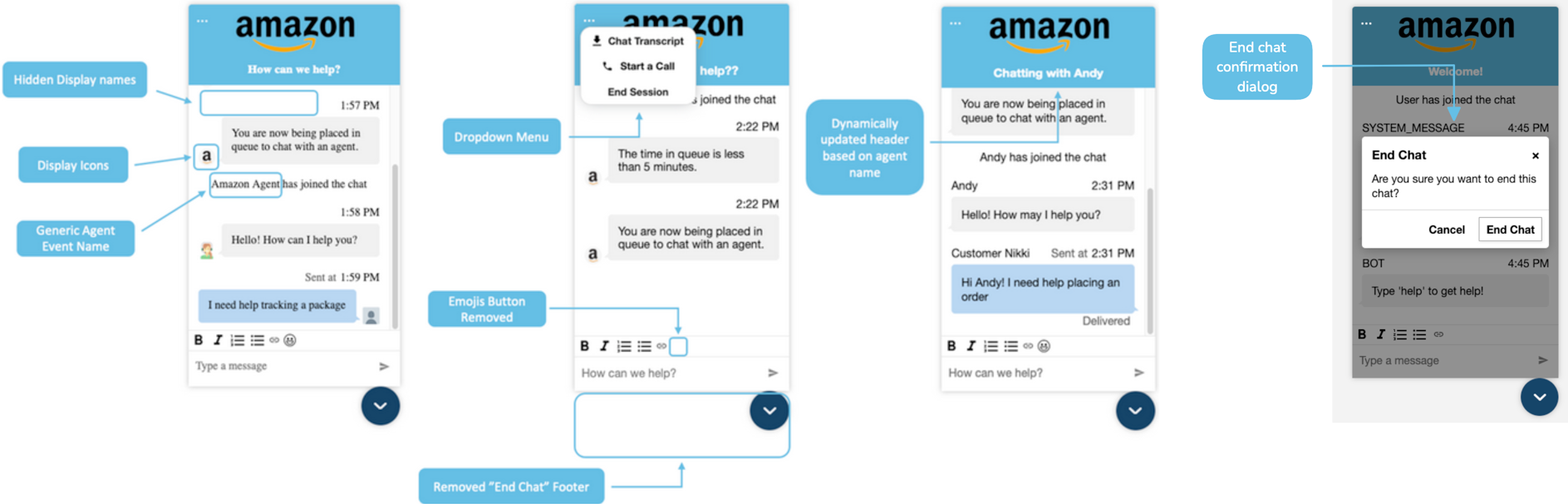
在標頭下拉式功能表,顯示結束聊天按鈕,而不是在頁腳中。
-
遮蓋或隱藏顯示名稱。
-
新增訊息圖示。
-
覆寫事件訊息。
-
設定會在客戶選擇結束聊天按鈕時顯示的確認對話方塊。此對話方塊會確認客戶是否真的要結束聊天工作階段。您可以自訂確認對話方塊、標題、訊息和按鈕文字。
-
覆寫附件拒絕訊息。
-
在聊天標頭中顯示最小化按鈕。
設定自訂物件
此範例說明如何實作部分選用的自訂。如需所有可能自訂的清單,請參閱 支援的選項和限制。由於這些自訂是選用的,您可以實作下列範例中顯示的部分或所有欄位。視需要取代 eventNames.customer、eventNames.agent、eventNames.supervisor、eventMessages.participantJoined、eventMessages.participantDisconnect、eventMessages.participantLeft、eventMessages.participantIdle、eventMessages.participantReturned 和 eventMessages.chatEnded 字串。圖示必須在公共 URL 上受管。
amazon_connect('customizationObject', {
        header: {
            dropdown: true,
            dynamicHeader: true,
            minimizeChatHeaderButton: true,
        },
        transcript: {
            hideDisplayNames: false,
            eventNames: {
                customer: "User",
                agent: "Webchat Agent",
                supervisor: "Webchat Supervisor"
            },
            eventMessages: {
                participantJoined: "{name} has joined the chat",
                participantDisconnect: "",
                participantLeft: "{name} has dropped",
                participantIdle: "{name}, are you still there?",
                participantReturned: "",
                chatEnded: "Chat ended",
            },
            displayIcons: true,
            iconSources: {
                botMessage: "imageURL",
                systemMessage: "imageURL",
                agentMessage: "imageURL",
                customerMessage: "imageURL",
            },
        },
        composer: {
            disableEmojiPicker: true,
            disableCustomerAttachments: true,
            alwaysHideToolbar: true,
            hide: false,
        },
        footer: {
            disabled:true,
            skipCloseChatButton: true,
        },
        endChat: {
            enableConfirmationDialog: true,
            confirmationDialogText: {
                title: "End Chat",
                message: "Are you sure you want to end this chat?",
                confirmButtonText: "End Chat",
                cancelButtonText: "Cancel",
        },
    },
    attachment: {
         // Default rejectedErrorMessage: Attachment was rejected.
        rejectedErrorMessage: "Custom Error Message: Files cannot exceed 15 MB." //this is customizable attribute
    }
});
下圖顯示如果您使用此範例,自訂的外觀:
支援的選項和限制
下表會列出支援的自訂欄位和建議的數值條件限制。
| 自訂配置選項 | Type | 描述 |
|---|---|---|
|
|
Boolean |
呈現標頭下拉式功能表,而不是預設的頁腳 注意當您將此選項設定為 |
|
Boolean | 將標頭標題動態設定為「與 Bot/AgentName 聊天」。 |
|
Boolean | 隱藏標頭下拉式功能表中的下載文字記錄按鈕。預設值為 false。 |
|
Boolean | 在聊天標頭中顯示最小化按鈕。預設值為 false。 |
|
|
Boolean |
隱藏所有顯示名稱,如果 |
|
|
String |
遮蓋客戶的顯示名稱。 |
|
|
String |
遮蓋客服人員的顯示名稱。 |
|
|
String |
遮蓋主管的顯示名稱。 |
|
|
String |
覆寫文字記錄中關於參與者加入聊天時的事件訊息。如果指定空白字串,則會在文字記錄中省略事件訊息。 |
|
|
String |
覆寫文字記錄中關於參與者聊天連線中斷時的事件訊息。如果指定空白字串,則會在文字記錄中省略事件訊息。 |
|
|
String |
覆寫文字記錄中關於參與者退出聊天時的事件訊息。如果指定空白字串,則會在文字記錄中省略事件訊息。 |
|
|
String |
覆寫文字記錄中關於參與者閒置時的事件訊息。如果指定空白字串,則會在文字記錄中省略事件訊息。 |
|
|
String |
覆寫文字記錄中關於參與者返回聊天時的事件訊息。如果指定空白字串,則會在文字記錄中省略事件訊息。 |
|
|
String |
覆寫文字記錄中關於聊天結束時的事件訊息。如果指定空白字串,則會在文字記錄中省略事件訊息。 |
|
|
Boolean |
啟用訊息顯示圖示。 |
|
|
String |
為機器人訊息顯示的圖示必須託管於公開 URL 上。 |
|
|
String |
為系統訊息顯示的圖示必須託管於公開 URL 上。 |
|
|
String |
為客服人員訊息顯示的圖示必須託管於公開 URL 上。 |
|
|
String |
為客戶訊息顯示的圖示必須託管於公開 URL 上。 |
|
|
Boolean |
隱藏包含文字樣式功能的格式工具列,例如粗體、斜體,以及項目符號和編號清單選項。 |
|
|
Boolean |
使用 RTF 文字編輯器時停用表情符號選擇器。 |
|
Boolean |
防止客戶傳送或上傳附件。 |
|
Boolean |
隱藏編譯器 (
|
|
|
Boolean |
隱藏結束聊天按鈕的預設頁腳。 |
|
|
Boolean |
按一下結束聊天按鈕即可直接關閉小工具,而不顯示關閉按鈕。 |
|
Boolean | 啟用結束聊天確認對話方塊。若未提供 confirmationDialogText,則使用預設文字。 |
|
String | 覆寫結束聊天確認對話方塊的標題。 |
|
String | 覆寫結束聊天確認對話方塊的訊息。 |
|
String | 覆寫結束聊天確認對話方塊中的確認按鈕文字。 |
|
String | 覆寫結束聊天確認對話方塊中的取消按鈕文字。 |
|
String | 覆寫聊天小工具附件拒絕的錯誤訊息。 |
