Integrating a traditional cloud workload with Amazon Bedrock
| Influence the future of the AWS Security Reference Architecture (AWS SRA) by taking a short survey |
The scope of this use case is to demonstrate a traditional cloud workload that is integrated with Amazon Bedrock to take advantage of generative AI capabilities. The following diagram illustrates the Generative AI account in conjunction with an example application account.
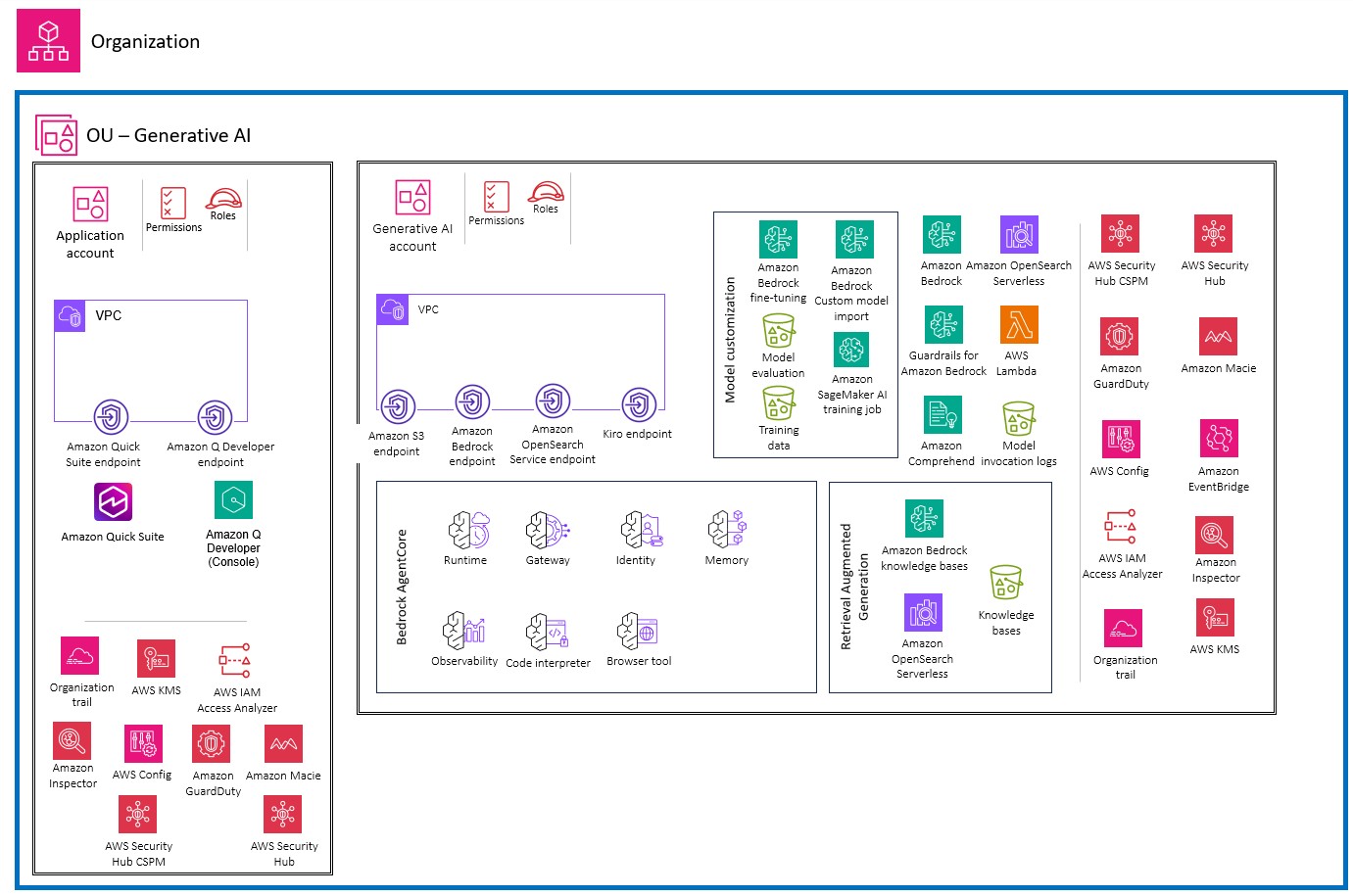
The Generative AI account provides generative AI functionality by using Amazon Bedrock. The Application account hosts an example workload. The AWS services that you use in this account depend on your requirements. Interactions between the Generative AI account and the Application account use the Amazon Bedrock APIs.
The Application account is separated from the Generative AI account to help group workloads based on business purposes and ownership. This separation constrains access to sensitive data in the generative AI environment and supports the application of distinct security controls by environment. Keeping the traditional cloud workload in a separate account also helps limit the scope of impact of adverse events.
You can build and scale enterprise generative AI applications around various use cases that are supported by Amazon Bedrock. Common use cases include text generation, virtual assistance, text and image search, text summarization, and image generation. Depending on your use case, your application component interacts with one or more Amazon Bedrock capabilities such as foundation model (FM) inference, knowledge bases, agents, and model customization.
Application account
The Application account hosts the primary infrastructure and services to run and maintain an enterprise application. In this context, the Application account acts as the traditional cloud workload, which interacts with the Amazon Bedrock managed service in the Generative AI account. For general security best practices for securing this account, see Workloads OU - Application account in the AWS SRA – core architecture guide.
Identity propagation and access control
Implement identity propagation throughout your generative AI application architecture. When your application uses Retrieval Augmented Generation (RAG), propagate the user's identity from the application in the form of metadata to the knowledge base. The knowledge base enforces controls through metadata filtering, ensuring users only access data they are authorized to view.
For agentic applications, make sure every agent propagates the application user's identity to all systems it interacts with, including data sources, knowledge bases, and external APIs. Each system must understand the user identity, limit its responses to actions the user is authorized to perform, and respond with data the user is authorized to access. Use Amazon Bedrock AgentCore Identity to manage authentication and authorization across the agent workflow, maintaining separation between ingress authentication (verifying user identity) and egress authorization (accessing tools and resources).
Application security
Apply standard application security best practices as you would for other applications. Protect your web application infrastructure using AWS WAF to defend against common web exploits including SQL injection, cross-site scripting, and request floods. Configure rate limiting to prevent resource exhaustion and control costs, as application invocations trigger model inference API calls that incur charges.
Restrict direct access to foundation model inference endpoints to control costs and monitor activity. Use AWS Identity and Access Management (IAM) policies to control permissions to invoke inference actions on Amazon Bedrock base models. Implement least-privilege access by granting only the minimum permissions required for your application to function.
Prompt injection protection
Traditional web application firewalls don't protect against prompt injection threats because these threats use natural language text rather than code patterns that firewalls detect. Implement Amazon Bedrock Guardrails to protect against prompt injection attacks and ensure model safety. Configure guardrails with prompt attack detection enabled, set appropriate filter strength based on your risk tolerance, and deploy versioned guardrails to production.
Add pre-processing validation through AWS Lambda functions that sanitize and validate input before passing it to foundation models or agents. This additional layer of defense detects malicious prompts that attempt to bypass guardrails or manipulate model behavior. Regularly test your applications for prompt attacks using adversarial testing techniques.
Data protection
Encrypt data in transit between the Application account and Generative AI account by using TLS 1.2 or higher. Encrypt data at rest using AWS Key Management Service (AWS KMS) customer managed keys for application data stores, conversation logs, and any cached model responses.
Implement data classification schemes to categorize data based on sensitivity and criticality. Use Amazon Macie to detect and classify sensitive data in Amazon S3 buckets that contain user prompts, conversation logs, and application data. Deploy Amazon Comprehend personally identifiable information (PII) detection or Amazon Bedrock Guardrails to detect and redact sensitive information in both model inputs and outputs before processing or storage.
Network security
Deploy your application within a virtual private cloud (VPC) by using private subnets for application tiers that don't require direct internet access. Use VPC endpoints to establish private connectivity to Amazon Bedrock services, to help make sure traffic between your application and Amazon Bedrock doesn't traverse the public internet.
Configure security groups with restrictive rules that allow only necessary traffic between application tiers. Implement network access control lists (network ACLs) as an additional defensive layer with explicit allow rules for required traffic and a default-deny posture. Deploy AWS Network Firewall for deep packet inspection of traffic between application tiers and to detect unusual request patterns that might indicate attacks.
Logging and monitoring
Enable comprehensive logging and monitoring for your generative AI application. Configure AWS CloudTrail to log all API calls to Amazon Bedrock, capturing user identity, request parameters, and response metadata. Forward CloudTrail logs to the Log Archive account for centralized security analysis.
Configure CloudWatch to monitor application metrics including model invocation rates, response latencies, error rates, and token usage patterns. Create CloudWatch alarms that trigger when metrics deviate from established baselines, indicating potential security issues, service degradation, or unexpected usage patterns.
Monitor Amazon Bedrock Guardrails metrics to track how frequently content is filtered or blocked, providing visibility into potential security threats or policy violations. Analyze trends in guardrail activations to identify emerging attack patterns or areas where additional security controls might be needed.
Implement centralized log aggregation using Amazon OpenSearch Service or integrate with third-party security information and event management (SIEM) platforms. Configure automated pattern analysis and threat detection to identify anomalous behavior including unusual traffic volumes, connections to unexpected destinations, or communication patterns that deviate from established baselines.
Generative AI account
Depending on the use case, the Generative AI account hosts all generative AI activities. These include model inference (Capability 1), model customization (Capability 2), Retrieval Augmented Generation (RAG) with knowledge bases (Capability 3), tool integration (Capability 4), autonomous agents (Capability 5), and end-user AI applications (Capability 6). For more information about these capabilities, see Generative AI capabilities.
Foundation model inference
Implement the security controls described in Capability 1 for foundation model (FM) inference. Deploy AWS WAF as the first line of defense against malicious requests targeting your AI applications. Configure rate limiting to prevent resource exhaustion attacks and implement AWS Managed Rules for the Core rule set managed rule group and the Known bad inputs managed rule group.
Use Amazon Bedrock Guardrails to filter inputs and outputs across multiple harmful categories: hate, insults, sexual, violence, misconduct, and prompt attacks. Configure filter strength for each category based on your risk tolerance. Define restricted topics to prevent models from discussing sensitive subjects or internal systems.
Model customization
If your use case requires model customization, implement the security controls described in Capability 2. Encrypt the model customization job, output files, and resulting custom model by using customer managed keys in AWS Key Management Service (AWS KMS). Store training and validation data in Amazon S3 buckets with encryption, versioning, and access logging enabled.
Use a virtual private cloud (VPC) with no internet access for model customization jobs. Create Amazon S3 VPC endpoints to allow customization jobs to access training data buckets without internet exposure. This approach helps to ensure that training data and model artifacts remain private throughout the customization process.
Knowledge bases and RAG
For applications using RAG, implement the security controls described in Capability 3. Encrypt knowledge base data in transit and at rest using customer managed AWS KMS keys. Configure data ingestion jobs with customer managed keys and implement metadata filtering for secure retrieval based on user attributes.
Use Amazon Macie to detect and classify sensitive data in Amazon S3 buckets that contain knowledge base data sources. Implement input validation to protect knowledge bases from malicious content by scanning files for malware before uploading them to data sources. Use Amazon Comprehend to detect and redact sensitive information in documents before indexing them in your knowledge base.
Tool integration
For applications that extend AI capabilities through tool integration, implement the security controls described in Capability 4. Use Amazon Bedrock AgentCore Gateway to centralize tool discovery and invocation through the Model Context Protocol (MCP). Configure OAuth authorizers for gateway access and use Amazon Bedrock AgentCore Identity to manage authentication credentials securely.
Deploy AI applications and AWS Lambda function tools within private subnets by using restrictive security groups. Create VPC endpoints for AgentCore Gateway and Amazon Bedrock AgentCore Runtime to help make sure that tool integration occurs through private network paths. Apply rate limiting and resource quotas at the identity level to prevent resource exhaustion from excessive tool calls.
Autonomous agents
For agentic applications, implement the security controls described in Capability 5. Use Amazon Bedrock AgentCore Runtime to host agents with complete session isolation by using dedicated microVMs. Configure customer managed KMS keys for Amazon Bedrock AgentCore Memory resources, AgentCore Identity token vaults, and AgentCore Gateway configuration.
Implement authentication architecture that addresses user authentication to invoke the agent, agent authentication to access tools and resources, and tool authentication to access downstream systems. Assign IAM roles to agents that provide minimum permissions required for agent functions. Enable Amazon Bedrock AgentCore Observability to trace, debug, and monitor agent activity.
End-user AI applications
For end-user AI applications described in Capability 6, implement appropriate authentication and authorization controls based on your user population. For internal applications, federate with your corporate identity provider. For external applications, use Amazon Cognito or another identity provider that meets your requirements.
Implement user session management that maintains security boundaries between users. Use Amazon Bedrock Guardrails to filter content based on user context and persona. Monitor user interactions for anomalous patterns that might indicate account compromise or malicious activity.
