Capability 2. Providing secure access, usage, and implementation for generative AI model customization
The scope of this scenario is to secure model customization. This use case focuses on securing the resources and training environment for a model customization job as well as securing the invocation of a custom model. The following diagram illustrates the AWS services recommended for the Generative AI account for this capability.
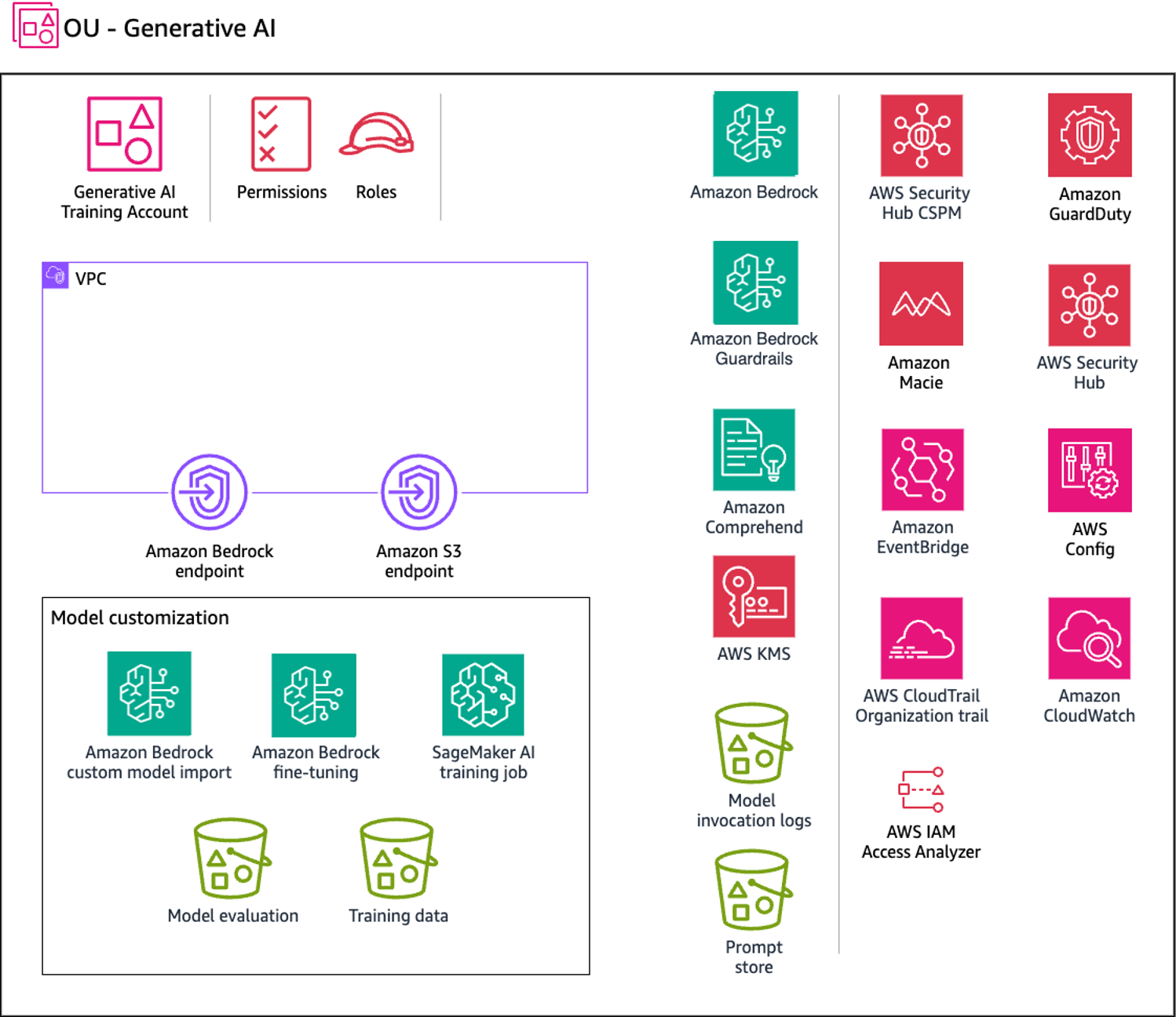
The Generative AI account includes services required for customizing a model along with a suite of required security services to implement security guardrails and centralized security governance. To allow for private model customization, you should create Amazon S3 gateway endpoints for the training data and evaluation Amazon S3 buckets that a private VPC environment is configured to access.
Rationale
Model customization improves foundation model (FM) performance for specific use cases by providing training data. Amazon Bedrock offers two customization methods:
-
Continued pre-training with unlabeled data to enhance domain knowledge
-
Fine-tuning with labeled data to optimize task-specific performance
Customized models require Provisioned Throughput for inference.
This capability addresses the following scenarios from the Generative AI Security Scoping Matrix
-
Scope 4 - Model customization – You customize an FM (from Amazon Bedrock or Amazon SageMaker Jumpstart) with your data to improve performance for specific tasks or domains. You control the application, customer data, training data, and customized model. The FM provider controls the pre-trained model and its training data.
-
Scope 5 - Model training from scratch – You train a model from scratch using datasets you provide. You control the training data, model algorithm, training infrastructure, application, customer data, and related infrastructure.
Beyond customizing models within Amazon Bedrock, you can use the Custom
Model Import feature to import models customized in other environments,
such as Amazon SageMaker AI. Use Safetensorspickle, Safetensors stores only tensor data, not
arbitrary Python objects. This approach eliminates vulnerabilities
from unpickling untrusted data because Safetensors can't execute
code.
To detect potential training data leakage, introduce canaries into your training data. Canaries are unique, identifiable strings that should never appear in model outputs. Configure prompt logging to alert when these canaries are detected, indicating the model may be memorizing and reproducing training data inappropriately.
Amazon Bedrock model customization
You can privately and securely customize FMs with your own data in Amazon Bedrock to build applications specific to your domain, organization, and use case. Fine-tuning increases model accuracy by providing your own task-specific, labeled training dataset to further specialize FMs. Continued pre-training trains models using your own unlabeled data in a secure and managed environment with customer managed keys. For more information, see Customize your model to improve its performance for your use case in the Amazon Bedrock documentation.
Model training or fine-tuning with SageMaker AI
You can train new models or fine-tune existing models by using Amazon SageMaker AI training jobs. This solution creates models customized for your business needs while maintaining control of all resources, including Amazon Elastic Compute Cloud (Amazon EC2) instances, training code, and training infrastructure.
Security considerations
Model customization creates artifacts, including the model and its weights, that are used in production workloads. This stage faces the following threats:
-
Data and model poisoning – A threat actor injects malicious data to alter model behavior, introducing bias and causing unintended outputs.
-
Sensitive information disclosure – A model trained on datasets containing personally identifiable information (PII) leaks sensitive information during inference.
SageMaker AI and Amazon Bedrock provide features that mitigate these risks, including data protection, access control, network security, logging, and monitoring.
Remediations
This section reviews the AWS services and features that address the risks that are specific to this capability.
Data protection
Encrypt the model customization job, output files (training and validation metrics), and resulting custom model. For this encryption, use an AWS Key Management Service (AWS KMS) customer managed key that you create, own, and manage.
When you use Amazon Bedrock to run a model customization job, you store the input files (training and validation data) in your Amazon S3 bucket. When the job is completed, Amazon Bedrock stores the output metrics files in the S3 bucket that you specified when you created the job. Amazon Bedrock stores the resulting custom model artifacts in an S3 bucket controlled by AWS. By default, input and output files are encrypted with Amazon S3 SSE-S3 server-side encryption using an AWS managed key. You can choose to encrypt these files with a customer managed key.
Identity and access management
Create a custom AWS Identity and Access Management (IAM) service role for model customization or model import that follows the principle of least privilege.
To create a service role for model customization, follow the instructions in the Amazon Bedrock documentation.
To create a service role for importing pre-trained models, follow the instructions in the Amazon Bedrock documentation.
Network security
Use a VPC with Amazon Virtual Private Cloud (Amazon VPC) to control access to your data. When you create your VPC, use the default DNS settings for your endpoint route table so that standard Amazon S3 URLs resolve.
If you configure your VPC with no internet access, create an Amazon S3 VPC endpoint. Use this VPC endpoint to allow your model customization jobs to access the S3 buckets that store your training and validation data and model artifacts.
For SageMaker AI, configure the training job with a VPC configuration, including private subnets and security groups that restrict both inbound and outbound traffic. This approach helps to ensure that Amazon EC2 instances can only access the resources that you define. Combined with Amazon S3 VPC endpoints, this approach helps to ensure that EC2 instances only access specified S3 buckets.
After you set up your VPC and endpoint, attach permissions to your model customization IAM role. After you configure the VPC and required roles and permissions, you can create a model customization job that uses this VPC. By creating a VPC with no internet access and an associated Amazon S3 VPC endpoint for training data, you can run your model customization job with private connectivity without internet exposure.
Recommended AWS services
This section discusses the AWS services that are recommended to build this capability securely. In addition to the services in this section, use Amazon OpenSearch Service and Amazon Comprehend as discussed in Capability 3.
Amazon S3
When you run a model customization job, the job accesses your Amazon S3 bucket to download input data and upload job metrics. You can choose fine-tuning or continued pre-training as the model type when you submit your model customization job on the Amazon Bedrock console or API. After a model customization job completes, analyze the training process results. To do this, you can view the files in the output S3 bucket that you specified when you submitted the job or view details about the model.
Encrypt both buckets with a customer managed key. Use Amazon S3 Object Lock or versioning to ensure data integrity. For additional network security hardening, create a gateway endpoint for the S3 buckets that the VPC environment accesses. Log and monitor all access. Use resource-based policies to control access to your Amazon S3 files.
Amazon Macie
Amazon Macie is a fully managed data security and data privacy service that uses machine learning and pattern matching to discover and help protect your sensitive data in AWS. You need to identify the type and classification of data that your workload is processing to ensure that appropriate controls are enforced. Macie can help identify sensitive data in your prompt store and model invocation logs stored in S3 buckets.
You can use Macie to automate discovery, logging, and reporting of sensitive data in Amazon S3. You can do this in two ways: Configure Macie to perform automated sensitive data discovery, or create and run sensitive data discovery jobs. For more information, see Discovering sensitive data with Amazon Macie in the Macie documentation.
Amazon EventBridge
Use EventBridge to configure SageMaker to respond automatically to model customization job status changes in Amazon Bedrock. Events from Amazon Bedrock are delivered to EventBridge in near real time. You can write simple rules to automate actions when an event matches a rule.
AWS KMS
Use a customer managed key to encrypt the model customization job, output files (training and validation metrics), resulting custom model, and Amazon S3 buckets that host the training, validation, and output data. For more information, see Encryption of custom models in the Amazon Bedrock documentation.
A key policy is a resource policy for an AWS KMS key. Key policies are the primary way to control access to KMS keys. You can also use IAM policies and grants to control access to KMS keys, but every KMS key must have a key policy. Use a key policy to provide permissions to a role to access the custom model encrypted with the customer managed key. This approach allows specified roles to use a custom model for inference.
Amazon CloudWatch
Use CloudWatch to monitor training job metrics in SageMaker and fine-tuning metrics in Amazon Bedrock. Create alarms to receive notifications when a job fails or when a metric deviates from baseline.
AWS CloudTrail
Use CloudTrail to log all events on your AWS resources. Create a trail filtered on your training resources, including datasets on Amazon S3. This trail enables you to act on suspicious activity surrounding your resources.
