기계 번역으로 제공되는 번역입니다. 제공된 번역과 원본 영어의 내용이 상충하는 경우에는 영어 버전이 우선합니다.
AI 기반 Bot Analyzer를 사용하여 봇 최적화
AI 기반 권장 사항을 사용하여 AWS 모범 사례를 기준으로 Amazon Lex V2 봇 구성을 분석합니다. Bot Analyzer는 Amazon Bedrock의 생성형 AI 기능을 사용하여 구성 문제를 식별하고 의도 분류 및 슬롯 해결 성능을 개선하기 위한 실행 가능한 지침을 제공합니다.
Bot Analyzer는 봇의 의도 구성을 자동으로 평가하고 다음을 위한 권장 사항을 제공합니다.
-
의도 분리 개선 - 여러 개념을 그룹화하는 일반적인 의도 식별 및 해결
-
의도 중복 제거 - 라우팅 오류를 유발하는 의도 간에 유사한 의미와 문구 감지
-
슬롯 사용량 최적화 - 슬롯을 적절하게 사용하여 유사한 의도를 결합하고 개체 추출을 개선하는 것이 좋습니다.
-
발화 품질 향상 - 더 나은 의도 분류를 위해 샘플 발화 범위 및 다양성 분석
사전 조건
Bot Analyzer를 사용하기 전에 다음을 확인하세요.
콘솔 또는 API에서 Bot Analyzer를 사용할 수 있습니다.
- Console
-
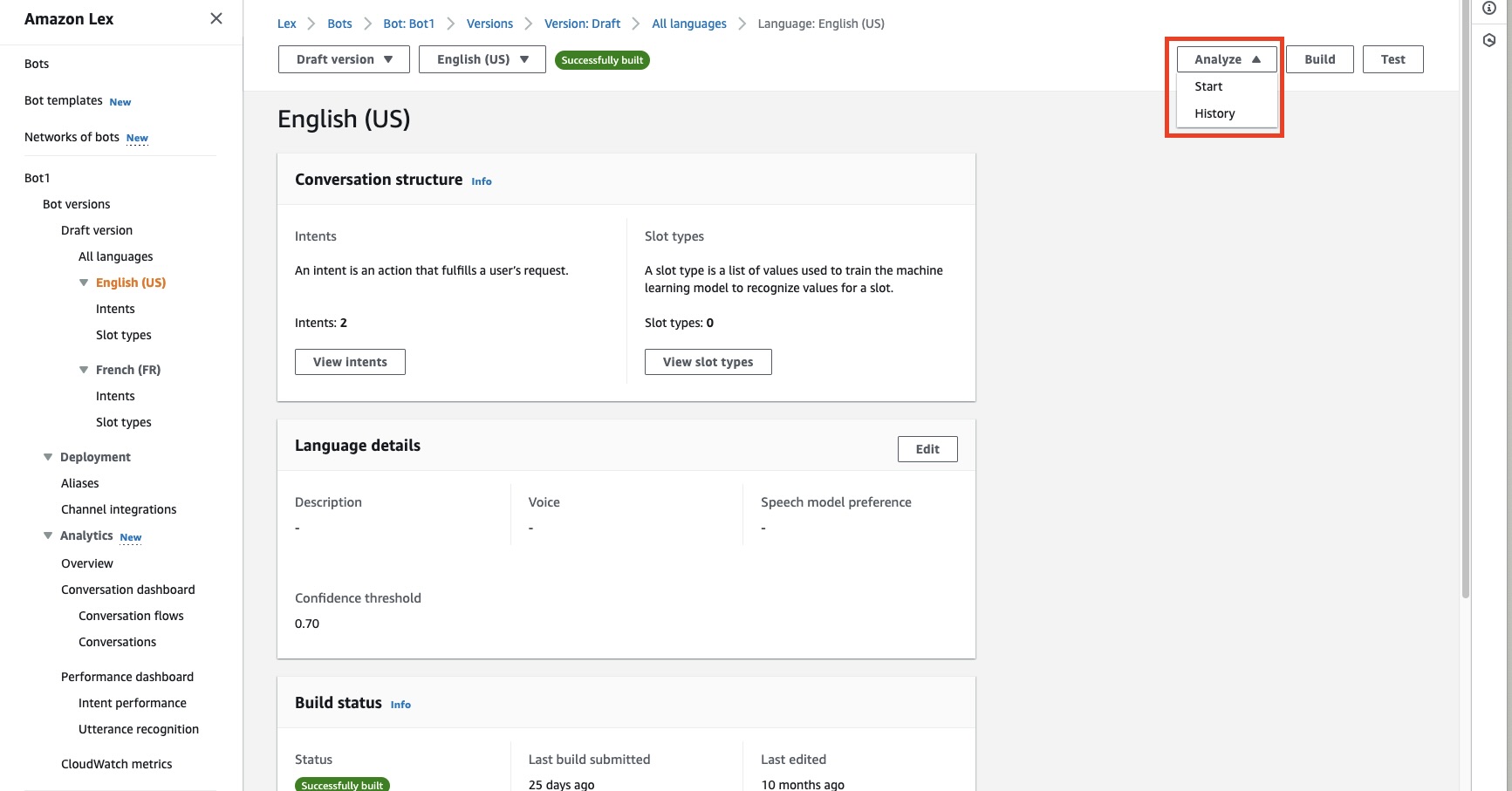
분석 시작
분석은 일반적으로 몇 분 내에 완료됩니다. 분석 중에 취소해야 하는 경우 시작 버튼이 분석 중지로 변경됩니다.
권장 사항 보기
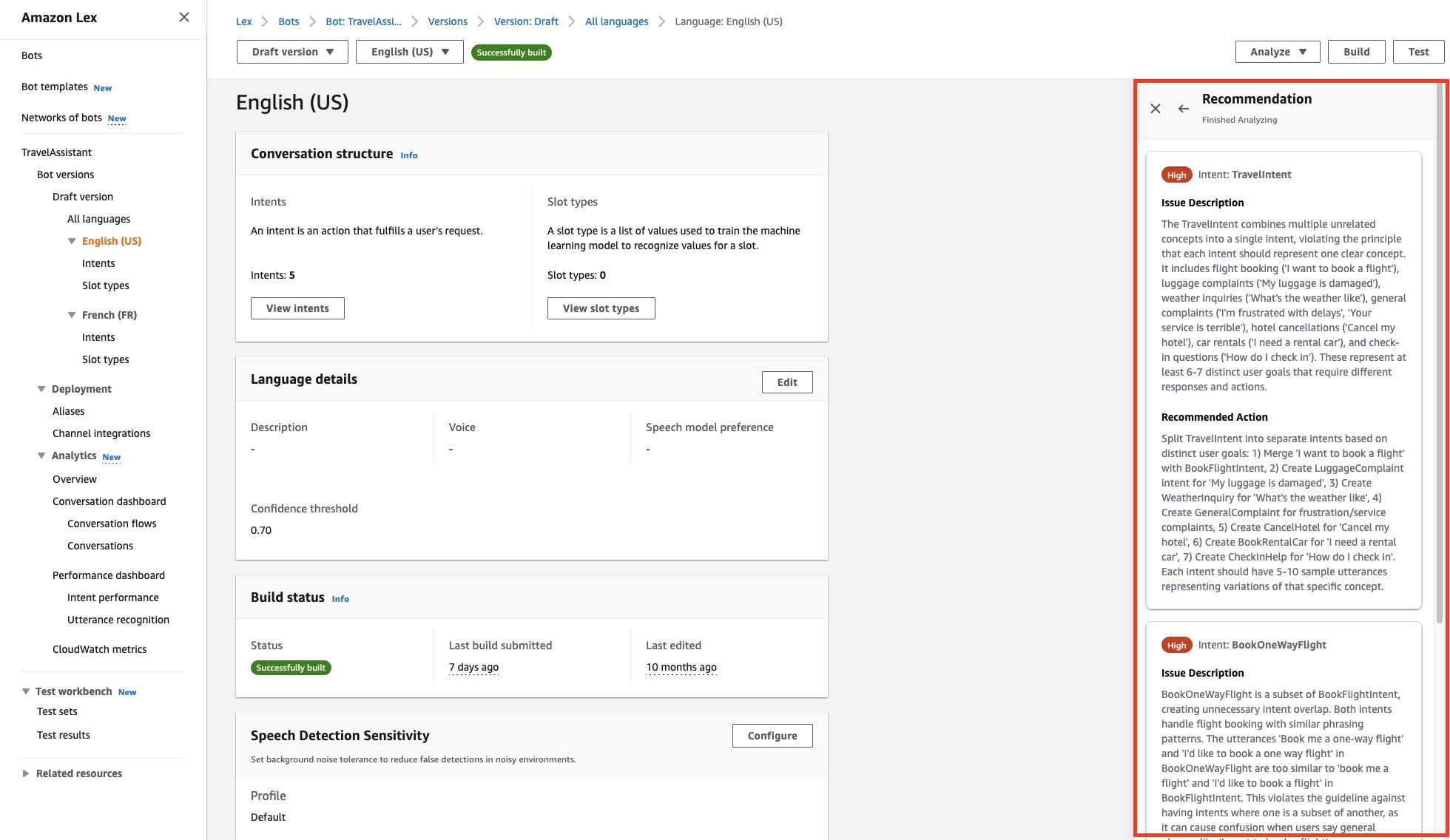
분석이 완료되면 오른쪽에 있는 권장 사항 패널에 권장 사항이 표시됩니다.
각 권장 사항에는 다음이 포함됩니다.
분석 기록 보기
이전 분석을 보려면:
-
분석 드롭다운 메뉴를 클릭합니다.
-
기록을 선택합니다.
-
분석 기록 패널에는 과거 분석 요청이 상태 및 타임스탬프와 함께 표시됩니다.
권장 사항 삭제
분석 결과를 제거하려면:
-
분석 드롭다운 메뉴를 클릭합니다.
-
삭제를 선택합니다.
-
현재 권장 사항의 삭제를 확인합니다.
- API
-
분석 시작
봇 로캘에 대한 분석을 시작하는 StartBotAnalyzer 요청을 보냅니다. 응답은와 함께 HTTP 202 상태를 반환합니다botAnalyzerRequestId. 이 ID를 기록해 두면 분석 상태를 확인하고 권장 사항을 검색하는 데 필요합니다.
분석 상태 확인 및 권장 사항 검색
botAnalyzerRequestId 이전 단계의를 사용하여 DescribeBotAnalyzerRecommendation 요청을 보냅니다. 요청 경로botId에를 포함합니다.
응답botAnalyzerStatus의이 이면 Available분석이 완료되고 botAnalyzerRecommendationList 필드에 권장 사항이 채워집니다. 각 권장 사항에는 다음이 포함됩니다.
-
issueLocation - 문제가 감지된 위치
-
priority - 높음, 중간 또는 낮음 심각도
-
issueDescription - 구성 문제에 대한 세부 정보
-
proposedFix - 문제 해결을 위한 실행 가능한 지침
진행 중인 분석 중지
진행 중인 분석을 취소해야 하는 경우 botId 및를 사용하여 StopBotAnalyzer 요청을 보냅니다botAnalyzerRequestId.
분석 기록 보기
봇 로캘에 대한 이전 분석 목록을 검색하려면 ListBotAnalyzerHistory 요청을 보냅니다. botId 상태 및 타임스탬프가 있는 모든 과거 분석 요청을 localeId 보려면 및를 지정합니다.
권장 사항 삭제
분석 결과를 제거하려면 botId 및를 사용하여 DeleteBotAnalyzerRecommendation 요청을 보냅니다botAnalyzerRequestId. 그러면 해당 분석과 관련된 권장 사항이 영구적으로 삭제됩니다.
권장 사항은 15일 후에 자동으로 삭제됩니다.
관련 항목