Die vorliegende Übersetzung wurde maschinell erstellt. Im Falle eines Konflikts oder eines Widerspruchs zwischen dieser übersetzten Fassung und der englischen Fassung (einschließlich infolge von Verzögerungen bei der Übersetzung) ist die englische Fassung maßgeblich.
Bieten Sie Agenten-Coaching in Connect Customer an
Connect Customer bietet integrierte Coaching-Tools, mit denen Vorgesetzte den Agenten auf der Grundlage von Leistungsbewertungen strukturiertes, datengestütztes Feedback geben können. Bei bevorstehenden Einzelgesprächen mit Agenten können Vorgesetzte detailliertes Coaching-Feedback mit konkreten Beispielen teilen und Leistungsziele direkt in Connect Customer festlegen. Qualitätsmanagementteams können Vorgesetzten auch Coachings mit Fälligkeitsterminen zuweisen, wenn sie Verbesserungsmöglichkeiten erkennen, z. B. indem sie mehr Empathie für Kundenprobleme zeigen. Nach Abschluss des Coachings können Agenten das Feedback in Connect Customer bestätigen und so sicherstellen, dass sie die nächsten Verbesserungsschritte verstehen. Vergangenes Coaching-Feedback ist zentral zugänglich, sodass Agenten, Vorgesetzte und Qualitätsmanager die Fortschritte der Mitarbeiter im Laufe der Zeit leichter verfolgen können.
Anmerkung
Diese Funktion ist im Rahmen der Leistungsbeurteilungen von Connect Customer verfügbar.
Vergeben Sie Berechtigungen für das Coaching
Berechtigungen können wie folgt konfiguriert werden:
-
Administratoren und Qualitätsmanager: Bieten Sie Coaching an — verwalten Sie die Berechtigungen für Coaching-Sitzungen. Diese Berechtigungen gewähren ihnen Zugriff auf alle Coaching-Sitzungen in Ihrer Connect Customer-Instanz. Mit dieser Berechtigung können sie den Vorgesetzten der Agenten das Agenten-Coaching zuweisen.
-
Vorgesetzte: Coaching anbieten — Berechtigungen für meine Coaching-Sitzungen (Anzeigen, Erstellen, Löschen, Bearbeiten). Diese Berechtigungen ermöglichen es ihnen, Agenten-Coachings mit sich selbst als Coach zu erstellen und zu verwalten.
-
Agenten: Coaching anbieten — meine Coaching-Sitzungen — Erlaubnis anzeigen. Diese Berechtigung ermöglicht es dem Agenten, Coachings anzusehen und zu bestätigen, bei denen er der Teilnehmer ist.
Darüber hinaus können Administratoren, Qualitätsmanagern und Vorgesetzten die Berechtigungen Kontaktsuche — Ansicht und Bewertungsformulare — Bewertungen durchführen — Ansehen erteilt werden. Wenn diese Berechtigungen aktiviert sind, werden Benutzern automatische Vorschläge für Bewertungen angezeigt, anhand derer sie coachen können, basierend auf dem ausgewählten Coaching-Thema.
Weitere Informationen finden Sie unter Vergeben Sie Sicherheitsprofilberechtigungen für Leistungsbewertungen und Coaching.
Bieten Sie Agenten Coaching an
Sie können auf zwei Arten mit dem Coaching beginnen:
-
Coaching auf der Grundlage aggregierter Leistungseinblicke: Wenn Sie bereits Themen kennen, zu denen Sie coachen können, indem Sie die durchschnittlichen Bewertungsergebnisse innerhalb von überprüfenDashboard zur Bewertung der Kundendienstmitarbeiter-Leistung, können Sie zur Seite mit den Coaching-Sitzungen navigieren, eine neue Coaching-Sitzung erstellen und die entsprechenden Bewertungskriterien als Thema auswählen. Anschließend erhalten Sie automatische Vorschläge für Evaluationen, anhand derer Sie ein Coaching durchführen können, anhand derer Sie detailliertes Feedback verfassen können.
-
Coach zu individuellen Evaluationen: Während Sie eine Bewertung auf der Seite mit den Kontaktdaten überprüfen, können Sie eine Coaching-Sitzung starten, um auf der Grundlage dieser spezifischen Bewertung detailliertes Feedback zu geben. Sie können mehrere Bewertungen mit einer Coaching-Sitzung verknüpfen.
Coach auf der Grundlage aggregierter Leistungsdaten
Wenn Sie beispielsweise in Ihrem Dokument feststellen, Dashboard zur Bewertung der Kundendienstmitarbeiter-Leistung dass ein Agent in Bezug auf Empathie schlecht abgeschnitten hat, können Sie zur Seite mit den Coaching-Sitzungen navigieren und eine neue Coaching-Sitzung erstellen, um diesem Trend Rechnung zu tragen.
-
Melden Sie sich bei Connect Customer mit einem Sicherheitsprofil an, das über die erforderlichen Berechtigungen verfügt, um Coachings zu erstellen, nach Kontakten zu suchen und Bewertungen einzusehen.
-
Navigieren Sie zu Analytik und Optimierung > Coaching-Sitzungen.
-
Wählen Sie beim Erstellen einer neuen Coaching-Sitzung zunächst einen Teilnehmer aus.
-
Fügen Sie Bewertungsformulare mit Bewertungen als Sitzungsthemen hinzu. Wählen Sie beispielsweise das Bewertungsformular, den Abschnitt oder die Frage aus, die die Empathiekriterien enthält, bei denen der Agent schlecht abgeschnitten hat. Die Vorschläge basieren auf diesen Bewertungsformularen.

-
Connect Customer schlägt automatisch Bewertungen für diesen Teilnehmer vor. Sie können wählen, ob Sie Vorschläge als Stärken oder Chancen hinzufügen möchten.
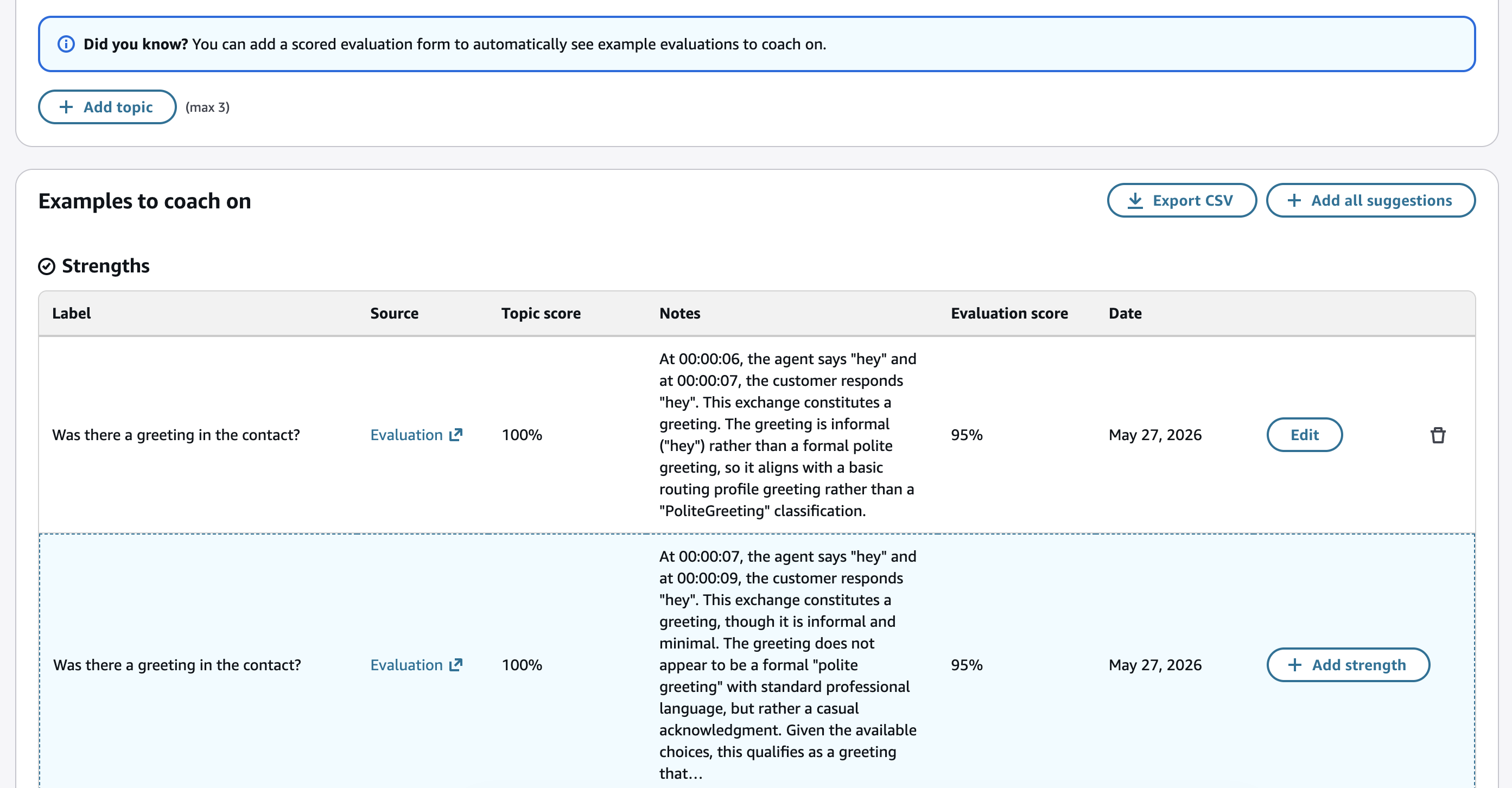
-
Wählen Sie Vorschläge für Stärken anzeigen oder Vorschläge für Geschäftschancen anzeigen aus, um weitere Vorschläge anzuzeigen, oder filtern Sie die Vorschläge anhand verschiedener Kriterien wie Punktebereich, Zeitraum oder bestimmten Themen.
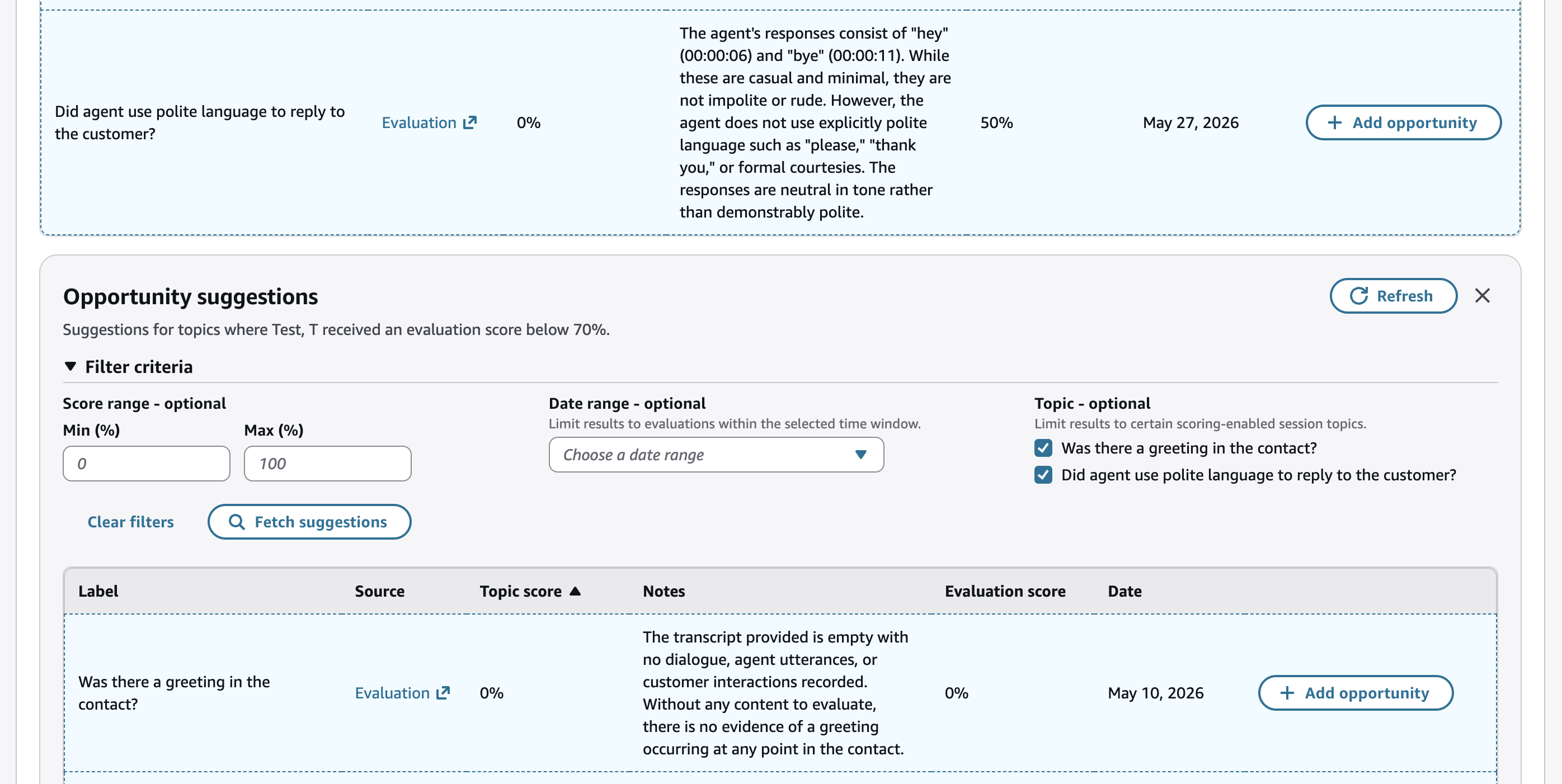
-
Sie können die Coaching-Sitzung bearbeiten, indem Sie Datum, Uhrzeit und Ort angeben, detailliertes Feedback geben und Verbesserungsziele zu Coaching-Themen festlegen.
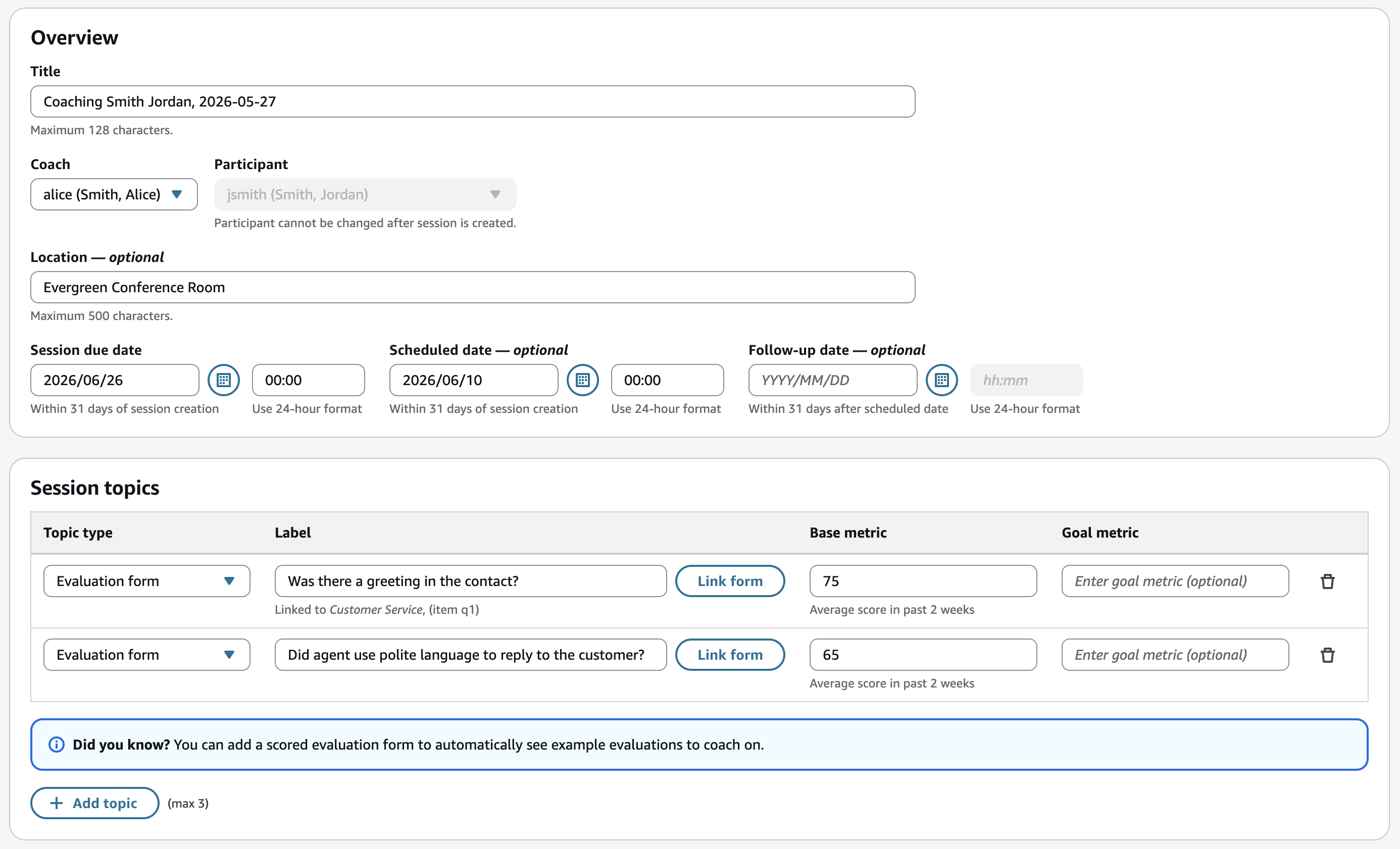
Anmerkung
Das Fälligkeitsdatum der Sitzung ist obligatorisch.
-
Wählen Sie Senden, um die Coaching-Sitzung als Entwurf zu speichern.
-
Wenn die Coaching-Sitzung fertig ist, wählen Sie Teilen, um die Coaching-Sitzung für den Agenten sichtbar zu machen. Wenn der Agent in Connect Customer eine E-Mail konfiguriert hat (oder eine sekundäre E-Mail für eine SAML-Instanz hat), erhält er eine E-Mail-Benachrichtigung mit einem Link zum Ansehen der Coaching-Sitzung.
-
Zum Zeitpunkt des Coachings können Sie unter Analytik und Optimierung > Coaching-Sitzungen auf die Coaching-Sitzung zugreifen. Auf dieser Seite werden alle vergangenen und bevorstehenden Coaching-Sitzungen angezeigt.
-
Wenn die Coaching-Sitzung beendet ist, wählen Sie Als abgeschlossen markieren und fügen Sie optional eine Notiz hinzu.
-
Agenten können das Coaching zusammen mit ihren eigenen Coaching-Notizen bestätigen.
Coachen Sie bei individuellen Evaluationen
-
Melden Sie sich bei Connect Customer mit einem Sicherheitsprofil an, das über die erforderlichen Berechtigungen verfügt, um Coachings zu erstellen, nach Kontakten zu suchen und Bewertungen einzusehen.
-
Wählen Sie in der Navigationsleiste auf der linken Seite Analysen und Optimierung > Kontaktsuche aus.
-
Suchen Sie in der Kontaktsuche nach Kontakten, die für den Agenten, den Sie coachen möchten, bewertet wurden. So können Sie beispielsweise Kontakte finden, deren Bewertungspunktzahl unter 70% liegt:

-
Öffnen Sie einen Kontakt, der bewertet wurde, und sehen Sie sich die Bewertungen im rechten Bereich an.
-
Öffnen Sie eine Bewertung und wählen Sie in dieser Bewertung Coach aus.

-
Du kannst die gesamte Bewertung, einen bestimmten Abschnitt oder eine Frage zu einer Coaching-Sitzung hinzufügen:
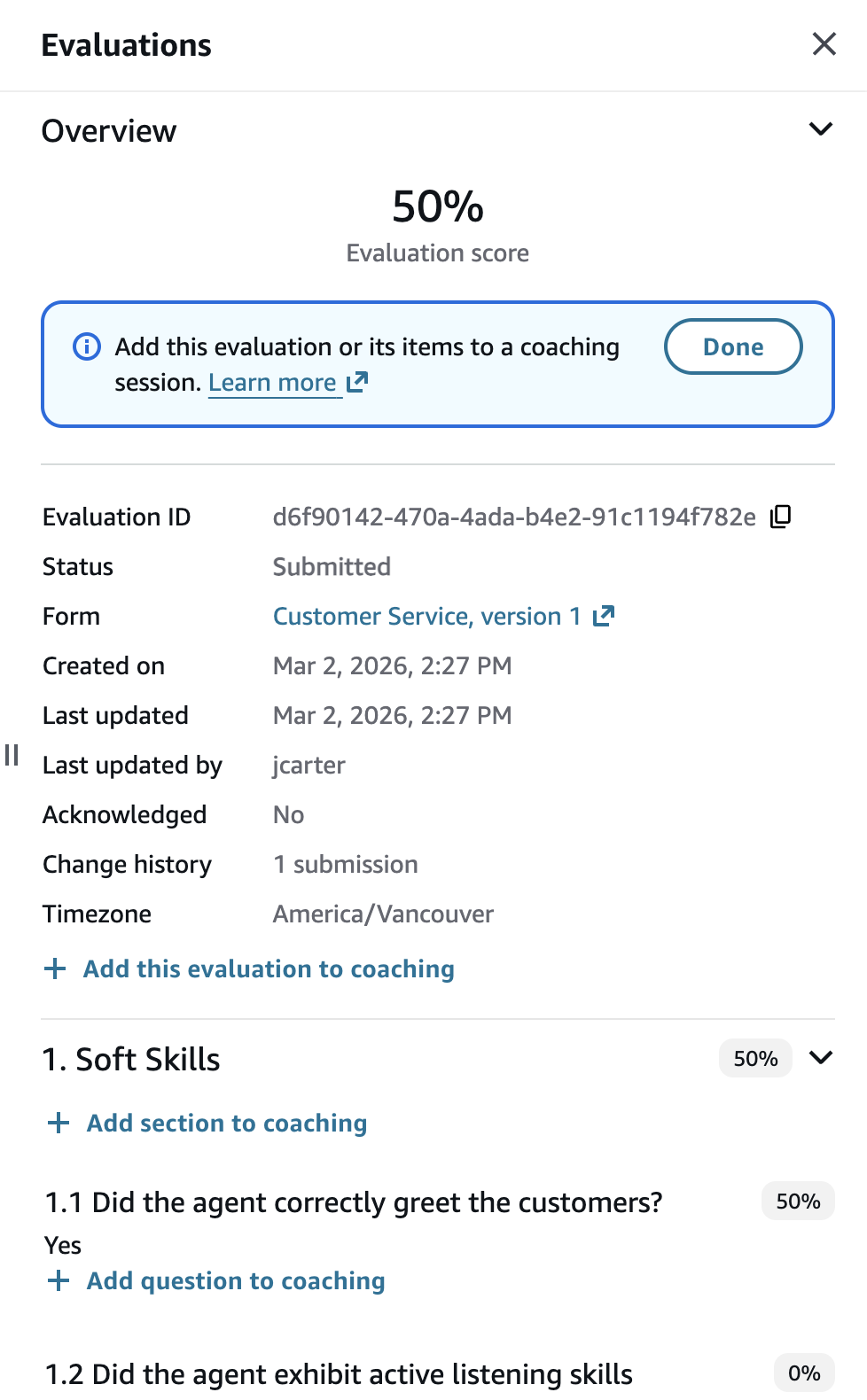
-
Sie können die Bewertung, ihre Abschnitte oder Fragen mit einer vorhandenen Coaching-Sitzung verknüpfen oder eine neue Sitzung erstellen. Elemente können als Stärken oder Wachstumschancen verknüpft werden.

-
Nachdem Sie eine Bewertung oder deren Elemente für das Coaching hinzugefügt haben, wird ein Link zur Ansicht der Coaching-Sitzung bereitgestellt.
-
Sie können bis zu 10 Bewertungen oder Evaluationselemente mit einer einzelnen Coaching-Sitzung verknüpfen, um Beispiele für die Stärke von Agenten oder Wachstumschancen zu erhalten. Um weitere Bewertungen zu verknüpfen, wiederholen Sie die Schritte 2 bis 7
-
Sie können die Coaching-Sitzung bearbeiten, indem Sie Datum, Uhrzeit und Ort angeben, detailliertes Feedback geben und Verbesserungsziele zu Coaching-Themen festlegen.
Anmerkung
Das Fälligkeitsdatum der Sitzung ist obligatorisch.
-
Wählen Sie Senden, um die Coaching-Sitzung als Entwurf zu speichern.
-
Wenn die Coaching-Sitzung fertig ist, wählen Sie Teilen, um die Coaching-Sitzung für den Agenten sichtbar zu machen. Wenn der Agent in Connect Customer eine E-Mail konfiguriert hat (oder eine sekundäre E-Mail für eine SAML-Instanz hat), erhält er eine E-Mail-Benachrichtigung mit einem Link zum Ansehen der Coaching-Sitzung.
-
Zum Zeitpunkt des Coachings können Sie unter Analytik und Optimierung > Coaching-Sitzungen auf die Coaching-Sitzung zugreifen. Auf dieser Seite werden alle vergangenen und bevorstehenden Coaching-Sitzungen angezeigt.
-
Wenn die Coaching-Sitzung beendet ist, wählen Sie Als abgeschlossen markieren und fügen Sie optional eine Notiz hinzu.
-
Agenten können das Coaching zusammen mit ihren eigenen Coaching-Notizen bestätigen.
Suchen Sie nach Coaching-Sitzungen
Sie können alle vergangenen und bevorstehenden Coaching-Sitzungen auf der Seite Analytik und Optimierung > Coaching-Sitzungen einsehen.
Diese Seite bietet erweiterte Suchfunktionen. Sie können nach Coaching-Sitzungen suchen:
-
Von einem bestimmten Coach durchgeführt
-
Wo ein bestimmter Agent der Teilnehmer war
-
Erstellt von einem bestimmten Qualitätsmanager
-
Zu einem bestimmten Thema
-
Das ist das Fälligkeitsdatum überschritten, aber noch nicht abgeschlossen
-
Die Fertigstellung steht noch aus (Status „Gemeinsam genutzt“ oder „Entwurf“)
-
Diese sind abgeschlossen, aber vom Teilnehmer noch nicht bestätigt
-
und mehr

