本文為英文版的機器翻譯版本,如內容有任何歧義或不一致之處,概以英文版為準。
以文字分類來分類文字 (單一標籤)
若要將文章和文字分類到預先定義的類別,請使用文字分類。例如,您可以使用文字分類來識別評論中所傳達的情緒,或識別某段文字底下的情緒。使用 Amazon SageMaker Ground Truth 文字分類,讓工作者將文字分類到您定義的類別。使用 Amazon SageMaker AI 主控台的 Ground Truth 區段或 CreateLabelingJob 操作來建立文字分類標籤工作。
重要
如果您手動建立輸入資訊清單檔案,請使用 "source" 來識別您要標籤的文字。如需詳細資訊,請參閱輸入資料。
建立文字分類標籤工作 (主控台)
您可以依照指示 建立標籤工作 (主控台),了解如何在 SageMaker AI 主控台建立文字分類標籤工作。在步驟 10 中,從任務類別下拉式清單中選擇文字,然後選擇文字分類 (單一標籤)做為任務類型。
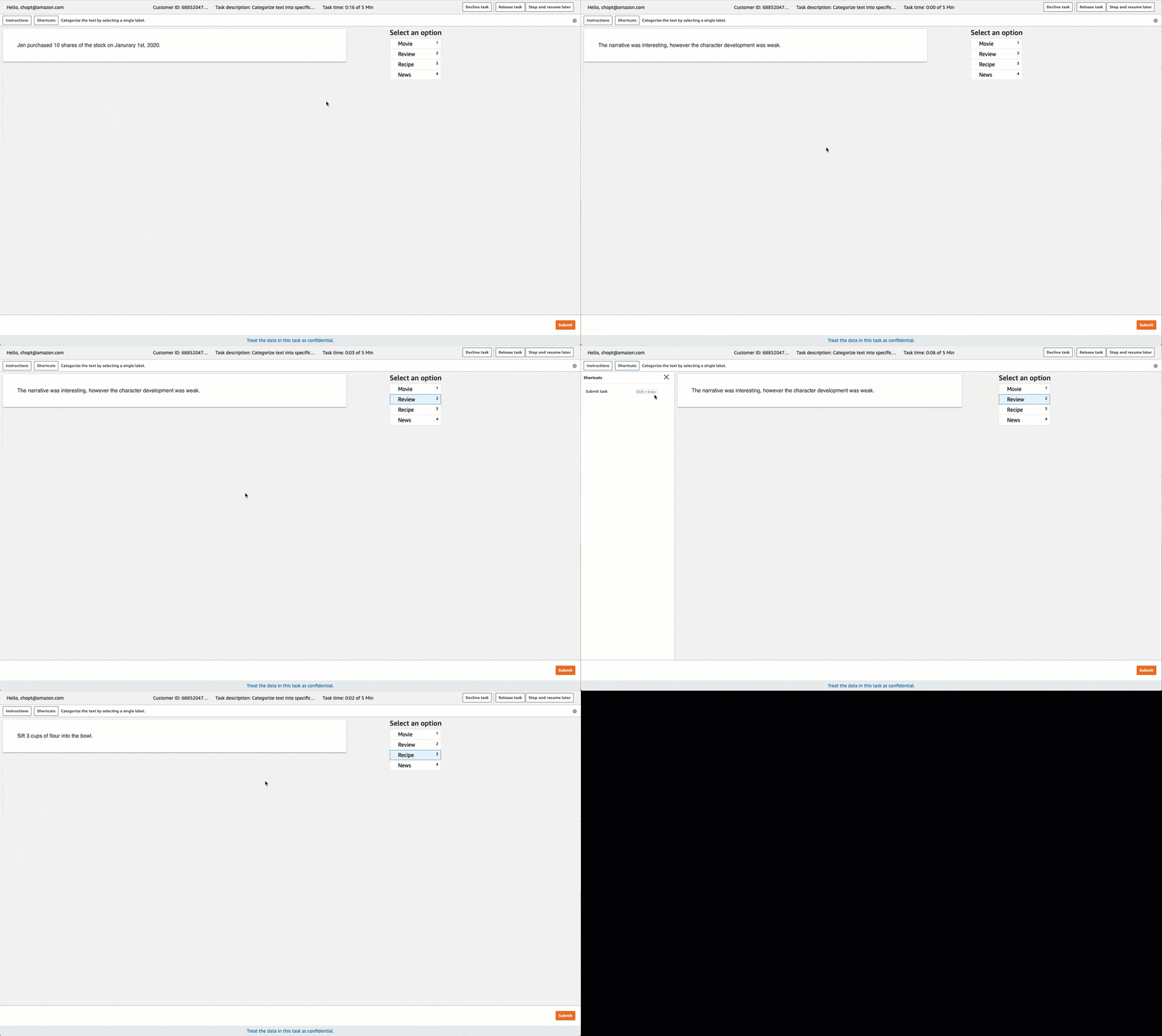
Ground Truth 提供類似下列標籤任務的工作者使用者介面。使用主控台建立標籤工作時,您可以指定指示以協助工作者完成工作,以及工作者可以選擇的標籤。
建立文字分類標籤工作 (API)
若要建立文字分類標籤工作,請使用 SageMaker API 作業 CreateLabelingJob。此 API 會定義 AWS SDKs此操作。若要查看這項作業支援的特定語言 SDK 清單,請參閱 CreateLabelingJob 的另請參閱一節。
設定請求時,請遵循建立標籤工作 (API)上的指示並執行下列動作:
-
此任務類型的註釋前 Lambda 函式會以
PRE-TextMultiClass結尾。若要尋找您區域的註釋前 Lambda ARN,請參閱 PreHumanTaskLambdaArn。 -
此任務類型的註釋合併 Lambda 函式會以
ACS-TextMultiClass結尾。若要尋找您區域的註釋合併 Lambda ARN,請參閱 AnnotationConsolidationLambdaArn。
下列是用 AWS Python SDK (Boto3) 請求
response = client.create_labeling_job( LabelingJobName='example-text-classification-labeling-job, LabelAttributeName='label', InputConfig={ 'DataSource': { 'S3DataSource': { 'ManifestS3Uri':'s3://bucket/path/manifest-with-input-data.json'} }, 'DataAttributes': { 'ContentClassifiers': ['FreeOfPersonallyIdentifiableInformation'|'FreeOfAdultContent', ] } }, OutputConfig={ 'S3OutputPath':'s3://bucket/path/file-to-store-output-data', 'KmsKeyId':'string'}, RoleArn='arn:aws:iam::*:role/*, LabelCategoryConfigS3Uri='s3://bucket/path/label-categories.json', StoppingConditions={ 'MaxHumanLabeledObjectCount':123, 'MaxPercentageOfInputDatasetLabeled':123}, HumanTaskConfig={ 'WorkteamArn':'arn:aws:sagemaker:region:*:workteam/private-crowd/*', 'UiConfig': { 'UiTemplateS3Uri':'s3://bucket/path/worker-task-template.html'}, 'PreHumanTaskLambdaArn': 'arn:aws:lambda:us-east-1:432418664414:function:PRE-TextMultiClass, 'TaskKeywords': [Text classification', ], 'TaskTitle':Text classification task', 'TaskDescription':'Carefully read and classify this text using the categories provided.', 'NumberOfHumanWorkersPerDataObject':123, 'TaskTimeLimitInSeconds':123, 'TaskAvailabilityLifetimeInSeconds':123, 'MaxConcurrentTaskCount':123, 'AnnotationConsolidationConfig': { 'AnnotationConsolidationLambdaArn': 'arn:aws:lambda:us-east-1:432418664414:function:ACS-TextMultiClass' }, Tags=[ { 'Key':'string', 'Value':'string'}, ] )
提供文字分類標籤工作的範本
如果您使用 API 來建立標籤工作,則必須在 UiTemplateS3Uri 中提供工作者任務範本。複製並修改下列範本。僅修改 short-instructions、full-instructions 和 header。
將此範本上傳至 S3,並在 UiTemplateS3Uri 中提供此檔案的 S3 URI。
<script src="https://assets.crowd.aws/crowd-html-elements.js"></script>
<crowd-form>
  <crowd-classifier
    name="crowd-classifier"
    categories="{{ task.input.labels | to_json | escape }}"
    header="classify text"
  >
    <classification-target style="white-space: pre-wrap">
      {{ task.input.taskObject }}
    </classification-target>
    <full-instructions header="Classifier instructions">
      <ol><li><strong>Read</strong> the text carefully.</li>
      <li><strong>Read</strong> the examples to understand more about the options.</li>
      <li><strong>Choose</strong> the appropriate labels that best suit the text.</li></ol>
    </full-instructions>
    <short-instructions>
      <p>Enter description of the labels that workers have to choose from</p>
      <p><br></p><p><br></p><p>Add examples to help workers understand the label</p>
      <p><br></p><p><br></p><p><br></p><p><br></p><p><br></p>
    </short-instructions>
  </crowd-classifier>
  </crowd-form>
文字分類輸出資料
建立文字分類標籤工作後,您的輸出資料會位於使用 API 時在 S3OutputPath 參數中指定的 Amazon S3 儲存貯體中,或在主控台工作概觀區段的輸出資料集位置欄位中。
若要進一步了解 Ground Truth 產生的輸出資訊清單檔案,以及 Ground Truth 用來儲存輸出資料的檔案結構,請參閱標籤工作輸出資料。
若要檢視文字分類標籤工作的輸出資訊清單檔案範例,請參閱分類任務輸出。
