本文為英文版的機器翻譯版本,如內容有任何歧義或不一致之處,概以英文版為準。
管道步驟的選取性執行
當您使用 Pipelines 建立工作流程並協調 ML 訓練步驟時,您可能需要經歷多個實驗階段。您可能只想重複特定步驟,而不是每次執行完整管道。使用 Pipelines,您可以選擇性地執行管道步驟。這有助於最佳化您的 ML 訓練。選取性執行在下列情況下很有用:
您想使用更新後的執行個體類型、超參數或其他變數來重新啟動特定步驟,同時保留上游步驟中的參數。
您的管道會在中間步驟失敗。執行中的先前步驟 (例如資料準備或特徵擷取) 的重新執行成本很高。您可能需要引入修正程式,然後手動重新執行某些步驟以完成管道。
使用選取性執行,您可以選擇執行任何步驟子集,只要這些步驟子集在管道的有向無環圖 (DAG) 中已連線即可。下列 DAG 顯示管道工作流程範例:
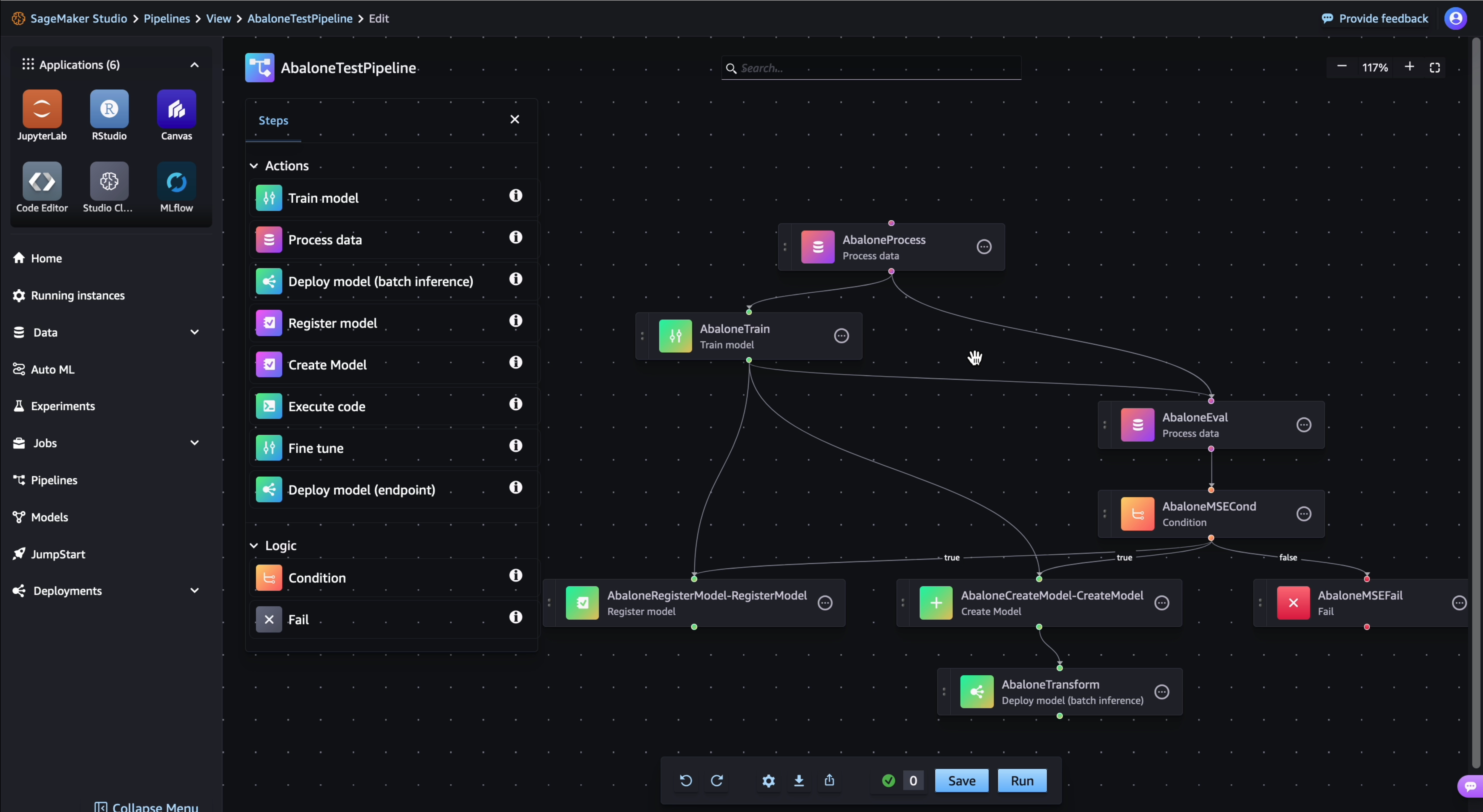
您可以在選取性執行中選取 AbaloneTrain 和 AbaloneEval 步驟,但您無法只選取 AbaloneTrain 和 AbaloneMSECond 步驟,因為這些步驟在 DAG 中未連線。對於工作流程中未選取的步驟,選取性執行會重新使用參考管道執行的輸出,而不是重新執行步驟。此外,位於所選取步驟下游的未選取步驟不會在選取性執行中執行。
如果您選擇在管道中執行中繼步驟的子集,則您的步驟可能會依賴先前的步驟。SageMaker AI 需要參考管道執行,以便從中為這些相依性提供資源。例如,如果您選擇執行步驟 AbaloneTrain 和 AbaloneEval,則需要 AbaloneProcess 步驟的輸出。您可以提供參考執行 ARN 或指示 SageMaker AI 使用最新的管道執行,這是預設行為。如果您有參考執行,則還可以透過參考執行建置執行時期參數,並將其提供給具有覆寫的選取性執行。如需詳細資訊,請參閱重複使用參考執行中的執行期參數值。
詳細來說,您可以使用 SelectiveExecutionConfig 為選取性執行管道執行提供組態。如果您包含參考管道執行 (含 source_pipeline_execution_arn 引數) 的 ARN,SageMaker AI 會使用先前的步驟相依性,這些相依性來自您提供的管道執行。如果您未包含 ARN 且最新的管道執行存在,則 SageMaker AI 預設會使用其作為參考。如果您未包含 ARN 且不想要 SageMaker AI 使用最新的管道執行,請將 reference_latest_execution 設定為 False。SageMaker AI 最終用作參考的管道執行 (無論是最新的還是使用者指定的) 都必須處於 Success 或 Failed 狀態。
下表彙總了 SageMaker AI 選擇參考執行的方式。
source_pipeline_execution_arn 引數值 |
reference_latest_execution 引數值 |
使用的參考執行 |
|---|---|---|
| 管道 AARN |
|
指定的管道 ARN |
| 管道 AARN |
|
指定的管道 ARN |
null 或未指定 |
|
最新管道執行 |
null 或未指定 |
|
無 - 在此情況下,請選取沒有上游相依性的步驟 |
如需有關選取性執行組態要求的更多資訊,請參閱 sagemaker.workflow.selective_execution_config.SelectiveExecutionConfig
以下討論內容涵蓋您想執行下列動作的情況範例:指定管道參考執行、使用最新管道執行作為參考,或在沒有參考管道執行的情況下執行選取性執行。
使用使用者指定之管道參考的選取性執行
下列範例示範如何使用參考管道執行,選擇性地執行步驟 AbaloneTrain 和 AbaloneEval。
from sagemaker.workflow.selective_execution_config import SelectiveExecutionConfig

selective_execution_config = SelectiveExecutionConfig(
    source_pipeline_execution_arn="arn:aws:sagemaker:us-west-2:123123123123:pipeline/abalone/execution/123ab12cd3ef",
    selected_steps=["AbaloneTrain", "AbaloneEval"]
)

selective_execution = pipeline.start(
    execution_display_name=f"Sample-Selective-Execution-1",
    parameters={"MaxDepth":6, "NumRound":60},
    selective_execution_config=selective_execution_config,
)
以最新的管道執行作為參考的選取性執行
下列範例示範如何使用最新參考管道執行做為參考,選擇性地執行步驟 AbaloneTrain 和 AbaloneEval。由於 SageMaker AI 預設使用最新的管道執行,因此您可以選擇將 reference_latest_execution 引數設定為 True。
# Prepare a new selective execution. Select only the first step in the pipeline without providing source_pipeline_execution_arn.
selective_execution_config = SelectiveExecutionConfig(
    selected_steps=["AbaloneTrain", "AbaloneEval"],
    # optional
    reference_latest_execution=True
)

# Start pipeline execution without source_pipeline_execution_arn
pipeline.start(
    execution_display_name=f"Sample-Selective-Execution-1",
    parameters={"MaxDepth":6, "NumRound":60},
    selective_execution_config=selective_execution_config,
)
沒有參考管道的選取性執行
下列範例示範如何選擇性地執行步驟 AbaloneProcess 和 AbaloneTrain,而無需提供參考 ARN 並關閉使用最新管道執行做為參考的選項。SageMaker AI 允許此組態,因為這個步驟子集不依賴先前的步驟。
# Prepare a new selective execution. Select only the first step in the pipeline without providing source_pipeline_execution_arn.
selective_execution_config = SelectiveExecutionConfig(
    selected_steps=["AbaloneProcess", "AbaloneTrain"],
    reference_latest_execution=False
)

# Start pipeline execution without source_pipeline_execution_arn
pipeline.start(
    execution_display_name=f"Sample-Selective-Execution-1",
    parameters={"MaxDepth":6, "NumRound":60},
    selective_execution_config=selective_execution_config,
)
重複使用參考執行中的執行期參數值
您可以使用 build_parameters_from_execution 透過參考管道執行建置參數,並將結果提供給您的選取性執行管道。您可以使用參考執行中的原始參數,或使用 parameter_value_overrides 引數套用任何覆寫。
下列範例示範如何透過參考執行建置參數,以及如何套用 MseThreshold 參數的覆寫。
# Prepare a new selective execution.
selective_execution_config = SelectiveExecutionConfig(
    source_pipeline_execution_arn="arn:aws:sagemaker:us-west-2:123123123123:pipeline/abalone/execution/123ab12cd3ef",
    selected_steps=["AbaloneTrain", "AbaloneEval", "AbaloneMSECond"],
)
# Define a new parameters list to test.
new_parameters_mse={
    "MseThreshold": 5,
}

# Build parameters from reference execution and override with new parameters to test.
new_parameters = pipeline.build_parameters_from_execution(
    pipeline_execution_arn="arn:aws:sagemaker:us-west-2:123123123123:pipeline/abalone/execution/123ab12cd3ef",
    parameter_value_overrides=new_parameters_mse
)

# Start pipeline execution with new parameters.
execution = pipeline.start(
    selective_execution_config=selective_execution_config,
    parameters=new_parameters
)
