本文為英文版的機器翻譯版本,如內容有任何歧義或不一致之處,概以英文版為準。
新增啟動範本
建立或編輯專案時,您可以使用專案組態中的進階選項來新增啟動範本。啟動範本為專案中的所有 VDI 執行個體提供額外的組態,例如安全群組、IAM 政策和啟動指令碼。
新增政策
您可以新增 IAM 政策來控制專案下部署之所有執行個體的 VDI 存取。若要加入政策,請使用下列鍵值對標記政策:
res:Resource/vdi-host-policy
如需 IAM 角色的詳細資訊,請參閱 IAM 中的政策和許可。
新增安全群組
您可以新增安全群組來控制專案下所有 VDI 執行個體的輸出和輸入資料。若要加入安全群組,請使用下列鍵值對標記安全群組:
res:Resource/vdi-security-group
如需安全群組的詳細資訊,請參閱《Amazon VPC 使用者指南》中的使用安全群組控制資源AWS的流量。
新增啟動指令碼
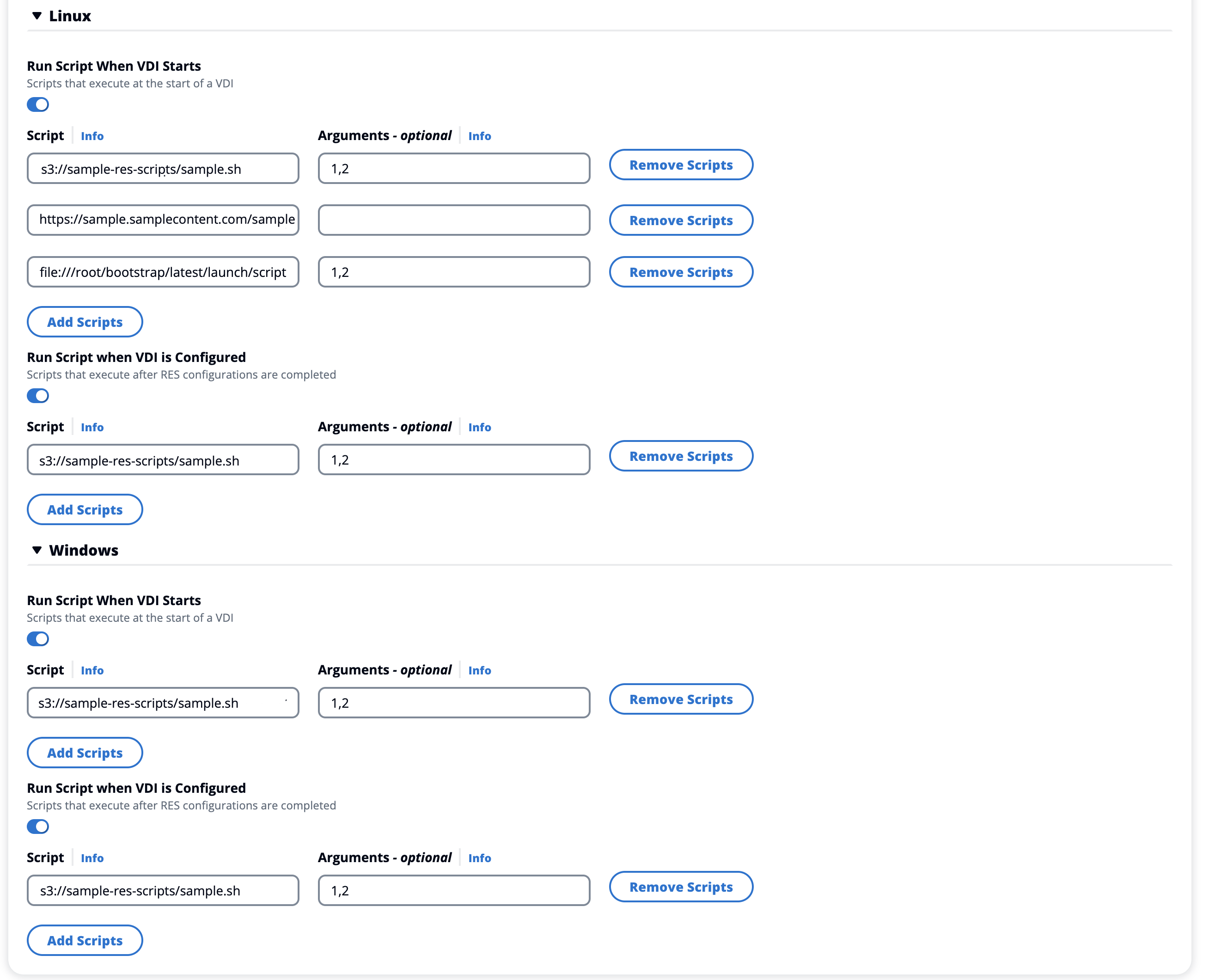
您可以新增啟動指令碼,這些指令碼將在專案中的所有 VDI 工作階段上啟動。RES 支援 Linux 和 Windows 的指令碼啟動。對於指令碼啟動,您可以選擇:
- VDI 啟動時執行指令碼
-
此選項會在執行任何 RES 組態或安裝之前,在 VDI 執行個體的開頭啟動指令碼。
- 設定 VDI 時執行指令碼
-
此選項會在 RES 組態完成後啟動指令碼。
指令碼支援下列選項:
| 指令碼組態 |
範例 |
| S3 URI |
s3://bucketname/script.sh |
| HTTPS URL (HTTPS URL) |
https://sample.samplecontent.com/sample |
| 本機檔案 |
file:///user/scripts/example.sh |
在 S3 儲存貯體上託管的所有自訂指令碼都需要使用下列標籤佈建:
res:EnvironmentName/<res-environment>
對於引數,請提供以逗號分隔的任何引數。
啟動指令碼的範例範本。
- Linux
-
#  Copyright Amazon.com, Inc. or its affiliates. All Rights Reserved.
#
#  Licensed under the Apache License, Version 2.0 (the "License"). You may not use this file except in compliance
#  with the License. A copy of the License is located at
#
#      http://www.apache.org/licenses/LICENSE-2.0
#
#  or in the 'license' file accompanying this file. This file is distributed on an 'AS IS' BASIS, WITHOUT WARRANTIES
#  OR CONDITIONS OF ANY KIND, express or implied. See the License for the specific language governing permissions
#  and limitations under the License.

#!/bin/bash

echo "start_script.sh running" >> /test_scripts
echo "All arguments: $@" >> /test_scripts
echo "Argument count: $#" >> /test_scripts
echo "Argument 1, $1" >> /test_scripts
echo "Argument 2, $2" >> /test_scripts
echo "end of start_script.sh" >> /test_scripts
- Windows
-
#  Copyright Amazon.com, Inc. or its affiliates. All Rights Reserved.
#
#  Licensed under the Apache License, Version 2.0 (the "License"). You may not use this file except in compliance
#  with the License. A copy of the License is located at
#
#      http://www.apache.org/licenses/LICENSE-2.0
#
#  or in the 'license' file accompanying this file. This file is distributed on an 'AS IS' BASIS, WITHOUT WARRANTIES
#  OR CONDITIONS OF ANY KIND, express or implied. See the License for the specific language governing permissions
#  and limitations under the License.

#!pwsh

Write-Output "configure_script.ps1 running" | Out-File -Append -FilePath "/test_scripts"
Write-Output "All arguments: $args" | Out-File -Append -FilePath "/test_scripts"
Write-Output "Argument count: $($args.Count)" | Out-File -Append -FilePath "/test_scripts"
Write-Output "Argument 1, $($args[0])" | Out-File -Append -FilePath "/test_scripts"
Write-Output "Argument 2, $($args[1])" | Out-File -Append -FilePath "/test_scripts"
Write-Output "end of configure_script.ps1" | Out-File -Append -FilePath "/test_scripts"