Investigation Agent in Amazon OpenSearch Service - Amazon OpenSearch Service

Investigation Agent in Amazon OpenSearch Service

The Investigation Agent is a goal-driven deep research agent in OpenSearch UI that autonomously investigates complex issues on your behalf. It plans using your data and the stated goal, executes queries and analysis, and reflects through a multi-step workflow. When the investigation completes, typically within a few minutes, it generates structured hypotheses ranked by likelihood, each backed by data evidence. It provides full transparency into every step of its reasoning, so that you can verify and trust the results.

Starting an investigation

You can start an investigation in two ways:

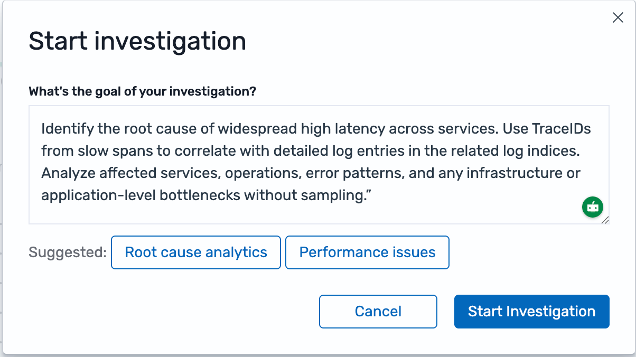
  • From Discover, Visualization, or other supported feature pages, choose the Start Investigation button. A dialog appears where you can enter your investigation goal and select from suggested templates such as "Root cause analytics" or "Performance issues."

  • From Agentic Chat, type the /investigate slash command in the chat input with your investigation goal.

The Start investigation dialog showing a text field for the investigation goal and suggested templates for root cause analytics and performance issues.

For more information about Agentic Chat, see Agentic Chat in Amazon OpenSearch Service.

Reviewing investigation results

When the investigation completes, the Investigation Agent presents a primary hypothesis with a confidence level and supporting evidence. The results page shows the investigation steps taken, relevant findings ranked by importance, and alternative hypotheses.

The investigation results page showing a primary hypothesis with Accept and Rule out options, relevant findings ranked by importance, and alternative hypotheses.

You can review the findings behind each hypothesis, then choose Accept to confirm the hypothesis or Rule out to reject it. Alternative hypotheses with lower likelihood are also available for review. You can select any alternative hypothesis as the final conclusion if it better matches your assessment.

Reinvestigating

If the investigation results require more clarification, or if the Investigation Agent determines that the investigation question cannot be answered by the available datasets, you can use the Reinvestigate option to adjust and rerun the investigation. Choose Reinvestigate to edit the initial goal, adjust the time range, and optionally bring the existing hypotheses and findings into the new investigation.

The Reinvestigate the issue dialog showing options to edit the initial goal, adjust the time range, and bring existing hypotheses and findings into the new investigation.