本文為英文版的機器翻譯版本,如內容有任何歧義或不一致之處,概以英文版為準。
使用自訂工作區
請先檢閱這些先決條件,再開啟資產同步。
先決條件
使用 之前 AWS IoT SiteWise,必須先完成下列項目:
-
您有一個 AWS IoT TwinMaker 工作區。
-
您在 中有資產和資產模型 AWS IoT SiteWise。如需詳細資訊,請參閱建立資產模型。
-
具有下列 AWS IoT SiteWise 動作讀取許可的現有 IAM 角色:
ListAssetsListAssetModelsDescribeAssetDescribeAssetModel
-
IAM 角色必須具有下列 的寫入許可 AWS IoT TwinMaker:
CreateEntityUpdateEntityDeleteEntityCreateComponentTypeUpdateComponentTypeDeleteComponentTypeListEntitiesGetEntityListComponentTypes
使用下列 IAM 角色做為所需角色的範本:
// trust relationships
 {
    {
        "Version": "2012-10-17",
        "Statement": [
        {
            "Effect": "Allow",
            "Principal": {
            "Service": [
            "iottwinmaker.amazonaws.com"
            ]
        },
            "Action": "sts:AssumeRole"
        }
    ]
}

// permissions - replace ACCOUNT_ID, REGION, WORKSPACE_ID with actual values
{
    "Version": "2012-10-17",
    "Statement": [{
            "Sid": "SiteWiseAssetReadAccess",
            "Effect": "Allow",
            "Action": [
                "iotsitewise:DescribeAsset"
            ],
            "Resource": [
                "arn:aws:iotsitewise:REGION:ACCOUNT_ID:asset/*"
            ]
        },
        {
            "Sid": "SiteWiseAssetModelReadAccess",
            "Effect": "Allow",
            "Action": [
                "iotsitewise:DescribeAssetModel"
            ],
            "Resource": [
                "arn:aws:iotsitewise:REGION:ACCOUNT_ID:asset-model/*"
            ]
        },
        {
            "Sid": "SiteWiseAssetModelAndAssetListAccess",
            "Effect": "Allow",
            "Action": [
                "iotsitewise:ListAssets",
                "iotsitewise:ListAssetModels"
            ],
            "Resource": [
                "*"
            ]
        },
        {
            "Sid": "TwinMakerAccess",
            "Effect": "Allow",
            "Action": [
                "iottwinmaker:GetEntity",
                "iottwinmaker:CreateEntity",
                "iottwinmaker:UpdateEntity",
                "iottwinmaker:DeleteEntity",
                "iottwinmaker:ListEntities",
                "iottwinmaker:GetComponentType",
                "iottwinmaker:CreateComponentType",
                "iottwinmaker:UpdateComponentType",
                "iottwinmaker:DeleteComponentType",
                "iottwinmaker:ListComponentTypes"
            ],
            "Resource": [
                "arn:aws:iottwinmaker:REGION:ACCOUNT_ID:workspace/WORKSPACE_ID",
                "arn:aws:iottwinmaker:REGION:ACCOUNT_ID:workspace/WORKSPACE_ID/*"
            ]
        }
    ]
}
使用下列程序來開啟和設定 AWS IoT SiteWise 資產同步。
-
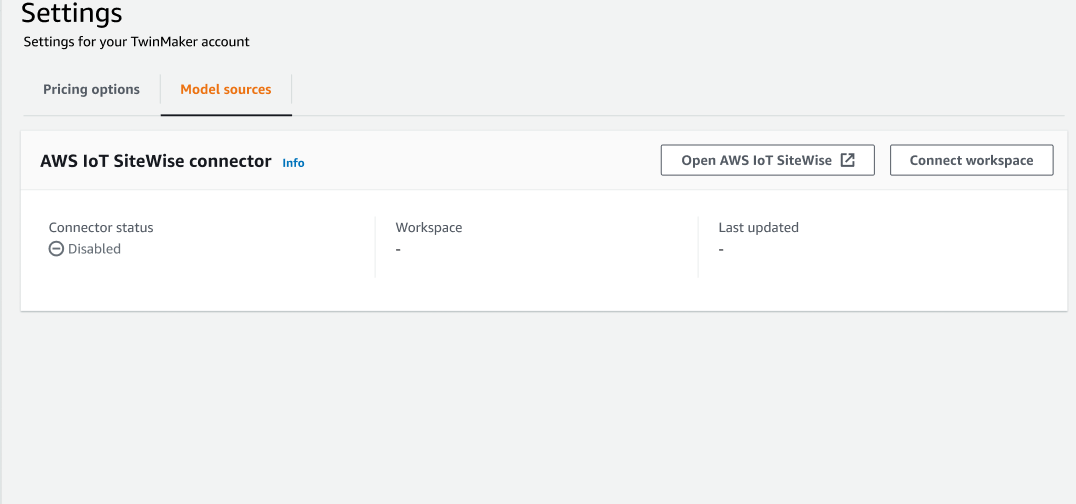
在 AWS IoT TwinMaker 主控台
中,導覽至設定頁面。 -
開啟模型來源索引標籤。
-
選擇連線工作區,將您的 AWS IoT TwinMaker 工作區連結至您的 AWS IoT SiteWise 資產。
注意
您只能搭配單一 AWS IoT TwinMaker 工作區使用資產同步。如果您想要在不同工作區中同步,您必須中斷同步與某個工作區的連線,並連線至另一個工作區。
-
接下來,導覽至您要在其中使用資產同步的工作區。
-
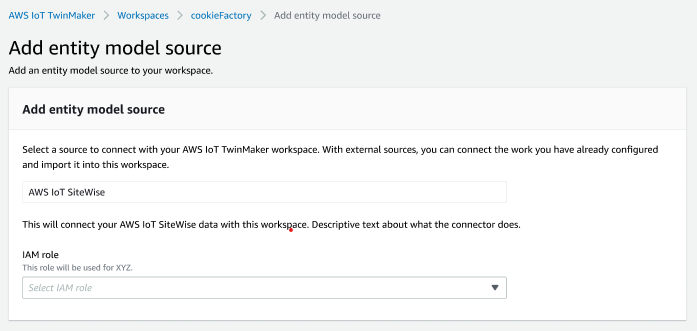
選擇 Add sources (新增來源)。這會開啟新增實體模型來源頁面。
-
在新增實體模型來源頁面上,確認來源欄位顯示 AWS IoT SiteWise。選取您建立做為 IAM 角色先決條件的 IAM 角色。
-
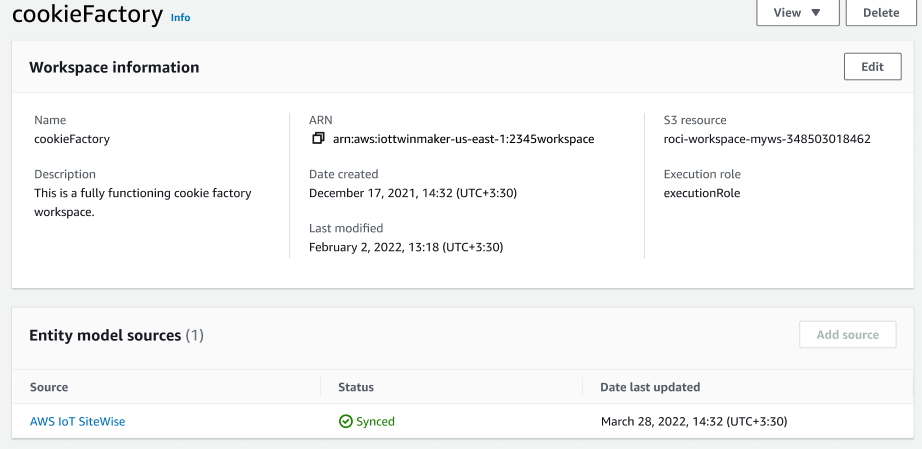
您現在已開啟 AWS IoT SiteWise 資產同步。您應該會在選取的工作區頁面頂端看到合規橫幅,確認資產同步處於作用中狀態。您也應該會在實體模型來源區段中看到列出的同步來源。