本文為英文版的機器翻譯版本,如內容有任何歧義或不一致之處,概以英文版為準。
Q Developer 的 MCP 控管
使用 IAM Identity Center 作為登入方法的專業層客戶可以控制組織內使用者的 MCP 存取。根據預設,您的使用者可以在其 Q 用戶端使用任何 MCP 伺服器。身為管理員,您可以完全停用使用者使用 MCP 伺服器,或指定允許使用者使用的 MCP 伺服器審核清單。
您可以使用 MCP 開/關切換和 MCP 登錄來控制這些限制。MCP 切換和登錄屬性是 Q 開發人員設定檔的一部分,可在組織層級或帳戶層級定義,帳戶層級設定檔會取代組織層級設定檔。您可以為組織指定預設 MCP 政策,並覆寫特定帳戶;例如,停用組織的 MCP,但使用特定團隊 (帳戶) 的允許清單來啟用它。
注意
切換和登錄設定都會在用戶端強制執行。請注意,您的最終使用者可以會規避此設定。
停用組織的 MCP
若要為您的帳戶或組織停用 MCP:
-
開啟 Kiro 主控台。
-
選擇設定。
選擇 Q 開發人員索引標籤。
-
將模型內容通訊協定 (MCP) 切換為關閉。
為您的組織指定 MCP 允許清單
若要控制使用者可以存取的 MCP 伺服器,請使用允許的伺服器建立 JSON 檔案、透過 HTTPS 提供,並將 URL 新增至您的 Q 開發人員設定檔。Q 開發人員用戶端使用此設定檔可讓使用者僅存取允許清單中的 MCP 伺服器。
指定 MCP 登錄 URL
開啟 Kiro 主控台。
選擇設定。
選擇 Q 開發人員索引標籤。
確保模型內容通訊協定 (MCP) 已開啟。
在 MCP 登錄 URL 欄位中,選擇編輯。
輸入 MCP 登錄檔 JSON 檔案的 URL,其中包含允許列出的 MCP 伺服器。
選擇儲存。
MCP 登錄 URL 會根據我們的資料加密政策,在傳輸中和靜態時加密。
MCP 登錄檔檔案格式
登錄檔 JSON 檔案格式是 MCP 登錄標準
下列範例顯示 MCP 登錄檔,其中包含遠端 (HTTP) 和本機 (stdio) MCP 伺服器定義。
{
  "servers": [
    {
      "server": {
        "name": "my-remote-server",
        "title": "My server",
        "description": "My server description",
        "version": "1.0.0",
        "remotes": [
          {
            "type": "streamable-http",
            "url": "https://acme.com/my-server",
            "headers": [
              {
                "name": "X-My-Header",
                "value": "SomeValue"
              }
            ]
          }
        ]
      }
    },
    {
      "server": {
        "name": "my-local-server",
        "title": "My server",
        "description": "My server description",
        "version": "1.0.0",
        "packages": [
          {
            "registryType": "npm",
            "registryBaseUrl": "https://npm.acme.com",
            "identifier": "@acme/my-server",
            "transport": {
              "type": "stdio"
            },
            "runtimeArguments": [
              {
                "type": "positional",
                "value": "-q"
              }
            ],
            "packageArguments": [
              {
                "type": "positional",
                "value": "start"
              }
            ],
            "environmentVariables": [
              {
                "name": "ENV_VAR",
                "value": "ENV_VAR_VALUE"
              }
            ]
          }
        ]
      }
    }
  ]
}
下表列出登錄檔 JSON 檔案的屬性。除非另有說明,否則所有屬性都是強制性的。如需完整的 JSON 結構描述,請參閱登錄結構描述一節。
巢狀屬性會從其父系縮排顯示。例如,「標頭」是「遠端」的子屬性,而「名稱」和「值」是「標頭」的子屬性。
| 屬性 | 說明 | 選用? | 範例值 |
|---|---|---|---|
|
常見屬性 |
|||
|
name |
伺服器名稱。在特定登錄檔中必須是唯一的。 |
「aws-ccapi-mcp」 |
|
|
標題 |
人類可讀取的伺服器名稱。 |
是 |
「AWS CC API」 |
|
description |
伺服器的說明。 |
「透過自然語言管理 AWS 基礎設施。」 |
|
|
version |
伺服器版本。強烈建議使用語意版本控制 (x.y.z)。 |
"1.0.2" |
|
|
遠端 (HTTP) 伺服器屬性 |
|||
|
遠端 |
陣列,其中只有一個項目指定遠端端點。 |
- |
|
|
type |
必須是「可串流http」或「sse」之一。 |
「可串流http」 |
|
|
url |
MCP 伺服器端點 URL。 |
"https://mcp.figma.com/mcp" |
|
|
標頭 |
每個請求中要包含的 HTTP 標頭陣列。 |
是 |
- |
|
name |
HTTP 標頭名稱。 |
「授權」 |
|
|
value |
HTTP 標頭值。 |
「承載 mF_9.B5f-4.1JqM」 |
|
|
Local (stdio) 伺服器屬性 |
|||
|
packages |
陣列,其中只有一個項目包含 MCP 伺服器定義。 |
- |
|
|
registryType |
必須是「npm」、「pypi」或「oci」其中之一。 下列套件執行器用於下載和執行 MCP 伺服器套件:
用戶端機器必須預先安裝適當的套件執行器。 |
「npm」 |
|
|
registryBaseUrl |
套件登錄 URL。 |
是 |
"https://npm.acme.com" |
|
identifier |
伺服器套件識別符。 |
"@acme/my-server" |
|
|
transport |
物件只有一個屬性,「類型」。 |
- |
|
|
type |
必須是 "stdio"。 |
「stdio」 |
|
|
runtimeArguments |
提供給執行時間的引數陣列,也就是 npx、uvx 或 docker。 |
是 |
- |
|
type |
必須是「位置」。 |
「位置」 |
|
|
value |
執行時間引數值。 |
“-q” |
|
|
packageArguments |
提供給 MCP 伺服器的引數陣列。 |
是 |
- |
|
type |
必須是「位置」。 |
「位置」 |
|
|
value |
套件引數值。 |
「開始」 |
|
|
environmentVariables |
啟動伺服器之前要設定的 env vars 陣列。 |
是 |
- |
|
name |
環境變數名稱。 |
「LOG_LEVEL」 |
|
|
value |
環境變數值。 |
「INFO」 |
提供 MCP 登錄檔
使用任何 Web 伺服器透過 HTTPS 提供 MCP 登錄檔 JSON 檔案,例如 Amazon S3、Apache 或 nginx。此 URL 必須可供使用者電腦上的 Q Developer 用戶端存取,但您的公司網路可以私有存取。
HTTPS 端點必須具有受信任憑證授權單位簽署的有效 SSL 憑證。不支援自我簽署憑證。
Q 開發人員會在啟動時和每 24 小時擷取一次 MCP 登錄檔。在定期同步期間,如果本機安裝的 MCP 伺服器不再位於登錄檔中,Q Developer 會終止該伺服器,並防止使用者將其新增回來。如果本機安裝的伺服器與登錄檔中的伺服器版本不同,Q Developer 會使用登錄檔中定義的版本重新啟動伺服器。
Q 開發人員外掛程式
當使用者啟動 Q Developer 時,它會檢查是否已在設定檔中定義登錄 URL。若是如此,它會在該 URL 擷取登錄檔 JSON,並強制使用者只能使用登錄檔中定義的 MCP 伺服器。當使用者新增 MCP 伺服器時,Q Developer 會顯示來自登錄檔的伺服器清單。
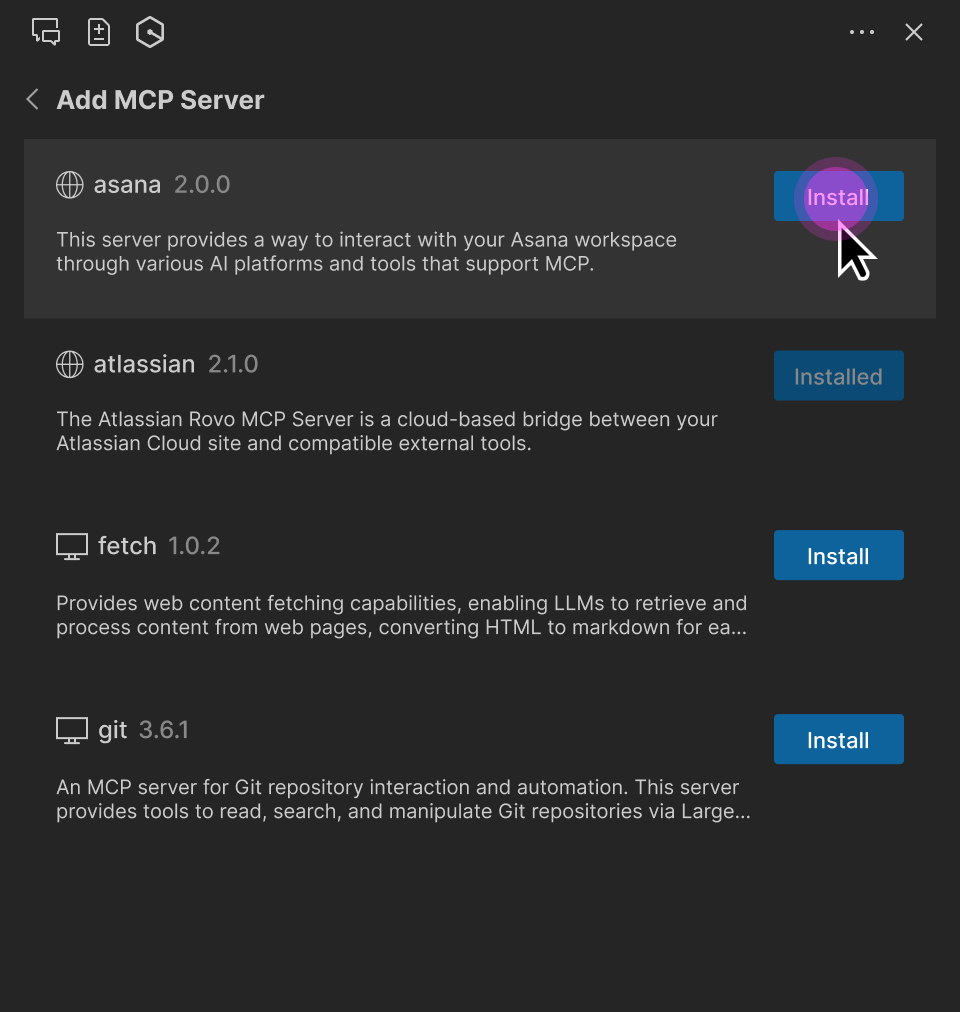
登錄檔 MCP 伺服器參數 (URL、套件識別符、runtimeArguments 等) 為唯讀。不過,使用者可以:
調整 MCP 工具許可 (「請求執行」、「一律執行」或「拒絕」)。
選取 MCP 伺服器範圍 (全域或工作區)。
變更請求逾時。
指定本機 MCP 伺服器的其他環境變數。
指定遠端 MCP 伺服器的其他 HTTP 標頭。
注意
使用者指定的環境變數或 HTTP 標頭會覆寫登錄檔定義。這可讓使用者指定其設定的特定屬性,例如身分驗證金鑰或本機資料夾路徑。
MCP 登錄檔 JSON 結構描述
下列 JSON 結構描述定義 Q Developer 支援的 MCP 登錄檔檔案格式。您可以使用此結構描述來驗證您建立的任何登錄檔。
{
  "$schema": "https://json-schema.org/draft-07/schema",
  "properties": {
    "servers": {
      "type": "array",
      "items": {
        "type": "object",
        "properties": {
          "server": {
            "$ref": "#/definitions/ServerDetail"
          }
        },
        "required": [
          "server"
        ]
      }
    }
  },
  "definitions": {
    "ServerDetail": {
      "properties": {
        "name": {
          "description": "Server name. Must be unique within a given registry file.",
          "example": "weather-mcp",
          "maxLength": 200,
          "minLength": 3,
          "pattern": "^[a-zA-Z0-9._-]+$",
          "type": "string"
        },
        "title": {
          "description": "Optional human-readable title or display name for the MCP server. MCP subregistries or clients MAY choose to use this for display purposes.",
          "example": "Weather API",
          "maxLength": 100,
          "minLength": 1,
          "type": "string"
        },
        "description": {
          "description": "Clear human-readable explanation of server functionality. Should focus on capabilities, not implementation details.",
          "example": "MCP server providing weather data and forecasts via OpenWeatherMap API",
          "maxLength": 100,
          "minLength": 1,
          "type": "string"
        },
        "version": {
          "description": "Version string for this server. SHOULD follow semantic versioning (e.g., '1.0.2', '2.1.0-alpha'). Equivalent of Implementation.version in MCP specification. Non-semantic versions are allowed but may not sort predictably. Version ranges are rejected (e.g., '^1.2.3', '~1.2.3', '\u003e=1.2.3', '1.x', '1.*').",
          "example": "1.0.2",
          "maxLength": 255,
          "type": "string"
        },
        "packages": {
          "items": {
            "$ref": "#/definitions/Package"
          },
          "type": "array",
          "minItems": 0,
          "maxItems": 1
        },
        "remotes": {
          "items": {
            "anyOf": [
              {
                "$ref": "#/definitions/StreamableHttpTransport"
              },
              {
                "$ref": "#/definitions/SseTransport"
              }
            ]
          },
          "type": "array",
          "minItems": 0,
          "maxItems": 1
        }
      },
      "required": [
        "name",
        "description",
        "version"
      ],
      "type": "object"
    },
    "Package": {
      "properties": {
        "registryType": {
          "description": "Registry type indicating how to download packages (e.g., 'npm', 'pypi', 'oci')",
          "enum": [
            "npm",
            "pypi",
            "oci"
          ],
          "type": "string"
        },
        "registryBaseUrl": {
          "description": "Base URL of the package registry",
          "examples": [
            "https://registry.npmjs.org",
            "https://pypi.org",
            "https://docker.io"
          ],
          "format": "uri",
          "type": "string"
        },
        "identifier": {
          "description": "Package identifier - either a package name (for registries) or URL (for direct downloads)",
          "examples": [
            "@modelcontextprotocol/server-brave-search",
            "https://github.com/example/releases/download/v1.0.0/package.mcpb"
          ],
          "type": "string"
        },
        "transport": {
          "anyOf": [
            {
              "$ref": "#/definitions/StdioTransport"
            },
            {
              "$ref": "#/definitions/StreamableHttpTransport"
            },
            {
              "$ref": "#/definitions/SseTransport"
            }
          ],
          "description": "Transport protocol configuration for the package"
        },

        "runtimeArguments": {
          "description": "A list of arguments to be passed to the package's runtime command (such as docker or npx).",
          "items": {
            "$ref": "#/definitions/PositionalArgument"
          },
          "type": "array"
        },
        "packageArguments": {
          "description": "A list of arguments to be passed to the package's binary.",
          "items": {
            "$ref": "#/definitions/PositionalArgument"
          },
          "type": "array"
        },
        "environmentVariables": {
          "description": "A mapping of environment variables to be set when running the package.",
          "items": {
            "$ref": "#/definitions/KeyValueInput"
          },
          "type": "array"
        }
      },
      "required": [
        "registryType",
        "identifier",
        "transport"
      ],
      "type": "object"
    },
    "StdioTransport": {
      "properties": {
        "type": {
          "description": "Transport type",
          "enum": [
            "stdio"
          ],
          "example": "stdio",
          "type": "string"
        }
      },
      "required": [
        "type"
      ],
      "type": "object"
    },
    "StreamableHttpTransport": {
      "properties": {
        "type": {
          "description": "Transport type",
          "enum": [
            "streamable-http"
          ],
          "example": "streamable-http",
          "type": "string"
        },
        "url": {
          "description": "URL template for the streamable-http transport. Variables in {curly_braces} reference argument valueHints, argument names, or environment variable names. After variable substitution, this should produce a valid URI.",
          "example": "https://api.example.com/mcp",
          "type": "string"
        },
        "headers": {
          "description": "HTTP headers to include",
          "items": {
            "$ref": "#/definitions/KeyValueInput"
          },
          "type": "array"
        }
      },
      "required": [
        "type",
        "url"
      ],
      "type": "object"
    },
    "SseTransport": {
      "properties": {
        "type": {
          "description": "Transport type",
          "enum": [
            "sse"
          ],
          "example": "sse",
          "type": "string"
        },
        "url": {
          "description": "Server-Sent Events endpoint URL",
          "example": "https://mcp-fs.example.com/sse",
          "format": "uri",
          "type": "string"
        },
        "headers": {
          "description": "HTTP headers to include",
          "items": {
            "$ref": "#/definitions/KeyValueInput"
          },
          "type": "array"
        }
      },
      "required": [
        "type",
        "url"
      ],
      "type": "object"
    },
    "PositionalArgument": {
      "properties": {
        "type": {
          "enum": [
            "positional"
          ],
          "example": "positional",
          "type": "string"
        },
        "value": {
          "description": "The value for the input.",
          "type": "string"
        }
      },
      "required": [
        "type",
        "value"
      ],
      "type": "object"
    },
    "KeyValueInput": {
      "properties": {
        "name": {
          "description": "Name of the header or environment variable.",
          "example": "SOME_VARIABLE",
          "type": "string"
        },
        "value": {
          "description": "The value for the input.",
          "type": "string"
        }
      },
      "required": [
        "name"
      ],
      "type": "object"
    }
  },
  "required": [
    "servers"
  ],
  "type": "object"
}
