本文為英文版的機器翻譯版本,如內容有任何歧義或不一致之處,概以英文版為準。
設定資料庫執行個體類別的 CPU 核心和每 CPU 核心執行緒數量
當您執行下列操作時,可針對資料庫執行個體類別設定其 CPU 核心數量,以及每核心的執行緒數量:
注意
當您修改資料庫執行個體以設定每個核心的 CPU 核心或執行緒數量時,會有類似修改執行個體類別的短暫中斷。
使用 AWS 管理主控台 AWS CLI 或 RDS API 設定 CPU 核心。
設定核心
登入 AWS 管理主控台 並開啟位於 https://https://console.aws.amazon.com/rds/
的 Amazon RDS 主控台。 選擇建立資料庫。
設定執行個體組態選項時:
選擇最佳化 CPU 選項。
選擇核心數量來設定 vCPU 選項。
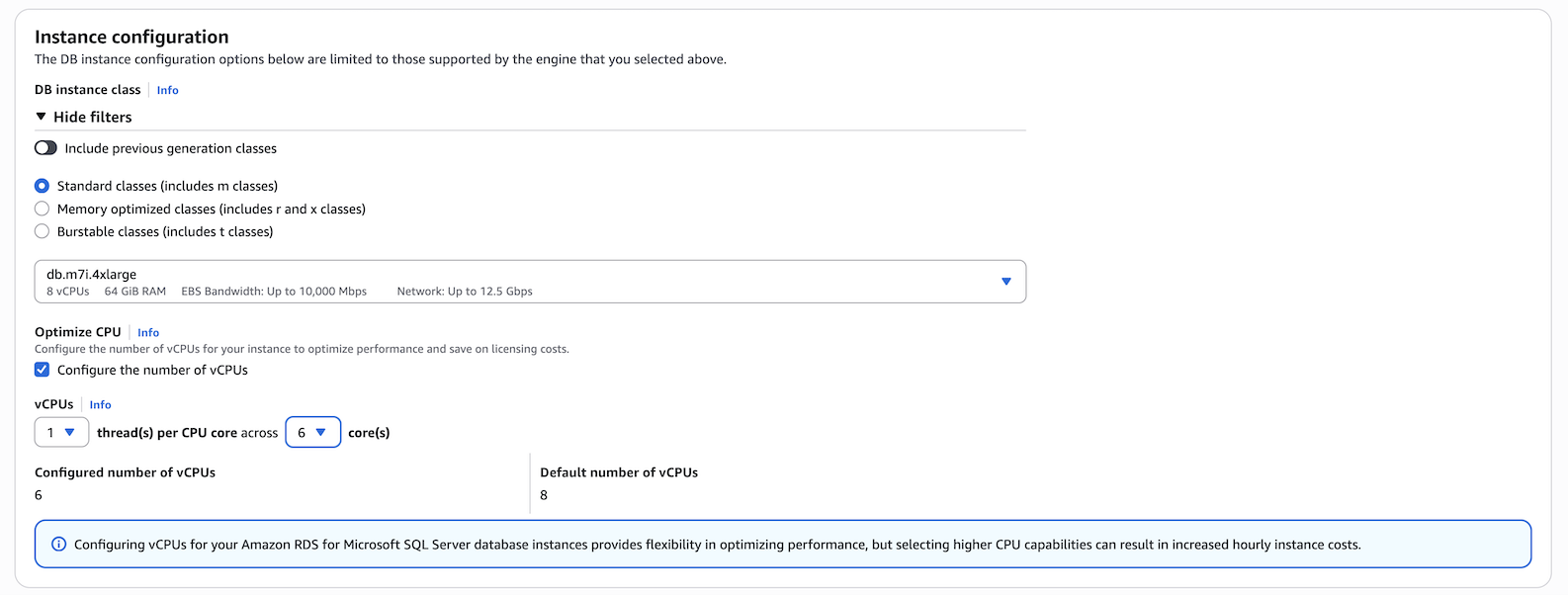
-
完成其他選擇後,選取建立資料庫。
設定核心
若要使用 AWS CLI 設定最佳化 CPU,請在 命令中包含
--processor-features選項。將具有coreCount和 的 CPU 核心數目指定threadsPerCore為1。使用下列語法:
aws rds create-db-instance \ --engine sqlserver-ee \ --engine-version 16.00 \ --license-model license-included \ --allocated-storage 300 \ --master-usernamemyuser\ --master-user-passwordxxxxx\ --no-multi-az \ --vpc-security-group-ids myvpcsecuritygroup \ --db-subnet-group-name mydbsubnetgroup \ --db-instance-identifier my-rds-instance \ --db-instance-class db.m7i.4xlarge \ --processor-features "Name=coreCount,Value=6" "Name=threadsPerCore,Value=1"
範例 檢視資料庫執行個體類別的有效處理器值
使用 describe-orderable-db-instance-options命令來顯示每個核心的預設 vCPUs、核心和執行緒。例如,下列命令的輸出會顯示 db.r7i.2xlarge 執行個體類別的處理器選項。
aws rds describe-orderable-db-instance-options --engine sqlserver-ee \
--db-instance-class db.r7i.2xlarge

Sample output:
-------------------------------------------------------------
|            DescribeOrderableDBInstanceOptions             |
+-----------------------------------------------------------+
||               OrderableDBInstanceOptions                ||
|+------------------------------------+--------------------+|
||  DBInstanceClass                   |  db.r7i.2xlarge    ||
||  Engine                            |  sqlserver-ee      ||
||  EngineVersion                     |  13.00.6300.2.v1   ||
||  LicenseModel                      |  license-included  ||
||  MaxIopsPerDbInstance              |                    ||
||  MaxIopsPerGib                     |                    ||
||  MaxStorageSize                    |  64000             ||
||  MinIopsPerDbInstance              |                    ||
||  MinIopsPerGib                     |                    ||
||  MinStorageSize                    |  20                ||
||  MultiAZCapable                    |  True              ||
||  OutpostCapable                    |  False             ||
||  ReadReplicaCapable                |  True              ||
||  StorageType                       |  gp2               ||
||  SupportsClusters                  |  False             ||
||  SupportsDedicatedLogVolume        |  False             ||
||  SupportsEnhancedMonitoring        |  True              ||
||  SupportsGlobalDatabases           |  False             ||
||  SupportsIAMDatabaseAuthentication |  False             ||
||  SupportsIops                      |  False             ||
||  SupportsKerberosAuthentication    |  True              ||
||  SupportsPerformanceInsights       |  True              ||
||  SupportsStorageAutoscaling        |  True              ||
||  SupportsStorageEncryption         |  True              ||
||  SupportsStorageThroughput         |  False             ||
||  Vpc                               |  True              ||
|+------------------------------------+--------------------+|
|||                   AvailabilityZones                   |||
||+-------------------------------------------------------+||
|||                         Name                          |||
||+-------------------------------------------------------+||
|||  us-west-2a                                           |||
|||  us-west-2b                                           |||
|||  us-west-2c                                           |||
||+-------------------------------------------------------+||
|||              AvailableProcessorFeatures               |||
||+-----------------+-----------------+-------------------+||
|||  AllowedValues  |  DefaultValue   |       Name        |||
||+-----------------+-----------------+-------------------+||
|||  1,2,3,4        |  4              |  coreCount        |||
|||  1              |  1              |  threadsPerCore   |||
||+-----------------+-----------------+-------------------+||
此外,您可以執行下列命令,以取得資料庫執行個體類別的處理器資訊:
-
describe-db-instances– 顯示指定資料庫執行個體的處理器資訊 -
describe-db-snapshots– 顯示指定資料庫快照的處理器資訊 -
describe-valid-db-instance-modifications– 顯示指定資料庫執行個體處理器的有效修改
在上述命令的輸出中,null如果未設定最佳化 CPU,則處理器功能的值為 。
範例 設定資料庫執行個體的 CPU 核心數量
下列範例透過將 CPU 核心數目設定為 4 個threadsPerCore 設定為 1 來修改 mydbinstance。使用 立即套用變更--apply-immediately。如果您想要在下一個排定的維護時段套用變更,請省略 --apply-immediately option。
aws rds modify-db-instance \ --db-instance-identifiermydbinstance\ --db-instance-class db.r7i.8xlarge \ --processor-features "Name=coreCount,Value=4" "Name=threadsPerCore,Value=1" \ --apply-immediately
範例 傳回資料庫執行個體的預設處理器設定
下列範例會將 mydbinstance 傳回至其預設處理器值,以修改 mydbinstance。
aws rds modify-db-instance \ --db-instance-identifiermydbinstance\ --db-instance-class db.r7i.8xlarge \ --use-default-processor-features \ --apply-immediately
