本文属于机器翻译版本。若本译文内容与英语原文存在差异,则一律以英文原文为准。
MCP 服务器集成
如果您在解决方案部署期间部署了可选的 MCP 服务器组件,则可以将分布式负载测试解决方案与支持模型上下文协议的 AI 开发工具集成。MCP 服务器提供编程访问权限,可通过 AI 助手检索、管理和分析负载测试。
客户可以使用自己选择的客户端(Amazon Q、Claude 等)连接到 DLT MCP 服务器,每个客户端的配置说明略有不同。本节提供 MCP Inspector、Kiro CLI、Cline 和 Amazon Quick 的设置说明。
第 1 步:获取 MCP 端点和访问令牌
在配置任何 MCP 客户端之前,您需要从 DLT Web 控制台检索 MCP 服务器端点和访问令牌。
-
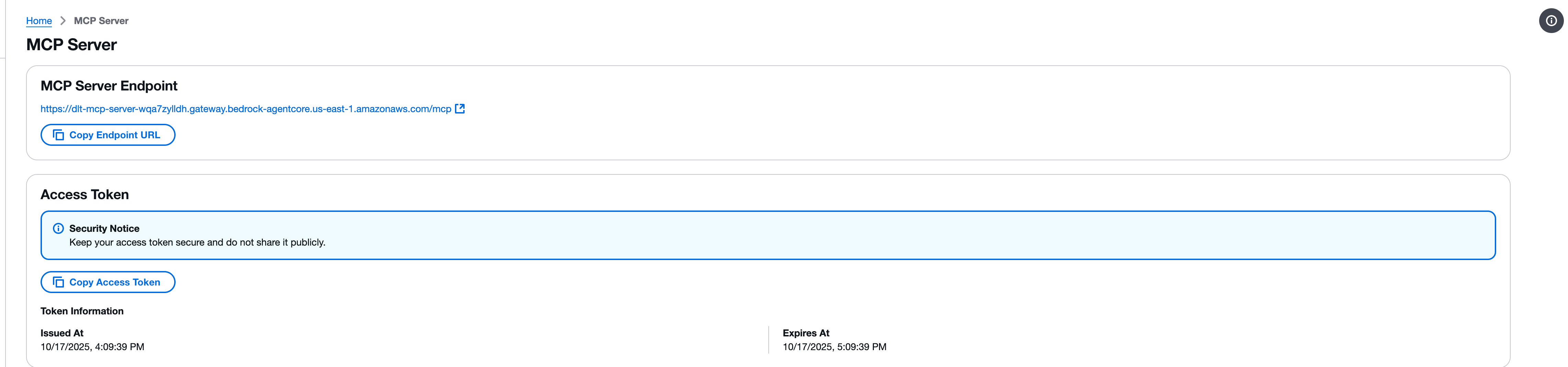
导航到分布式负载测试 Web 控制台中的 MCP 服务器页面。
-
找到 “MCP 服务器端点” 部分。
-
使用复制终端节点 URL 按钮复制终端节点 URL。终端节点 URL 遵循以下格式:
https://{gateway-id}.gateway.bedrock-agentcore.{region}.amazonaws.com/mcp -
找到 “访问令牌” 部分。
-
使用 “复制访问令牌” 按钮复制访问令牌。
重要
请妥善保管您的访问令牌,不要将其公开共享。该令牌通过 MCP 接口提供对分布式负载测试解决方案的只读访问权限。
第 2 步:使用 MCP Inspector 进行测试
模型上下文协议提供了 MCP Inspector
注意
MCP Inspector 需要版本 0.17 或更高版本。也可以直接使用 JSON RPC 发出所有请求,但是 MCP Inspector 提供了一个更加用户友好的界面。
安装并启动 MCP Inspector
-
如有必要,请安装 npm。
-
运行以下命令启动 MCP Inspector:
npx @modelcontextprotocol/inspector
配置连接
-
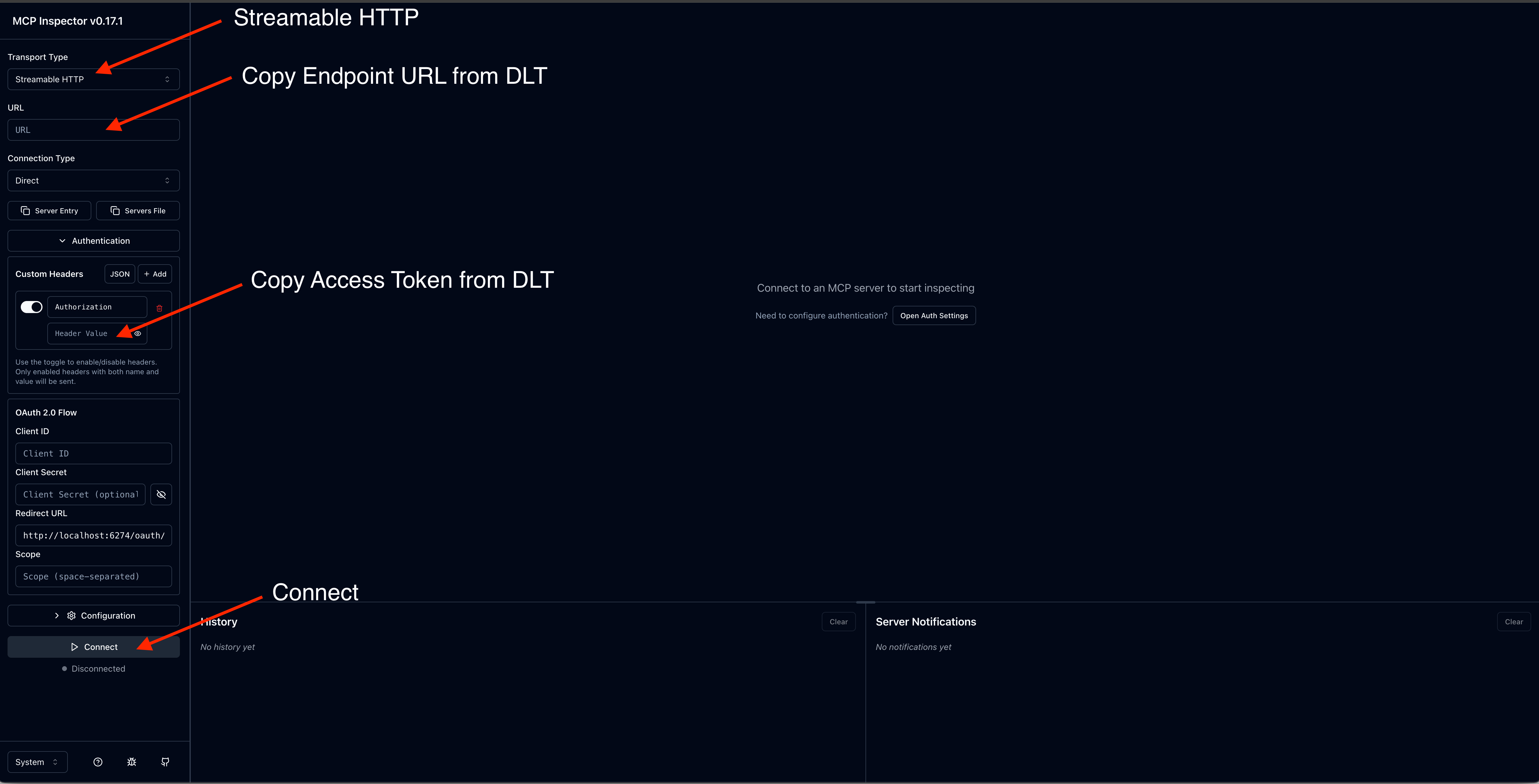
在 MCP Inspector 界面中,输入你的 MCP 服务器端点 URL。
-
添加带有访问令牌的授权标头。
-
选择 Connect 以建立连接。
调用工具
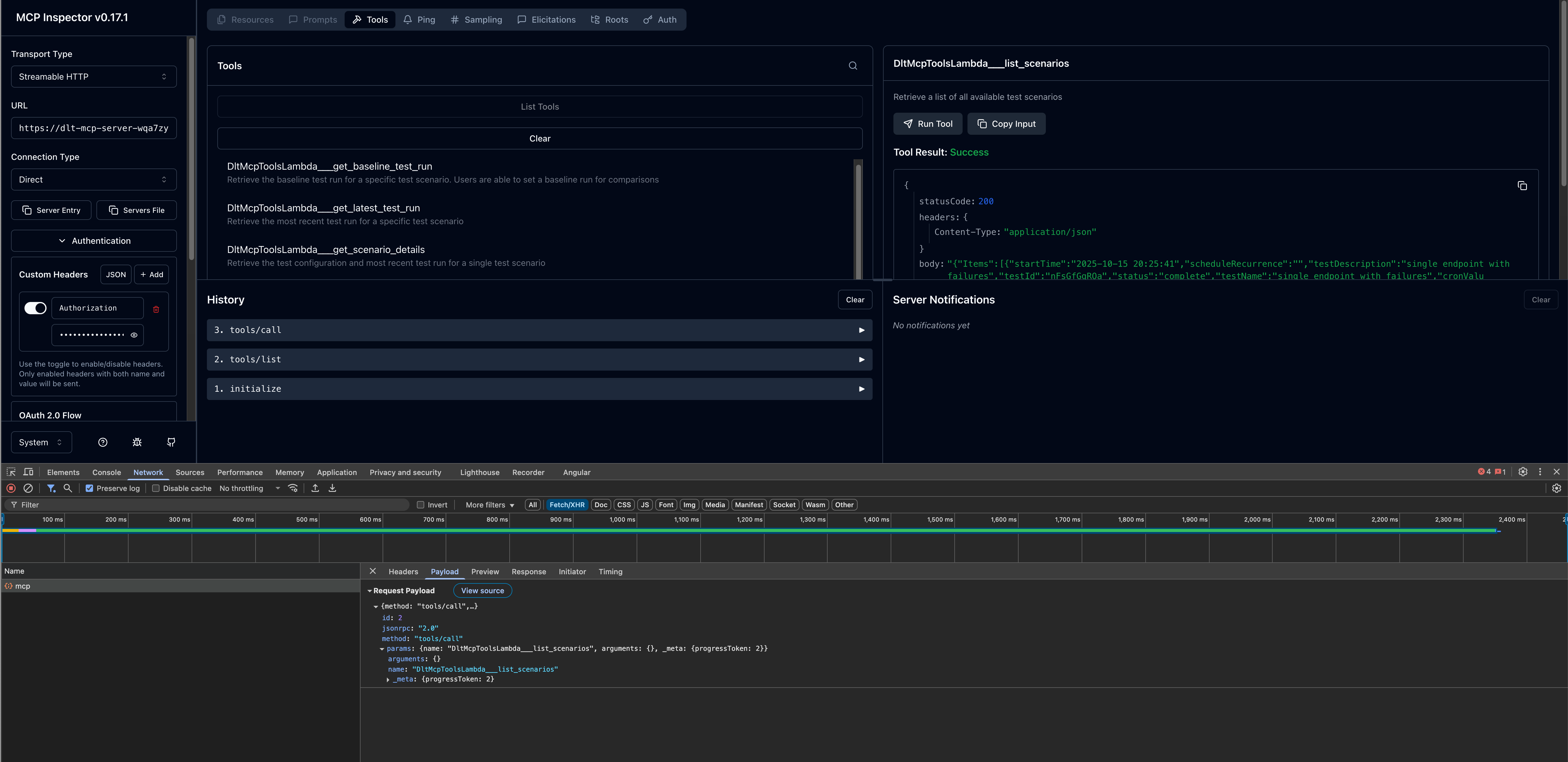
连接后,您可以测试可用的 MCP 工具:
-
浏览左侧面板中的可用工具列表。
-
选择工具(例如,
list_scenarios)。 -
提供任何必需的参数。
-
选择 Invok e 以执行该工具并查看响应。
步骤 3:配置 AI 开发客户端
验证 MCP 服务器与 MCP Inspector 的连接后,您可以配置首选的 AI 开发客户端。
Kiro CLI
Kiro CLI(前身为 Amazon Q Developer CLI)通过集成 MCP 服务器提供命令行 AI-assisted 开发权限。
配置步骤
-
编辑
mcp.json配置文件。有关配置文件位置的更多信息,请参阅 Kiro CLI 文档中的模型上下文协议 (MCP)。 -
添加您的 DLT MCP 服务器配置:
{
  "mcpServers": {
    "dlt-mcp": {
      "type": "http",
      "url": "https://<gateway-id>.gateway.bedrock-agentcore.<region>.amazonaws.com/mcp",
      "headers": {
        "Authorization": "Bearer <access-token>"
      }
    }
  }
}
将<gateway-id>和<region>替换为您的 MCP 服务器端点 URL 中的值<access-token>,以及您在步骤 1 中复制的值。
验证配置
-
在终端中,键入
kiro-cli以启动 Kiro CLI。 -
键
/mcp入查看所有可用的 MCP 服务器。 -
键入
/tools以查看由dlt-mcp和其他已配置的 MCP 服务器提供的可用工具。 -
验证是否
dlt-mcp成功初始化。
克莱恩
Cline 是一款支持 MCP 服务器集成的人工智能编码助手。
配置步骤
-
在 Cline 中,导航到管理 MCP 服务器 > 配置 > 配置 MC P 服务器。
-
更新
cline_mcp_settings.json文件:{ "mcpServers": { "dlt-mcp": { "type": "streamableHttp", "url": "https://<gateway-id>.gateway.bedrock-agentcore.<region>.amazonaws.com/mcp", "headers": { "Authorization": "Bearer <access-token>" } } } }将
<gateway-id>和<region>替换为您的 MCP 服务器端点 URL 中的值<access-token>,以及您在步骤 1 中复制的值。 -
保存配置文件。
-
重新启动 Cline 以应用更改。
Amazon Quick
Amazon Quick(前身为 Amazon Quick Suite)提供了一个全面的人工智能助手平台,支持 MCP 服务器操作。
先决条件
在 Amazon Quick 中配置 MCP 服务器之前,您需要从 DLT 部署的 Cognito 用户池中检索 OAuth 证书:
-
选择分布式负载测试堆栈。
-
在 “输出” 选项卡中,找到并复制与您的 DLT 部署关联的 Cognito 用户池 ID。
-
导航到 Amazon Cognito 控制台
。 -
使用 CloudFormation 输出中的用户池 ID 选择用户池。
-
在左侧导航栏中,选择应用程序集成 > 应用程序客户端。
-
找到名称以
m2m(计算机对机器)结尾的应用程序客户端,然后将其选中。 -
在应用程序客户端详细信息页面上,复制客户端 ID。要显示客户机密钥,请选择显示客户机密钥,然后复制该值。
-
返回用户池并从 “域” 选项卡中获取用户池域。
-
通过追加
/oauth2/token到域名末尾来构造令牌端点 URL。
配置步骤
-
在 Amazon Quick 中,创建新代理或选择现有代理。
-
添加描述如何与 DLT MCP 服务器交互的代理提示符。
-
添加新操作并选择 MCP 服务器操作。
-
配置 MCP 服务器详细信息:
-
MCP 服务器网址:你的 DLT MCP 端点
-
身份验证类型: Service-based 身份验证
-
令牌端点:您的 Cognito 令牌端点网址
-
客户端 ID:来自 m2m 应用程序客户端的客户端 ID
-
客户端密钥:来自 m2m 应用程序客户端的客户端密钥
-
-
保存 MCP 服务器操作配置。
-
将新的 MCP 服务器操作添加到您的代理。
启动并测试代理
-
在 Amazon Quick 中启动代理。
-
使用自然语言提示与代理开始对话。
-
代理将使用 MCP 工具检索和分析您的负载测试数据。
提示示例
以下示例演示如何与 AI 助手交互以通过 MCP 接口分析负载测试数据。自定义测试 ID、日期范围和标准,以满足您的特定测试需求。
有关可用的 MCP 工具及其参数的详细信息,请参阅《开发人员指南》中的 MCP 工具规范。
简单的测试结果查询
与 MCP 服务器的自然语言交互可以很简单,Show me the load tests that have completed in the last 24 hours with their associated completion status也可以更具描述性,例如
Use list_scenarios to find my load tests. Then use get_latest_test_run to show me the basic execution data and performance metrics for the most recent test. If the results look concerning, also get the detailed performance metrics using get_test_run.
采用渐进式披露的交互式绩效分析
I need to analyze my load test performance, but I'm not sure which specific tests to focus on. Please help me by:

1. First, use list_scenarios to show me available test scenarios
2. Ask me which tests I want to analyze based on the list you show me
3. For my selected tests, use list_test_runs to get the test run history
4. Then use get_test_run with the test_run_id to get detailed response times, throughput, and error rates
5. If I want to compare tests, use get_baseline_test_run to compare against the baseline
6. If there are any issues, use get_test_run_artifacts to help me understand what went wrong

Please guide me through this step by step, asking for clarification whenever you need more specific information.
生产就绪性验证
Help me validate if my API is ready for production deployment:

1. Use list_scenarios to find recent test scenarios
2. For the most recent test scenario, use get_latest_test_run to get basic execution data
3. Use get_test_run with that test_run_id to get detailed response times, error rates, and throughput
4. Use get_scenario_details with the test_id to show me what load patterns and endpoints were tested
5. If I have a baseline, use get_baseline_test_run to compare current results with the baseline
6. Provide a clear go/no-go recommendation based on the performance data
7. If there are any concerns, use get_test_run_artifacts to help identify potential issues

My SLA requirements are: response time under [X]ms, error rate under [Y]%.
性能趋势分析
Analyze the performance trend for my load tests over the past [TIME_PERIOD]:

1. Use list_scenarios to get all test scenarios
2. For each scenario, use list_test_runs with start_date and end_date to get tests from that period
3. Use get_test_run for the key test runs to get detailed metrics
4. Use get_baseline_test_run to compare against the baseline
5. Identify any significant changes in response times, error rates, or throughput
6. If you detect performance degradation, use get_test_run_artifacts on the problematic tests to help identify causes
7. Present the trend analysis in a clear format showing whether performance is improving, stable, or degrading

Focus on completed tests and limit results to [N] tests if there are too many.
排除失败的测试故障
Help me troubleshoot my failed load tests:

1. Use list_scenarios to find test scenarios
2. For each scenario, use list_test_runs to find recent test runs
3. Use get_test_run with the test_run_id to get the basic execution data and failure information
4. Use get_test_run_artifacts to get detailed error messages and logs
5. Use get_scenario_details to understand what was being tested when it failed
6. If I have a similar test that passed, use get_baseline_test_run to identify differences
7. Summarize the causes of failure and suggest next steps for resolution

Show me the most recent [N] failed tests from the past [TIME_PERIOD].
