本文属于机器翻译版本。若本译文内容与英语原文存在差异,则一律以英文原文为准。
演练-第 2 部分
AWS CDK 版本 ≥ 1.46.0,支持 AWS 解决方案构造。
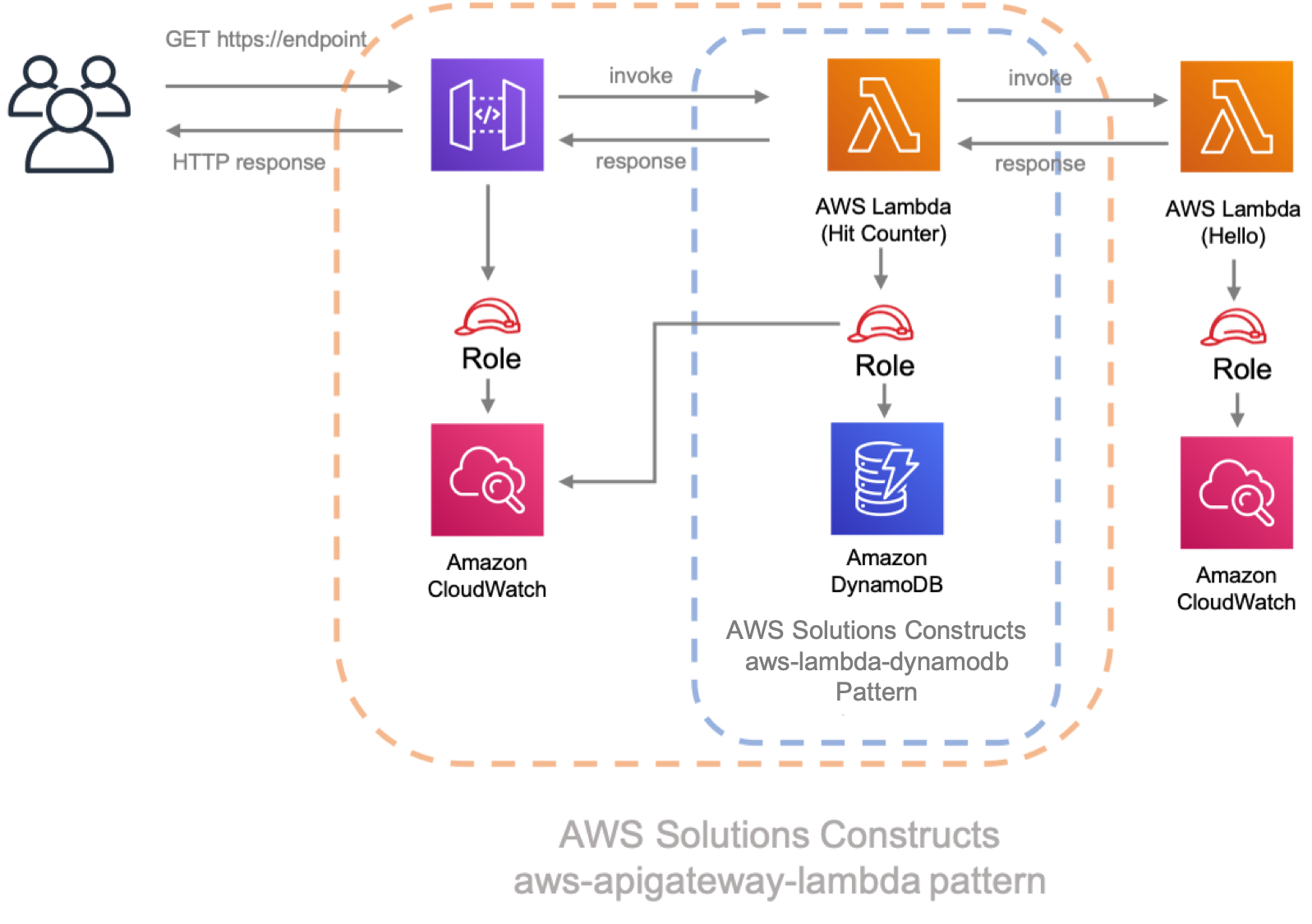
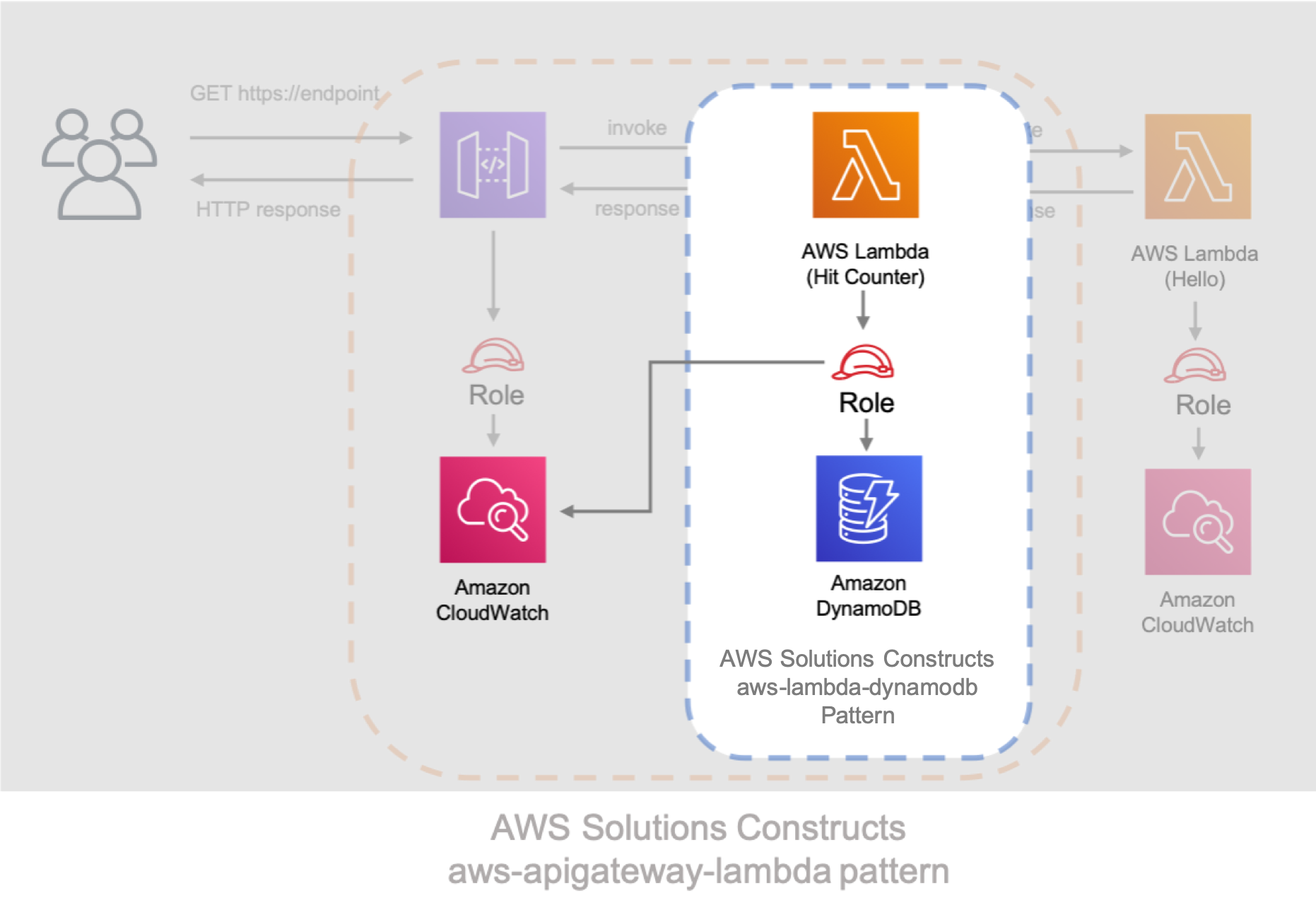
本教程将向您介绍如何修改第 1 部分。我们的修改将使用 AWS Lambda 向 AWS 解决方案构造中的 DynamoDB 模式添加站点点击计数器。修改 Hello 构造应用程序将导致以下解决方案:
点击计数器 Lambda 代码
让我们先为命中计数器 AWS Lambda 函数编写代码。此函数将:
- TypeScript
-
添加名为的文件lambda/hitcounter.js更改为以下内容:
  const { DynamoDB, Lambda } = require('aws-sdk');

exports.handler = async function(event) {
  console.log("request:", JSON.stringify(event, undefined, 2));

  // create AWS SDK clients
  const dynamo = new DynamoDB();
  const lambda = new Lambda();

  // update dynamo entry for "path" with hits++
  await dynamo.updateItem({
    TableName: process.env.DDB_TABLE_NAME,
    Key: { path: { S: event.path } },
    UpdateExpression: 'ADD hits :incr',
    ExpressionAttributeValues: { ':incr': { N: '1' } }
  }).promise();

  // call downstream function and capture response
  const resp = await lambda.invoke({
    FunctionName: process.env.DOWNSTREAM_FUNCTION_NAME,
    Payload: JSON.stringify(event)
  }).promise();

  console.log('downstream response:', JSON.stringify(resp, undefined, 2));

  // return response back to upstream caller
  return JSON.parse(resp.Payload);
};
- Python
-
添加名为的文件lambda/hitcounter.py更改为以下内容:
import json
import os
import boto3

ddb = boto3.resource('dynamodb')
table = ddb.Table(os.environ['DDB_TABLE_NAME'])
_lambda = boto3.client('lambda')


def handler(event, context):
    print('request: {}'.format(json.dumps(event)))
    table.update_item(
        Key={'path': event['path']},
        UpdateExpression='ADD hits :incr',
        ExpressionAttributeValues={':incr': 1}
    )

    resp = _lambda.invoke(
        FunctionName=os.environ['DOWNSTREAM_FUNCTION_NAME'],
        Payload=json.dumps(event),
    )

    body = resp['Payload'].read()

    print('downstream response: {}'.format(body))
    return json.loads(body)
安装新的依赖关系
请记住,将用于 AWS 解决方案构造和 AWS CDK 的正确匹配版本替换为VERSION_NUMBER每个命令的占位符字段。这应该与本演练第一部分用于依赖关系的版本号相同。软件包之间的版本不匹配可能会导致错误。
像往常一样,我们首先需要安装我们的解决方案更新所需的依赖关系。首先,我们需要安装 DynamoDB 构造库:
- TypeScript
-
npm install -s @aws-cdk/aws-dynamodb@VERSION_NUMBER
- Python
-
pip install aws_cdk.aws_dynamodb==VERSION_NUMBER
最后,安装 AWS 解决方案构造aws-lambda-dynamodb模块及其所有依赖关系到我们的项目中:
- TypeScript
-
npm install -s @aws-solutions-constructs/aws-lambda-dynamodb@VERSION_NUMBER
- Python
-
pip install aws_solutions_constructs.aws_lambda_dynamodb==VERSION_NUMBER
定义资源
现在,让我们更新我们的堆栈代码以适应我们的新架构。
首先,我们将导入我们的新依赖关系,并将 “Hello” 函数移动到aws-apigateway-lambda模式,我们在第 1 部分创建。
- TypeScript
-
编辑文件lib/hello-constructs.ts更改为以下内容:
import * as cdk from '@aws-cdk/core';
import * as lambda from '@aws-cdk/aws-lambda';
import * as api from '@aws-cdk/aws-apigateway';
import * as dynamodb from '@aws-cdk/aws-dynamodb';
import { ApiGatewayToLambda, ApiGatewayToLambdaProps } from '@aws-solutions-constructs/aws-apigateway-lambda';
import { LambdaToDynamoDB, LambdaToDynamoDBProps } from '@aws-solutions-constructs/aws-lambda-dynamodb';

export class HelloConstructsStack extends cdk.Stack {
  constructor(scope: cdk.Construct, id: string, props?: cdk.StackProps) {
    super(scope, id, props);

    // The code that defines your stack goes here

    const helloFunc = new lambda.Function(this, 'HelloHandler', {
      runtime: lambda.Runtime.NODEJS_12_X,
      code: lambda.Code.fromAsset('lambda'),
      handler: 'hello.handler'
    });

    const api_lambda_props: ApiGatewayToLambdaProps = {
      lambdaFunctionProps: {
        code: lambda.Code.fromAsset('lambda'),
        runtime: lambda.Runtime.NODEJS_12_X,
        handler: 'hello.handler'
      },
      apiGatewayProps: {
        defaultMethodOptions: {
          authorizationType: api.AuthorizationType.NONE
        }
      }
    };

    new ApiGatewayToLambda(this, 'ApiGatewayToLambda', api_lambda_props);
  }
}
- Python
-
编辑文件hello_constructs/hello_constructs_stack.py更改为以下内容:
from aws_cdk import (
    aws_lambda as _lambda,
    aws_apigateway as apigw,
    aws_dynamodb as ddb,
    core,
)

from aws_solutions_constructs import (
    aws_apigateway_lambda as apigw_lambda,
    aws_lambda_dynamodb as lambda_ddb
)

class HelloConstructsStack(core.Stack):

    def __init__(self, scope: core.Construct, id: str, **kwargs) -> None:
        super().__init__(scope, id, **kwargs)

        # The code that defines your stack goes here

        self._handler = _lambda.Function(
          self, 'HelloHandler',
          runtime=_lambda.Runtime.PYTHON_3_7,
          handler='hello.handler',
          code=_lambda.Code.asset('lambda'),
        )

        apigw_lambda.ApiGatewayToLambda(
            self, 'ApiGatewayToLambda',
            lambda_function_props=_lambda.FunctionProps(
                runtime=_lambda.Runtime.PYTHON_3_7,
                code=_lambda.Code.asset('lambda'),
                handler='hello.handler',
            ),
            api_gateway_props=apigw.RestApiProps(
                default_method_options=apigw.MethodOptions(
                    authorization_type=apigw.AuthorizationType.NONE
                )
            )
        )
接下来,我们将添加aws-lambda-dynamodb模式来构建我们更新的架构的命中计数器服务。
下面的下一个更新定义了aws-lambda-dynamodb模式,方法是使用命中计数器处理程序定义 AWS Lambda 函数。此外,Amazon DynamoDB 表的定义名称为Hits和一个分区键path。
- TypeScript
-
编辑文件lib/hello-constructs.ts更改为以下内容:
import * as cdk from '@aws-cdk/core';
import * as lambda from '@aws-cdk/aws-lambda';
import * as api from '@aws-cdk/aws-apigateway';
import * as dynamodb from '@aws-cdk/aws-dynamodb';
import { ApiGatewayToLambda, ApiGatewayToLambdaProps } from '@aws-solutions-constructs/aws-apigateway-lambda';
import { LambdaToDynamoDB, LambdaToDynamoDBProps } from '@aws-solutions-constructs/aws-lambda-dynamodb';

export class HelloConstructsStack extends cdk.Stack {
  constructor(scope: cdk.Construct, id: string, props?: cdk.StackProps) {
    super(scope, id, props);

    // The code that defines your stack goes here

    const helloFunc = new lambda.Function(this, 'HelloHandler', {
      runtime: lambda.Runtime.NODEJS_12_X,
      code: lambda.Code.fromAsset('lambda'),
      handler: 'hello.handler'
    });

    // hit counter, aws-lambda-dynamodb pattern
    const lambda_ddb_props: LambdaToDynamoDBProps = {
      lambdaFunctionProps: {
          code: lambda.Code.asset(`lambda`),
          runtime: lambda.Runtime.NODEJS_12_X,
          handler: 'hitcounter.handler',
          environment: {
              DOWNSTREAM_FUNCTION_NAME: helloFunc.functionName
          }
      },
      dynamoTableProps: {
          tableName: 'Hits',
          partitionKey: { name: 'path', type: dynamodb.AttributeType.STRING }
      }
    };

    const hitcounter = new LambdaToDynamoDB(this, 'LambdaToDynamoDB', lambda_ddb_props);

    const api_lambda_props: ApiGatewayToLambdaProps = {
      lambdaFunctionProps: {
        code: lambda.Code.fromAsset('lambda'),
        runtime: lambda.Runtime.NODEJS_12_X,
        handler: 'hello.handler'
      },
      apiGatewayProps: {
        defaultMethodOptions: {
          authorizationType: api.AuthorizationType.NONE
        }
      }
    };

    new ApiGatewayToLambda(this, 'ApiGatewayToLambda', api_lambda_props);
  }
}
- Python
-
编辑文件hello_constructs/hello_constructs_stack.py更改为以下内容:
from aws_cdk import (
    aws_lambda as _lambda,
    aws_apigateway as apigw,
    aws_dynamodb as ddb,
    core,
)

from aws_solutions_constructs import (
    aws_apigateway_lambda as apigw_lambda,
    aws_lambda_dynamodb as lambda_ddb
)

class HelloConstructsStack(core.Stack):

    def __init__(self, scope: core.Construct, id: str, **kwargs) -> None:
        super().__init__(scope, id, **kwargs)

        # The code that defines your stack goes here

        self.hello_func = _lambda.Function(
          self, 'HelloHandler',
          runtime=_lambda.Runtime.PYTHON_3_7,
          handler='hello.handler',
          code=_lambda.Code.asset('lambda'),
        )

        #  hit counter, aws-lambda-dynamodb pattern
        self.hit_counter = lambda_ddb.LambdaToDynamoDB(
            self, 'LambdaToDynamoDB',
            lambda_function_props=_lambda.FunctionProps(
                runtime=_lambda.Runtime.PYTHON_3_7,
                code=_lambda.Code.asset('lambda'),
                handler='hitcounter.handler',
                environment={
                    'DOWNSTREAM_FUNCTION_NAME': self.hello_func.function_name
                }
            ),
            dynamo_table_props=ddb.TableProps(
                table_name='Hits',
                partition_key={
                    'name': 'path',
                    'type': ddb.AttributeType.STRING
                }
            )
        )

        apigw_lambda.ApiGatewayToLambda(
            self, 'ApiGatewayToLambda',
            lambda_function_props=_lambda.FunctionProps(
                runtime=_lambda.Runtime.PYTHON_3_7,
                code=_lambda.Code.asset('lambda'),
                handler='hello.handler',
            ),
            api_gateway_props=apigw.RestApiProps(
                default_method_options=apigw.MethodOptions(
                    authorization_type=apigw.AuthorizationType.NONE
                )
            )
        )
接下来,我们需要授予从aws-lambda-dynamodb模式来调用我们的 Hello 函数。
- TypeScript
-
编辑文件lib/hello-constructs.ts更改为以下内容:
  import * as cdk from '@aws-cdk/core';
import * as lambda from '@aws-cdk/aws-lambda';
import * as api from '@aws-cdk/aws-apigateway';
import * as dynamodb from '@aws-cdk/aws-dynamodb';
import { ApiGatewayToLambda, ApiGatewayToLambdaProps } from '@aws-solutions-constructs/aws-apigateway-lambda';
import { LambdaToDynamoDB, LambdaToDynamoDBProps } from '@aws-solutions-constructs/aws-lambda-dynamodb';

export class HelloConstructsStack extends cdk.Stack {
  constructor(scope: cdk.Construct, id: string, props?: cdk.StackProps) {
    super(scope, id, props);

    // The code that defines your stack goes here

    // hello function responding to http requests
    const helloFunc = new lambda.Function(this, 'HelloHandler', {
      runtime: lambda.Runtime.NODEJS_12_X,
      code: lambda.Code.fromAsset('lambda'),
      handler: 'hello.handler'
    });

    // hit counter, aws-lambda-dynamodb pattern
    const lambda_ddb_props: LambdaToDynamoDBProps = {
      lambdaFunctionProps: {
          code: lambda.Code.asset(`lambda`),
          runtime: lambda.Runtime.NODEJS_12_X,
          handler: 'hitcounter.handler',
          environment: {
              DOWNSTREAM_FUNCTION_NAME: helloFunc.functionName
          }
      },
      dynamoTableProps: {
          tableName: 'Hits',
          partitionKey: { name: 'path', type: dynamodb.AttributeType.STRING }
      }
    };

    const hitcounter = new LambdaToDynamoDB(this, 'LambdaToDynamoDB', lambda_ddb_props);

    // grant the hitcounter lambda role invoke permissions to the hello function
    helloFunc.grantInvoke(hitcounter.lambdaFunction);

    const api_lambda_props: ApiGatewayToLambdaProps = {
      lambdaFunctionProps: {
        code: lambda.Code.fromAsset('lambda'),
        runtime: lambda.Runtime.NODEJS_12_X,
        handler: 'hello.handler'
      },
      apiGatewayProps: {
        defaultMethodOptions: {
          authorizationType: api.AuthorizationType.NONE
        }
      }
    };

    new ApiGatewayToLambda(this, 'ApiGatewayToLambda', api_lambda_props);
  }
}
- Python
-
编辑文件hello_constructs/hello_constructs_stack.py更改为以下内容:
from aws_cdk import (
    aws_lambda as _lambda,
    aws_apigateway as apigw,
    aws_dynamodb as ddb,
    core,
)

from aws_solutions_constructs import (
    aws_apigateway_lambda as apigw_lambda,
    aws_lambda_dynamodb as lambda_ddb
)

class HelloConstructsStack(core.Stack):

    def __init__(self, scope: core.Construct, id: str, **kwargs) -> None:
        super().__init__(scope, id, **kwargs)

        # The code that defines your stack goes here

        self.hello_func = _lambda.Function(
          self, 'HelloHandler',
          runtime=_lambda.Runtime.PYTHON_3_7,
          handler='hello.handler',
          code=_lambda.Code.asset('lambda'),
        )

        #  hit counter, aws-lambda-dynamodb pattern
        self.hit_counter = lambda_ddb.LambdaToDynamoDB(
            self, 'LambdaToDynamoDB',
            lambda_function_props=_lambda.FunctionProps(
                runtime=_lambda.Runtime.PYTHON_3_7,
                code=_lambda.Code.asset('lambda'),
                handler='hitcounter.handler',
                environment={
                    'DOWNSTREAM_FUNCTION_NAME': self.hello_func.function_name
                }
            ),
            dynamo_table_props=ddb.TableProps(
                table_name='Hits',
                partition_key={
                    'name': 'path',
                    'type': ddb.AttributeType.STRING
                }
            )
        )

        # grant the hitcounter lambda role invoke permissions to the hello function
        self.hello_func.grant_invoke(self.hit_counter.lambda_function)

        apigw_lambda.ApiGatewayToLambda(
            self, 'ApiGatewayToLambda',
            lambda_function_props=_lambda.FunctionProps(
                runtime=_lambda.Runtime.PYTHON_3_7,
                code=_lambda.Code.asset('lambda'),
                handler='hello.handler',
            ),
            api_gateway_props=apigw.RestApiProps(
                default_method_options=apigw.MethodOptions(
                    authorization_type=apigw.AuthorizationType.NONE
                )
            )
        )
最后,我们需要更新原始aws-apigateway-lambda模式来利用我们的新命中计数器函数,该函数是通过aws-lambda-dynamodb模式。
- TypeScript
-
编辑文件lib/hello-constructs.ts更改为以下内容:
  import * as cdk from '@aws-cdk/core';
import * as lambda from '@aws-cdk/aws-lambda';
import * as api from '@aws-cdk/aws-apigateway';
import * as dynamodb from '@aws-cdk/aws-dynamodb';
import { ApiGatewayToLambda, ApiGatewayToLambdaProps } from '@aws-solutions-constructs/aws-apigateway-lambda';
import { LambdaToDynamoDB, LambdaToDynamoDBProps } from '@aws-solutions-constructs/aws-lambda-dynamodb';

export class HelloConstructsStack extends cdk.Stack {
  constructor(scope: cdk.Construct, id: string, props?: cdk.StackProps) {
    super(scope, id, props);

    // The code that defines your stack goes here

    // hello function responding to http requests
    const helloFunc = new lambda.Function(this, 'HelloHandler', {
      runtime: lambda.Runtime.NODEJS_12_X,
      code: lambda.Code.fromAsset('lambda'),
      handler: 'hello.handler'
    });

    // hit counter, aws-lambda-dynamodb pattern
    const lambda_ddb_props: LambdaToDynamoDBProps = {
      lambdaFunctionProps: {
          code: lambda.Code.asset(`lambda`),
          runtime: lambda.Runtime.NODEJS_12_X,
          handler: 'hitcounter.handler',
          environment: {
              DOWNSTREAM_FUNCTION_NAME: helloFunc.functionName
          }
      },
      dynamoTableProps: {
          tableName: 'Hits',
          partitionKey: { name: 'path', type: dynamodb.AttributeType.STRING }
      }
    };

    const hitcounter = new LambdaToDynamoDB(this, 'LambdaToDynamoDB', lambda_ddb_props);

    // grant the hitcounter lambda role invoke permissions to the hello function
    helloFunc.grantInvoke(hitcounter.lambdaFunction);

    const api_lambda_props: ApiGatewayToLambdaProps = {
      existingLambdaObj: hitcounter.lambdaFunction,
      apiGatewayProps: {
        defaultMethodOptions: {
          authorizationType: api.AuthorizationType.NONE
        }
      }
    };

    new ApiGatewayToLambda(this, 'ApiGatewayToLambda', api_lambda_props);
  }
}
- Python
-
编辑文件hello_constructs/hello_constructs_stack.py更改为以下内容:
from aws_cdk import (
    aws_lambda as _lambda,
    aws_apigateway as apigw,
    aws_dynamodb as ddb,
    core,
)

from aws_solutions_constructs import (
    aws_apigateway_lambda as apigw_lambda,
    aws_lambda_dynamodb as lambda_ddb
)

class HelloConstructsStack(core.Stack):

    def __init__(self, scope: core.Construct, id: str, **kwargs) -> None:
        super().__init__(scope, id, **kwargs)

        # The code that defines your stack goes here

        self.hello_func = _lambda.Function(
          self, 'HelloHandler',
          runtime=_lambda.Runtime.PYTHON_3_7,
          handler='hello.handler',
          code=_lambda.Code.asset('lambda'),
        )

        #  hit counter, aws-lambda-dynamodb pattern
        self.hit_counter = lambda_ddb.LambdaToDynamoDB(
            self, 'LambdaToDynamoDB',
            lambda_function_props=_lambda.FunctionProps(
                runtime=_lambda.Runtime.PYTHON_3_7,
                code=_lambda.Code.asset('lambda'),
                handler='hitcounter.handler',
                environment={
                    'DOWNSTREAM_FUNCTION_NAME': self.hello_func.function_name
                }
            ),
            dynamo_table_props=ddb.TableProps(
                table_name='Hits',
                partition_key={
                    'name': 'path',
                    'type': ddb.AttributeType.STRING
                }
            )
        )

        # grant the hitcounter lambda role invoke permissions to the hello function
        self.hello_func.grant_invoke(self.hit_counter.lambda_function)

        apigw_lambda.ApiGatewayToLambda(
            self, 'ApiGatewayToLambda',
            existing_lambda_obj=self.hit_counter.lambda_function,
            api_gateway_props=apigw.RestApiProps(
                default_method_options=apigw.MethodOptions(
                    authorization_type=apigw.AuthorizationType.NONE
                )
            )
        )
查看更改
让我们构建我们的项目,并回顾我们在部署此项目时将发生的资源变化:
npm run build
cdk diff
我们的输出应该如下所示:
Stack HelloConstructsStack
IAM Statement Changes
┌───┬───────────────────────────────────┬────────┬───────────────────────────────────┬────────────────────────────────────┬───────────┐
│   │ Resource                          │ Effect │ Action                            │ Principal                          │ Condition │
├───┼───────────────────────────────────┼────────┼───────────────────────────────────┼────────────────────────────────────┼───────────┤
│ + │ ${HelloHandler.Arn}               │ Allow  │ lambda:InvokeFunction             │ AWS:${LambdaFunctionServiceRole}   │           │
├───┼───────────────────────────────────┼────────┼───────────────────────────────────┼────────────────────────────────────┼───────────┤
│ + │ ${HelloHandler/ServiceRole.Arn}   │ Allow  │ sts:AssumeRole                    │ Service:lambda.amazonaws.com       │           │
├───┼───────────────────────────────────┼────────┼───────────────────────────────────┼────────────────────────────────────┼───────────┤
│ + │ ${LambdaToDynamoDB/DynamoTable.Ar │ Allow  │ dynamodb:BatchGetItem             │ AWS:${LambdaFunctionServiceRole}   │           │
│   │ n}                                │        │ dynamodb:BatchWriteItem           │                                    │           │
│   │                                   │        │ dynamodb:DeleteItem               │                                    │           │
│   │                                   │        │ dynamodb:GetItem                  │                                    │           │
│   │                                   │        │ dynamodb:GetRecords               │                                    │           │
│   │                                   │        │ dynamodb:GetShardIterator         │                                    │           │
│   │                                   │        │ dynamodb:PutItem                  │                                    │           │
│   │                                   │        │ dynamodb:Query                    │                                    │           │
│   │                                   │        │ dynamodb:Scan                     │                                    │           │
│   │                                   │        │ dynamodb:UpdateItem               │                                    │           │
└───┴───────────────────────────────────┴────────┴───────────────────────────────────┴────────────────────────────────────┴───────────┘
IAM Policy Changes
┌───┬─────────────────────────────┬────────────────────────────────────────────────────────────────────────────────┐
│   │ Resource                    │ Managed Policy ARN                                                             │
├───┼─────────────────────────────┼────────────────────────────────────────────────────────────────────────────────┤
│ + │ ${HelloHandler/ServiceRole} │ arn:${AWS::Partition}:iam::aws:policy/service-role/AWSLambdaBasicExecutionRole │
└───┴─────────────────────────────┴────────────────────────────────────────────────────────────────────────────────┘
(NOTE: There may be security-related changes not in this list. See https://github.com/aws/aws-cdk/issues/1299)

Resources
[+] AWS::IAM::Role HelloHandler/ServiceRole HelloHandlerServiceRole11EF7C63
[+] AWS::Lambda::Function HelloHandler HelloHandler2E4FBA4D
[+] AWS::DynamoDB::Table LambdaToDynamoDB/DynamoTable LambdaToDynamoDBDynamoTable53C1442D
[+] AWS::IAM::Policy LambdaFunctionServiceRole/DefaultPolicy LambdaFunctionServiceRoleDefaultPolicy126C8897
[~] AWS::Lambda::Function LambdaFunction LambdaFunctionBF21E41F
 ├─ [+] Environment
 │   └─ {"Variables":{"DOWNSTREAM_FUNCTION_NAME":{"Ref":"HelloHandler2E4FBA4D"},"DDB_TABLE_NAME":{"Ref":"LambdaToDynamoDBDynamoTable53C1442D"}}}
 ├─ [~] Handler
 │   ├─ [-] hello.handler
 │   └─ [+] hitcounter.handler
 └─ [~] DependsOn
     └─ @@ -1,3 +1,4 @@
        [ ] [
        [+]   "LambdaFunctionServiceRoleDefaultPolicy126C8897",
        [ ]   "LambdaFunctionServiceRole0C4CDE0B"
        [ ] ]
CDk 部署
好,准备部署了吗?
cdk deploy
堆栈输出
部署完成后,您将注意到以下内容:
Outputs:
HelloConstructsStack.RestApiEndpoint0551178A = https://xxxxxxxxxx.execute-api.us-east-1.amazonaws.com/prod/
测试应用程序
让我们尝试用 curl 击中这个端点。复制 URL 并执行(您的前缀和区域可能会有所不同)。
curl https://xxxxxxxxxx.execute-api.us-east-1.amazonaws.com/prod/
输出应该如下所示:
Hello, AWS Solutions Constructs! You've hit /
现在,我们来看一下HitsAmazon DynamoDB 表。
-
转到 DynamoDB 控制台。
-
确保您位于创建表的区域。
-
Select表,然后选择命中数表。
-
打开表格并选择 “项目”。
-
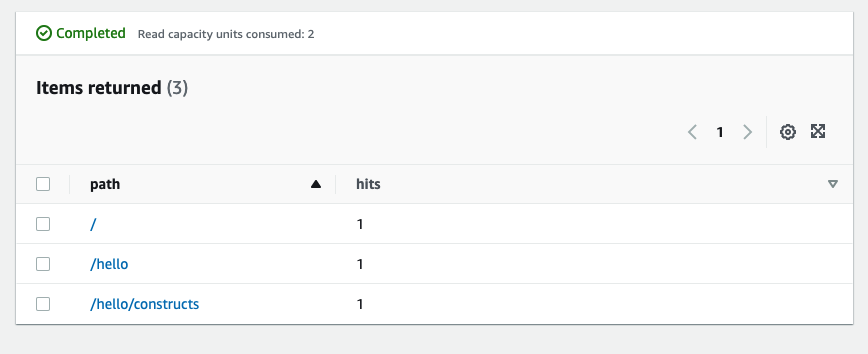
你应该看到你为每个路径获得了多少点击。
-
尝试点击新路径并刷新 “项目” 视图。您应看到一个新项目,包含hits计数为 1。
如果这是您收到的输出,您的应用程序可以正常工作!