本文属于机器翻译版本。若本译文内容与英语原文存在差异,则一律以英文原文为准。
Application Migration Service
您可以使用 AWS Application Migration Service 将应用程序快速迁移到云,并最大限度地减少停机时间。Application Migration Service 通过自动将源服务器从物理、虚拟和云基础设施转换为在 AWS 上以原生方式运行,从而最大限度地减少耗时且容易出错的手动流程。Application Migration Service 会将您的源服务器复制到您的 AWS 账户。准备就绪后,Application Migration Service 会自动转换并在 AWS 上启动您的服务器,以便您可以快速从 AWS 云的成本节约、生产力、韧性和敏捷性中受益。在某些使用案例中,Application Migration Service 可能是通往云的最快途径(例如,当您想将数据库和操作系统迁移到云时)。要确定使用 Application Migration Service 是否是您的最佳选择,请参阅 Application Migration Service 文档中的 When to Choose AWS Application Migration Service
架构
下图显示了使用 Application Migration Service 将本地 PostgreSQL 数据库迁移到 AWS 云的架构。
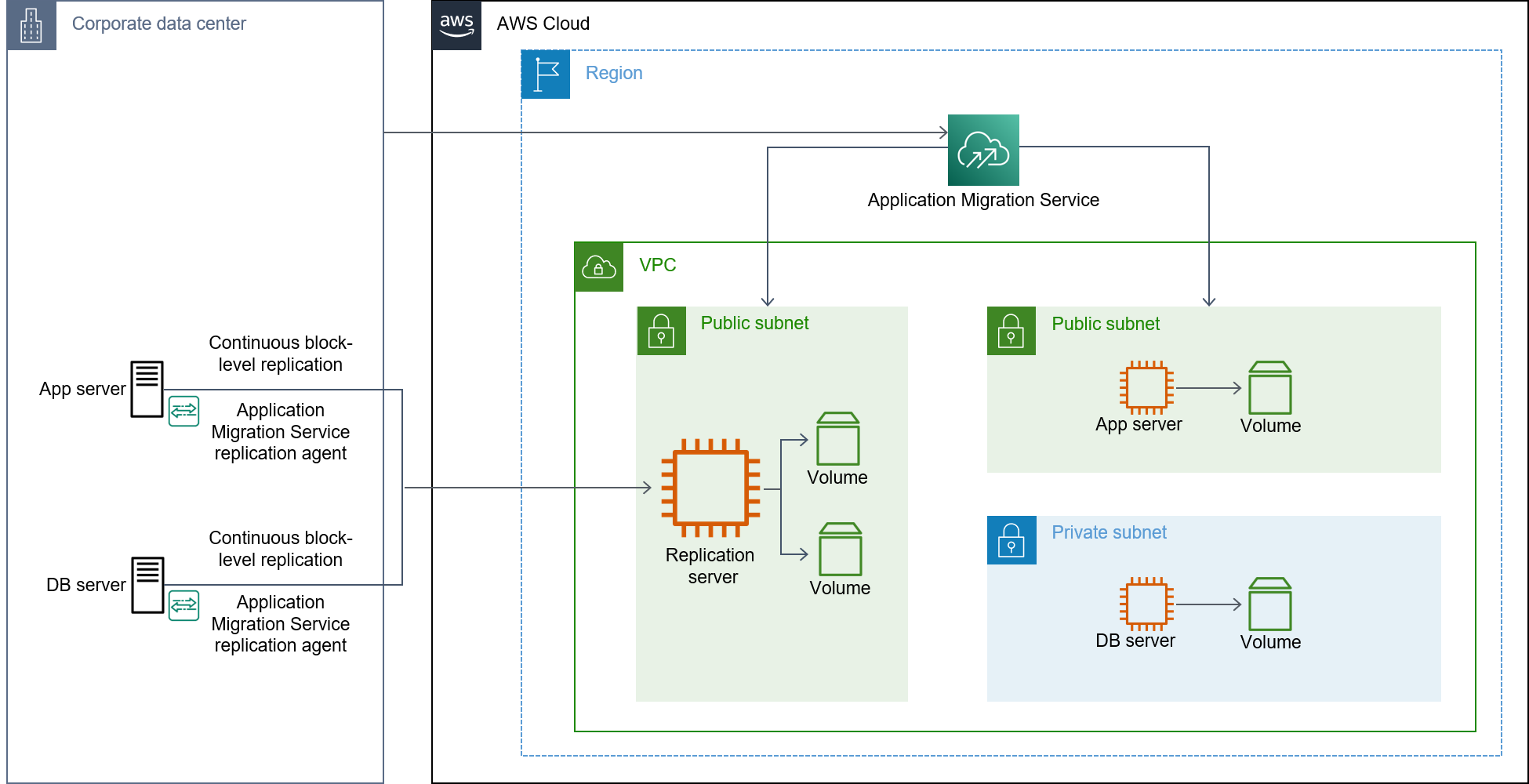
图表显示了以下工作流程:
在源数据库服务器上安装 AWS 复制代理。
在 Application Migration Service 控制台中配置启动设置。
启动测试实例。
启动割接实例。
完成割接。
有关使用 Application Migration Service 的更多信息,请参阅 AWS 公共部门博客中的 How to migrate on-premises workloads with AWS Application Migration Service
限制
我们建议您在开始迁移之前,考虑以下有关使用 Application Migration Service 的限制:
在每个支持的 AWS 区域,可以随时主动复制的最大服务器数量为 20。您可以将此值增加到 60。
在单个作业中最多可以使用 200 个源服务器。
有关限制的更多信息,请参阅 Application Migration Service 文档中的 What are the MGN service quota limits?。
