本文属于机器翻译版本。若本译文内容与英语原文存在差异,则一律以英文原文为准。
在 SDK 中构造电路
本节提供了定义电路、查看可用门、扩展电路以及查看每个设备支持的门的示例。它还包含有关如何进行手动 qubits 分配、指示编译器完全按照定义运行电路以及如何使用噪声模拟器构造噪声电路的说明。
您还可以在 Braket 中对具有某些 QPU 的各种门设置脉冲电平。有关更多信息,请参阅 Amazon Braket 上的脉冲控制。
门和电路
量子门和电路是在 Amazon Braket Python SDK 的 braket.circuitsCircuit() 来实例化一个新的电路对象。
示例:定义电路
该示例首先定义了一个由四个 qubits(标记为 q0、q1、q2 和 q3)组成的样本电路,包括标准的单量子比特的 Hadamard 门和两个量子比特的 CNOT 门。您可以通过调用 print 函数来实现此电路的可视化,如下例所示。
# Import the circuit module
from braket.circuits import Circuit

# Define circuit with 4 qubits
my_circuit = Circuit().h(range(4)).cnot(control=0, target=2).cnot(control=1, target=3)
print(my_circuit)
T  : │  0  │     1     │
      ┌───┐
q0 : ─┤ H ├───●─────────
      └───┘   │
      ┌───┐   │
q1 : ─┤ H ├───┼─────●───
      └───┘   │     │
      ┌───┐ ┌─┴─┐   │
q2 : ─┤ H ├─┤ X ├───┼───
      └───┘ └───┘   │
      ┌───┐       ┌─┴─┐
q3 : ─┤ H ├───────┤ X ├─
      └───┘       └───┘
T  : │  0  │     1     │
示例:定义参数化电路
在此示例中,我们定义了一个电路,该电路的门依赖于自由参数。我们可以通过指定这些参数的值来构建新电路,或者在提交电路时,在某些设备上将其作为量子任务运行。
from braket.circuits import Circuit, FreeParameter

# Define a FreeParameter to represent the angle of a gate
alpha = FreeParameter("alpha")

# Define a circuit with three qubits
my_circuit = Circuit().h(range(3)).cnot(control=0, target=2).rx(0, alpha).rx(1, alpha)
print(my_circuit)
您可以通过向电路提供单个参数 float(这是所有自由参数将采用的值)或关键字参数来指定每个参数的值,从而从参数化电路中构造一个新的非参数化电路,如下所示。
my_fixed_circuit = my_circuit(1.2)
my_fixed_circuit = my_circuit(alpha=1.2)
print(my_fixed_circuit)
请注意,my_circuit 是未修改的,因此您可以使用它来实例化许多具有固定参数值的新电路。
示例:修改电路中的门
以下示例定义了一个电路,该电路的门使用了控制和功率修改器。您可以使用这些修改来创建新的门,如受控的 Ry 门。
from braket.circuits import Circuit

# Create a bell circuit with a controlled x gate
my_circuit = Circuit().h(0).x(control=0, target=1)

# Add a multi-controlled Ry gate of angle .13
my_circuit.ry(angle=.13, target=2, control=(0, 1))

# Add a 1/5 root of X gate
my_circuit.x(0, power=1/5)

print(my_circuit)
只有本地模拟器支持门修改器。
示例:查看所有可用的门
以下示例说明了如何查看 Amazon Braket 中的所有可用门。
from braket.circuits import Gate
# Print all available gates in Amazon Braket
gate_set = [attr for attr in dir(Gate) if attr[0].isupper()]
print(gate_set)
这段代码的输出列出了所有的门。
['CCNot', 'CNot', 'CPhaseShift', 'CPhaseShift00', 'CPhaseShift01', 'CPhaseShift10', 'CSwap', 'CV', 'CY', 'CZ', 'ECR', 'GPhase', 'GPi', 'GPi2', 'H', 'I', 'ISwap', 'MS', 'PRx', 'PSwap', 'PhaseShift', 'PulseGate', 'Rx', 'Ry', 'Rz', 'S', 'Si', 'Swap', 'T', 'Ti', 'U', 'Unitary', 'V', 'Vi', 'X', 'XX', 'XY', 'Y', 'YY', 'Z', 'ZZ']
通过调用该类电路的方法,可以将这些门中的任何一个附加到电路中。例如,调用 circ.h(0),在第一个 qubit 门上添加 Hadamard 门。
注意
门已追加到位,以下示例将上一个示例中列出的所有门添加到同一个电路中。
circ = Circuit()
# toffoli gate with q0, q1 the control qubits and q2 the target.
circ.ccnot(0, 1, 2)
# cnot gate
circ.cnot(0, 1)
# controlled-phase gate that phases the |11> state, cphaseshift(phi) = diag((1,1,1,exp(1j*phi))), where phi=0.15 in the examples below
circ.cphaseshift(0, 1, 0.15)
# controlled-phase gate that phases the |00> state, cphaseshift00(phi) = diag([exp(1j*phi),1,1,1])
circ.cphaseshift00(0, 1, 0.15)
# controlled-phase gate that phases the |01> state, cphaseshift01(phi) = diag([1,exp(1j*phi),1,1])
circ.cphaseshift01(0, 1, 0.15)
# controlled-phase gate that phases the |10> state, cphaseshift10(phi) = diag([1,1,exp(1j*phi),1])
circ.cphaseshift10(0, 1, 0.15)
# controlled swap gate
circ.cswap(0, 1, 2)
# swap gate
circ.swap(0,1)
# phaseshift(phi)= diag([1,exp(1j*phi)])
circ.phaseshift(0,0.15)
# controlled Y gate
circ.cy(0, 1)
# controlled phase gate
circ.cz(0, 1)
# Echoed cross-resonance gate applied to q0, q1
circ = Circuit().ecr(0,1)
# X rotation with angle 0.15
circ.rx(0, 0.15)
# Y rotation with angle 0.15
circ.ry(0, 0.15)
# Z rotation with angle 0.15
circ.rz(0, 0.15)
# Hadamard gates applied to q0, q1, q2
circ.h(range(3))
# identity gates applied to q0, q1, q2
circ.i([0, 1, 2])
# iswap gate, iswap = [[1,0,0,0],[0,0,1j,0],[0,1j,0,0],[0,0,0,1]]
circ.iswap(0, 1)
# pswap gate, PSWAP(phi) = [[1,0,0,0],[0,0,exp(1j*phi),0],[0,exp(1j*phi),0,0],[0,0,0,1]]
circ.pswap(0, 1, 0.15)
# X gate applied to q1, q2
circ.x([1, 2])
# Y gate applied to q1, q2
circ.y([1, 2])
# Z gate applied to q1, q2
circ.z([1, 2])
# S gate applied to q0, q1, q2
circ.s([0, 1, 2])
# conjugate transpose of S gate applied to q0, q1
circ.si([0, 1])
# T gate applied to q0, q1
circ.t([0, 1])
# conjugate transpose of T gate applied to q0, q1
circ.ti([0, 1])
# square root of not gate applied to q0, q1, q2
circ.v([0, 1, 2])
# conjugate transpose of square root of not gate applied to q0, q1, q2
circ.vi([0, 1, 2])
# exp(-iXX theta/2)
circ.xx(0, 1, 0.15)
# exp(i(XX+YY) theta/4), where theta=0.15 in the examples below
circ.xy(0, 1, 0.15)
# exp(-iYY theta/2)
circ.yy(0, 1, 0.15)
# exp(-iZZ theta/2)
circ.zz(0, 1, 0.15)
# IonQ native gate GPi with angle 0.15 applied to q0
circ.gpi(0, 0.15)
# IonQ native gate GPi2 with angle 0.15 applied to q0
circ.gpi2(0, 0.15)
# IonQ native gate MS with angles 0.15, 0.15, 0.15 applied to q0, q1
circ.ms(0, 1, 0.15, 0.15, 0.15)
除了预定义的门设置之外,您还可以将自定义的单一门应用于电路。它们可以是单量子比特门(如以下源代码所示),也可以是应用于参数 targets 定义的 qubits 的多量子比特门。
import numpy as np

# Apply a general unitary
my_unitary = np.array([[0, 1],[1, 0]])
circ.unitary(matrix=my_unitary, targets=[0])
示例:扩展现有电路
您可以通过添加指令来扩展现有电路。Instruction 是一种量子指令,该指令描述了要在量子设备上执行的量子任务。Instruction 运算符仅包括 Gate 类型的对象。
# Import the Gate and Instruction modules
from braket.circuits import Gate, Instruction

# Add instructions directly.
circ = Circuit([Instruction(Gate.H(), 4), Instruction(Gate.CNot(), [4, 5])])

# Or with add_instruction/add functions
instr = Instruction(Gate.CNot(), [0, 1])
circ.add_instruction(instr)
circ.add(instr)

# Specify where the circuit is appended
circ.add_instruction(instr, target=[3, 4])
circ.add_instruction(instr, target_mapping={0: 3, 1: 4})

# Print the instructions
print(circ.instructions)
# If there are multiple instructions, you can print them in a for loop
for instr in circ.instructions:
     print(instr)

# Instructions can be copied
new_instr = instr.copy()
# Appoint the instruction to target
new_instr = instr.copy(target=[5, 6])
new_instr = instr.copy(target_mapping={0: 5, 1: 6})
示例:查看每台设备支持的门
模拟器支持 Braket SDK 中的所有门,但是 QPU 设备支持的子集较小。您可以在设备属性中找到设备支持的门。下面给出了 IonQ 设备的一个示例:
# Import the device module
from braket.aws import AwsDevice

device = AwsDevice("arn:aws:braket:us-east-1::device/qpu/ionq/Aria-1")

# Get device name
device_name = device.name
# Show supportedQuantumOperations (supported gates for a device)
device_operations = device.properties.dict()['action']['braket.ir.openqasm.program']['supportedOperations']
print('Quantum Gates supported by {}:\n {}'.format(device_name, device_operations))
Quantum Gates supported by Aria 1:
 ['x', 'y', 'z', 'h', 's', 'si', 't', 'ti', 'v', 'vi', 'rx', 'ry', 'rz', 'cnot', 'swap', 'xx', 'yy', 'zz']
受支持的门可能需要编译成原生门,然后才能在量子硬件上运行。当您提交电路时,Amazon Braket 会自动执行此编译。
示例:以编程方式检索设备支持的原生门的保真度
您可以在 Braket 控制台的“设备”页面上查看保真度信息。有时,以编程方式访问相同的信息会很有帮助。以下代码显示如何提取 QPU 的两门之间的两个 qubit 门保真度。
# Import the device module
from braket.aws import AwsDevice

device = AwsDevice("arn:aws:braket:us-west-1::device/qpu/rigetti/Ankaa-3")

# Specify the qubits
a=10
b=11
edge_properties_entry = device.properties.standardized.twoQubitProperties['10-11'].twoQubitGateFidelity
gate_name = edge_properties_entry[0].gateName
fidelity = edge_properties_entry[0].fidelity
print(f"Fidelity of the {gate_name} gate between qubits {a} and {b}: {fidelity}")
程序集
程序集在单个量子任务中高效运行多个量子电路。在这一项任务中,您可以提交多达 100 个量子电路或一个包含多达 100 个不同参数集的单个参数电路。此操作可最大限度地缩短后续电路执行的时间间隔,并降低量子任务处理开销。目前,Amazon Braket Local Simulator 等设备和设备都支持程序集IQM。AQT Rigetti
定义一个 ProgramSet
以下第一个代码示例演示了如何同时使用参数化电路和不带参数的电路来构建 ProgramSet。
from braket.aws import AwsDevice
from braket.circuits import Circuit, FreeParameter
from braket.program_sets.circuit_binding import CircuitBinding
from braket.program_sets import ProgramSet

# Initialize the quantum device
device = AwsDevice("arn:aws:braket:eu-north-1::device/qpu/iqm/Garnet")

# Define circuits
circ1 = Circuit().h(0).cnot(0, 1)
circ2 = Circuit().rx(0, 0.785).ry(1, 0.393).cnot(1, 0)
circ3 = Circuit().t(0).t(1).cz(0, 1).s(0).cz(1, 2).s(1).s(2)
parameterize_circuit = Circuit().rx(0, FreeParameter("alpha")).cnot(0, 1).ry(1, FreeParameter("beta"))

# Create circuit bindings with different parameters
circuit_binding = CircuitBinding(
    circuit=parameterize_circuit,
    input_sets={
            'alpha': (0.10, 0.11, 0.22, 0.34, 0.45),
            'beta': (1.01, 1.01, 1.03, 1.04, 1.04),
    })

# Creating the program set
program_set_1 = ProgramSet([
    circ1,
    circ2,
    circ3,
    circuit_binding,
])
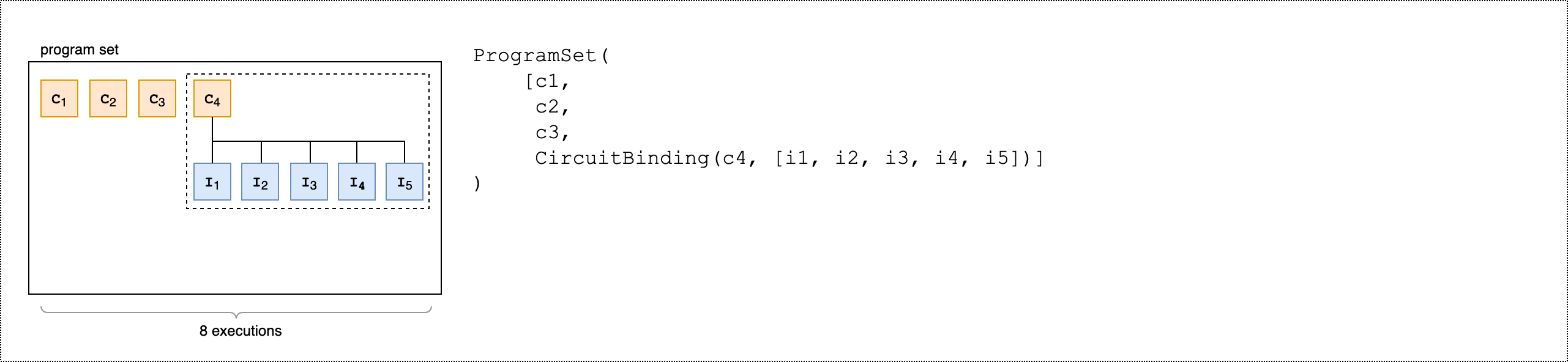
该程序集包含四个独特的程序:circ1、circ2、circ3 和 circuit_binding。circuit_binding 程序使用五个不同的参数绑定运行,创建了五个可执行文件。其他三个无参数程序分别创建一个可执行文件。这会生成八个可执行文件,如下图所示。
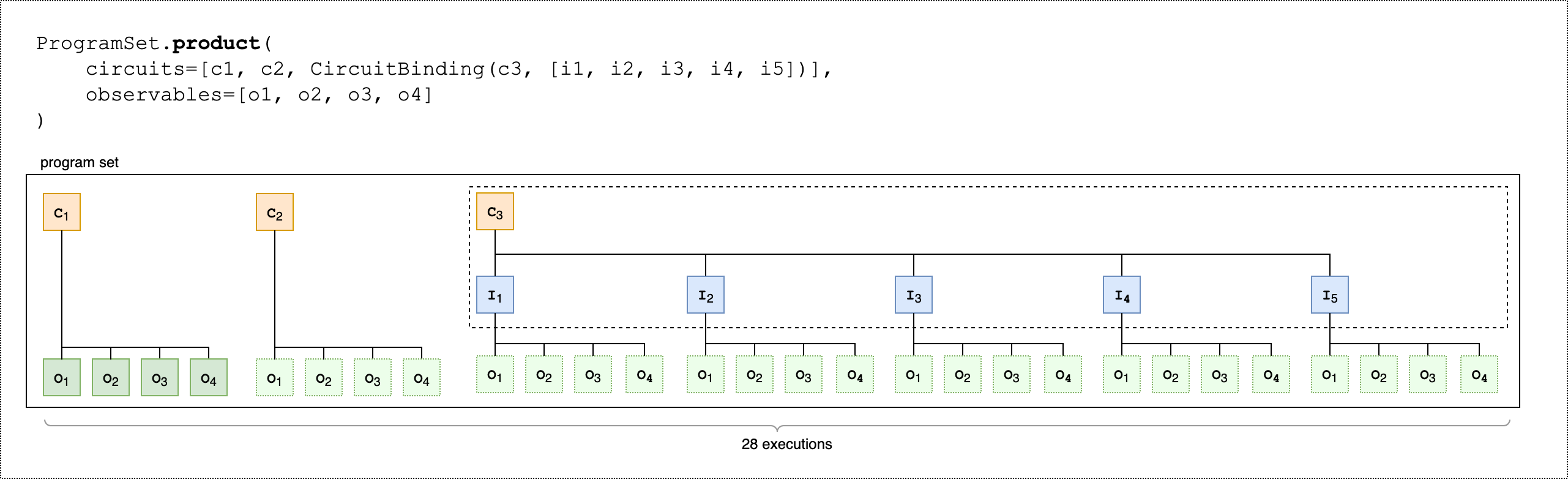
以下第二个代码示例演示了如何使用 product() 方法将同一组可观测值附加到程序集的每个可执行文件中。
from braket.circuits.observables import I, X, Y, Z

observables = [Z(0) @ Z(1), X(0) @ X(1), Z(0) @ X(1), X(0) @ Z(1)]

program_set_2 = ProgramSet.product(
    circuits=[circ1, circ2, circuit_binding],
    observables=observables
)
对于无参数程序,针对每个电路测量各个可观测值。对于参数化程序,针对每个输入集测量每个可观测值,如下图所示。
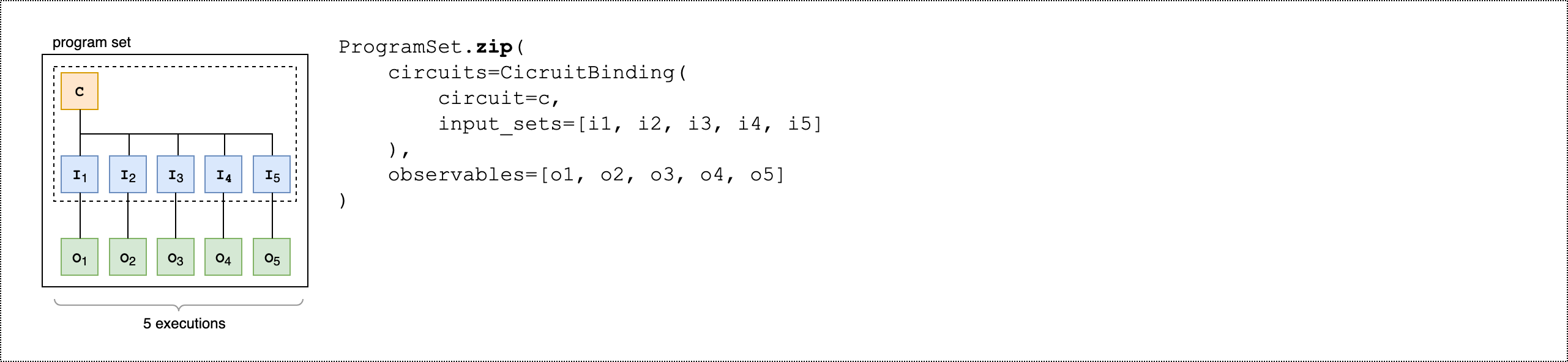
下列第三个代码示例演示了如何使用 zip() 方法将单个可观测值与 ProgramSet 中的特定参数集配对。
program_set_3 = ProgramSet.zip(
    circuits=circuit_binding,
    observables=observables + [Y(0) @ Y(1)]
)
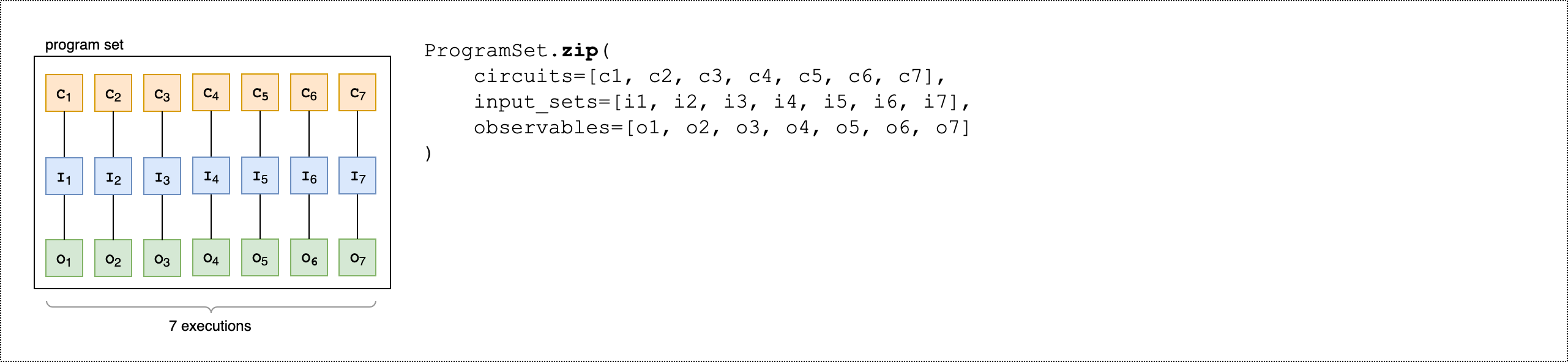
不选择 CircuitBinding(),您可以直接压缩带有电路和输入集列表的可观察值列表。
program_set_4 = ProgramSet.zip(
    circuits=[circ1, circ2, circ3],
    input_sets=[{}, {}, {}],
    observables=observables[:3]
)
有关程序集的更多信息和示例,请参阅 amazon-braket-examples Github 中的程序集文件夹
检查并运行设备上设置的程序
程序集的可执行文件数量等于其唯一参数绑定的电路的数量。使用以下代码示例计算电路可执行文件总数和总拍摄次数。
# Number of shots per executable
shots = 10
num_executables = program_set_1.total_executables

# Calculate total number of shots across all executables
total_num_shots = shots*num_executables
注意
使用程序集,您需要根据程序集中所有电路的总拍摄次数来支付每项任务的单次费用和每次拍摄的费用。
要运行程序集,请使用以下代码示例。
# Run the program set
task = device.run(
   program_set_1, shots=total_num_shots,
)
使用 Rigetti 设备时,当任务部分完成及部分排队时,您的程序集可能会保持 RUNNING 状态。为了更快地获得结果,请考虑将您的程序集作为混合作业提交。
分析结果
运行以下代码,分析、测量 ProgramSet 中可执行文件的结果。
# Get the results from a program set
result = task.result()

# Get the first executbable
first_program = result[0]
first_executable = first_program[0]

# Inspect the results of the first executable
measurements_from_first_executable = first_executable.measurements
print(measurements_from_first_executable)
部分测量
不测量量子电路中的所有量子比特,而是使用部分测量来测量单个量子比特或量子比特子集。
注意
其他功能,如中间电路测量和前馈操作,可作为实验功能提供,请参阅访问 IQM 设备上的动态电路。
示例:测量量子比特的子集
以下代码示例演示了通过在贝尔态电路中仅测量量子比特 0 来进行部分测量。
from braket.devices import LocalSimulator
from braket.circuits import Circuit

# Use the local state vector simulator
device = LocalSimulator()

# Define an example bell circuit and measure qubit 0
circuit = Circuit().h(0).cnot(0, 1).measure(0)

# Run the circuit
task = device.run(circuit, shots=10)

# Get the results
result = task.result()

# Print the circuit and measured qubits
print(circuit)
print()
print("Measured qubits: ", result.measured_qubits)
手动 量子比特 分配
当您在量子计算机上从 Rigetti 运行量子电路时,您可以选择使用手动 qubit 分配来控制将哪些 qubits 用于您的算法。Amazon Braket 控制台
通过手动 qubit 分配,能够更准确地运行电路及调查各个 qubit 特性。研究人员和高级用户可以根据最新的设备校准数据优化其电路设计,从而获得更准确的结果。
以下示例演示了如何进行 qubits 显式分配。
# Import the device module
from braket.aws import AwsDevice

device = AwsDevice("arn:aws:braket:us-west-1::device/qpu/rigetti/Ankaa-3")
circ = Circuit().h(0).cnot(0, 7)  # Indices of actual qubits in the QPU

# Set up S3 bucket (where results are stored)
my_bucket = "amazon-braket-s3-demo-bucket" # The name of the bucket
my_prefix = "your-folder-name" # The name of the folder in the bucket
s3_location = (my_bucket, my_prefix)

my_task = device.run(circ, s3_location, shots=100, disable_qubit_rewiring=True)
欲了解更多信息,请参阅本笔记本上的 Amazon Braket 示例:在 GitHub
逐字记录编译
当您在基于门的量子计算机上运行量子电路时,您可以指示编译器完全按照定义运行您的电路,而无需做出任何修改。使用逐字记录编译,您可以指定要么完全按照指定方式保留整个电路,要么仅保留其中的特定部分(仅受 Rigetti 支持)。在为硬件基准测试或错误缓解协议开发算法时,您需要能够选择精确指定硬件上运行的门和电路布局。通过逐字记录编译,您可以关闭某些优化步骤来直接控制编译过程,从而确保您的电路完全按照设计运行。
、、和Rigetti设备支持逐字编译 AQT IonQIQM,并且需要使用原生门。使用逐字记录编译时,建议检查设备的拓扑结构,以确保在连接的 qubits 上调用门且电路使用硬件支持的原生门。以下示例说明如何以编程方式访问设备支持的原生门列表。
device.properties.paradigm.nativeGateSet
对于 Rigetti,必须通过设置 disableQubitRewiring=True 与逐字记录编译一起使用,进而关闭 qubit 重新布线。如果在编译中使用逐字记录框时设置 disableQubitRewiring=False,则量子电路验证失败且电路无法运行。
如果为电路启用了逐字记录编译且在不支持逐字记录编译的 QPU 上运行,则会生成一个错误,指明不支持的操作导致任务失败。随着越来越多的量子硬件原生支持编译器功能,该功能将扩展到包括这些设备。使用以下代码查询时,支持逐字记录编译的设备将其列为支持的操作。
from braket.aws import AwsDevice
from braket.device_schema.device_action_properties import DeviceActionType
device = AwsDevice("arn:aws:braket:us-west-1::device/qpu/rigetti/Ankaa-3")
device.properties.action[DeviceActionType.OPENQASM].supportedPragmas
使用逐字记录编译不会产生额外成本。对于在 Braket QPU 设备、Notebook 实例和按需模拟器上执行的量子任务,您需要继续按照“Amazon Braket 定价
注意
如果您使用 OpenQasm 为AQT和IonQ设备编写电路,并且希望将电路直接映射到物理量子比特,则需要使用,因#pragma braket verbatim为 OpenQasm 会忽略disableQubitRewiring标志。
噪声模拟
要实例化本地噪声模拟器,您可以按如下方式更改后端。
# Import the device module
from braket.aws import AwsDevice

device = LocalSimulator(backend="braket_dm")
您可以通过两种方式构造噪声电路:
-
自下而上地构造嘈杂电路。
-
采用现有的无噪声电路,并在整个过程中注入噪声。
以下示例显示了使用具有去极化噪声和自定义 Kraus 通道的基本电路的方法。
import scipy.stats
import numpy as np

# Bottom up approach
# Apply depolarizing noise to qubit 0 with probability of 0.1
circ = Circuit().x(0).x(1).depolarizing(0, probability=0.1)

# Create an arbitrary 2-qubit Kraus channel
E0 = scipy.stats.unitary_group.rvs(4) * np.sqrt(0.8)
E1 = scipy.stats.unitary_group.rvs(4) * np.sqrt(0.2)
K = [E0, E1]

# Apply a two-qubit Kraus channel to qubits 0 and 2
circ = circ.kraus([0, 2], K)
from braket.circuits import Noise

# Inject noise approach
# Define phase damping noise
noise = Noise.PhaseDamping(gamma=0.1)
# The noise channel is applied to all the X gates in the circuit
circ = Circuit().x(0).y(1).cnot(0, 2).x(1).z(2)
circ_noise = circ.copy()
circ_noise.apply_gate_noise(noise, target_gates=Gate.X)
运行电路的用户体验与之前相同,如以下两个示例所示。
示例 1
task = device.run(circ, shots=100)
Or
示例 2
task = device.run(circ_noise, shots=100)
有关更多示例,请参阅 Braket 入门噪声模拟器示例
