本文属于机器翻译版本。若本译文内容与英语原文存在差异,则一律以英文原文为准。
定义网关目标配置
目标配置取决于您要添加到网关的目标类型。有关支持的网关目标类型的更多信息,请参阅 Amazon Bedrock AgentCore 网关亚马逊 Bedrock AgentCore 网关支持的目标支持的目标。
选择一个主题以查看添加目标类型的示例:
添加 Lambda 目标
您可以使用 CL AgentCore I 将 Lambda 目标指定为并提供 Lambda ARN lambda-function-arn 和工具架构文件,从而向网关添加 Lambda 目标。--type
目标配置
Lambda 函数的目标配置(或负载)包含以下字段:
有关 Lambda 目标的更多信息,请参阅 AWS Lambda 函数目标。
选择以下方法之一:
例
- AgentCore CLI
-
-
要添加 Lambda 函数作为目标,请agentcore add gateway-target使用--type lambda-function-arn选项运行。提供 Lambda ARN 和包含工具架构的 JSON 文件:
agentcore add gateway-target \
  --name MyLambdaTarget \
  --type lambda-function-arn \
  --lambda-arn arn:aws:lambda:us-east-1:123456789012:function:MyFunction \
  --tool-schema-file tools.json \
  --gateway MyGateway
agentcore deploy
对于lambda-function-arn目标,使用向 AgentCore CLI 提供工具架构--tool-schema-file。对于 AgentCore Python 开发工具包和 Boto3,请提供工具架构和。inlinePayload
- AgentCore Python SDK
-
-
使用 AgentCore Python 开发工具包,您可以使用默认配置创建 AWS Lambda 目标。
# Import dependencies
from bedrock_agentcore_starter_toolkit.operations.gateway.client import GatewayClient

# Initialize the client
client = GatewayClient(region_name="us-east-1")

# Create a lambda target.
lambda_target = client.create_mcp_gateway_target(
    gateway=gateway,
    name=None, # If you don't set one, one will be generated.
    target_type="lambda",
    target_payload=None, # Define your own lambda if you pre-created one. Otherwise leave this as None and one will be created for you.
    credentials=None, # If you leave this as None, one will be created for you
)
以下是您可以提供的示例参数target_payload。如果您省略该target_payload参数,则使用以下有效载荷:
{
    "lambdaArn": "<insert your lambda arn>",
    "toolSchema": {
        "inlinePayload": [
            {
                "name": "get_weather",
                "description": "Get weather for a location",
                "inputSchema": {
                    "type": "object",
                    "properties": {
                        "location": {
                            "type": "string",
                            "description": "the location e.g. seattle, wa"
                        }
                    },
                    "required": [
                        "location"
                    ]
                }
            },
            {
                "name": "get_time",
                "description": "Get time for a timezone",
                "inputSchema": {
                    "type": "object",
                    "properties": {
                        "timezone": {
                            "type": "string"
                        }
                    },
                    "required": [
                        "timezone"
                    ]
                }
            }
        ]
    }
}
- Boto3
-
-
以下 Python 代码显示了如何使用 Py AWS thon 开发工具包 (Boto3) 添加 Lambda 目标:
import boto3

# Create the agentcore client
agentcore_client = boto3.client('bedrock-agentcore-control')

# Create a Lambda target
target = agentcore_client.create_gateway_target(
    gatewayIdentifier="your-gateway-id",
    name="LambdaTarget",
    targetConfiguration={
        "mcp": {
            "lambda": {
                "lambdaArn": "arn:aws:lambda:us-west-2:123456789012:function:YourLambdaFunction",
                "toolSchema": {
                    "inlinePayload": [
                        {
                            "name": "get_weather",
                            "description": "Get weather for a location",
                            "inputSchema": {
                                "type": "object",
                                "properties": {"location": {"type": "string"}},
                                "required": ["location"],
                            },
                        },
                        {
                            "name": "get_time",
                            "description": "Get time for a timezone",
                            "inputSchema": {
                                "type": "object",
                                "properties": {"timezone": {"type": "string"}},
                                "required": ["timezone"],
                            },
                        },
                    ]
                }
            }
        }
    },
    credentialProviderConfigurations=[
        {
            "credentialProviderType": "GATEWAY_IAM_ROLE"
        }
    ]
)
- Interactive
-
-
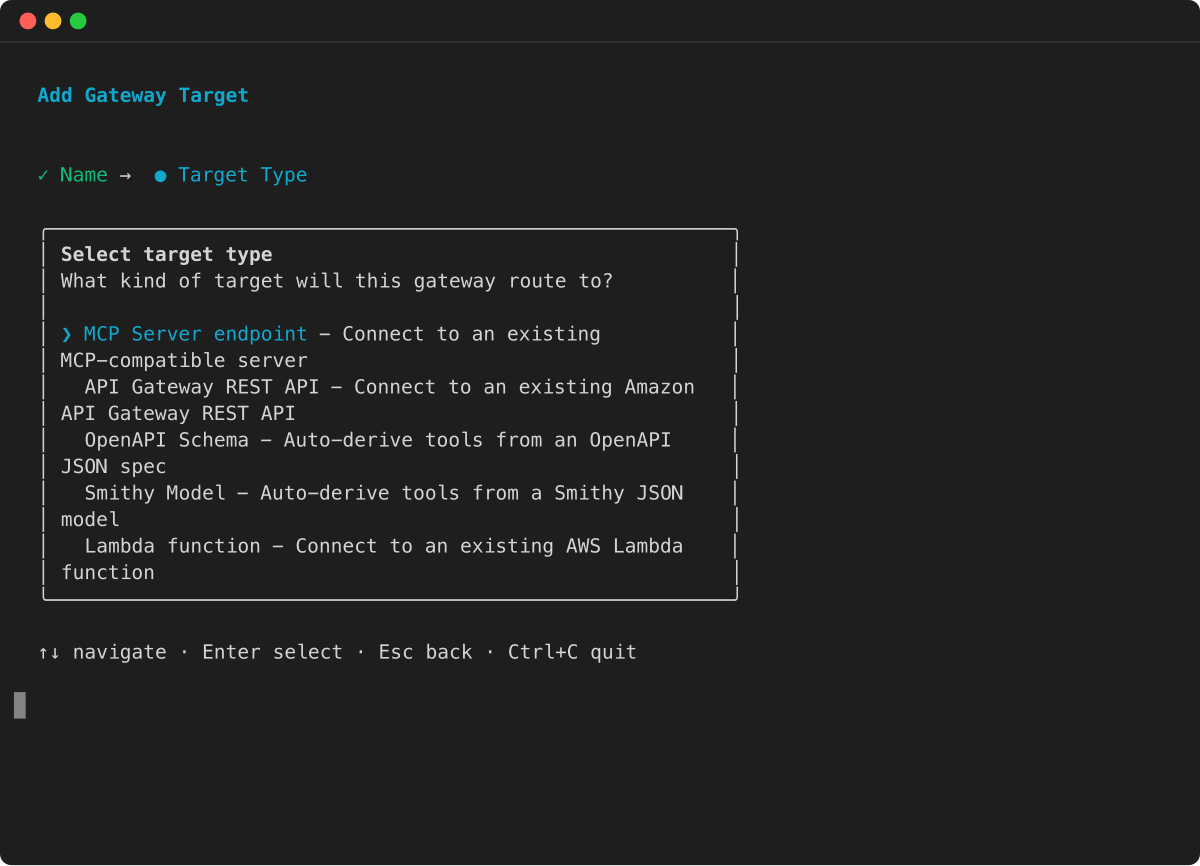
在 AgentCore CLI 交互式终端用户界面中agentcore,运行,选择添加,选择网关目标,然后选择 Lambda 函数:
然后,向导会提示您输入目标名称、Lambda 函数 ARN、工具架构文件和出站授权配置。
添加 API 网关阶段目标
要将 API 网关 REST API 的某个阶段添加为目标,请指定 API 的 ARN 和阶段并定义设置,以筛选 API 网关中的工具或覆盖网关中工具的名称和描述:
以下示例显示如何添加 API 网关目标。还应用了以下配置:
选择以下方法之一:
例
- AgentCore CLI
-
-
要将 API Gateway REST API 阶段添加为目标,请agentcore add gateway-target使用以下--type api-gateway选项运行:
agentcore add gateway-target \
  --name MyAPIGatewayTarget \
  --type api-gateway \
  --rest-api-id your-rest-api-id \
  --stage your-stage \
  --gateway MyGateway
agentcore deploy
- AWS CLI
-
-
以下命令使用 AWS CLI:
aws bedrock-agentcore-control create-gateway-target \
    --gateway-identifier "your-gateway-id" \
    --name "SearchAPITarget" \
    --target-configuration '{
        "mcp": {
            "apiGateway": {
                "restApiId": "your-rest-api-id",
                "stage": "your-stage",
                "apiGatewayToolConfiguration": {
                    "toolFilters": [
                        {
                            "filterPath": "/products",
                            "methods": [
                                "GET",
                                "POST"
                            ]
                        }
                    ],
                    "toolOverrides": [
                        {
                            "path": "/products",
                            "method": "GET",
                            "name": "get_items",
                            "description": "Gets information for items in the list of products."
                        }
                    ]
                }
            }
        }
    }'
    --credential-provider-configurations '[
        {
            "credentialProviderType": "GATEWAY_IAM_ROLE"
        }
    ]'
- Boto3
-
-
以下代码显示了使用 AWS Python 软件开发工具包 (Boto3):
import boto3

# Create the client
agentcore_client = boto3.client('bedrock-agentcore-control')

# Create an API gateway REST API target with gateway service role authentication
target = agentcore_client.create_gateway_target(
    gatewayIdentifier="your-gateway-id",
    name="SearchAPITarget",
    targetConfiguration={
        "mcp": {
            "apiGateway": {
                "restApiId": "your-rest-api-id",
                "stage": "your-stage",
                "apiGatewayToolConfiguration": {
                    "toolFilters": [
                        {
                            "filterPath": "/products",
                            "methods": [
                                "GET",
                                "POST"
                            ]
                        }
                    ],
                    "toolOverrides": [
                        {
                            "path": "/products",
                            "method": "GET",
                            "name": "get_item",
                            "description": "Gets information for a specific item in the product list."
                        }
                    ]
                }
            }
        }
    },
    credentialProviderConfigurations=[
        {
            "credentialProviderType": "GATEWAY_IAM_ROLE"
        }
    ]
)
- Interactive
-
-
在 AgentCore CLI 交互式终端用户界面中agentcore,运行,选择添加,选择网关目标,然后选择 API Gateway REST API:
然后,向导会提示您输入目标名称、REST API ID、阶段和出站授权配置。
添加 OpenAPI 目标
选择以下方法之一:
例
- AgentCore CLI
-
-
要添加 OpenAPI 架构目标,请agentcore add gateway-target使用--type open-api-schema选项运行并提供您的 OpenAPI 规范文件的路径:
agentcore add gateway-target \
  --name MyOpenAPITarget \
  --type open-api-schema \
  --schema path/to/openapi-spec.json \
  --outbound-auth none|api-key|oauth \
  --gateway MyGateway
agentcore deploy
- Boto3
-
-
以下 Python 代码显示了如何使用 Py AWS thon SDK (Boto3) 添加 OpenAPI 目标。该架构已上传到一个 S3 位置,该位置的 URI 在中引用target_payload。目标的出站授权是通过 API 密钥进行的。
import boto3

# Create the client
agentcore_client = boto3.client('bedrock-agentcore-control')

# Create an OpenAPI target with API Key authentication
target = agentcore_client.create_gateway_target(
    gatewayIdentifier="your-gateway-id",
    name="SearchAPITarget",
    targetConfiguration={
        "mcp": {
            "openApiSchema": {
                "s3": {
                    "uri": "s3://your-bucket/path/to/open-api-spec.json",
                    "bucketOwnerAccountId": "123456789012"
                }
            }
        }
    },
    credentialProviderConfigurations=[
        {
            "credentialProviderType": "API_KEY",
            "credentialProvider": {
                "apiKeyCredentialProvider": {
                    "providerArn": "arn:aws:agent-credential-provider:us-east-1:123456789012:token-vault/default/apikeycredentialprovider/abcdefghijk",
                    "credentialLocation": "HEADER",
                    "credentialParameterName": "X-API-Key"
                }
            }
        }
    ]
)
- Interactive
-
-
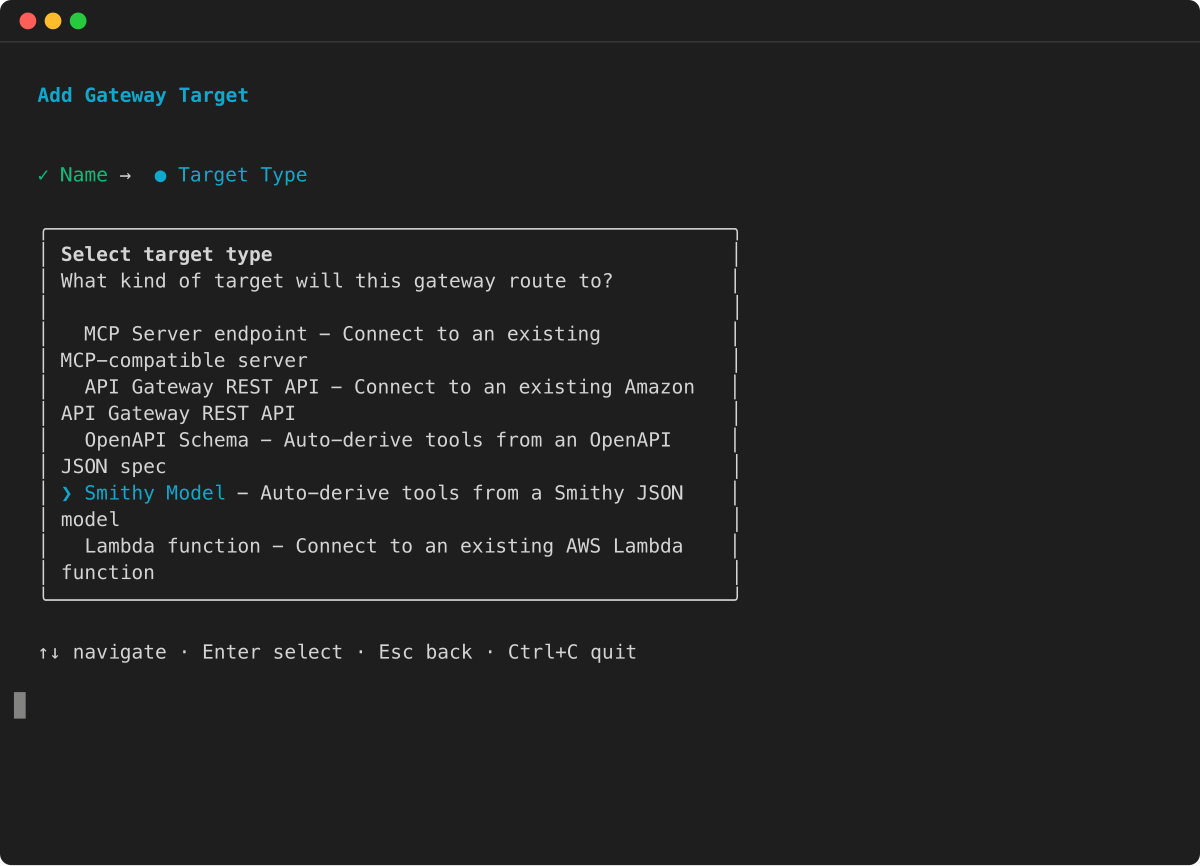
在 AgentCore CLI 交互式终端用户界面中agentcore,运行,选择添加,选择网关目标,然后选择 OpenAPI 架构:
然后,向导会提示您输入目标名称、OpenAPI 规范文件路径和出站授权配置。
添加 Smithy 目标
选择以下方法之一:
例
- AgentCore CLI
-
-
要添加 Smithy 模型目标,请agentcore add gateway-target使用该--type smithy-model选项运行并提供您的 Smithy 模型文件的路径:
agentcore add gateway-target \
  --name MySmithyTarget \
  --type smithy-model \
  --schema path/to/smithy-model.json \
  --gateway MyGateway
agentcore deploy
- Boto3
-
-
以下 Python 代码显示了如何使用 Py AWS thon 软件开发工具包 (Boto3) 添加 Smithy 模型目标:
import boto3

# Create the agentcore client
agentcore_client = boto3.client('bedrock-agentcore-control')

# Create a Smithy model target
target = agentcore_client.create_gateway_target(
    gatewayIdentifier="your-gateway-id",
    name="DynamoDBTarget",
    targetConfiguration={
        "mcp": {
            "smithyModel": {
                "s3": {
                    "uri": "s3://your-bucket/path/to/smithy-model.json",
                    "bucketOwnerAccountId": "123456789012"
                }
            }
        }
    },
    credentialProviderConfigurations=[
        {
            "credentialProviderType": "GATEWAY_IAM_ROLE"
        }
    ]
)
- Interactive
-
-
在 AgentCore CLI 交互式终端用户界面中agentcore,运行,选择添加,选择网关目标,然后选择 Smithy 模型:
然后,向导会提示您输入目标名称、Smithy 模型文件路径和出站授权配置。
添加 HTTP 运行时目标
您可以将亚马逊 Bedrock AgentCore 运行时代理作为 HTTP 目标添加到您的网关。网关直接将流量发送到运行时代理,无需聚合或协议转换。
有关 HTTP 目标的更多信息,请参阅亚马逊 Bedrock AgentCore 运行时目标。
选择以下方法之一:
例
- AWS CLI
-
-
以下命令使用 IAM 授权创建 HTTP 运行时目标:
aws bedrock-agentcore-control create-gateway-target \
    --gateway-identifier "your-gateway-id" \
    --name "MyRuntimeTarget" \
    --description "Runtime gateway target" \
    --target-configuration '{
        "http": {
            "agentcoreRuntime": {
                "arn": "arn:aws:bedrock-agentcore:us-west-2:111122223333:runtime/RUNTIME_ID"
            }
        }
    }' \
    --credential-provider-configurations '[{
        "credentialProviderType": "GATEWAY_IAM_ROLE"
    }]'
- Boto3
-
-
以下 Python 代码显示了如何使用 Py AWS thon 软件开发工具包 (Boto3) 添加 HTTP 运行时目标:
import boto3

agentcore_client = boto3.client('bedrock-agentcore-control')

target = agentcore_client.create_gateway_target(
    gatewayIdentifier="your-gateway-id",
    name="MyRuntimeTarget",
    description="Runtime gateway target",
    targetConfiguration={
        "http": {
            "agentcoreRuntime": {
                "arn": "arn:aws:bedrock-agentcore:us-west-2:111122223333:runtime/RUNTIME_ID"
            }
        }
    },
    credentialProviderConfigurations=[
        {
            "credentialProviderType": "GATEWAY_IAM_ROLE"
        }
    ]
)
添加 MCP 服务器目标
您可以使用 C AgentCore LI 或 P AWS ython SDK (Boto3) 添加 MCP 服务器目标。以下示例显示如何创建具有不同出站授权类型的 MCP 服务器目标。
具有 IAM (SigV4) 授权的 MCP 服务器
以下示例使用 IAM 授权创建了 MCP 服务器目标。网关使用带有网关服务角色的证书的 SigV4 对 MCP 服务器的请求进行签名。必须指定用于签service名的名称。region是可选的,默认为网关的区域。
的值service取决于您的 MCP 服务器的托管位置。以下是常用值:
-
bedrock-agentcore— 适用于托管在 Amazon Bedrock 上的 MCP 服务器 AgentCore,例如运行时(请参阅在 AgentCore 运行时部署 MCP 服务器)或其他网关。
-
execute-api— 适用于亚马逊 API Gateway 背后的 MCP 服务器。
-
lambda— 适用于 Lambda 函数 URL 后面的 MCP 服务器。
选择以下方法之一:
例
- AWS CLI
-
-
aws bedrock-agentcore-control create-gateway-target \
    --gateway-identifier "your-gateway-id" \
    --name "MyMCPTarget" \
    --target-configuration '{
        "mcp": {
            "mcpServer": {
                "endpoint": "https://my-server.bedrock-agentcore.us-west-2.api.aws"
            }
        }
    }' \
    --credential-provider-configurations '[{
        "credentialProviderType": "GATEWAY_IAM_ROLE",
        "credentialProvider": {
            "iamCredentialProvider": {
                "service": "bedrock-agentcore",
                "region": "us-west-2"
            }
        }
    }]'
- Interactive
-
-
在 AgentCore CLI 交互式终端用户界面中agentcore,运行,选择添加,选择网关目标,然后选择 MCP 服务器端点:
然后,向导会提示您输入目标名称、MCP 服务器端点 URL 和出站授权配置。
- Boto3
-
-
import boto3

agentcore_client = boto3.client('bedrock-agentcore-control')

target = agentcore_client.create_gateway_target(
    gatewayIdentifier="your-gateway-id",
    name="MyMCPTarget",
    targetConfiguration={
        "mcp": {
            "mcpServer": {
                "endpoint": "https://my-server.bedrock-agentcore.us-west-2.api.aws"
            }
        }
    },
    credentialProviderConfigurations=[
        {
            "credentialProviderType": "GATEWAY_IAM_ROLE",
            "credentialProvider": {
                "iamCredentialProvider": {
                    "service": "bedrock-agentcore",
                    "region": "us-west-2"
                }
            }
        }
    ]
)
具有 OAuth 授权的 MCP 服务器
以下示例使用 OAuth(客户端凭证)授权创建了 MCP 服务器目标。
选择以下方法之一:
例
- AWS CLI
-
-
aws bedrock-agentcore-control create-gateway-target \
    --gateway-identifier "your-gateway-id" \
    --name "MyMCPTarget" \
    --target-configuration '{
        "mcp": {
            "mcpServer": {
                "endpoint": "https://my-mcp-server.example.com"
            }
        }
    }' \
    --credential-provider-configurations '[{
        "credentialProviderType": "OAUTH",
        "credentialProvider": {
            "oauthCredentialProvider": {
                "providerArn": "arn:aws:bedrock-agentcore:us-west-2:123456789012:token-vault/default/oauth2credentialprovider/my-oauth-provider",
                "scopes": []
            }
        }
    }]'
- AgentCore CLI
-
-
要添加具有 OAuth 授权的 MCP 服务器目标,请使用--type mcp-server选项运行并指定 OAuth agentcore add gateway-target 凭据:
agentcore add gateway-target \
  --type mcp-server \
  --name MyMCPTarget \
  --endpoint https://my-mcp-server.example.com \
  --gateway MyGateway \
  --outbound-auth oauth \
  --oauth-client-id my-client \
  --oauth-client-secret my-secret \
  --oauth-discovery-url https://auth.example.com/.well-known/openid-configuration
agentcore deploy
- Boto3
-
-
import boto3

agentcore_client = boto3.client('bedrock-agentcore-control')

target = agentcore_client.create_gateway_target(
    gatewayIdentifier="your-gateway-id",
    name="MyMCPTarget",
    targetConfiguration={
        "mcp": {
            "mcpServer": {
                "endpoint": "https://my-mcp-server.example.com"
            }
        }
    },
    credentialProviderConfigurations=[
        {
            "credentialProviderType": "OAUTH",
            "credentialProvider": {
                "oauthCredentialProvider": {
                    "providerArn": "arn:aws:bedrock-agentcore:us-west-2:123456789012:token-vault/default/oauth2credentialprovider/my-oauth-provider",
                    "scopes": []
                }
            }
        }
    ]
)
具有 API 密钥授权的 MCP 服务器
以下示例使用 API 密钥授权创建了 MCP 服务器目标。
选择以下方法之一:
例
- AWS CLI
-
-
aws bedrock-agentcore-control create-gateway-target \
    --gateway-identifier "your-gateway-id" \
    --name "MyMCPTarget" \
    --target-configuration '{
        "mcp": {
            "mcpServer": {
                "endpoint": "https://my-mcp-server.example.com"
            }
        }
    }' \
    --credential-provider-configurations '[{
        "credentialProviderType": "API_KEY",
        "credentialProvider": {
            "apiKeyCredentialProvider": {
                "providerArn": "arn:aws:bedrock-agentcore:us-west-2:123456789012:token-vault/default/apikeycredentialprovider/my-api-key",
                "credentialLocation": "HEADER",
                "credentialParameterName": "x-api-key",
                "credentialPrefix": ""
            }
        }
    }]'
- Boto3
-
-
import boto3

agentcore_client = boto3.client('bedrock-agentcore-control')

target = agentcore_client.create_gateway_target(
    gatewayIdentifier="your-gateway-id",
    name="MyMCPTarget",
    targetConfiguration={
        "mcp": {
            "mcpServer": {
                "endpoint": "https://my-mcp-server.example.com"
            }
        }
    },
    credentialProviderConfigurations=[
        {
            "credentialProviderType": "API_KEY",
            "credentialProvider": {
                "apiKeyCredentialProvider": {
                    "providerArn": "arn:aws:bedrock-agentcore:us-west-2:123456789012:token-vault/default/apikeycredentialprovider/my-api-key",
                    "credentialLocation": "HEADER",
                    "credentialParameterName": "x-api-key",
                    "credentialPrefix": ""
                }
            }
        }
    ]
)
使用亚马逊 Bedrock 托管知识库添加连接器目标
您可以将 Amazon Bedrock 托管知识库连接器作为目标添加到网关。
有关亚马逊 Bedrock 托管知识库连接器的更多信息,请参阅亚马逊 Bedrock 托管知识库。
建立托管知识库
该连接器提供了两个工具,每个工具都以其后端操作命名:AgenticRetrieveStream(多步骤、流式代理检索)和Retrieve(单一混合搜索)。您可以为每个工具添加一个配置条目。
对于AgenticRetrieveStream,设置retrievers(要查询的托管知识库)并输agenticRetrieveConfiguration入parameterValues。两者都是必需的——省略agenticRetrieveConfiguration会导致运行时错误。它可以是一个空对象 ({}),用于接受服务管理的默认值,但要指定foundationModelType并rerankingModelType明确配置内容。该代理在通话时不提供知识库 ID。对于Retrieve,设置为 knowledgeBaseIdparameterValues;这是必填项。
该连接器仅支持托管知识库。连接器目标仅支持GATEWAY_IAM_ROLE凭据提供者类型。
例
- Boto3
-
-
以下 Python 代码显示了如何使用 Py AWS thon 软件开发工具包 (Boto3) 使用亚马逊 Bedrock 托管知识库连接器配置创建网关目标:
import boto3

gateway_client = boto3.client("bedrock-agentcore-control", region_name="<REGION>")

gateway_client.create_gateway_target(
    name="managed-kb",
    gatewayIdentifier="<GATEWAY_ID>",
    targetConfiguration={
        "mcp": {
            "connector": {
                "source": {"connectorId": "bedrock-knowledge-bases"},
                "configurations": [
                    {
                        "name": "AgenticRetrieveStream",
                        "parameterValues": {
                            "retrievers": [
                                {
                                    "description": "Product documentation",
                                    "configuration": {"knowledgeBase": {"knowledgeBaseId": "<KB_ID_1>"}},
                                },
                                {
                                    "description": "Engineering runbooks",
                                    "configuration": {"knowledgeBase": {"knowledgeBaseId": "<KB_ID_2>"}},
                                },
                            ],
                            "agenticRetrieveConfiguration": {
                                "foundationModelType": "MANAGED",
                                "rerankingModelType": "MANAGED",
                            },
                        },
                    },
                    {
                        "name": "Retrieve",
                        "parameterValues": {"knowledgeBaseId": "<KB_ID>"},
                    },
                ],
            }
        }
    },
    credentialProviderConfigurations=[
        {"credentialProviderType": "GATEWAY_IAM_ROLE"}
    ],
)
- AWS CLI
-
-
以下命令使用 AWS CLI 使用 Amazon Bedrock 托管知识库连接器配置创建网关目标:
aws bedrock-agentcore-control create-gateway-target \
  --gateway-identifier "<GATEWAY_ID>" \
  --name "managed-kb" \
  --target-configuration '{
    "mcp": {
      "connector": {
        "source": {
          "connectorId": "bedrock-knowledge-bases"
        },
        "configurations": [
          {
            "name": "AgenticRetrieveStream",
            "parameterValues": {
              "retrievers": [
                {
                  "description": "Product documentation",
                  "configuration": {"knowledgeBase": {"knowledgeBaseId": "<KB_ID_1>"}}
                },
                {
                  "description": "Engineering runbooks",
                  "configuration": {"knowledgeBase": {"knowledgeBaseId": "<KB_ID_2>"}}
                }
              ],
              "agenticRetrieveConfiguration": {
                "foundationModelType": "MANAGED",
                "rerankingModelType": "MANAGED"
              }
            }
          },
          {
            "name": "Retrieve",
            "parameterValues": {
              "knowledgeBaseId": "<KB_ID>"
            }
          }
        ]
      }
    }
  }' \
  --credential-provider-configurations '[{"credentialProviderType": "GATEWAY_IAM_ROLE"}]' \
  --region "<REGION>"
- AgentCore CLI
-
-
要添加托管知识库连接器目标,请agentcore add gateway-target使用--type connector --connector bedrock-knowledge-bases以下命令运行:
agentcore add gateway-target \
  --name MyKnowledgeBaseTarget \
  --type connector \
  --connector bedrock-knowledge-bases \
  --knowledge-base-id <KB_ID> \
  --gateway MyGateway
agentcore deploy
- Interactive
-
-
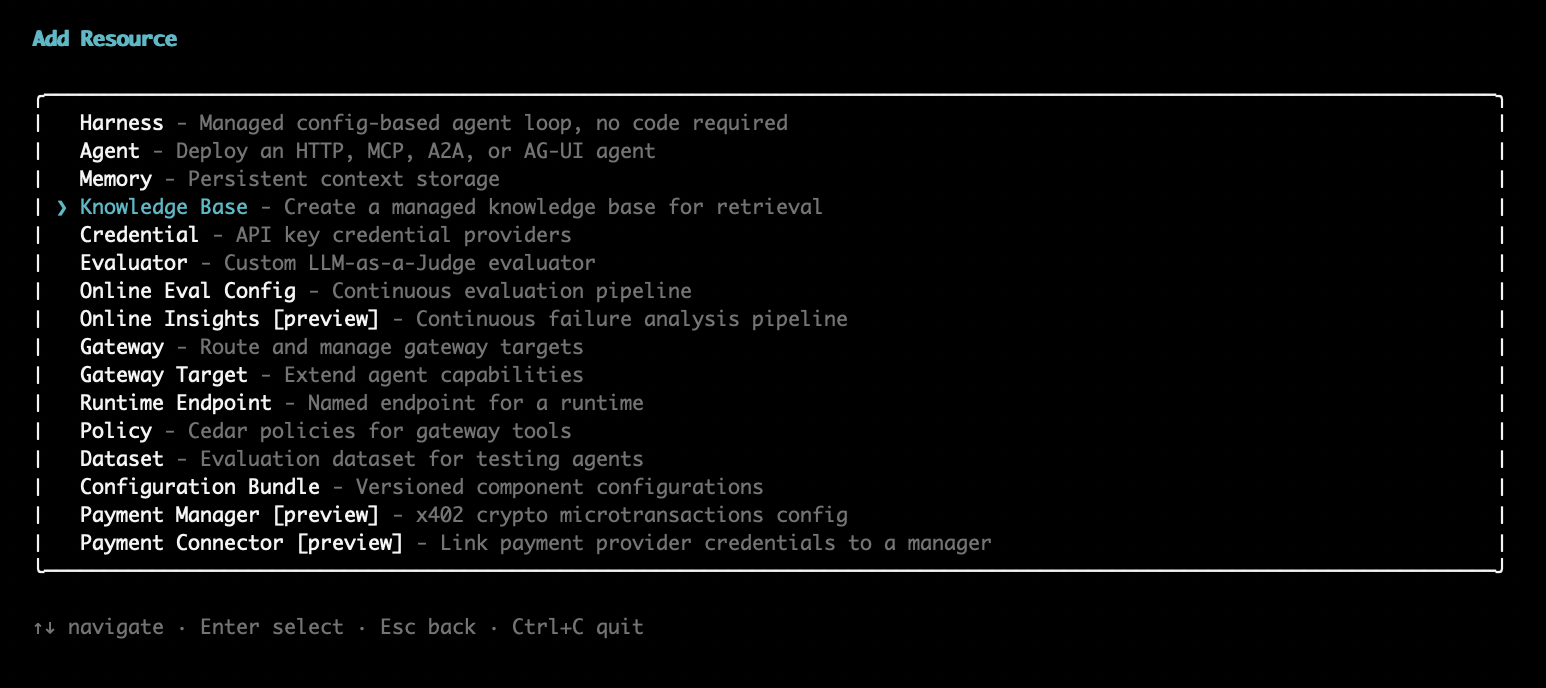
在 AgentCore CLI 交互式终端用户界面中,运行agentcore add gateway-target,然后从目标类型选择器中选择 Amazon Bedrock 知识库:
向导会提示您输入名称和描述,并允许您选择一种或多种源类型和来源。
在您调用后CreateGatewayTarget,Gateway 会异步验证配置(通常在大约 30 秒内),其中包括对每个绑定知识库的GetKnowledgeBase检查。轮询GetGatewayTarget直至status结束READY;FAILED状态包括描述问题的原因。
要自定义代理检索(例如,限制规划迭代或安装护栏),请在中添加可选字段。agenticRetrieveConfiguration如果省略它们,则服务管理的默认值适用。有关所有可接受的值,请参阅配置参考。
{
  "name": "AgenticRetrieveStream",
  "parameterValues": {
    "retrievers": [
      { "configuration": { "knowledgeBase": { "knowledgeBaseId": "<KB_ID>" } } }
    ],
    "agenticRetrieveConfiguration": {
      "maxAgentIteration": 5,
      "policyConfiguration": {
        "guardrailConfiguration": {
          "guardrailId": "<GUARDRAIL_ID>",
          "guardrailVersion": "1"
        }
      }
    }
  }
}
控制代理可以设置哪些参数
每个工具配置条目接受两个参数控件,用于确定呼叫代理看到的内容以及网关向知识库发送的内容:
绑定 knowledgeBaseIdparameterValues,不要将其公开。
以下配置条目绑定知识库,将默认值设置为 10 个结果,并将查询文本和结果数暴露给代理:
{
  "name": "Retrieve",
  "description": "Search the knowledge base for relevant documents.",
  "parameterValues": {
    "knowledgeBaseId": "<KB_ID>",
    "retrievalConfiguration": {
      "managedSearchConfiguration": {
        "numberOfResults": 10
      }
    }
  },
  "parameterOverrides": [
    {
      "path": "$.retrievalQuery.text",
      "description": "The search query. Use specific keywords for best results.",
      "visible": true
    },
    {
      "path": "$.retrievalConfiguration.managedSearchConfiguration.numberOfResults",
      "description": "Number of results to retrieve (1-100).",
      "visible": true
    }
  ]
}
配置网关服务角色
此连接器使用网关执行角色 ——您传递给的 IAM 角色 ARNCreateGateway,该 AgentCore 服务假定该角色代表您调用后端。这是您创建的角色,而不是服务相关角色。对于亚马逊 Bedrock 托管知识库连接器,它需要以下权限:
-
bedrock:GetKnowledgeBase— 在创建目标时验证绑定知识库。范围限于托管知识库资源。
-
bedrock:Retrieve— 用于Retrieve工具。范围限于托管知识库资源。
-
bedrock:AgenticRetrieveStream— 用于AgenticRetrieveStream工具。此操作的范围不限于托管知识库资源,因此请将其授予权限。*
网关将后端调用签名为bedrock服务。bedrock:GetKnowledgeBase无论您添加了哪些工具,都包括在内;如果仅添加一个工具,则仅包括该工具的检索操作。
bedrock-agentcore:InvokeGateway不是执行角色的一部分。该权限属于调用者(调用网关的代理或应用程序),而不属于网关承担的角色。
将包含以下内容的策略添加到附加到网关的执行角色中:
{
  "Version": "2012-10-17",
  "Statement": [
    {
      "Sid": "ValidateKnowledgeBase",
      "Effect": "Allow",
      "Action": "bedrock:GetKnowledgeBase",
      "Resource": "arn:aws:bedrock:<REGION>:<ACCOUNT_ID>:knowledge-base/<KB_ID>"
    },
    {
      "Sid": "RetrieveFromKnowledgeBase",
      "Effect": "Allow",
      "Action": "bedrock:Retrieve",
      "Resource": "arn:aws:bedrock:<REGION>:<ACCOUNT_ID>:knowledge-base/<KB_ID>"
    },
    {
      "Sid": "AgenticRetrieveStream",
      "Effect": "Allow",
      "Action": "bedrock:AgenticRetrieveStream",
      "Resource": "*"
    }
  ]
}
服务角色还必须信任该 AgentCore 服务,这样它才能代入该角色。附上以下信任政策,将其范围限定为您的账户和网关,并附上aws:SourceAccount和aws:SourceArn条件:
{
  "Version": "2012-10-17",
  "Statement": [
    {
      "Sid": "AllowAgentCoreToAssumeRole",
      "Effect": "Allow",
      "Principal": {
        "Service": "bedrock-agentcore.amazonaws.com"
      },
      "Action": "sts:AssumeRole",
      "Condition": {
        "StringEquals": {
          "aws:SourceAccount": "<ACCOUNT_ID>"
        },
        "ArnLike": {
          "aws:SourceArn": "arn:aws:bedrock-agentcore:<REGION>:<ACCOUNT_ID>:gateway/*"
        }
      }
    }
  ]
}
使用 Web 搜索工具添加连接器目标
您可以将内置连接器作为目标添加到网关。Web 搜索工具连接器无需自定义基础架构或 API 密钥即可提供托管的 Web 搜索功能。
有关 Web 搜索工具连接器的更多信息,请参阅 Web 搜索工具。
设置 Web 搜索工具
您可以选择通过在source字段中添加来将目标固定到特定的连接器版本。version如果省略version,则目标将使用连接器的当前默认版本。有关连接器版本的更多信息,请参阅连接器版本。
例
- Boto3
-
-
以下 Python 代码显示了如何使用 Py AWS thon SDK (Boto3) 使用 Web 搜索工具连接器配置创建网关目标:
import boto3

gateway_client = boto3.client("bedrock-agentcore-control", region_name="<REGION>")

gateway_client.create_gateway_target(
    name="web-search-tool",
    gatewayIdentifier="<GATEWAY_ID>",
    targetConfiguration={
        "mcp": {
            "connector": {
                "source": {"connectorId": "web-search", "version": "1.1.0"},
                "configurations": [{"name": "WebSearch", "parameterValues": {}}],
            }
        }
    },
    credentialProviderConfigurations=[
        {"credentialProviderType": "GATEWAY_IAM_ROLE"}
    ],
)
- AWS CLI
-
-
以下命令使用 AWS CLI 使用 Web 搜索工具连接器配置创建网关目标:
aws bedrock-agentcore-control create-gateway-target \
  --gateway-identifier "<GATEWAY_ID>" \
  --name "web-search-tool" \
  --target-configuration '{
    "mcp": {
      "connector": {
        "source": {
          "connectorId": "web-search",
          "version": "1.1.0"
        },
        "configurations": [
          {
            "name": "WebSearch",
            "parameterValues": {}
          }
        ]
      }
    }
  }' \
  --credential-provider-configurations '[{"credentialProviderType": "GATEWAY_IAM_ROLE"}]' \
  --region "<REGION>"
- AgentCore CLI
-
-
要添加 Web 搜索工具目标,请运行agentcore add gateway-target以下命令--type connector --connector web-search:
agentcore add gateway-target \
  --name MyWebSearchTarget \
  --type connector \
  --connector web-search \
  --gateway MyGateway
agentcore deploy
- Interactive
-
-
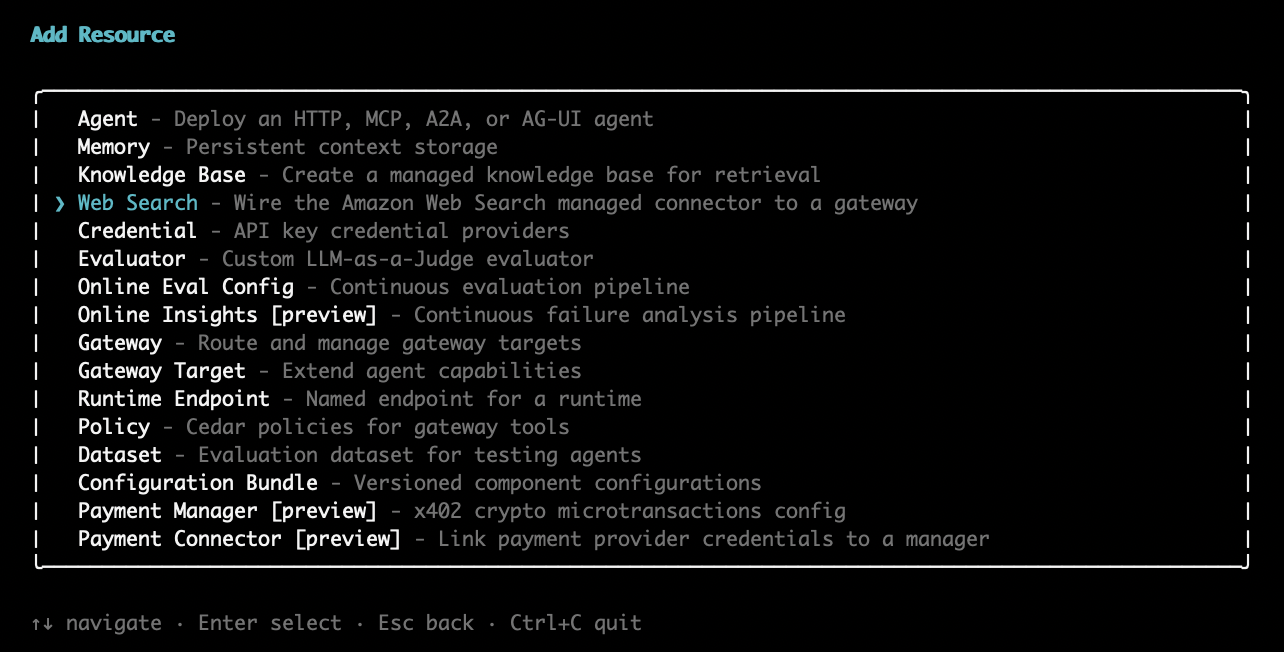
在 AgentCore CLI 交互式终端用户界面中,运行agentcore add gateway-target,然后从目标类型选择器中选择 Amazon Web Search:
向导会提示您输入目标名称、要连接的网关以及要从搜索结果中排除的可选域列表。
配置域过滤
您可以通过配置域名包含列表或排除列表来限制允许 Web 搜索工具查询哪些域。这对于想要阻止代理从特定网站返回结果的管理员很有用。
-
Target-level 域排除列表 -从目标的所有搜索中排除的域列表,在创建目标时使用设置parameterValues.domainFilter.exclude。排除列表在服务器端强制执行,对呼叫代理隐藏。
-
Target-level 域包含列表(连接器版本1.2.0及更高版本)-除了排除列表外,您还可以配置parameterValues.domainFilter.include为将搜索限制在一组特定的域中。
Request-level 在连接器版本 include/exclude 及更高版本1.2.0中,过滤器(域和发布日期范围)可供呼叫代理使用。 Request-level 过滤器由目标级别的排除和包含列表组成:目标级别的排除和包含项始终适用,代理无法放松它们。
以下示例创建了一个固定到版本1.2.0的 Web 搜索工具目标,其中包含域名包含列表和排除列表:
例
- Boto3
-
-
以下 Python 代码显示了如何使用 Py AWS thon 软件开发工具包 (Boto3) 创建具有域过滤功能的 Web 搜索工具目标:
import boto3

gateway_client = boto3.client("bedrock-agentcore-control", region_name="<REGION>")

gateway_client.create_gateway_target(
    name="web-search-tool",
    gatewayIdentifier="<GATEWAY_ID>",
    targetConfiguration={
        "mcp": {
            "connector": {
                "source": {"connectorId": "web-search", "version": "1.2.0"},
                "configurations": [
                    {
                        "name": "WebSearch",
                        "parameterValues": {
                            "domainFilter": {
                                "include": ["allowed-website-1.com", "allowed-website-2.com"],
                                "exclude": ["blocked-website-1.com", "blocked-website-2.com"]
                            }
                        },
                    }
                ],
            }
        }
    },
    credentialProviderConfigurations=[
        {"credentialProviderType": "GATEWAY_IAM_ROLE"}
    ],
)
- AWS CLI
-
-
以下命令使用 AWS CLI 创建具有域过滤功能的 Web 搜索工具目标:
aws bedrock-agentcore-control create-gateway-target \
  --gateway-identifier "<GATEWAY_ID>" \
  --name "web-search-tool" \
  --target-configuration '{
    "mcp": {
      "connector": {
        "source": {
          "connectorId": "web-search",
          "version": "1.2.0"
        },
        "configurations": [
          {
            "name": "WebSearch",
            "parameterValues": {
              "domainFilter": {
                "include": ["allowed-website-1.com", "allowed-website-2.com"],
                "exclude": ["blocked-website-1.com", "blocked-website-2.com"]
              }
            }
          }
        ]
      }
    }
  }' \
  --credential-provider-configurations '[{"credentialProviderType": "GATEWAY_IAM_ROLE"}]' \
  --region "<REGION>"
- AgentCore CLI
-
-
通过以下方式传递以逗号分隔的域名列表:--exclude-domains
agentcore add gateway-target \
  --name MyWebSearchTarget \
  --type connector \
  --connector web-search \
  --exclude-domains blocked-website-1.com,blocked-website-2.com \
  --gateway MyGateway
agentcore deploy
- Interactive
-
-
在 AgentCore CLI 交互式终端用户界面中,在您选择 Amazon Web Search 并选择网关后,“添加网关目标” 向导会提示您输入一个以逗号分隔的可选域名列表,以从搜索结果中排除。将提示符留空将创建不进行域过滤的目标。
您还可以更新现有目标以使用添加或修改域筛选UpdateGatewayTarget。
配置网关服务角色
网关需要一个服务角色来允许该 AgentCore 服务代表您执行操作。对于 Web 搜索工具,该角色需要以下权限:
向附加到网关的服务角色添加包含以下内容的策略:
{
  "Version": "2012-10-17",
  "Statement": [
    {
      "Sid": "InvokeGateway",
      "Effect": "Allow",
      "Action": "bedrock-agentcore:InvokeGateway",
      "Resource": "arn:aws:bedrock-agentcore:<REGION>:<ACCOUNT_ID>:gateway/*"
    },
    {
      "Sid": "InvokeWebSearch",
      "Effect": "Allow",
      "Action": "bedrock-agentcore:InvokeWebSearch",
      "Resource": "arn:aws:bedrock-agentcore:<REGION>:aws:tool/web-search.v1"
    }
  ]
}