Architecture
This section provides a reference implementation architecture diagram, AWS Well-Architected design considerations, security components, scheduler configurations, and AWS services used in this solution.
Architecture diagram
Deploying this solution deploys the following components in your AWS account.
Instance Scheduler on the AWS Cloud
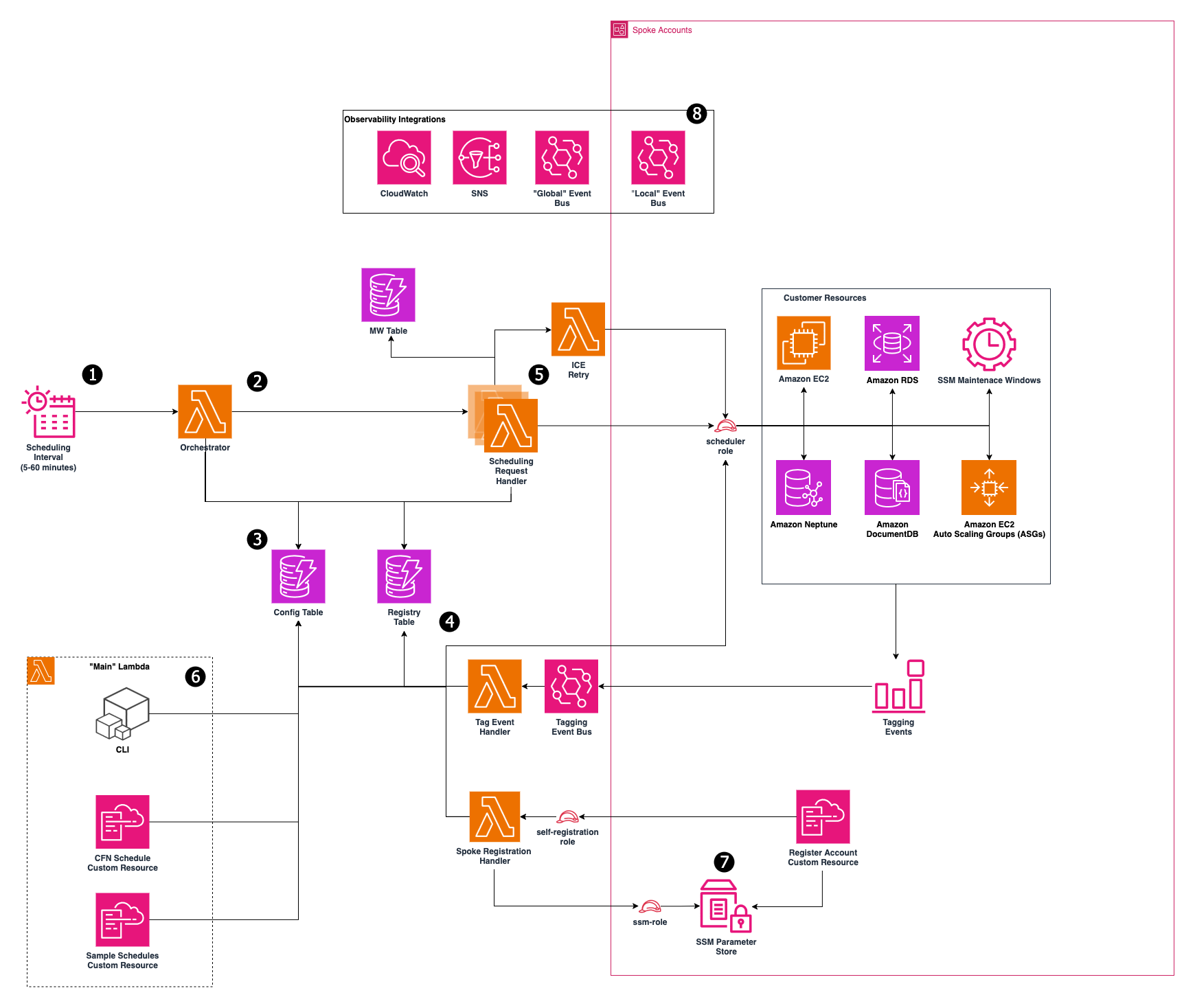
-
An Amazon EventBridge Rule triggers the orchestration Lambda function at configurable intervals (default: every 5 minutes).
-
The EventBridge rule invokes an AWS Lambda
orchestration function that queries the DynamoDB configuration table to identify active scheduling targets. The orchestrator then invokes parallel scheduling Lambda functions for each active target. -
Schedule definitions and periods are stored in an Amazon DynamoDB
configuration table. You can define any number of schedules and periods in this table to control when your instances start and stop. -
A DynamoDB registry table automatically tracks all managed resources. When resources are tagged for scheduling, they are registered in this table in response to AWS tagging events.
-
Each scheduling Lambda function describes tagged resources, evaluates their schedules against the current time, and executes the appropriate start or stop actions.
-
For EC2 instances, if a start operation fails due to insufficient capacity, the solution can be configured to attempt to resize the instance to alternate instance types before retrying the start operation.
-
-
Schedule management is available through the DynamoDB console, scheduler CLI tool, or AWS CloudFormation Custom resources. The solution deploys with several example schedules pre-configured.
-
Cross-account deployments use a hub-spoke architecture where spoke accounts automatically self-register with the hub account. Spoke stacks must be deployed in the same region as the hub stack and must be either pre-approved by the hub stack or members of the same AWS Organization.
-
The solution publishes scheduling and registration events to EventBridge buses in the hub account (global events) and spoke accounts (local events per region).
Note
AWS CloudFormation resources are created from (AWS CDK)
All Lambda functions used by this solution leverage AWS IAM for permission requirements for your resources, and AWS KMS for encryption of the Amazon Simple Notification Service
Each time the solution performs a scheduling interval, it checks the current state of each appropriately tagged instance against the targeted state (defined by one or more periods in a schedule in the instance tag) in the associated schedule. The schedule interval then applies the appropriate start or stop action, as necessary.
For example, if the Lambda function is invoked on a Friday at 9 AM (ET) and it identifies a stopped EC2 or RDS DB instance with a Schedule=office-hours tag, it will check Amazon DynamoDB for the office-hours schedule configuration details. If the office-hours schedule contains a period that indicates that the instance should run Monday through Friday from 9 AM ET to 5 PM ET, the Lambda function will start that instance.
The Lambda function also records information about your resources and displays them in an optional Amazon CloudWatch Custom dashboard. Information recorded includes the number of instances tagged for each schedule, the sizes of those instances, and whether or not those instances are currently in a running or stopped state. For more information on this custom dashboard, refer to Operational insights dashboard.
Note
Stopping an Amazon EC2 instance is different from terminating an Amazon EC2 instance. By default, Amazon EC2 instances are configured to stop, not terminate, when shut down, but you can modify this behavior. Before using this solution, verify that instances are set to stop or terminate as appropriate.
