Machine Learning Enabled Predictive Maintenance on AWS
Publication date: September 13, 2022 (Diagram history)
With this architecture, you can implement condition-based maintenance with near real-time inference results and notifications for sucker rod pumping systems. These systems are the most widely applied artificial lift equipment in oil and gas. This architecture uses AWS IoT Core, Amazon Timestream, Amazon Managed Grafana, Amazon Data Firehose, and Amazon Lookout for Equipment.
ML predictive maintenance architecture diagram
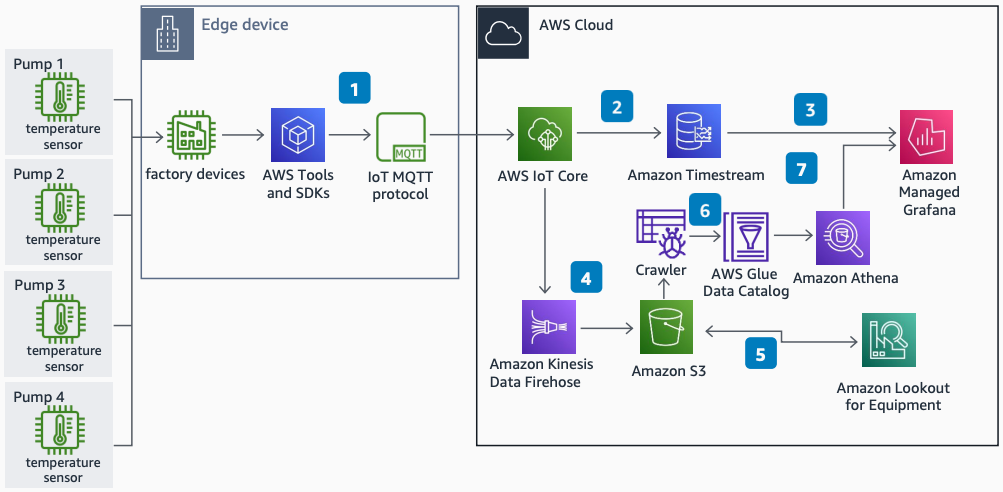
The following steps describe the architecture:
-
Use Message Queuing Telemetry Transport (MQTT) protocol in an IoT device SDK to ingest data to AWS IoT Core from sucker rod pumps.
-
Configure an IoT rule in AWS IoT Core to store data in Amazon Timestream as time series data.
-
Visualize and monitor sensor data with Amazon Managed Grafana from a Timestream database.
-
Configure an IoT rule in AWS IoT Core to capture, transform, and deliver data to Amazon S3 with Amazon Data Firehose.
-
Amazon Lookout for Equipment analyzes data from Amazon S3 and trains a unique ML model to detect equipment abnormalities in near real time. Store inference results in Amazon S3.
-
Use AWS Glue Data Catalog to categorize data. Amazon Athena integrates with the catalog for on-demand queries.
-
Display inference results from Athena with Amazon Managed Grafana.
Further reading
For additional information, see the following resources:
Diagram history
To be notified about updates to this reference architecture diagram, subscribe to the RSS feed.
| Change | Description | Date |
|---|---|---|
Initial publication | Reference architecture diagram first published. | September 13, 2022 |
RSS subscription
To subscribe to RSS updates, you must have an RSS plugin enabled for the browser that you are using.
