기계 번역으로 제공되는 번역입니다. 제공된 번역과 원본 영어의 내용이 상충하는 경우에는 영어 버전이 우선합니다.
6단계: 봇 사용
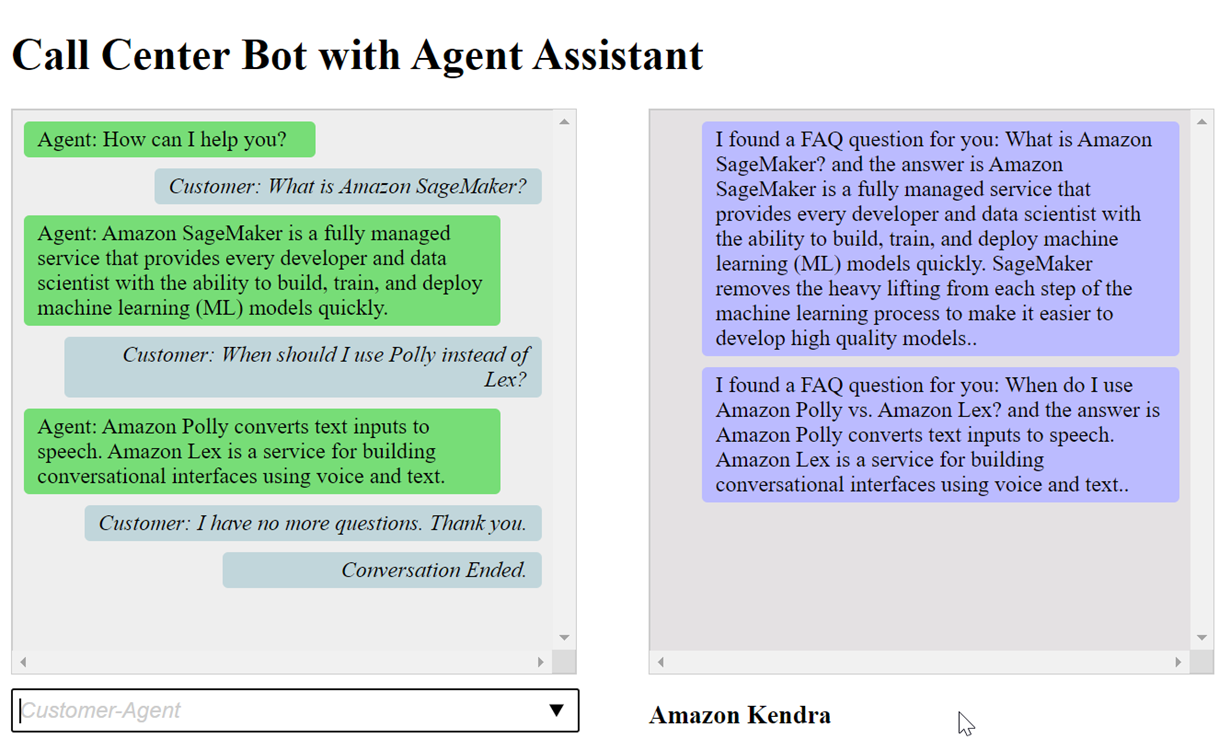
데모용으로 봇에 고객 및 에이전트로서 입력을 제공합니다. 이 둘을 구분하기 위해 고객이 묻는 질문은 “고객:”으로 시작하고 에이전트가 제공하는 답변은 “에이전트:”로 시작합니다. 제안된 입력 메뉴 중에서 선택할 수 있습니다.
다음과 같이를 열어 웹 애플리케이션을 실행index.html하여 봇과의 대화에 참여합니다.
index.html 파일의 pushChat() 함수에 대한 설명은 다음과 같습니다.
            var endConversationStatement = "Customer: I have no more questions. Thank you."
            // If the agent has to send a message, start the message with 'Agent'
            var inputText = document.getElementById('input');
            if (inputText && inputText.value && inputText.value.trim().length > 0 && inputText.value[0]=='Agent') {
                showMessage(inputText.value, 'agentRequest','conversation');
                inputText.value = "";
            }
            // If the customer has to send a message, start the message with 'Customer'
            if(inputText && inputText.value && inputText.value.trim().length > 0 && inputText.value[0]=='Customer') {
                // disable input to show we're sending it
                var input = inputText.value.trim();
                inputText.value = '...';
                inputText.locked = true;
                customerInput = input.substring(2);

                // Send it to the Lex runtime
                var params = {
                    botAlias: '$LATEST',
                    botName: 'KendraTestBot',
                    inputText: customerInput,
                    userId: lexUserId,
                    sessionAttributes: sessionAttributes
                };

                showMessage(input, 'customerRequest', 'conversation');
                if(input== endConversationStatement){
                    showMessage('Conversation Ended.','conversationEndRequest','conversation');
                }
                lexruntime.postText(params, function(err, data) {
                    if (err) {
                        console.log(err, err.stack);
                        showMessage('Error:  ' + err.message + ' (see console for details)', 'lexError', 'conversation1')
                    }

                    if (data &&input!=endConversationStatement) {
                        // capture the sessionAttributes for the next cycle
                        sessionAttributes = data.sessionAttributes;

                            showMessage(data, 'lexResponse', 'conversation1');
                    }
                    // re-enable input
                    inputText.value = '';
                    inputText.locked = false;
                });
            }
            // we always cancel form submission
            return false;
고객으로서 입력을 제공하면 Amazon Lex V2 런타임 API가 이를 Amazon Lex V2로 전송합니다.
이 showMessage(daText, senderRequest, displayWindow) 함수는 채팅 창에 에이전트와 고객 간의 대화를 표시합니다. Amazon Kendra에서 제안한 응답은 인접한 창에 표시됩니다. 고객이 “I have no more questions. Thank you.”과 같이 말하면 대화가 종료됩니다.
참고: 사용하지 않을 때는 Amazon Kendra 색인을 삭제하십시오.
