기계 번역으로 제공되는 번역입니다. 제공된 번역과 원본 영어의 내용이 상충하는 경우에는 영어 버전이 우선합니다.
Appium을 사용하여 디바이스와 상호 작용
원격 액세스 세션을 생성하면 디바이스를 Appium 테스트에 사용할 수 있습니다. 원격 액세스 세션의 전체 기간 동안 사용하는 클라이언트에 대한 제한 없이 디바이스에서 원하는 수만큼 Appium 세션을 실행할 수 있습니다. 예를 들어 IDE의 로컬 Appium 코드를 사용하여 테스트를 실행한 다음 Appium Inspector로 전환하여 발생하는 문제를 해결할 수 있습니다. 세션은 최대 150분 동안 지속될 수 있지만 5분 이상 활동이 없는 경우(대화형 콘솔 또는 Appium 엔드포인트를 통해) 세션 시간이 초과됩니다.
Appium 세션으로 테스트하기 위해 앱 사용
Appium 세션에 사용할 앱을 제공하는 방법에는 여러 가지가 있습니다.
-
앱을 Device Farm에 업로드하고 세션에 설치합니다.
-
HTTPS URL 또는 Amazon S3 URI를 appium:app 기능으로 지정합니다.
-
패키지 이름으로 이미 설치된 앱을 참조합니다(appium:appPackageAndroid 또는 iOSappium:bundleId에서 사용).
-
browserName 기능을 지정하여 웹 앱을 테스트합니다(ChromeAndroid의 경우 , iOSSafari의 경우 ).
표준 앱 크기 제한(4GB)은 모든 앱 소스에 적용됩니다.
Device Farm은 원격 액세스 세션 appium:app 중에에 로컬 파일 시스템 경로를 전달하는 기능을 지원하지 않습니다.
앱 업로드, 설치 및 사용
Appium 세션에서 업로드된 앱을 사용하려면 다음 단계를 따르세요.
-
앱 업로드 및 설치
테스트 중인 디바이스에 앱을 업로드하고 설치하는 방법에는 두 가지가 있습니다.
-
설치된 앱 사용
설치되면 앱이 후속 Appium 세션의 기본 appium:app 기능으로 자동으로 주입됩니다. 보조 앱을 포함하면 보조 앱이 appium:otherApps 기능으로 설정됩니다.
예를 들어를 앱com.aws.devicefarm.sample으로,를 보조 앱 중 com.aws.devicefarm.other.sample 하나로 사용하여 원격 액세스 세션을 생성하는 경우 Appium 세션을 생성하면 다음과 유사한 기능을 갖게 됩니다.
{
    "value":
    {
        "sessionId": "abcdef123456-1234-5678-abcd-abcdef123456",
        "capabilities":
        {
            "app": "/tmp/com.aws.devicefarm.sample.apk",
            "otherApps": "[\"/tmp/com.aws.devicefarm.other.sample.apk\"]",
            ...
        }
    }
}
세션 중에 새 앱을 설치하면 현재 appium:app 기능이 대체됩니다. 이전에 설치된 앱에 고유한 패키지 이름이 있는 경우 디바이스에 남아 appium:otherApps 기능으로 이동합니다.
예를 들어 처음에 원격 액세스 세션을 생성할 com.aws.devicefarm.sample 때를 사용한 다음 세션 com.aws.devicefarm.other.sample 중에를 설치하는 경우 Appium 세션에는 다음과 유사한 기능이 있습니다.
{
    "value":
    {
        "sessionId": "abcdef123456-1234-5678-abcd-abcdef123456",
        "capabilities":
        {
            "app": "/tmp/com.aws.devicefarm.other.sample.apk",
            "otherApps": "[\"/tmp/com.aws.devicefarm.sample.apk\"]",
            ...
        }
    }
}
HTTPS URL 사용
Appium 세션을 생성할 때 공개적으로 액세스할 수 있는 HTTPS URL을 appium:app 원하는 기능으로 지정할 수 있습니다. URL은 다운로드 가능한 앱 파일(예: .apk 또는 .ipa 파일)을 직접 가리켜야 합니다. Device Farm은 지정된 URL에서 앱을 다운로드하여 테스트 중인 디바이스에 설치합니다.
HTTPS URLs만 지원됩니다. 일반 HTTP URLs 거부됩니다.
예를 들어 다음 Appium 세션 생성 요청은 HTTPS URL에서 앱을 다운로드합니다.
{
    "capabilities":
    {
        "alwaysMatch": {},
        "firstMatch":
        [
            {
                "appium:app": "https://example.com/path/to/MyApp.apk"
            }
        ]
    }
}
Amazon S3 URI 사용
Appium 세션을 생성할 때 Amazon S3 URI(예: s3://my-bucket/path/to/MyApp.ipa)를 appium:app 원하는 기능으로 지정할 수 있습니다. Device Farm은 지정된 S3 위치에서 앱을 다운로드하여 테스트 중인 디바이스에 설치합니다.
S3 URI를 사용하려면 다음 요구 사항을 충족해야 합니다.
-
원격 액세스 세션은 IAM 실행 역할이 구성된 프로젝트에서 시작해야 합니다.
-
역할은 원격 액세스 세션 기간 동안 수임되므로 IAM 실행 역할의 최대 세션 기간은 최소 150분이어야 합니다.
-
IAM 실행 역할에는 URIs3:GetObject에 지정된 S3 객체에서를 호출할 수 있는 권한이 있어야 합니다. 또한 Device Farm이 다운로드를 시도하기 전에 객체의 존재를 검증할 수 있도록 동일한 객체에 대한 s3:HeadObject 권한을 부여하는 것이 좋습니다.
예를 들어 다음 Appium 세션 생성 요청은 S3 URI에서 앱을 다운로드합니다.
{
    "capabilities":
    {
        "alwaysMatch": {},
        "firstMatch":
        [
            {
                "appium:app": "s3://my-test-bucket/apps/MyApp.ipa"
            }
        ]
    }
}
다음은 선택적 권한을 포함하여 Amazon S3에서 앱을 다운로드하기 위한 권장 액세스 권한을 부여하는 IAM s3:HeadObject 권한 정책의 예입니다. IAM 실행 역할 구성에 대한 자세한 내용은 섹션을 참조하세요IAM 실행 역할을 사용하여 AWS 리소스에 액세스.
예
{
  "Version": "2012-10-17",
  "Statement": [
    {
      "Effect": "Allow",
      "Action": [
        "s3:GetObject",
        "s3:HeadObject"
      ],
      "Resource": "arn:aws:s3:::my-test-bucket/apps/*"
    }
  ]
}
이미 설치된 앱 사용
테스트하려는 앱이 디바이스에 이미 설치되어 있는 경우 업로드하는 대신 패키지 이름으로 직접 참조할 수 있습니다. Android에서는 appium:appPackage 및 appium:appActivity 기능을 사용하고 iOS에서는 appium:bundleId 기능을 사용합니다.
예를 들어 다음 Appium 세션 생성 요청은 이미 설치된 Android 앱을 시작합니다.
{
    "capabilities":
    {
        "alwaysMatch": {},
        "firstMatch":
        [
            {
                "appium:appPackage": "com.example.myapp",
                "appium:appActivity": "com.example.myapp.MainActivity"
            }
        ]
    }
}
iOS에서는 appium:bundleId 대신를 사용합니다.
{
    "capabilities":
    {
        "alwaysMatch": {},
        "firstMatch":
        [
            {
                "appium:bundleId": "com.example.myapp"
            }
        ]
    }
}
웹 앱 테스트
웹 앱을 테스트하려면 Appium 세션 생성 요청에서 browserName 기능을 지정합니다. Android 디바이스 또는 iOS 디바이스Chrome에서 Safari를 사용합니다.
예를 들어 다음 요청은 Android 디바이스에서 Chrome을 엽니다.
{
    "capabilities":
    {
        "alwaysMatch": {},
        "firstMatch":
        [
            {
                "browserName": "Chrome"
            }
        ]
    }
}
Appium 엔드포인트 사용 방법
다음은 콘솔 AWS CLI, 및 AWS SDKs. 이 단계에는 다양한 Appium 클라이언트 테스트 프레임워크를 사용하여 테스트 실행을 시작하는 방법이 포함됩니다.
- Console
-
-
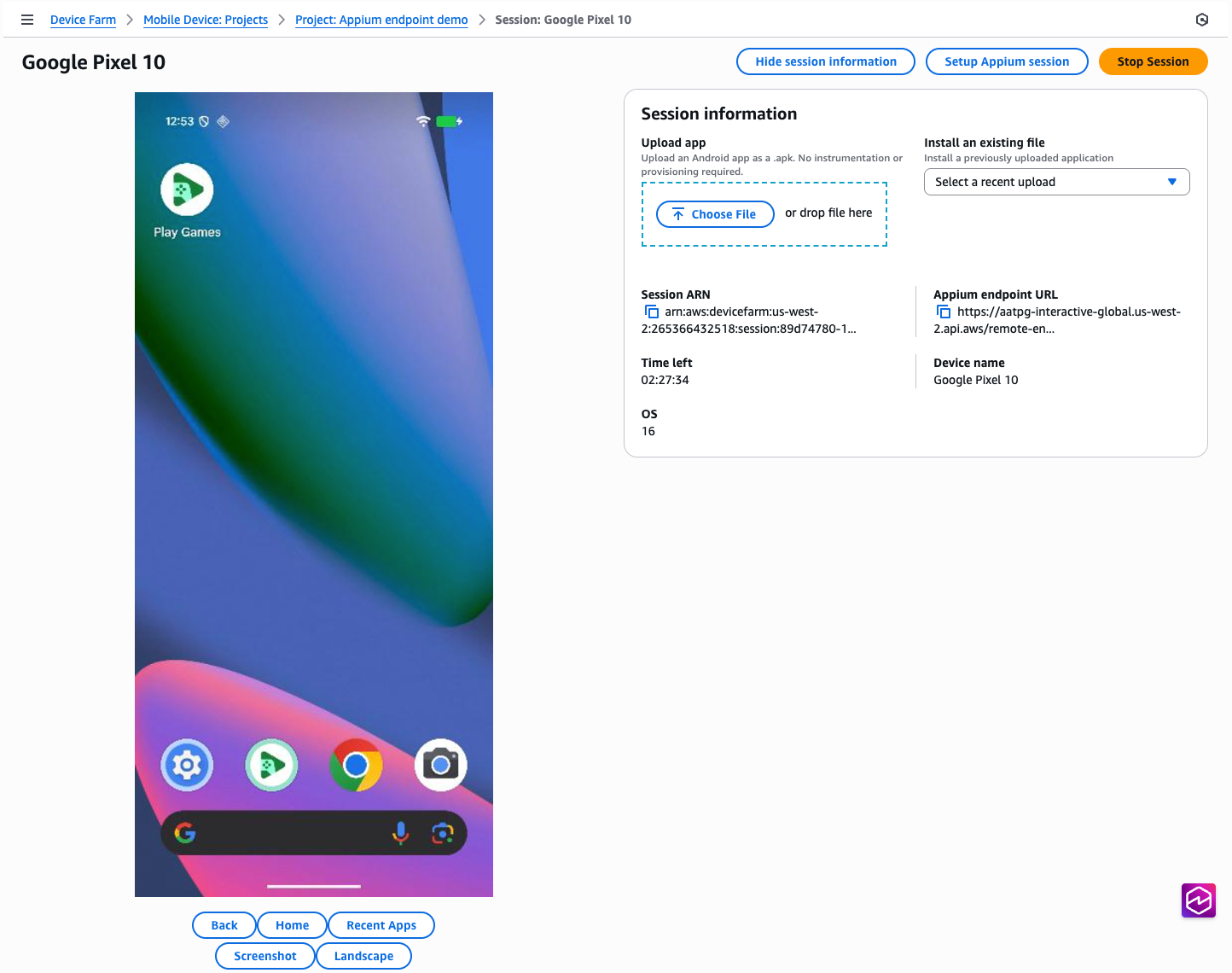
웹 브라우저에서 원격 액세스 세션 페이지를 엽니다.
-
Appium Inspector를 사용하여 세션을 실행하려면 다음을 수행합니다.
-
Appium 세션 설정 버튼을 클릭합니다.
-
Appium Inspector를 사용하여 세션을 시작하는 방법은 페이지의 지침을 따르십시오.
-
로컬 IDE에서 Appium 테스트를 실행하려면 다음을 수행합니다.
-
Appium 엔드포인트 URL 텍스트 옆에 있는 "복사" 아이콘을 클릭합니다.
-
현재 원격 주소 또는 명령 실행기를 지정할 때마다이 URL을 로컬 Appium 코드에 붙여넣습니다. 언어별 예제를 보려면이 예제 창의 탭 중 하나를 클릭하여 원하는 언어를 선택하십시오.
- AWS CLI
-
먼저 최신 버전을 다운로드하고 설치하여 AWS CLI 버전이 up-to-date 버전인지 확인합니다.
Appium 엔드포인트 필드는 AWS CLI의 이전 버전에서는 사용할 수 없습니다.
세션이 시작되고 실행되면 GetRemoteAccessSession API 호출에 대한 응답remoteDriverEndpoint에서 라는 필드를 통해 Appium 엔드포인트 URL을 사용할 수 있습니다.
$ aws devicefarm get-remote-access-session \
    --arn "arn:aws:devicefarm:us-west-2:123456789876:session:abcdef123456-1234-5678-abcd-abcdef123456/abcdef123456-1234-5678-abcd-abcdef123456/00000"
그러면 다음과 같은 출력이 표시됩니다.
{
    "remoteAccessSession": {
        "arn": "arn:aws:devicefarm:us-west-2:111122223333:session:abcdef123456-1234-5678-abcd-abcdef123456/abcdef123456-1234-5678-abcd-abcdef123456/00000",
        "name": "Google Pixel 8",
        "status": "RUNNING",
        "endpoints": {
            "remoteDriverEndpoint": "https://devicefarm-interactive-global.us-west-2.api.aws/remote-endpoint/ABCD1234...",
        ...
}
현재 원격 주소 또는 명령 실행기를 지정할 때마다 로컬 Appium 코드에서이 URL을 사용할 수 있습니다. 언어별 예제를 보려면이 예제 창의 탭 중 하나를 클릭하여 원하는 언어를 선택하십시오.
명령줄에서 엔드포인트와 직접 상호 작용하는 방법의 예를 보려면 명령줄 도구 curl을 사용하여 WebDriver 엔드포인트를 직접 호출할 수 있습니다.
$ curl "https://devicefarm-interactive-global.us-west-2.api.aws/remote-endpoint/ABCD1234.../status"
그러면 다음과 같은 출력이 표시됩니다.
{
    "value":
    {
        "ready": true,
        "message": "The server is ready to accept new connections",
        "build":
        {
            "version": "2.5.1"
        }
    }
}
- Python
-
세션이 시작되고 실행되면 GetRemoteAccessSession API 호출에 대한 응답remoteDriverEndpoint에서 라는 필드를 통해 Appium 엔드포인트 URL을 사용할 수 있습니다.
# To get the URL
import sys
import boto3
from botocore.exceptions import ClientError

def get_appium_endpoint() -> str:
    session_arn = "arn:aws:devicefarm:us-west-2:111122223333:session:abcdef123456-1234-5678-abcd-abcdef123456/abcdef123456-1234-5678-abcd-abcdef123456/00000"
    device_farm_client = boto3.client("devicefarm", region_name="us-west-2")

    try:
        resp = device_farm_client.get_remote_access_session(arn=session_arn)
    except ClientError as exc:
        sys.exit(f"Failed to call Device Farm: {exc}")

    remote_access_session = resp.get("remoteAccessSession", {})
    endpoints = remote_access_session.get("endpoints", {})
    endpoint = endpoints.get("remoteDriverEndpoint")

    if not endpoint:
        sys.exit("Device Farm response did not include endpoints.remoteDriverEndpoint")

    return endpoint

# To use the URL
from appium import webdriver
from appium.options.android import UiAutomator2Options

opts = UiAutomator2Options()
driver = webdriver.Remote(get_appium_endpoint(), options=opts)
# ...
driver.quit()
- Java
-
참고:이 예제에서는 AWS SDK for Java v2를 사용하며 JDK 버전 11 이상과 호환됩니다.
세션이 시작되고 실행되면 GetRemoteAccessSession API 호출에 대한 응답remoteDriverEndpoint에서 라는 필드를 통해 Appium 엔드포인트 URL을 사용할 수 있습니다.
// To get the URL
import software.amazon.awssdk.auth.credentials.DefaultCredentialsProvider;
import software.amazon.awssdk.regions.Region;
import software.amazon.awssdk.services.devicefarm.DeviceFarmClient;
import software.amazon.awssdk.services.devicefarm.model.GetRemoteAccessSessionRequest;
import software.amazon.awssdk.services.devicefarm.model.GetRemoteAccessSessionResponse;

public class AppiumEndpointBuilder {
    public static String getAppiumEndpoint() throws Exception {
        String session_arn = "arn:aws:devicefarm:us-west-2:111122223333:session:abcdef123456-1234-5678-abcd-abcdef123456/abcdef123456-1234-5678-abcd-abcdef123456/00000";

        try (DeviceFarmClient client = DeviceFarmClient.builder()
                .region(Region.US_WEST_2)
                .credentialsProvider(DefaultCredentialsProvider.create())
                .build()) {

            GetRemoteAccessSessionResponse resp = client.getRemoteAccessSession(
                    GetRemoteAccessSessionRequest.builder().arn(session_arn).build()
            );

            String endpoint = resp.remoteAccessSession().endpoints().remoteDriverEndpoint();
            if (endpoint == null || endpoint.isEmpty()) {
                throw new IllegalStateException("remoteDriverEndpoint missing from response");
            }
            return endpoint;
        }
    }
}

// To use the URL
import io.appium.java_client.android.AndroidDriver;
import io.appium.java_client.android.options.UiAutomator2Options;

import java.net.URL;

public class ExampleTest {
    public static void main(String[] args) throws Exception {
        String endpoint = AppiumEndpointBuilder.getAppiumEndpoint();
        UiAutomator2Options options = new UiAutomator2Options();
        AndroidDriver driver = new AndroidDriver(new URL(endpoint), options);

        try {
            // ... your test ...
        } finally {
            driver.quit();
        }
    }
}
- JavaScript
-
참고:이 예제에서는 AWS SDK for JavaScript v3 및 WebdriverIO v8+ using Node 18+를 사용합니다.
세션이 시작되고 실행되면 GetRemoteAccessSession API 호출에 대한 응답remoteDriverEndpoint에서 라는 필드를 통해 Appium 엔드포인트 URL을 사용할 수 있습니다.
// To get the URL
import { DeviceFarmClient, GetRemoteAccessSessionCommand } from "@aws-sdk/client-device-farm";

export async function getAppiumEndpoint() {
  const sessionArn = "arn:aws:devicefarm:us-west-2:111122223333:session:abcdef123456-1234-5678-abcd-abcdef123456/abcdef123456-1234-5678-abcd-abcdef123456/00000";

  const client = new DeviceFarmClient({ region: "us-west-2" });
  const resp = await client.send(new GetRemoteAccessSessionCommand({ arn: sessionArn }));

  const endpoint = resp?.remoteAccessSession?.endpoints?.remoteDriverEndpoint;
  if (!endpoint) throw new Error("remoteDriverEndpoint missing from response");
  return endpoint;
}

// To use the URL with WebdriverIO
import { remote } from "webdriverio";

(async () => {
  const endpoint = await getAppiumEndpoint();
  const u = new URL(endpoint);

  const driver = await remote({
    protocol: u.protocol.replace(":", ""),
    hostname: u.hostname,
    port: u.port ? Number(u.port) : (u.protocol === "https:" ? 443 : 80),
    path: u.pathname + u.search,
    capabilities: {
      platformName: "Android",
      "appium:automationName": "UiAutomator2",
      // ...other caps...
    },
  });

  try {
    // ... your test ...
  } finally {
    await driver.deleteSession();
  }
})();
- C#
-
세션이 시작되고 실행되면 GetRemoteAccessSession API 호출에 대한 응답remoteDriverEndpoint에서 라는 필드를 통해 Appium 엔드포인트 URL을 사용할 수 있습니다.
// To get the URL
using System;
using System.Threading.Tasks;
using Amazon;
using Amazon.DeviceFarm;
using Amazon.DeviceFarm.Model;

public static class AppiumEndpointBuilder
{
    public static async Task<string> GetAppiumEndpointAsync()
    {
        var sessionArn = "arn:aws:devicefarm:us-west-2:111122223333:session:abcdef123456-1234-5678-abcd-abcdef123456/abcdef123456-1234-5678-abcd-abcdef123456/00000";

        var config = new AmazonDeviceFarmConfig
        {
            RegionEndpoint = RegionEndpoint.USWest2
        };
        using var client = new AmazonDeviceFarmClient(config);

        var resp = await client.GetRemoteAccessSessionAsync(new GetRemoteAccessSessionRequest { Arn = sessionArn });
        var endpoint = resp?.RemoteAccessSession?.Endpoints?.RemoteDriverEndpoint;

        if (string.IsNullOrWhiteSpace(endpoint))
            throw new InvalidOperationException("RemoteDriverEndpoint missing from response");

        return endpoint;
    }
}

// To use the URL
using OpenQA.Selenium.Appium;
using OpenQA.Selenium.Appium.Android;

class Example
{
    static async Task Main()
    {
        var endpoint = await AppiumEndpointBuilder.GetAppiumEndpointAsync();

        var options = new AppiumOptions();
        options.PlatformName = "Android";
        options.AutomationName = "UiAutomator2";

        using var driver = new AndroidDriver(new Uri(endpoint), options);
        try
        {
            // ... your test ...
        }
        finally
        {
            driver.Quit();
        }
    }
}
- Ruby
-
세션이 시작되고 실행되면 GetRemoteAccessSession API 호출에 대한 응답remoteDriverEndpoint에서 라는 필드를 통해 Appium 엔드포인트 URL을 사용할 수 있습니다.
# To get the URL
require 'aws-sdk-devicefarm'

def get_appium_endpoint
  session_arn = "arn:aws:devicefarm:us-west-2:111122223333:session:abcdef123456-1234-5678-abcd-abcdef123456/abcdef123456-1234-5678-abcd-abcdef123456/00000"

  client = Aws::DeviceFarm::Client.new(region: 'us-west-2')
  resp = client.get_remote_access_session(arn: session_arn)
  endpoint = resp.remote_access_session.endpoints.remote_driver_endpoint
  raise "remote_driver_endpoint missing from response" if endpoint.nil? || endpoint.empty?
  endpoint
end

# To use the URL
require 'appium_lib_core'

endpoint = get_appium_endpoint
opts = {
  server_url: endpoint,
  capabilities: {
    'platformName' => 'Android',
    'appium:automationName' => 'UiAutomator2'
  }
}

driver = Appium::Core.for(opts).start_driver
begin
  # ... your test ...
ensure
  driver.quit
end