기계 번역으로 제공되는 번역입니다. 제공된 번역과 원본 영어의 내용이 상충하는 경우에는 영어 버전이 우선합니다.
시나리오: AgentCore 메모리를 사용하는 고객 지원 AI 에이전트
이 섹션에서는 AgentCore 메모리를 사용하여 대화 기록을 유지하고 사용자 기본 설정에 대한 장기 인사이트를 추출하여 개인화된 지원을 제공하는 고객 지원 AI 에이전트를 구축하는 방법을 알아봅니다. 이 주제에는 AgentCore CLI 및 AWS SDK에 대한 코드 예제가 포함되어 있습니다.
쇼핑 웹 사이트의 지원 AI 에이전트와 협력하여 지연 주문에 대해 문의하는 고객인 Sarah를 생각해 보세요. AgentCore 메모리 APIs를 통한 상호 작용 흐름은 다음과 같습니다.
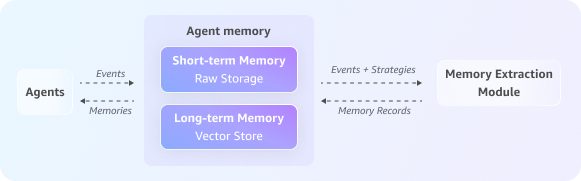
주제
1단계: AgentCore 메모리 생성
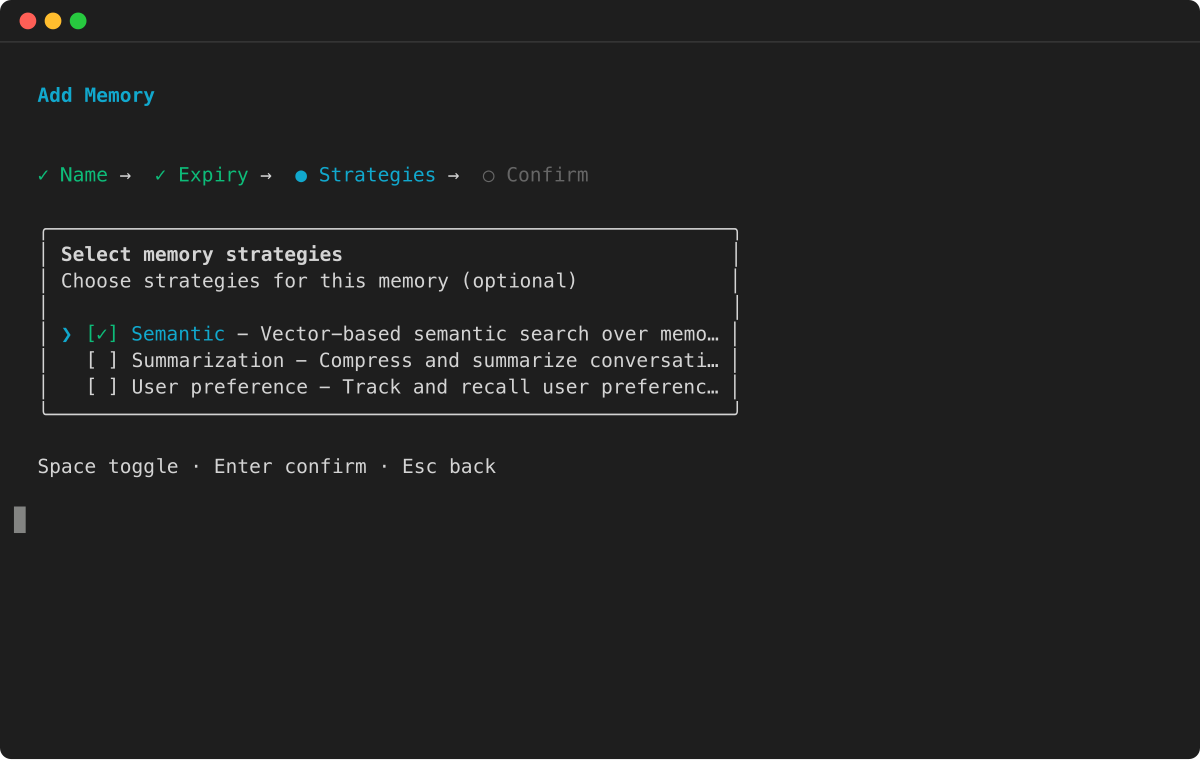
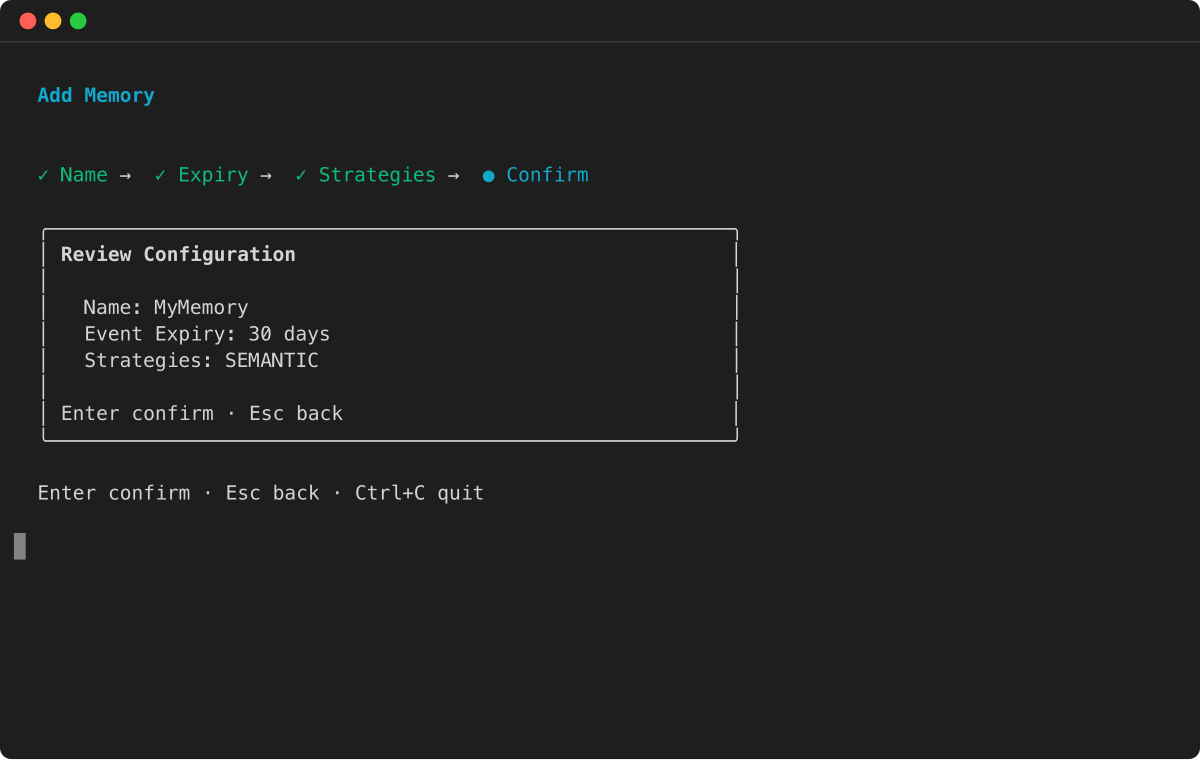
먼저 단기 및 장기 메모리 기능을 모두 사용하여 메모리 리소스를 생성하고 추출할 장기 정보에 대한 전략을 구성합니다.
예
2단계: 세션 시작
Sarah가 대화를 시작하면 에이전트는이 상호 작용을 개별적으로 추적할 수 있는 새롭고 고유한 세션 ID를 생성합니다.
# Unique identifier for the customer, Sarah
sarah_actor_id = "user-sarah-123"

# Unique identifier for this specific support session
support_session_id = "customer-support-session-1"

print(f"Session started for Actor ID: {sarah_actor_id}, Session ID: {support_session_id}")
3단계: 대화 기록 캡처
Sarah가 문제를 설명하면서 에이전트는 대화의 각 턴(그녀의 질문과 에이전트의 응답 모두)을 캡처합니다. 이렇게 하면 단기 메모리에 전체 대화가 채워지고 처리할 장기 메모리 전략에 대한 원시 데이터가 제공됩니다.
print("Capturing conversational events...")

full_conversation_payload = [
    {
        'conversational': {
            'role': 'USER',
            'content': {'text': "Hi, my order #ABC-456 is delayed."}
        }
    },
    {
        'conversational': {
            'role': 'ASSISTANT',
            'content': {'text': "I'm sorry to hear that, Sarah. Let me check the status for you."}
        }
    },
    {
        'conversational': {
            'role': 'USER',
            'content': {'text': "By the way, for future orders, please always use FedEx. I've had issues with other carriers."}
        }
    },
    {
        'conversational': {
            'role': 'ASSISTANT',
            'content': {'text': "Thank you for that information. I have made a note to use FedEx for your future shipments."}
        }
    }
]

data_client.create_event(
    memoryId=memory_id,
    actorId=sarah_actor_id,
    sessionId=support_session_id,
    eventTimestamp=datetime.now(),
    payload=full_conversation_payload
)

print("Conversation history has been captured in short-term memory.")
4단계: 장기 메모리 생성
백그라운드에서 비동기 추출 프로세스가 실행됩니다. 이 프로세스는 구성된 메모리 전략을 사용하여 최근 원시 이벤트를 분석하여 요약, 의미론적 사실 또는 사용자 기본 설정과 같은 장기 메모리를 추출한 다음 나중에 사용할 수 있도록 저장합니다.
5단계: 단기 메모리에서 과거 상호 작용 검색
컨텍스트 인식 지원을 제공하기 위해 에이전트는 현재 대화 기록을 로드합니다. 이렇게 하면 에이전트가 진행 중인 채팅에서 Sarah가 제기한 문제를 이해하는 데 도움이 됩니다.
print("\nRetrieving current conversation history from short-term memory...")

response = data_client.list_events(
    memoryId=memory_id,
    actorId=sarah_actor_id,
    sessionId=support_session_id,
    maxResults=10
)

# Reverse the list of events to display them in chronological order
event_list = reversed(response.get('events', []))

for event in event_list: print(event)
6단계: 맞춤형 지원을 위한 장기 메모리 사용
에이전트는 추출된 장기 메모리에서 의미 체계 검색을 수행하여 Sarah의 기본 설정, 주문 기록 또는 과거 우려 사항에 대한 관련 인사이트를 찾습니다. 이렇게 하면 에이전트가 Sarah에게 이전 채팅에서 이미 공유한 정보를 반복하도록 요청할 필요 없이 고도로 개인화된 지원을 제공할 수 있습니다.
# Wait for the asynchronous extraction to finish
print("\nWaiting 60 seconds for long-term memory processing...")
time.sleep(60)

# --- Example 1: Retrieve the user's shipping preference ---
print("\nRetrieving user preferences from long-term memory...")
preference_response = data_client.retrieve_memory_records(
    memoryId=memory_id,
    namespace=f"/users/{sarah_actor_id}/preferences/",
    searchCriteria={"searchQuery": "Does the user have a preferred shipping carrier?"}
)
for record in preference_response.get('memoryRecordSummaries', []):
    print(f"- Retrieved Record: {record}")

# --- Example 2: Broad query about the user's issue (across sessions with the help of namespacePath) ---
print("\nPerforming a broad search for user's reported issues...")
issue_response = data_client.retrieve_memory_records(
    memoryId=memory_id,
    namespacePath=f"/summaries/{sarah_actor_id}/",
    searchCriteria={"searchQuery": "What problem did the user report with their order?"}
)
for record in issue_response.get('memoryRecordSummaries', []):
    print(f"- Retrieved Record: {record}")
이 통합 접근 방식을 사용하면 에이전트가 세션 전반에 걸쳐 풍부한 컨텍스트를 유지하고, 재방문 고객을 인식하고, 중요한 세부 정보를 재현하고, 개인화된 경험을 원활하게 제공하여 더 빠르고 자연스럽고 효과적인 고객 지원을 제공할 수 있습니다.
