기계 번역으로 제공되는 번역입니다. 제공된 번역과 원본 영어의 내용이 상충하는 경우에는 영어 버전이 우선합니다.
Q Developer를 위한 MCP 거버넌스
IAM Identity Center를 로그인 방법으로 사용하는 프로 티어 고객은 조직 내 사용자의 MCP 액세스를 제어할 수 있습니다. 기본적으로 사용자는 Q 클라이언트의 모든 MCP 서버를 사용할 수 있습니다. 관리자는 사용자의 MCP 서버 사용을 완전히 비활성화하거나 사용자가 사용할 수 있는 검증된 MCP 서버 목록을 지정할 수 있습니다.
MCP 켜기/끄기 토글과 MCP 레지스트리를 사용하여 이러한 제한을 제어합니다. MCP 토글 및 레지스트리 속성은 조직 수준 또는 계정 수준에서 정의할 수 있는 Q Developer 프로파일의 일부이며, 계정 수준 프로파일이 조직 수준 프로파일을 대체합니다. 조직의 기본 MCP 정책을 지정하고 특정 계정에 대해 재정의할 수 있습니다. 예를 들어, 조직의 MCP는 비활성화하되 특정 팀(계정)의 허용 목록으로 활성화할 수 있습니다.
참고
토글과 레지스트리 설정은 모두 클라이언트 측에서 적용됩니다. 최종 사용자가 이를 우회할 수 있다는 점에 유의하세요.
조직의 MCP 비활성화
계정 또는 조직에 대해 MCP를 비활성화하려면:
-
Kiro 콘솔을 엽니다.
-
설정을 선택합니다.
Q Developer 탭을 선택합니다.
-
모델 컨텍스트 프로토콜(MCP)을 끄기로 전환합니다.
조직의 MCP 허용 목록 지정
사용자가 액세스할 수 있는 MCP 서버를 제어하려면 허용된 서버로 JSON 파일을 생성하고 HTTPS를 통해 제공하고 Q Developer 프로파일에 URL을 추가합니다. 이 프로필을 사용하는 Q Developer 클라이언트는 사용자가 허용 목록에 있는 MCP 서버에만 액세스할 수 있도록 허용합니다.
MCP 레지스트리 URL 지정
Kiro 콘솔을 엽니다.
설정을 선택합니다.
Q Developer 탭을 선택합니다.
모델 컨텍스트 프로토콜(MCP)이 켜져 있는지 확인합니다.
MCP 레지스트리 URL 필드에서 편집을 선택합니다.
허용 목록에 있는 MCP 서버가 포함된 MCP 레지스트리 JSON 파일의 URL을 입력합니다.
저장을 선택합니다.
MCP 레지스트리 URL은 데이터 암호화 정책에 따라 전송 중 및 저장 시 모두 암호화됩니다.
MCP 레지스트리 파일 형식
레지스트리 JSON 파일의 형식은 MCP 레지스트리 표준
다음 예제는 원격(HTTP) 및 로컬(stdio) MCP 서버 정의를 모두 포함하는 MCP 레지스트리 파일을 보여줍니다.
{
  "servers": [
    {
      "server": {
        "name": "my-remote-server",
        "title": "My server",
        "description": "My server description",
        "version": "1.0.0",
        "remotes": [
          {
            "type": "streamable-http",
            "url": "https://acme.com/my-server",
            "headers": [
              {
                "name": "X-My-Header",
                "value": "SomeValue"
              }
            ]
          }
        ]
      }
    },
    {
      "server": {
        "name": "my-local-server",
        "title": "My server",
        "description": "My server description",
        "version": "1.0.0",
        "packages": [
          {
            "registryType": "npm",
            "registryBaseUrl": "https://npm.acme.com",
            "identifier": "@acme/my-server",
            "transport": {
              "type": "stdio"
            },
            "runtimeArguments": [
              {
                "type": "positional",
                "value": "-q"
              }
            ],
            "packageArguments": [
              {
                "type": "positional",
                "value": "start"
              }
            ],
            "environmentVariables": [
              {
                "name": "ENV_VAR",
                "value": "ENV_VAR_VALUE"
              }
            ]
          }
        ]
      }
    }
  ]
}
다음 표에는 레지스트리 JSON 파일의 속성이 나열되어 있습니다. 달리 명시되지 않는 한 모든 속성은 필수입니다. 전체 JSON 스키마는 레지스트리 스키마 섹션을 참조하세요.
중첩된 속성은 상위 속성에서 들여쓰기된 상태로 표시됩니다. 예를 들어 “헤더”는 “원격”의 하위 속성이고, “이름”과 “값”은 “헤더”의 하위 속성입니다.
| 속성 | 설명 | 선택 사항입니까? | 예시 값 |
|---|---|---|---|
|
공통 속성 |
|||
|
이름 |
서버 이름입니다. 지정된 레지스트리 파일 내에서 고유해야 합니다. |
"aws-ccapi-mcp" |
|
|
제목 |
사람이 읽을 수 있는 서버 이름입니다. |
예 |
"AWS CC API" |
|
description |
서버에 대한 설명입니다. |
“자연어를 통해 AWS 인프라 관리” |
|
|
버전 |
서버 버전입니다. 의미 체계 버전 관리(x.y.z)를 적극 권장합니다. |
"1.0.2" |
|
|
원격(HTTP) 서버 속성 |
|||
|
원격 |
원격 엔드포인트를 지정하는 정확히 하나의 항목이 있는 배열입니다. |
- |
|
|
type |
"streamable-http" 또는 "sse" 중 하나여야 합니다. |
"스트리밍 가능-http" |
|
|
url |
MCP 서버 엔드포인트 URL입니다. |
"https://mcp.figma.com/mcp" |
|
|
헤더 |
각 요청에 포함할 HTTP 헤더 배열입니다. |
예 |
- |
|
이름 |
HTTP 헤더 이름입니다. |
"권한 부여" |
|
|
값 |
HTTP 헤더 값입니다. |
"Bearer mF_9.B5f-4.1JqM" |
|
|
로컬(stdio) 서버 속성 |
|||
|
packages |
MCP 서버 정의를 포함하는 정확히 하나의 항목이 있는 배열입니다. |
- |
|
|
registryType |
"npm", "pypi" 또는 "oci" 중 하나여야 합니다. 다음 패키지 실행기는 MCP 서버 패키지를 다운로드하고 실행하는 데 사용됩니다.
클라이언트 시스템에는 적절한 패키지 러너가 사전 설치되어 있어야 합니다. |
“npm” |
|
|
registryBaseUrl |
패키지 레지스트리 URL입니다. |
예 |
"https://npm.acme.com" |
|
식별자 |
서버 패키지 식별자입니다. |
"@acme/my-server" |
|
|
운송 |
속성이 "type"인 객체입니다. |
- |
|
|
type |
"stdio"여야 합니다. |
“stdio” |
|
|
runtimeArguments |
런타임, 즉 npx, uvx 또는 docker에 제공된 인수 배열입니다. |
예 |
- |
|
type |
"위치"여야 합니다. |
“위치” |
|
|
값 |
런타임 인수 값입니다. |
“-q” |
|
|
packageArguments |
MCP 서버에 제공된 인수 배열입니다. |
예 |
- |
|
type |
"위치"여야 합니다. |
“위치” |
|
|
값 |
패키지 인수 값입니다. |
“시작” |
|
|
environmentVariables |
서버를 시작하기 전에 설정할 env 변수의 배열입니다. |
예 |
- |
|
이름 |
환경 변수 이름입니다. |
“LOG_LEVEL” |
|
|
값 |
환경 변수 값입니다. |
“정보” |
MCP 레지스트리 파일 서비스
Amazon S3, Apache 또는 nginx와 같은 웹 서버를 사용하여 HTTPS를 통해 MCP 레지스트리 JSON 파일을 제공합니다. URL은 사용자 컴퓨터의 Q Developer 클라이언트가 액세스할 수 있어야 하지만 회사 네트워크에는 비공개일 수 있습니다.
HTTPS 엔드포인트에는 신뢰할 수 있는 인증 기관에서 서명한 유효한 SSL 인증서가 있어야 합니다. 자체 서명된 인증서는 지원되지 않습니다.
Q Developer는 시작 시 및 24시간마다 MCP 레지스트리를 가져옵니다. 주기적 동기화 중에 로컬로 설치된 MCP 서버가 더 이상 레지스트리에 없는 경우 Q Developer는 해당 서버를 종료하고 사용자가 다시 추가하지 못하도록 합니다. 로컬에 설치된 서버의 버전이 레지스트리의 서버와 다른 경우 Q Developer는 레지스트리에 정의된 버전으로 서버를 다시 시작합니다.
Q Developer 플러그인
사용자가 Q Developer를 시작하면 프로필에 레지스트리 URL이 정의되어 있는지 확인합니다. 이 경우 해당 URL에서 레지스트리 JSON을 검색하고 사용자가 레지스트리에 정의된 MCP 서버만 사용할 수 있도록 적용합니다. 사용자가 MCP 서버를 추가하면 Q Developer는 레지스트리의 서버 목록을 표시합니다.
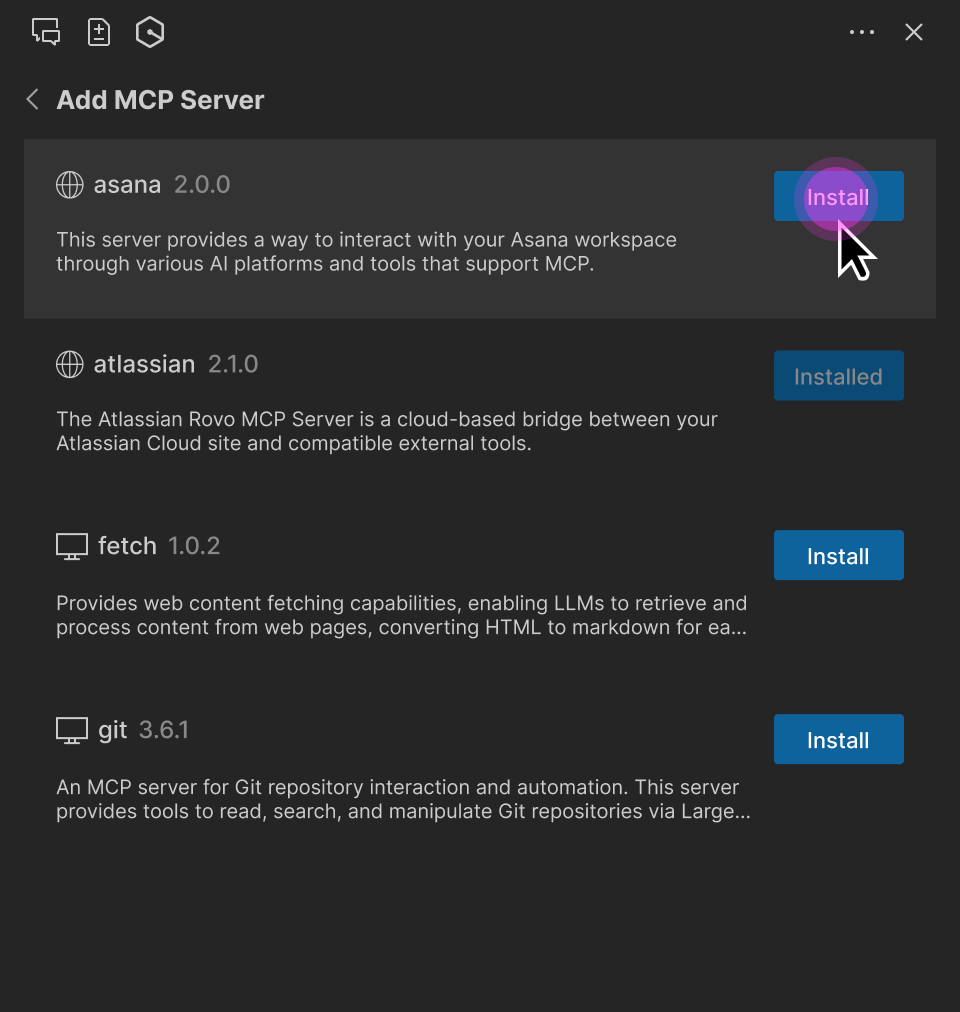
레지스트리 MCP 서버 파라미터(URL, 패키지 식별자, runtimeArguments 등)는 읽기 전용입니다. 그러나 사용자는 다음을 수행할 수 있습니다.
MCP 도구 권한(“실행 요청”, “항상 실행” 또는 “거부”)을 조정합니다.
MCP 서버 범위(글로벌 또는 Workspace)를 선택합니다.
요청 제한 시간을 변경합니다.
로컬 MCP 서버에 대한 추가 환경 변수를 지정합니다.
원격 MCP 서버에 대한 추가 HTTP 헤더를 지정합니다.
참고
사용자 지정 환경 변수 또는 HTTP 헤더는 레지스트리 정의를 재정의합니다. 이를 통해 사용자는 인증 키 또는 로컬 폴더 경로와 같은 설정과 관련된 속성을 지정할 수 있습니다.
MCP 레지스트리 JSON 스키마
다음 JSON 스키마는 Q Developer에서 지원하는 MCP 레지스트리 파일 형식을 정의합니다. 이 스키마를 사용하여 생성한 레지스트리 파일을 검증할 수 있습니다.
{
  "$schema": "https://json-schema.org/draft-07/schema",
  "properties": {
    "servers": {
      "type": "array",
      "items": {
        "type": "object",
        "properties": {
          "server": {
            "$ref": "#/definitions/ServerDetail"
          }
        },
        "required": [
          "server"
        ]
      }
    }
  },
  "definitions": {
    "ServerDetail": {
      "properties": {
        "name": {
          "description": "Server name. Must be unique within a given registry file.",
          "example": "weather-mcp",
          "maxLength": 200,
          "minLength": 3,
          "pattern": "^[a-zA-Z0-9._-]+$",
          "type": "string"
        },
        "title": {
          "description": "Optional human-readable title or display name for the MCP server. MCP subregistries or clients MAY choose to use this for display purposes.",
          "example": "Weather API",
          "maxLength": 100,
          "minLength": 1,
          "type": "string"
        },
        "description": {
          "description": "Clear human-readable explanation of server functionality. Should focus on capabilities, not implementation details.",
          "example": "MCP server providing weather data and forecasts via OpenWeatherMap API",
          "maxLength": 100,
          "minLength": 1,
          "type": "string"
        },
        "version": {
          "description": "Version string for this server. SHOULD follow semantic versioning (e.g., '1.0.2', '2.1.0-alpha'). Equivalent of Implementation.version in MCP specification. Non-semantic versions are allowed but may not sort predictably. Version ranges are rejected (e.g., '^1.2.3', '~1.2.3', '\u003e=1.2.3', '1.x', '1.*').",
          "example": "1.0.2",
          "maxLength": 255,
          "type": "string"
        },
        "packages": {
          "items": {
            "$ref": "#/definitions/Package"
          },
          "type": "array",
          "minItems": 0,
          "maxItems": 1
        },
        "remotes": {
          "items": {
            "anyOf": [
              {
                "$ref": "#/definitions/StreamableHttpTransport"
              },
              {
                "$ref": "#/definitions/SseTransport"
              }
            ]
          },
          "type": "array",
          "minItems": 0,
          "maxItems": 1
        }
      },
      "required": [
        "name",
        "description",
        "version"
      ],
      "type": "object"
    },
    "Package": {
      "properties": {
        "registryType": {
          "description": "Registry type indicating how to download packages (e.g., 'npm', 'pypi', 'oci')",
          "enum": [
            "npm",
            "pypi",
            "oci"
          ],
          "type": "string"
        },
        "registryBaseUrl": {
          "description": "Base URL of the package registry",
          "examples": [
            "https://registry.npmjs.org",
            "https://pypi.org",
            "https://docker.io"
          ],
          "format": "uri",
          "type": "string"
        },
        "identifier": {
          "description": "Package identifier - either a package name (for registries) or URL (for direct downloads)",
          "examples": [
            "@modelcontextprotocol/server-brave-search",
            "https://github.com/example/releases/download/v1.0.0/package.mcpb"
          ],
          "type": "string"
        },
        "transport": {
          "anyOf": [
            {
              "$ref": "#/definitions/StdioTransport"
            },
            {
              "$ref": "#/definitions/StreamableHttpTransport"
            },
            {
              "$ref": "#/definitions/SseTransport"
            }
          ],
          "description": "Transport protocol configuration for the package"
        },

        "runtimeArguments": {
          "description": "A list of arguments to be passed to the package's runtime command (such as docker or npx).",
          "items": {
            "$ref": "#/definitions/PositionalArgument"
          },
          "type": "array"
        },
        "packageArguments": {
          "description": "A list of arguments to be passed to the package's binary.",
          "items": {
            "$ref": "#/definitions/PositionalArgument"
          },
          "type": "array"
        },
        "environmentVariables": {
          "description": "A mapping of environment variables to be set when running the package.",
          "items": {
            "$ref": "#/definitions/KeyValueInput"
          },
          "type": "array"
        }
      },
      "required": [
        "registryType",
        "identifier",
        "transport"
      ],
      "type": "object"
    },
    "StdioTransport": {
      "properties": {
        "type": {
          "description": "Transport type",
          "enum": [
            "stdio"
          ],
          "example": "stdio",
          "type": "string"
        }
      },
      "required": [
        "type"
      ],
      "type": "object"
    },
    "StreamableHttpTransport": {
      "properties": {
        "type": {
          "description": "Transport type",
          "enum": [
            "streamable-http"
          ],
          "example": "streamable-http",
          "type": "string"
        },
        "url": {
          "description": "URL template for the streamable-http transport. Variables in {curly_braces} reference argument valueHints, argument names, or environment variable names. After variable substitution, this should produce a valid URI.",
          "example": "https://api.example.com/mcp",
          "type": "string"
        },
        "headers": {
          "description": "HTTP headers to include",
          "items": {
            "$ref": "#/definitions/KeyValueInput"
          },
          "type": "array"
        }
      },
      "required": [
        "type",
        "url"
      ],
      "type": "object"
    },
    "SseTransport": {
      "properties": {
        "type": {
          "description": "Transport type",
          "enum": [
            "sse"
          ],
          "example": "sse",
          "type": "string"
        },
        "url": {
          "description": "Server-Sent Events endpoint URL",
          "example": "https://mcp-fs.example.com/sse",
          "format": "uri",
          "type": "string"
        },
        "headers": {
          "description": "HTTP headers to include",
          "items": {
            "$ref": "#/definitions/KeyValueInput"
          },
          "type": "array"
        }
      },
      "required": [
        "type",
        "url"
      ],
      "type": "object"
    },
    "PositionalArgument": {
      "properties": {
        "type": {
          "enum": [
            "positional"
          ],
          "example": "positional",
          "type": "string"
        },
        "value": {
          "description": "The value for the input.",
          "type": "string"
        }
      },
      "required": [
        "type",
        "value"
      ],
      "type": "object"
    },
    "KeyValueInput": {
      "properties": {
        "name": {
          "description": "Name of the header or environment variable.",
          "example": "SOME_VARIABLE",
          "type": "string"
        },
        "value": {
          "description": "The value for the input.",
          "type": "string"
        }
      },
      "required": [
        "name"
      ],
      "type": "object"
    }
  },
  "required": [
    "servers"
  ],
  "type": "object"
}
