翻訳は機械翻訳により提供されています。提供された翻訳内容と英語版の間で齟齬、不一致または矛盾がある場合、英語版が優先します。
Q Developer の MCP ガバナンス
サインイン方法として IAM アイデンティティセンターを使用するプロティアのお客様は、組織内のユーザーの MCP アクセスを制御できます。デフォルトでは、ユーザーは Q クライアントで任意の MCP サーバーを使用できます。管理者は、ユーザーによる MCP サーバーの使用を完全に無効にするか、ユーザーが使用できる MCP サーバーの詳細なリストを指定できます。
これらの制限は、MCP のオン/オフ切り替えと MCP レジストリを使用して制御します。MCP トグル属性とレジストリ属性は Q Developer プロファイルの一部であり、組織レベルまたはアカウントレベルで定義でき、アカウントレベルのプロファイルは組織レベルのプロファイルよりも優先されます。組織のデフォルトの MCP ポリシーを指定し、特定のアカウントで上書きできます。たとえば、組織の MCP を無効にしますが、特定のチーム (アカウント) の許可リストで有効にします。
注記
トグルとレジストリ設定の両方がクライアント側に適用されます。エンドユーザーが回避できることに注意してください。
組織の MCP を無効にする
アカウントまたは組織の MCP を無効にするには:
-
Kiro コンソールを開きます。
-
[設定] を選択します。
Q Developer タブを選択します。
-
モデルコンテキストプロトコル (MCP) をオフに切り替えます。
組織の MCP 許可リストの指定
ユーザーがアクセスできる MCP サーバーを制御するには、許可されたサーバーを使用して JSON ファイルを作成し、HTTPS 経由で提供し、URL を Q Developer プロファイルに追加します。このプロファイルを使用する Q Developer クライアントでは、ユーザーは許可リスト内の MCP サーバーにのみアクセスできます。
MCP レジストリ URL の指定
Kiro コンソールを開きます。
[設定] を選択します。
Q Developer タブを選択します。
Model Context Protocol (MCP) がオンになっていることを確認します。
MCP レジストリ URL フィールドで、編集 を選択します。
許可リストに登録された MCP サーバーを含む MCP レジストリ JSON ファイルの URL を入力します。
[保存] を選択します。
MCP レジストリ URL は、当社のデータ暗号化ポリシーに従って、転送中および保管中に暗号化されます。
MCP レジストリファイル形式
レジストリ JSON ファイルの形式は、MCP レジストリ標準
次の例は、リモート (HTTP) とローカル (stdio) の両方の MCP サーバー定義を含む MCP レジストリファイルを示しています。
{
  "servers": [
    {
      "server": {
        "name": "my-remote-server",
        "title": "My server",
        "description": "My server description",
        "version": "1.0.0",
        "remotes": [
          {
            "type": "streamable-http",
            "url": "https://acme.com/my-server",
            "headers": [
              {
                "name": "X-My-Header",
                "value": "SomeValue"
              }
            ]
          }
        ]
      }
    },
    {
      "server": {
        "name": "my-local-server",
        "title": "My server",
        "description": "My server description",
        "version": "1.0.0",
        "packages": [
          {
            "registryType": "npm",
            "registryBaseUrl": "https://npm.acme.com",
            "identifier": "@acme/my-server",
            "transport": {
              "type": "stdio"
            },
            "runtimeArguments": [
              {
                "type": "positional",
                "value": "-q"
              }
            ],
            "packageArguments": [
              {
                "type": "positional",
                "value": "start"
              }
            ],
            "environmentVariables": [
              {
                "name": "ENV_VAR",
                "value": "ENV_VAR_VALUE"
              }
            ]
          }
        ]
      }
    }
  ]
}
次の表に、レジストリ JSON ファイルのプロパティを示します。特に明記されていない限り、すべてのプロパティは必須です。完全な JSON スキーマについては、レジストリスキーマセクションを参照してください。
ネストされた属性は、親からインデントされて表示されます。たとえば、「ヘッダー」は「リモート」の子属性で、「名前」と「値」は「ヘッダー」の子属性です。
| 属性 | 説明 | オプション? | 値の例 |
|---|---|---|---|
|
一般的な属性 |
|||
|
name |
サーバー名。特定のレジストリファイル内で一意である必要があります。 |
「aws-ccapi-mcp」 |
|
|
title |
人間が読めるサーバー名。 |
はい |
「AWS CC API」 |
|
説明 |
サーバーの説明。 |
「自然言語による AWS infra の管理」 |
|
|
バージョン |
サーバーのバージョン。セマンティックバージョニング (x.y.z) を強くお勧めします。 |
「1.0.2」 |
|
|
リモート (HTTP) サーバー属性 |
|||
|
リモート |
リモートエンドポイントを指定するエントリが 1 つだけの配列。 |
- |
|
|
型 |
「streamable-http」または「sse」のいずれかである必要があります。 |
「streamable-http」 |
|
|
url |
MCP サーバーエンドポイント URL。 |
「https://mcp.figma.com/mcp」 |
|
|
ヘッダー |
各リクエストに含める HTTP ヘッダーの配列。 |
はい |
- |
|
name |
HTTP ヘッダー名。 |
「認可」 |
|
|
値 |
HTTP ヘッダー値。 |
「ベアラー mF_9.B5f-4.1JqM」 |
|
|
ローカル (stdio) サーバー属性 |
|||
|
パッケージ |
MCP サーバー定義を含むエントリが 1 つだけの配列。 |
- |
|
|
registryType |
「npm」、「pypi」、または「oci」のいずれかである必要があります。 MCP サーバーパッケージをダウンロードして実行するには、次のパッケージランナーを使用します。
クライアントマシンには、適切なパッケージランナーがプリインストールされている必要があります。 |
「npm」 |
|
|
registryBaseUrl |
パッケージレジストリ URL。 |
はい |
「https://npm.acme.com」 |
|
識別子 |
サーバーパッケージ識別子。 |
「@acme/my-server」 |
|
|
トランスポート |
プロパティ「type」が 1 つだけあるオブジェクト。 |
- |
|
|
型 |
「stdio」である必要があります。 |
「stdio」 |
|
|
runtimeArguments |
ランタイム、つまり npx、uvx、または docker に提供される引数の配列。 |
はい |
- |
|
型 |
「位置」である必要があります。 |
「位置」 |
|
|
値 |
ランタイム引数値。 |
「-q」 |
|
|
packageArguments |
MCP サーバーに提供される引数の配列。 |
はい |
- |
|
型 |
「位置」である必要があります。 |
「位置」 |
|
|
値 |
パッケージ引数値。 |
「開始」 |
|
|
environmentVariables |
サーバーを起動する前に設定する env vars の配列。 |
はい |
- |
|
name |
環境変数名。 |
「LOG_LEVEL」 |
|
|
値 |
環境変数の値。 |
「INFO」 |
MCP レジストリファイルの供給
Amazon S3、Apache、nginx などのウェブサーバーを使用して、HTTPS 経由で MCP レジストリ JSON ファイルを提供します。URL は、ユーザーのコンピュータ上の Q Developer クライアントがアクセスできる必要がありますが、企業ネットワークに対してプライベートにすることができます。
HTTPS エンドポイントには、信頼できる認証機関によって署名された有効な SSL 証明書が必要です。自己署名証明書はサポートされていません。
Q Developer は、起動時と 24 時間ごとに MCP レジストリを取得します。定期的な同期中に、ローカルにインストールされた MCP サーバーがレジストリに存在しなくなった場合、Q Developer はそのサーバーを終了し、ユーザーによる追加を禁止します。ローカルにインストールされたサーバーのバージョンがレジストリ内のサーバーと異なる場合、Q Developer はレジストリで定義されたバージョンでサーバーを再起動します。
Q Developer プラグイン
ユーザーが Q Developer を起動すると、レジストリ URL がプロファイルで定義されているかどうかを確認します。その場合、その URL でレジストリ JSON を取得し、ユーザーがレジストリで定義された MCP サーバーのみを使用できるようにします。ユーザーが MCP サーバーを追加すると、Q Developer はレジストリのサーバーのリストを表示します。
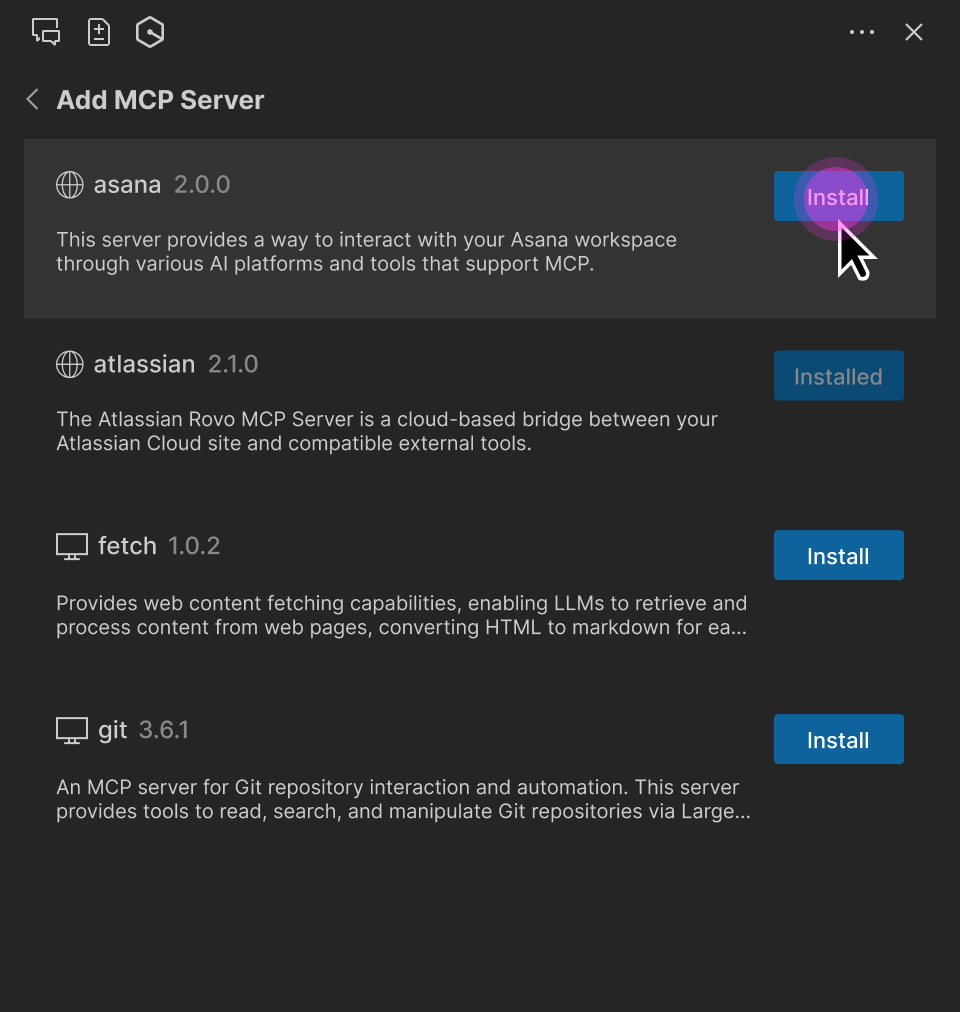
レジストリ MCP サーバーパラメータ (URL、パッケージ識別子、runtimeArguments など) は読み取り専用です。ただし、ユーザーは次のことができます。
MCP ツールのアクセス許可を調整します (「実行を求める」、「常に実行」、または「拒否」)。
MCP サーバースコープ (グローバルまたは Workspace) を選択します。
リクエストのタイムアウトを変更します。
ローカル MCP サーバーの追加の環境変数を指定します。
リモート MCP サーバーの追加の HTTP ヘッダーを指定します。
注記
ユーザー指定の環境変数または HTTP ヘッダーは、レジストリ定義を上書きします。これにより、ユーザーは認証キーやローカルフォルダパスなど、セットアップに固有の属性を指定できます。
MCP レジストリ JSON スキーマ
次の JSON スキーマは、Q Developer でサポートされている MCP レジストリファイル形式を定義します。このスキーマを使用して、作成したレジストリファイルを検証できます。
{
  "$schema": "https://json-schema.org/draft-07/schema",
  "properties": {
    "servers": {
      "type": "array",
      "items": {
        "type": "object",
        "properties": {
          "server": {
            "$ref": "#/definitions/ServerDetail"
          }
        },
        "required": [
          "server"
        ]
      }
    }
  },
  "definitions": {
    "ServerDetail": {
      "properties": {
        "name": {
          "description": "Server name. Must be unique within a given registry file.",
          "example": "weather-mcp",
          "maxLength": 200,
          "minLength": 3,
          "pattern": "^[a-zA-Z0-9._-]+$",
          "type": "string"
        },
        "title": {
          "description": "Optional human-readable title or display name for the MCP server. MCP subregistries or clients MAY choose to use this for display purposes.",
          "example": "Weather API",
          "maxLength": 100,
          "minLength": 1,
          "type": "string"
        },
        "description": {
          "description": "Clear human-readable explanation of server functionality. Should focus on capabilities, not implementation details.",
          "example": "MCP server providing weather data and forecasts via OpenWeatherMap API",
          "maxLength": 100,
          "minLength": 1,
          "type": "string"
        },
        "version": {
          "description": "Version string for this server. SHOULD follow semantic versioning (e.g., '1.0.2', '2.1.0-alpha'). Equivalent of Implementation.version in MCP specification. Non-semantic versions are allowed but may not sort predictably. Version ranges are rejected (e.g., '^1.2.3', '~1.2.3', '\u003e=1.2.3', '1.x', '1.*').",
          "example": "1.0.2",
          "maxLength": 255,
          "type": "string"
        },
        "packages": {
          "items": {
            "$ref": "#/definitions/Package"
          },
          "type": "array",
          "minItems": 0,
          "maxItems": 1
        },
        "remotes": {
          "items": {
            "anyOf": [
              {
                "$ref": "#/definitions/StreamableHttpTransport"
              },
              {
                "$ref": "#/definitions/SseTransport"
              }
            ]
          },
          "type": "array",
          "minItems": 0,
          "maxItems": 1
        }
      },
      "required": [
        "name",
        "description",
        "version"
      ],
      "type": "object"
    },
    "Package": {
      "properties": {
        "registryType": {
          "description": "Registry type indicating how to download packages (e.g., 'npm', 'pypi', 'oci')",
          "enum": [
            "npm",
            "pypi",
            "oci"
          ],
          "type": "string"
        },
        "registryBaseUrl": {
          "description": "Base URL of the package registry",
          "examples": [
            "https://registry.npmjs.org",
            "https://pypi.org",
            "https://docker.io"
          ],
          "format": "uri",
          "type": "string"
        },
        "identifier": {
          "description": "Package identifier - either a package name (for registries) or URL (for direct downloads)",
          "examples": [
            "@modelcontextprotocol/server-brave-search",
            "https://github.com/example/releases/download/v1.0.0/package.mcpb"
          ],
          "type": "string"
        },
        "transport": {
          "anyOf": [
            {
              "$ref": "#/definitions/StdioTransport"
            },
            {
              "$ref": "#/definitions/StreamableHttpTransport"
            },
            {
              "$ref": "#/definitions/SseTransport"
            }
          ],
          "description": "Transport protocol configuration for the package"
        },

        "runtimeArguments": {
          "description": "A list of arguments to be passed to the package's runtime command (such as docker or npx).",
          "items": {
            "$ref": "#/definitions/PositionalArgument"
          },
          "type": "array"
        },
        "packageArguments": {
          "description": "A list of arguments to be passed to the package's binary.",
          "items": {
            "$ref": "#/definitions/PositionalArgument"
          },
          "type": "array"
        },
        "environmentVariables": {
          "description": "A mapping of environment variables to be set when running the package.",
          "items": {
            "$ref": "#/definitions/KeyValueInput"
          },
          "type": "array"
        }
      },
      "required": [
        "registryType",
        "identifier",
        "transport"
      ],
      "type": "object"
    },
    "StdioTransport": {
      "properties": {
        "type": {
          "description": "Transport type",
          "enum": [
            "stdio"
          ],
          "example": "stdio",
          "type": "string"
        }
      },
      "required": [
        "type"
      ],
      "type": "object"
    },
    "StreamableHttpTransport": {
      "properties": {
        "type": {
          "description": "Transport type",
          "enum": [
            "streamable-http"
          ],
          "example": "streamable-http",
          "type": "string"
        },
        "url": {
          "description": "URL template for the streamable-http transport. Variables in {curly_braces} reference argument valueHints, argument names, or environment variable names. After variable substitution, this should produce a valid URI.",
          "example": "https://api.example.com/mcp",
          "type": "string"
        },
        "headers": {
          "description": "HTTP headers to include",
          "items": {
            "$ref": "#/definitions/KeyValueInput"
          },
          "type": "array"
        }
      },
      "required": [
        "type",
        "url"
      ],
      "type": "object"
    },
    "SseTransport": {
      "properties": {
        "type": {
          "description": "Transport type",
          "enum": [
            "sse"
          ],
          "example": "sse",
          "type": "string"
        },
        "url": {
          "description": "Server-Sent Events endpoint URL",
          "example": "https://mcp-fs.example.com/sse",
          "format": "uri",
          "type": "string"
        },
        "headers": {
          "description": "HTTP headers to include",
          "items": {
            "$ref": "#/definitions/KeyValueInput"
          },
          "type": "array"
        }
      },
      "required": [
        "type",
        "url"
      ],
      "type": "object"
    },
    "PositionalArgument": {
      "properties": {
        "type": {
          "enum": [
            "positional"
          ],
          "example": "positional",
          "type": "string"
        },
        "value": {
          "description": "The value for the input.",
          "type": "string"
        }
      },
      "required": [
        "type",
        "value"
      ],
      "type": "object"
    },
    "KeyValueInput": {
      "properties": {
        "name": {
          "description": "Name of the header or environment variable.",
          "example": "SOME_VARIABLE",
          "type": "string"
        },
        "value": {
          "description": "The value for the input.",
          "type": "string"
        }
      },
      "required": [
        "name"
      ],
      "type": "object"
    }
  },
  "required": [
    "servers"
  ],
  "type": "object"
}
