Le traduzioni sono generate tramite traduzione automatica. In caso di conflitto tra il contenuto di una traduzione e la versione originale in Inglese, quest'ultima prevarrà.
Flusso di contatto del campione
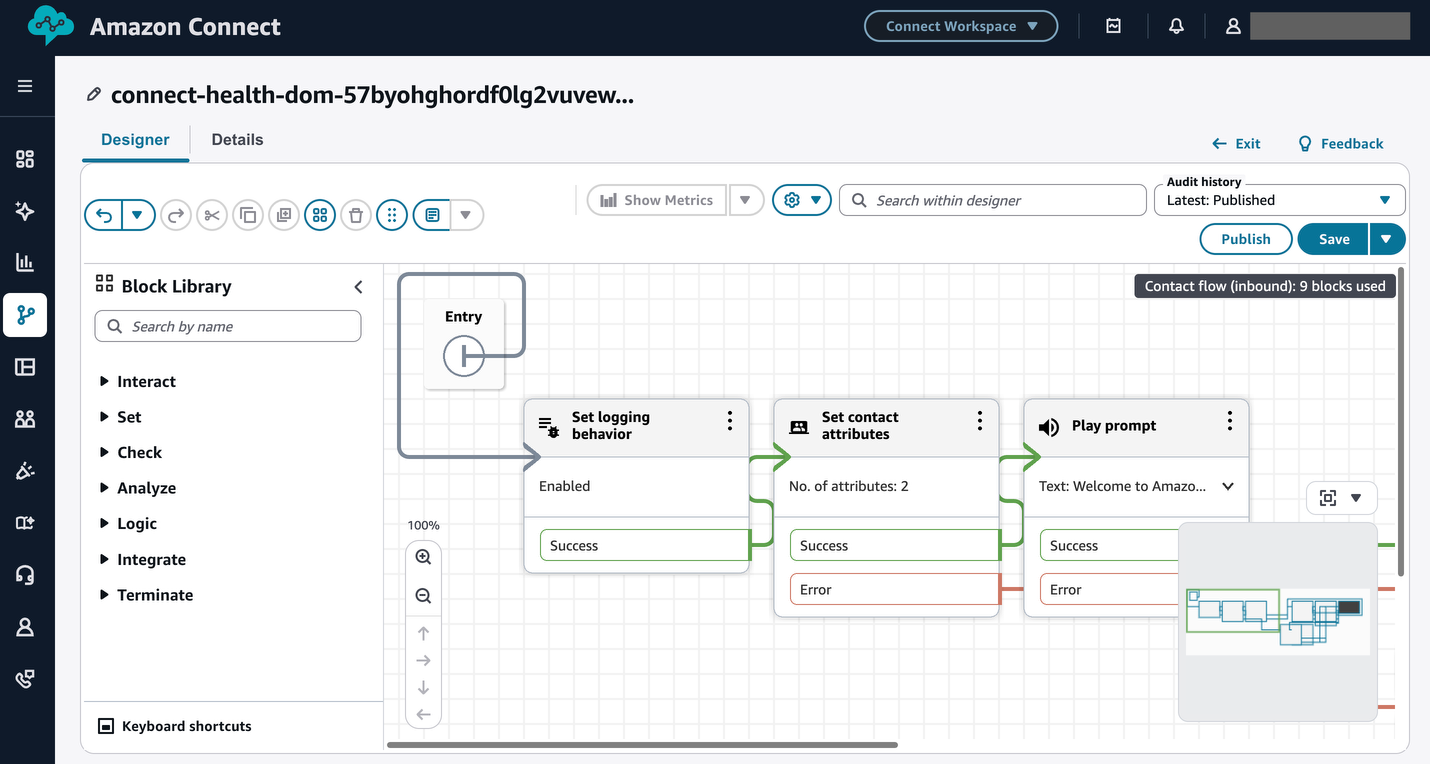
Amazon Connect Health fornisce un flusso di contatti di esempio predefinito per testare e rendere operative le conversazioni sulla gestione degli appuntamenti fornite da agenti AI. Il flusso simula una tipica conversazione sulla pianificazione degli appuntamenti, inclusa la verifica dell'identità del paziente. È possibile utilizzarlo per convalidare il comportamento degli agenti dall'inizio alla fine prima di passare alla produzione.
Il flusso di esempio viene distribuito automaticamente al momento della creazione del dominio, indipendentemente dal fatto che Amazon Connect Health crei una nuova istanza Amazon Connect o ne utilizzi una esistente.
Argomenti
Individua il flusso di esempio
Per trovare il flusso di contatto del campione:
-
Accedi alla tua istanza Amazon Connect.
-
Nel pannello di navigazione, scegli Routing, quindi scegli Flussi di contatti.
-
Cerca
connect-health-{DOMAIN_ID}-inbound-flow,{DOMAIN_ID}dov'è l'identificatore del tuo dominio Amazon Connect Health.
Puoi assegnare questo flusso al tuo numero di telefono preferito se il numero fornito non si adatta ai tuoi flussi di lavoro.
Risorse fornite
Esempio di flusso di contatti Connect Health
Amazon Connect Health fornisce le seguenti risorse come parte dell'implementazione del flusso di contatti di esempio:
| Risorsa | Schema di denominazione |
|---|---|
|
Istanza Amazon Connect (se creata da Amazon Connect Health) |
|
|
Esempio di flusso di contatto |
|
|
funzione Lambda |
|
|
Ruolo della funzione Lambda |
|
|
Bot di Amazon Lex |
|
|
Ruolo del bot Amazon Lex |
|
Attributi sessione
Gli attributi di sessione sono coppie chiave-valore passate tra i blocchi del flusso di contatti e le funzioni Lambda durante una chiamata vocale. Gli amministratori di Amazon Connect configurano gli attributi della sessione in base al contesto del paziente, ad esempio lo stato della verifica, l'intenzione dell'appuntamento e il motivo dell'escalation, tra le transizioni di flusso.
Il flusso di contatti di esempio include i seguenti attributi di sessione per gli identificatori degli agenti AI:
-
patient_agent_id— L'identificatore per l'agente di verifica del paziente. -
appointment_agent_id— L'identificatore dell'agente di gestione degli appuntamenti.
Per visualizzare o modificare gli attributi della sessione, apri il flusso di esempio nell'editor di flussi di Amazon Connect e controlla il blocco Set contact attributes.
funzione Lambda
La funzione Lambda connect-health-{DOMAIN_ID}-lambda () predefinita gestisce le ricerche EHR, la verifica assicurativa e l'elaborazione degli attributi di sessione durante ogni chiamata del paziente. Il ruolo di esecuzione IAM associato (connect-health-{DOMAIN_ID}-lambda-role) fornisce le autorizzazioni richieste. La funzione Lambda attualmente include "appointmentType": {"id": "1004", "type": "External"} e può essere aggiornata per gestire altri tipi di appuntamenti.
È possibile estendere o sostituire questa funzione con un'implementazione personalizzata per supportare integrazioni personalizzate o logiche aziendali.
Bot di Amazon Lex
Il bot Amazon Lex (connect-health-{DOMAIN_ID}-bot) consente la comprensione del linguaggio naturale e supporta segmenti di conversazione con i pazienti che esulano dall'ambito degli agenti di Amazon Connect Health, come i saluti iniziali e il routing degli intenti.
Personalizza il flusso di contatti
Amazon Connect Health fornisce un esempio di flusso di contatti Amazon Connect che dimostra come gli agenti Amazon Connect Health vengono richiamati all'interno di una sequenza di routing delle chiamate, ma è intenzionalmente generico. Personalizza il flusso di contatti di esempio per allinearlo ai processi operativi, alle strutture delle code, alle politiche di escalation e agli standard di comunicazione con i pazienti (incluse le pratiche di privacy e consenso) prima dell'implementazione in produzione.
La personalizzazione include in genere le seguenti attività:
-
Assegnazioni e profili di routing delle code: riassegna i rami del flusso di contatti alle code esistenti e ai profili di routing degli agenti configurati nella tua istanza Amazon Connect.
-
Logica del flusso di chiamata: aggiorna le condizioni di ramificazione e le sequenze di trasferimento degli agenti in modo che rispecchino i processi del tuo reparto.
-
Integrazione IVR: integra il flusso di esempio con i menu IVR o i flussi self-service esistenti in modo che gli agenti di Amazon Connect Health siano raggiungibili all'interno del tuo ambiente di telefonia più ampio.
-
Localizzazione: sostituisci l'audio predefinito con registrazioni approvate dall'organizzazione o contenuti text-to-speech che riflettano i tuoi standard di comunicazione.
Per indicazioni sulla creazione e la modifica dei flussi di contatti, consulta Usa lo strumento di progettazione dei flussi in Amazon Connect per creare flussi nella Amazon Connect Administrator Guide.
