Le traduzioni sono generate tramite traduzione automatica. In caso di conflitto tra il contenuto di una traduzione e la versione originale in Inglese, quest'ultima prevarrà.
Monitora gli eventi di errore nella valutazione delle prestazioni
Puoi monitorare gli errori delle valutazioni automatiche e le esportazioni S3 delle valutazioni dei contatti utilizzando e. EventBridge CloudWatch È possibile utilizzare questi eventi per analizzare e correggere gli errori. La seguente guida illustra il processo di creazione di EventBridge regole personalizzate per monitorare gli eventi di errore nella valutazione delle prestazioni.
Step-by-step guida
Questa è una guida su come creare una EventBridge regola per registrare gli eventi di invio della valutazione automatica non riuscita di Connect Customer e le esportazioni S3 non riuscite delle valutazioni dei contatti nella console. AWS
-
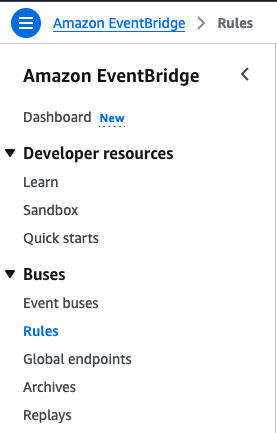
Accedi al tuo AWS account e accedi alla console. EventBridge Scegli Regole nella sezione Autobus.
-
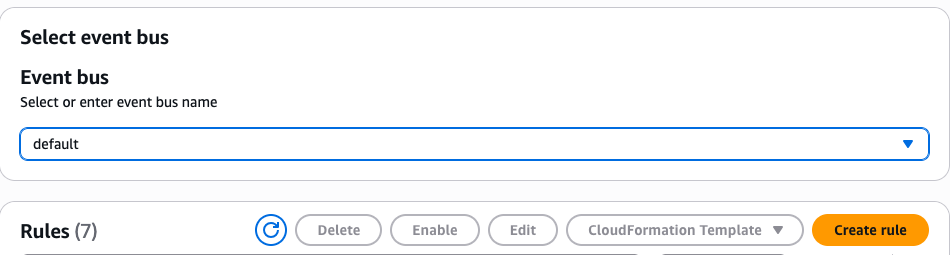
Scegli Crea regola con il bus di eventi predefinito selezionato.
-
Assegna un nome alla regola e seleziona Regola con uno schema di eventi per il tipo di regola. Scegli Avanti.

-
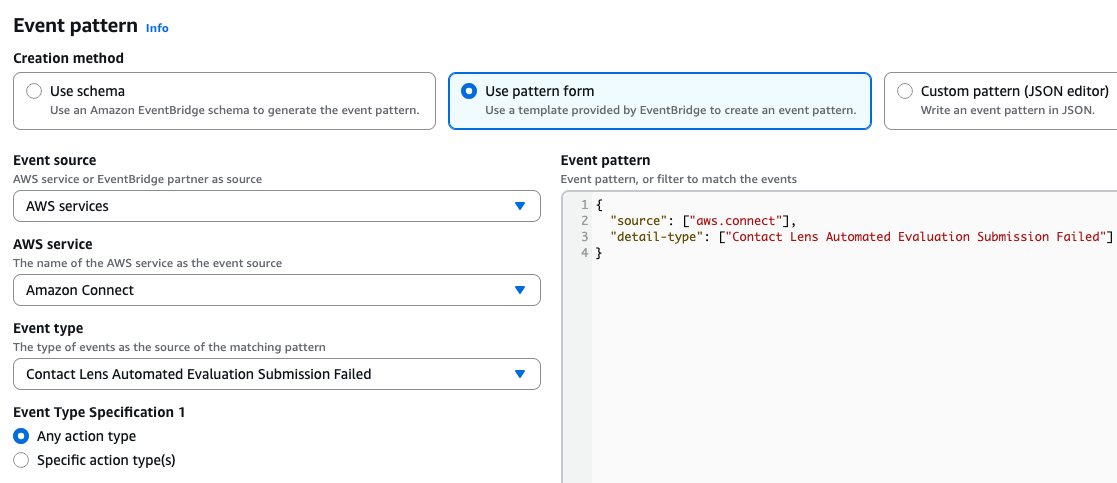
Con gli eventi AWS o gli eventi dei EventBridge partner selezionati in Eventi, seleziona l'opzione Usa pattern form in Event pattern. Qui definirai il modello a cui far corrispondere l'attivazione della regola.
-
Digita e seleziona Amazon Connect nel menu a discesa del servizio AWS per restringere i tipi di eventi. Seleziona il tipo di evento desiderato nel menu a discesa sottostante. Scegli Avanti dopo aver impostato lo schema.
Per iscriverti ai tipi di EventBridge eventi, crea una EventBridge regola personalizzata che corrisponda a quanto segue:
-
"source"="aws.connect" -
"detail-type"Il valore di può essere uno dei seguenti:-
"Contact Lens Automated Evaluation Submission Failed" -
"Contact Lens Evaluation Export Failed"
-
-
-
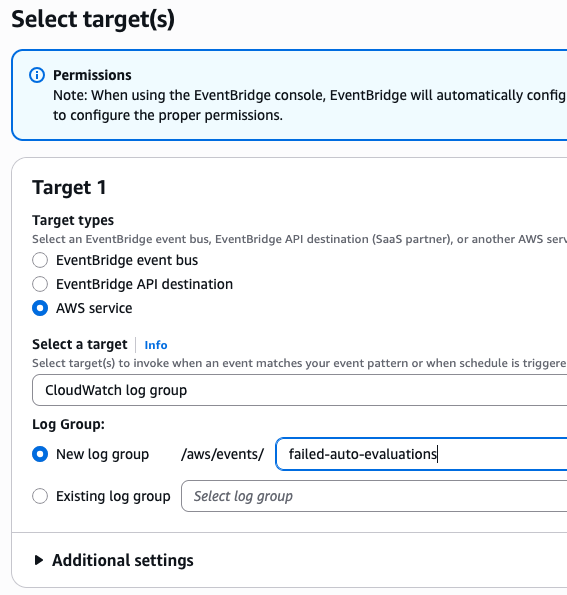
Nella fase successiva, puoi configurare gli obiettivi in base process/receive agli eventi corrispondenti. Per semplicità, seleziona l'opzione del gruppo di CloudWatch log in Seleziona una destinazione e scegli un gruppo di log.
-
Scegli Avanti e vai alla fase finale di revisione e creazione. Scegli nuovamente Crea regola per completare il processo di creazione della regola.
-
Ora, se la regola è nello stato Abilitato e si verifica un evento corrispondente, i log corrispondenti dovrebbero essere visualizzati nel gruppo di CloudWatch log configurato con gli ID pertinenti nella sezione dei metadati e il motivo dell'errore nella sezione dati.

Esempio di payload EventBridge
Di seguito è riportato un esempio di EventBridge payload in cui la regola viene soddisfatta:
{
  "version": "0",
  "id": "00005435-d12d-c93b-d9d2-b64cba85fbb6",
  "detail-type": "Contact Lens Automated Evaluation Submission Failed",
  "source": "aws.connect",
  "account": "Your AWS account ID",
  "time": "2025-10-02T10:34:56Z",
  "region": "us-west-2",
  "resources": [],
  "detail": {
    "version": "1.0.0",
    "metadata": {
      "contactId": "4266f8e9-8420-4ee7-96cd-515d2edae1f2",
      "instanceId": "d9b0b09d-7dab-47e5-9f82-d6787fbc068c",
      "formId": "8b1365bd-1415-41a9-a491-af226e1bda4e"
    },
    "data": {
      "reasonCode": "ANALYSIS_FILE_ERROR",
      "message": "Automated contact evaluation submission failed due to an error when searching/retrieving/parsing the analysis file."
    }
  }
}
Errori comuni
I seguenti errori possono verificarsi quando il sistema alla fine non riesce a elaborare le valutazioni dopo diversi tentativi.
Errori di invio automatico della valutazione
| Errore | Messaggio di errore |
|---|---|
AUTOMATED_SUBMISSION_FAILED |
L'invio automatico della valutazione dei contatti non è riuscito perché non è stato possibile rispondere ad alcune domande. Verifica il modulo di valutazione o le configurazioni delle regole di Connect Customer. |
ANALYSIS_FILE_ERROR |
L'invio automatico della valutazione dei contatti non è riuscito a causa di un errore durante l'analisi del file di searching/retrieving analisi. |
INTERNAL_SERVER_ERROR |
L'invio automatico della valutazione dei contatti non è riuscito a causa di un errore interno del server. Si prega di aspettarsi un ritardo nell'elaborazione. |
QUOTA_EXCEEDED_ERROR |
L'invio automatico della valutazione dei contatti non è riuscito perché la quota rimanente per l'utilizzo dell'intelligenza artificiale generativa per rispondere automaticamente alle domande di valutazione del contatto è insufficiente. |
Errori di esportazione di Evaluation S3
| Errore | Messaggio di errore |
|---|---|
S3_BUCKET_ACCESS_DENIED |
Esportazione JSON per la valutazione dei contatti non riuscita a causa di autorizzazioni insufficienti. |
S3_STORAGE_NOT_CONFIGURED |
Il bucket S3 di esportazione non è configurato per la tua istanza. |
INTERNAL_SERVER_ERROR |
L'esportazione JSON per la valutazione dei contatti non è riuscita a causa di un errore interno del server. È previsto un ritardo nella consegna del file di esportazione. |
