Crea un AgentCore gateway utilizzando l'API
Per creare un AgentCore gateway utilizzando l'API, effettua una CreateGatewayrichiesta con uno degli endpoint del piano di AgentCore controllo.
Come minimo, è necessario specificare i seguenti campi:
I seguenti campi opzionali aggiungono metadati al gateway:
-
protocolType— Il tipo di protocollo per il gateway. Se lo si imposta suMCP, il gateway funziona in modalità di aggregazione e può avere solo destinazioni MCP. Se si omette questo campo, il gateway può avere sia destinazioni MCP che HTTP.
-
description— Una descrizione del gateway.
-
tags— Un dizionario di coppie chiave-valore che specifica i tag che è possibile utilizzare per etichettare il gateway a scopo di monitoraggio.
I campi rimanenti dipendono dalla configurazione del gateway e dall'eventuale attivazione o meno di funzionalità personalizzate per il gateway:
-
clientToken— Un valore del token client per garantire che una richiesta venga completata non più di una volta. Se non includi questo token, ne viene generato uno casualmente per te. Se non includi un valore, ne viene generato uno casualmente per te. Per ulteriori informazioni, consulta Garanzia di idempotenza.
-
authorizerConfiguration— Se il tipo di autorizzazione èCUSTOM_JWT, è necessario includere questo campo per specificare i parametri di autorizzazione e autenticazione del gateway. Per ulteriori informazioni, vedere La configurazione dell'autorizzatore.
-
kmsKeyArn— Per crittografare il gateway con una chiave KMS, includi l'ARN della chiave in questo campo. Per ulteriori informazioni, consulta Crittografare il AgentCore gateway con una chiave KMS gestita dal cliente.
-
exceptionLevel— Per attivare i messaggi di debug quando si richiama il gateway, imposta questo valore su. DEBUG Per ulteriori informazioni, consulta Attivare i messaggi di debug. Per esempi di creazione di un gateway con questa impostazione, consulta Creare un gateway con messaggi di debug.
-
interceptorConfigurations— Per attivare il codice personalizzato che viene eseguito quando si richiama il gateway, includi questo campo. Per ulteriori informazioni, vedere Utilizzo degli intercettori con Gateway. Per esempi di creazione di un gateway con intercettori, consulta Creare un gateway con configurazioni di intercettori.
-
protocolConfiguration— Per includere personalizzazioni per il protocollo gateway, configura le impostazioni in questo campo. Per le opzioni di questa configurazione, vedere GatewayProtocolConfiguration.
La configurazione dell'autorizzatore
Se il tipo di autorizzatore èCUSTOM_JWT, è necessario includere anche una configurazione dell'autorizzatore nel campo. authorizerConfiguration La struttura di base della configurazione dell'autorizzatore è la seguente:
{
  "customJWTAuthorizer": {
    "discoveryUrl": "string",
    "allowedAudience": ["string"],
    "allowedClients": ["string"],
    "allowedScopes": ["string"],
    "customClaims": see below
  }
}
È necessario fornire l'URL di rilevamento per il token di autenticazione. I campi rimanenti definiscono le restrizioni per le dichiarazioni di autenticazione:
-
allowedAudience— Il pubblico o i servizi in grado di gestire il JWT.
-
allowedClients— I client autorizzati a creare un JWT.
-
allowedScopes— Gli ambiti di applicazione di ciò limitano l'insieme delle rivendicazioni.
-
customClaims— Una serie di oggetti che consente di definire campi e valori personalizzati che limitano le affermazioni da autenticare. Ogni oggetto è un CustomClaimValidationsType oggetto contiene i seguenti campi:
-
inboundTokenClaimName— Il nome del campo di reclamo personalizzato da controllare.
-
inboundTokenClaimValueType— Il tipo di dati del valore del reclamo da verificare.
-
authorizingClaimMatchValue— Definisce il valore a cui abbinare il valore del reclamo. Contiene i seguenti campi:
Gli esempi seguenti mostrano la struttura degli CustomClaimValidationsType oggetti che è possibile specificare:
Esempio
- String matches string
-
-
{
  "inboundTokenClaimName": "string",
  "inboundTokenClaimValueType": "STRING",
  "authorizingClaimMatchValue": {
    "claimMatchValue": {
      "matchValueString": "string"
    },
    "claimMatchOperator": "EQUALS"
  }
}
- Array contains string
-
-
{
  "inboundTokenClaimName": "string",
  "inboundTokenClaimValueType": "STRING_ARRAY",
  "authorizingClaimMatchValue": {
    "claimMatchValue": {
      "matchValueString": "string"
    },
    "claimMatchOperator": "CONTAINS"
  }
}
- Array contains any value in array
-
-
{
  "inboundTokenClaimName": "string",
  "inboundTokenClaimValueType": "STRING_ARRAY",
  "authorizingClaimMatchValue": {
    "claimMatchValue": {
      "matchValueStringList": ["string"]
    },
    "claimMatchOperator": "CONTAINS_ANY"
  }
}
Per vedere esempi di come creare un gateway, espandi la sezione corrispondente al tuo caso d'uso:
Creare un gateway: esempio di base (autorizzazione JWT personalizzata)
Questa sezione fornisce esempi di base sulla creazione di un gateway.
Nota quanto segue: * I valori per la configurazione dell'autorizzazione si riferiscono a quando si imposta l'autorizzazione in entrata. * Se scegli un'opzione che prevede la specificazione di un ruolo ARN del servizio gateway manifesto, assicurati di specificarne uno esistente che hai configurato. Per ulteriori informazioni, consulta Autorizzazioni del ruolo del servizio AgentCore Gateway.
Seleziona uno dei seguenti metodi:
Esempio
- AgentCore CLI
-
-
La AgentCore CLI fornisce un modo semplice per creare un gateway in un'interfaccia a riga di comando.
Per creare il gateway, si utilizza il agentcore add gateway comando. Il ruolo del servizio gateway e l'autorizzazione Amazon Cognito vengono configurati automaticamente durante la distribuzione.
Utilizzo di argomenti predefiniti
Esegui il seguente comando in un terminale per creare un gateway senza autorizzazione (impostazione predefinita). Per aggiungere l'autorizzazione JWT personalizzata, specificate i flag di autorizzazione come mostrato nell'esempio seguente:
agentcore add gateway --name my-gateway
Specificare gli argomenti
Il comando seguente mostra come creare un gateway con autorizzazione JWT personalizzata e configurazione esplicita:
agentcore add gateway \
  --name my-gateway \
  --authorizer-type CUSTOM_JWT \
  --discovery-url "https://cognito-idp.us-west-2.amazonaws.com/some-user-pool/.well-known/openid-configuration" \
  --allowed-audience "api.example.com"
agentcore deploy
Dopo la distribuzione, lo status gatewayUrl mostrato da agentcore è l'endpoint da utilizzare quando si richiama il gateway.
- Interactive
-
-
Esegui agentcore per aprire il TUI, quindi seleziona aggiungi e scegli Gateway:
-
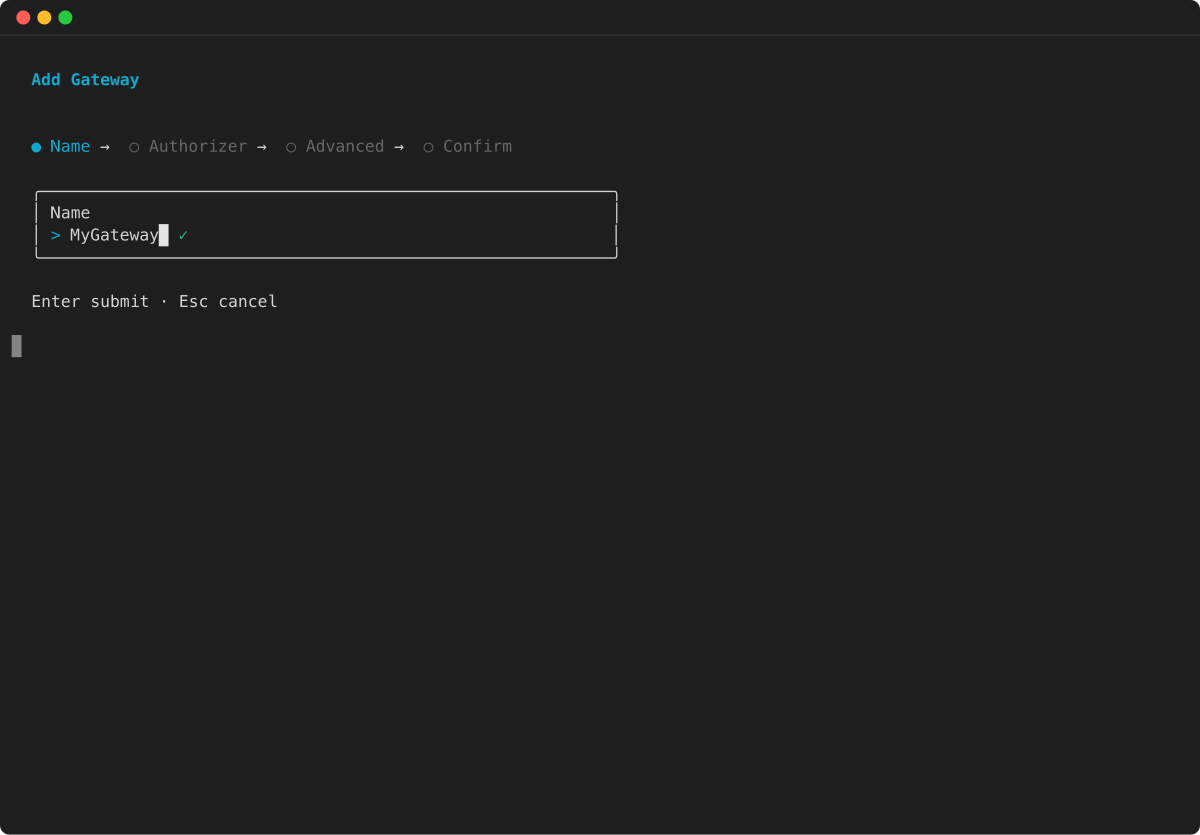
Inserisci il nome del gateway:
-
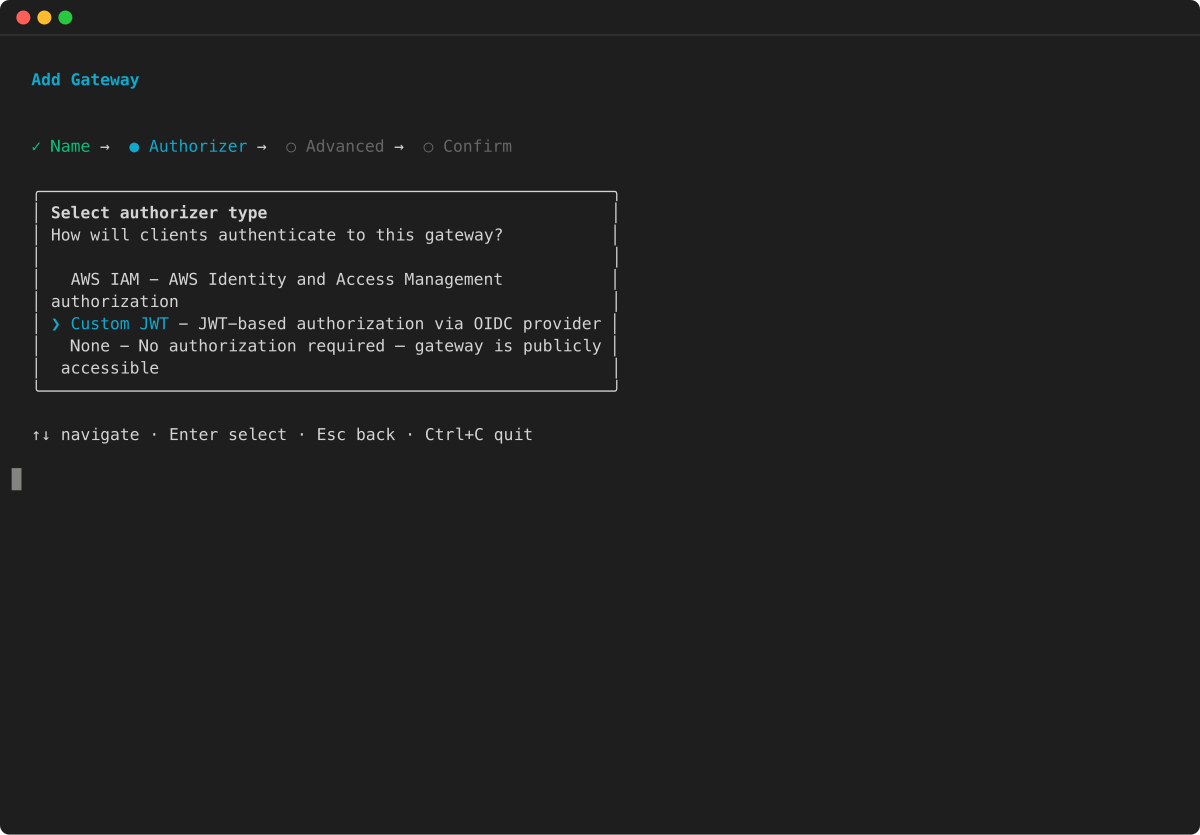
Seleziona Custom JWT come tipo di autorizzazione e premi Invio:
-
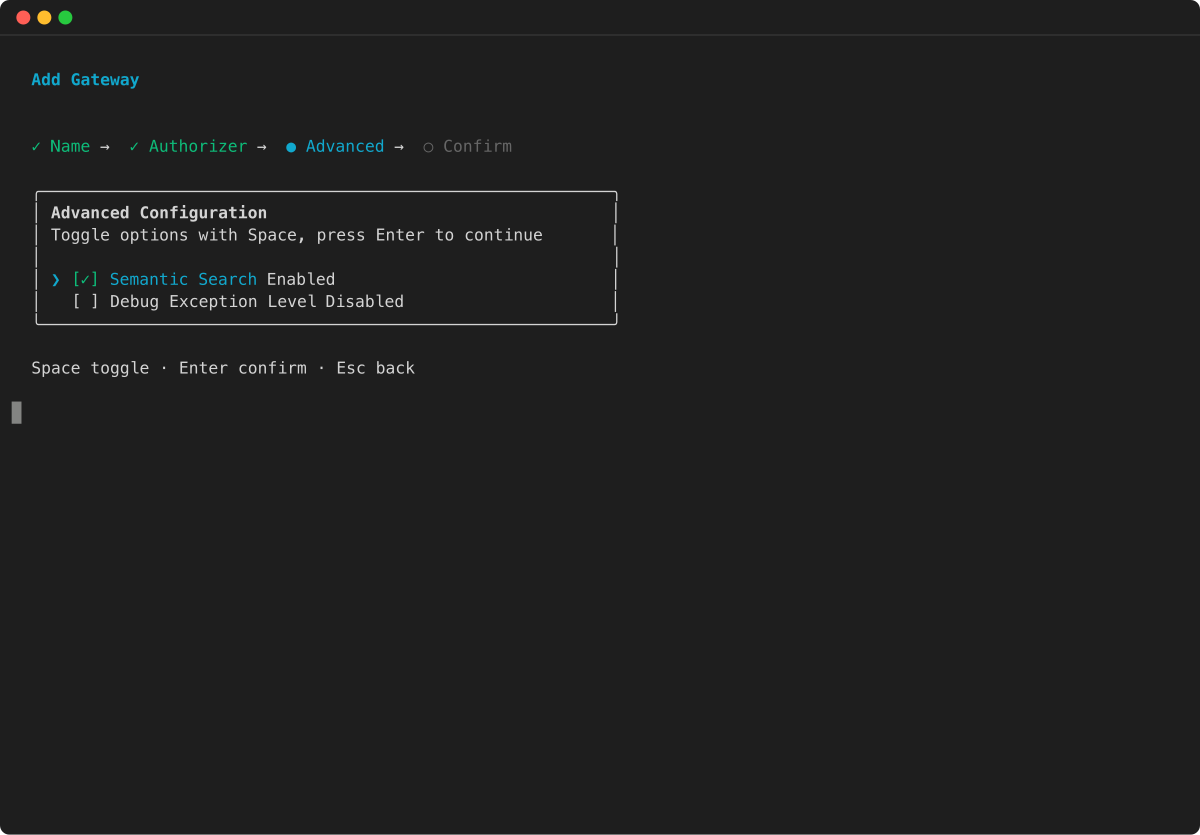
Configura le opzioni avanzate:
-
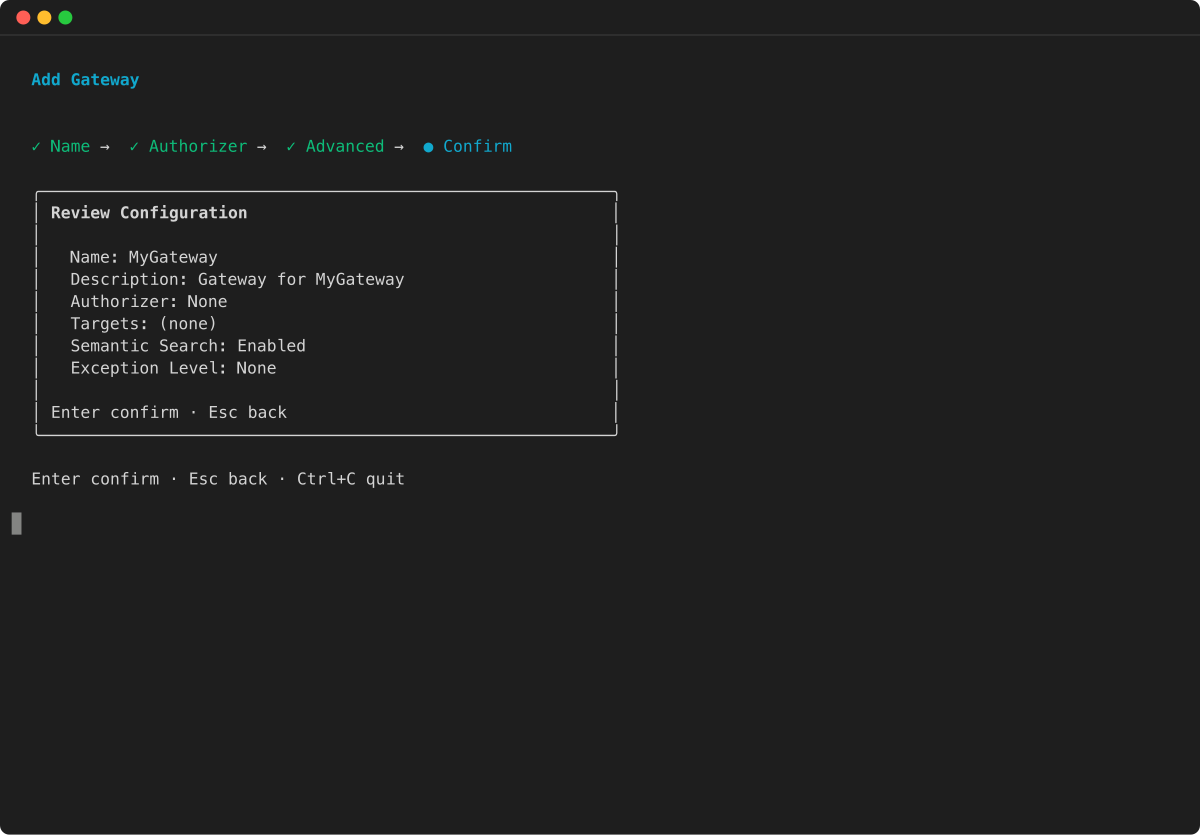
Rivedi il riepilogo della configurazione e premi Invio per confermare:
- AWS CLI
-
-
Esegui il codice seguente in un terminale per creare un gateway di base con la AWS CLI:
aws bedrock-agentcore-control create-gateway \
  --name my-gateway \
  --role-arn arn:aws:iam::123456789012:role/my-gateway-service-role \
  --protocol-type MCP \
  --authorizer-type CUSTOM_JWT \
  --authorizer-configuration '{
    "customJWTAuthorizer": {
      "discoveryUrl": "https://cognito-idp.us-west-2.amazonaws.com/some-user-pool/.well-known/openid-configuration",
      "allowedClients": ["clientId"]
    }
  }'
gatewayUrlNella risposta è l'endpoint da utilizzare quando si richiama il gateway.
- AWS Python SDK (Boto3)
-
-
Il seguente codice Python mostra come creare un gateway di base con AWS Python SDK (Boto3):
import boto3

# Initialize the AgentCore client
client = boto3.client('bedrock-agentcore-control')

# Create a gateway
gateway = client.create_gateway(
  name="my-gateway",
  roleArn="arn:aws:iam::123456789012:role/my-gateway-service-role",
  protocolType="MCP",
  authorizerType="CUSTOM_JWT",
  authorizerConfiguration={
      "customJWTAuthorizer": {
          "discoveryUrl": "https://cognito-idp.us-west-2.amazonaws.com/some-user-pool/.well-known/openid-configuration",
          "allowedClients": ["clientId"]
      }
  }
)

print(f"MCP Endpoint: {gateway['gatewayUrl']}")
Creare un gateway: esempio di base (autorizzazione IAM)
Questa sezione fornisce esempi di base sulla creazione di un gateway utilizzando l'autorizzazione IAM. Con l'autorizzazione IAM, non è necessaria una configurazione di autorizzazione.
La AgentCore CLI non supporta la creazione di gateway con autorizzazione IAM. Usa l'interfaccia a riga di AWS comando o AWS Python SDK (Boto3) per creare un gateway con autorizzazione IAM.
Seleziona uno dei seguenti metodi:
Esempio
- AWS CLI
-
-
Esegui quanto segue in un terminale:
aws bedrock-agentcore-control create-gateway \
--name my-gateway \
--role-arn arn:aws:iam::123456789012:role/MyAgentCoreServiceRole \
--protocol-type MCP \
--authorizer-type AWS_IAM
- Boto3
-
-
import boto3

# Create the AgentCore client
agentcore_client = boto3.client('bedrock-agentcore-control')

# Create a gateway
gateway = agentcore_client.create_gateway(
  name="my-gateway",
  roleArn="arn:aws:iam::123456789012:role/MyAgentCoreServiceRole",
  protocolType="MCP",
  authorizerType="AWS_IAM"
)
Creare un gateway: esempio di base (NONE authorizer)
Questa sezione fornisce esempi di base sulla creazione di un gateway con un tipo di autorizzazione NONE. Questo rappresenta un gateway che non eseguirà l'autenticazione o l'autorizzazione per le richieste in arrivo.
* Il tipo di autorizzazione NONE rappresenta un gateway che non eseguirà l'autenticazione o l'autorizzazione per le richieste in arrivo. Consulta l'autorizzazione in entrata per problemi di sicurezza e dettagli sull'utilizzo di questa configurazione. * Se scegli un'opzione che prevede la specificazione di un ruolo ARN del servizio gateway manifesto, assicurati di specificarne uno esistente che hai configurato. Per ulteriori informazioni, consulta Autorizzazioni del ruolo del servizio AgentCore Gateway.
Seleziona uno dei seguenti metodi:
Esempio
- AgentCore CLI
-
-
La AgentCore CLI fornisce un modo semplice per creare un gateway con il tipo di autorizzazione NONE in un'interfaccia a riga di comando.
Il comando seguente mostra come creare un gateway con il tipo di autorizzazione NONE:
agentcore add gateway \
  --name my-gateway \
  --authorizer-type NONE
agentcore deploy
Dopo la distribuzione, lo status gatewayUrl mostrato da agentcore è l'endpoint da utilizzare quando si richiama il gateway.
- Interactive
-
-
Esegui agentcore per aprire il TUI, quindi seleziona aggiungi e scegli Gateway:
-
Inserisci il nome del gateway:
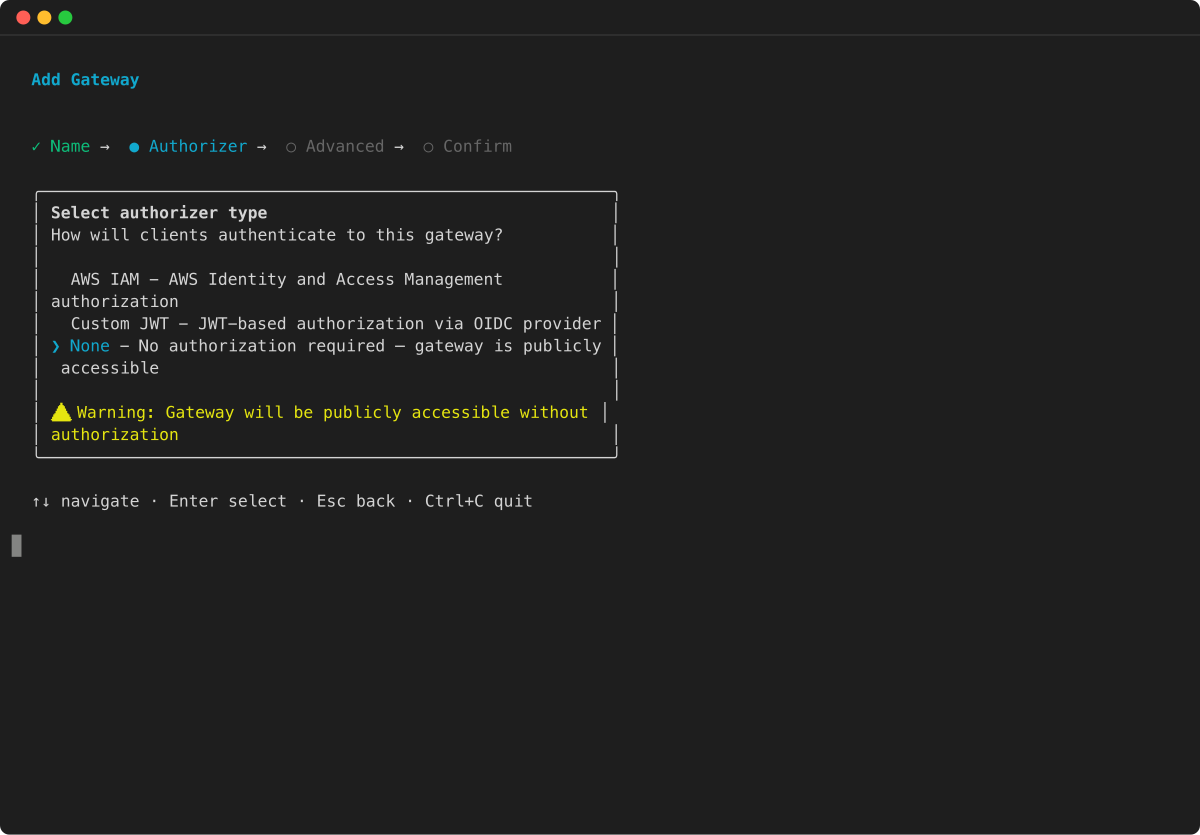
-
Seleziona NONE come tipo di autorizzatore e premi Invio:
-
Configura le opzioni avanzate:
-
Rivedi il riepilogo della configurazione e premi Invio per confermare:
- AWS CLI
-
-
Esegui il codice seguente in un terminale per creare un gateway con il tipo di autorizzazione NONE utilizzando la AWS CLI:
aws bedrock-agentcore-control create-gateway \
  --name my-gateway \
  --role-arn arn:aws:iam::111122223333:role/my-gateway-service-role \
  --protocol-type MCP \
  --authorizer-type NONE
gatewayUrlNella risposta è indicato l'endpoint da utilizzare quando si richiama il gateway.
- AWS Python SDK (Boto3)
-
-
Il seguente codice Python mostra come creare un gateway con il tipo di autorizzazione NONE utilizzando AWS Python SDK (Boto3):
import boto3

# Initialize the AgentCore client
client = boto3.client('bedrock-agentcore-control')

# Create a gateway
gateway = client.create_gateway(
  name="my-gateway",
  roleArn="arn:aws:iam::111122223333:role/my-gateway-service-role",
  protocolType="MCP",
  authorizerType="NONE"
)

print(f"MCP Endpoint: {gateway['gatewayUrl']}")
Creare un gateway: esempio di base (autorizzazione AUTHENTICATE_ONLY)
Questa sezione fornisce esempi di creazione di un gateway con autorizzazione. AUTHENTICATE_ONLY Con questo tipo di autorizzazione, il gateway convalida il token in entrata ma non esegue l'autorizzazione completa. L'identità o il token autenticati vengono quindi trasmessi alla destinazione per l'autorizzazione a valle. Ciò è utile quando si desidera che il gateway verifichi che il chiamante sia autenticato mentre delega le decisioni di autorizzazione al servizio di destinazione.
Il tipo di AUTHENTICATE_ONLY autorizzatore richiede una configurazione dell'autorizzatore JWT. Il gateway convalida il token ma non impone restrizioni relative all'ambito o al pubblico per l'autorizzazione. Se scegli un'opzione che prevede la specificazione di un ruolo ARN del servizio gateway manifesto, assicurati di specificarne uno esistente che hai configurato. Per ulteriori informazioni, consulta Autorizzazioni del ruolo del servizio AgentCore Gateway.
Seleziona uno dei seguenti metodi:
Esempio
- AWS CLI
-
-
Esegui il comando seguente per creare un gateway con AUTHENTICATE_ONLY autorizzazione:
aws bedrock-agentcore-control create-gateway \
  --name my-gateway \
  --role-arn arn:aws:iam::111122223333:role/my-gateway-service-role \
  --authorizer-type AUTHENTICATE_ONLY \
  --authorizer-configuration '{
    "jwtAuthenticationConfiguration": {
      "discoveryUrl": "https://cognito-idp.us-west-2.amazonaws.com/some-user-pool/.well-known/openid-configuration",
      "allowedClients": ["clientId"]
    }
  }'
gatewayUrlNella risposta è l'endpoint da utilizzare quando si richiama il gateway.
- AWS Python SDK (Boto3)
-
-
Il seguente codice Python mostra come creare un gateway con AUTHENTICATE_ONLY autorizzazione:
import boto3

# Initialize the AgentCore client
client = boto3.client('bedrock-agentcore-control')

# Create a gateway
gateway = client.create_gateway(
  name="my-gateway",
  roleArn="arn:aws:iam::111122223333:role/my-gateway-service-role",
  authorizerType="AUTHENTICATE_ONLY",
  authorizerConfiguration={
      "jwtAuthenticationConfiguration": {
          "discoveryUrl": "https://cognito-idp.us-west-2.amazonaws.com/some-user-pool/.well-known/openid-configuration",
          "allowedClients": ["clientId"]
      }
  }
)

print(f"Gateway URL: {gateway['gatewayUrl']}")
Crea un gateway con ricerca semantica
Questa sezione fornisce esempi di base sulla creazione di un gateway con uno strumento che consente di cercare semanticamente gli strumenti pertinenti. Per informazioni su come utilizzare questo strumento, consulta Search for tools in your AgentCore gateway with a natural language query.
Seleziona uno dei seguenti metodi:
Esempio
- AgentCore CLI
-
-
Per impostazione predefinita, la ricerca semantica è abilitata quando si crea un gateway utilizzando la AgentCore CLI. Per disabilitarlo, usa il --no-semantic-search flag. Per creare un gateway con la ricerca semantica predefinita abilitata:
agentcore add gateway --name my-gateway
agentcore deploy
- Interactive
-
-
Esegui agentcore per aprire il TUI, quindi seleziona aggiungi e scegli Gateway. La ricerca semantica è abilitata per impostazione predefinita nelle opzioni avanzate:
-
Inserisci il nome del gateway:
-
Seleziona il tipo di autorizzatore e premi Invio:
-
Nelle opzioni avanzate, verifica che la ricerca semantica sia abilitata (questa è l'impostazione predefinita):
-
Controlla il riepilogo della configurazione e premi Invio per confermare:
- AWS CLI
-
-
Attiva la ricerca semantica quando crei un gateway nella AWS CLI searchType specificando SEMANTIC come nell'--protocol-configurationoggetto, come nell'esempio seguente:
aws bedrock-agentcore-control create-gateway \
  --name my-gateway \
  --role-arn arn:aws:iam::123456789012:role/my-gateway-service-role \
  --protocol-type MCP \
  --authorizer-type CUSTOM_JWT \
  --authorizer-configuration '{
    "customJWTAuthorizer": {
      "discoveryUrl": "https://cognito-idp.us-west-2.amazonaws.com/some-user-pool/.well-known/openid-configuration",
      "allowedClients": ["clientId"]
    }
  }' \
  --protocol-configuration '{
    "mcp": {
        "searchType": "SEMANTIC"
    }
  }'
L'gatewayUrlin the response indica l'endpoint da utilizzare quando si richiama il gateway.
- AWS Python SDK (Boto3)
-
-
Attiva la ricerca semantica quando crei un gateway utilizzando AWS Python SDK (Boto3) searchType specificando come nell'oggetto, SEMANTIC come protocolConfiguration nell'esempio seguente:
import boto3

# Initialize the AgentCore client
client = boto3.client('bedrock-agentcore-control')

# Create a gateway
gateway = client.create_gateway(
  name="my-gateway",
  roleArn="arn:aws:iam::123456789012:role/my-gateway-service-role",
  protocolType="MCP",
  authorizerType="CUSTOM_JWT",
  authorizerConfiguration={
      "customJWTAuthorizer": {
          "discoveryUrl": "https://cognito-idp.us-west-2.amazonaws.com/some-user-pool/.well-known/openid-configuration",
          "allowedClients": ["clientId"]
      }
  },
  protocolConfiguration={
    "mcp": {
        "searchType": "SEMANTIC"
    }
  }
)

print(f"MCP Endpoint: {gateway['gatewayUrl']}")
Crea un gateway con messaggi di debug
È possibile creare un gateway con messaggi di debug specificando il valore come. exceptionLevel DEBUG Questa sezione fornisce esempi di creazione di un gateway con messaggi di debug. Per ulteriori informazioni, consulta Attivare i messaggi di debug.
Per impostazione predefinita, la AgentCore CLI non è DEBUG impostata exceptionLevel su. È necessario passare il --exception-level DEBUG flag durante la creazione del gateway. È possibile disattivare i messaggi di debug inviando una UpdateGatewayrichiesta e omettendo l'argomento. exceptionLevel
Seleziona uno dei seguenti metodi:
Esempio
- AgentCore CLI
-
-
Quando crei un gateway utilizzando la AgentCore CLI, passa il --exception-level flag per abilitare i messaggi di debug:
agentcore add gateway --name my-gateway --exception-level DEBUG
agentcore deploy
- Interactive
-
-
Esegui agentcore per aprire il TUI, quindi seleziona aggiungi e scegli Gateway. Nelle opzioni avanzate, puoi abilitare il debug dei messaggi impostando il livello di eccezione su: DEBUG
-
Inserisci il nome del gateway:
-
Seleziona il tipo di autorizzatore e premi Invio:
-
Nelle opzioni avanzate, imposta il livello di eccezione su: DEBUG
-
Rivedi il riepilogo della configurazione e premi Invio per confermare:
- AWS CLI
-
-
Esegui il codice seguente in un terminale per creare un gateway con messaggi di debug attivati nella CLI: AWS
aws bedrock-agentcore-control create-gateway \
  --name my-gateway \
  --role-arn arn:aws:iam::123456789012:role/my-gateway-service-role \
  --protocol-type MCP \
  --authorizer-type CUSTOM_JWT \
  --authorizer-configuration '{
    "customJWTAuthorizer": {
      "discoveryUrl": "https://cognito-idp.us-west-2.amazonaws.com/some-user-pool/.well-known/openid-configuration",
      "allowedClients": ["clientId"]
    }
  }' \
  --exception-level DEBUG
L'gatewayUrlin the response indica l'endpoint da utilizzare quando si richiama il gateway.
- AWS Python SDK (Boto3)
-
-
Il seguente codice Python mostra come creare un gateway di base con AWS Python SDK (Boto3):
import boto3

# Initialize the AgentCore client
client = boto3.client('bedrock-agentcore-control')

# Create a gateway
gateway = client.create_gateway(
  name="my-gateway",
  roleArn="arn:aws:iam::123456789012:role/my-gateway-service-role",
  protocolType="MCP",
  authorizerType="CUSTOM_JWT",
  authorizerConfiguration={
      "customJWTAuthorizer": {
          "discoveryUrl": "https://cognito-idp.us-west-2.amazonaws.com/some-user-pool/.well-known/openid-configuration",
          "allowedClients": ["clientId"]
      }
  },
  exceptionLevel="DEBUG"
)

print(f"MCP Endpoint: {gateway['gatewayUrl']}")
Crea un gateway con configurazioni di intercettori
Questa sezione fornisce esempi di creazione di un gateway con intercettori configurati. Gli intercettori verranno richiamati durante l'esecuzione del gateway per ogni richiesta.
* Gli intercettori verranno richiamati durante l'esecuzione del gateway per ogni richiesta. * Se scegli un'opzione che prevede la specificazione di un ruolo ARN del servizio gateway manifesto, assicurati di specificarne uno esistente che hai configurato. Per ulteriori informazioni, consulta Autorizzazioni del ruolo del servizio AgentCore Gateway.
Seleziona uno dei seguenti metodi:
Esempio
- AgentCore CLI
-
-
Con la AgentCore CLI, crea prima il gateway e poi configura gli intercettori utilizzando la AWS CLI o AWS Python SDK (Boto3).
Crea il gateway:
agentcore add gateway \
  --name my-gateway \
  --authorizer-type CUSTOM_JWT \
  --discovery-url "https://cognito-idp.us-west-2.amazonaws.com/some-user-pool/.well-known/openid-configuration" \
  --allowed-audience "api.example.com"
agentcore deploy
Dopo la distribuzione, configura gli intercettori sul gateway utilizzando il AWS comando CLI update-gateway o AWS Python SDK (Boto3) come mostrato nelle altre schede.
- Interactive
-
-
Esegui agentcore per aprire la TUI, quindi seleziona aggiungi e scegli Gateway. Dopo aver creato il gateway, configura gli intercettori utilizzando la CLI AWS o Python AWS SDK (Boto3):
-
Inserisci il nome del gateway:
-
Seleziona Custom JWT come tipo di autorizzazione e premi Invio:
-
Configura le opzioni avanzate:
-
Rivedi il riepilogo della configurazione e premi Invio per confermare:
Dopo aver creato e distribuito il gateway, configura gli intercettori utilizzando il update-gateway comando AWS CLI o AWS Python SDK (Boto3) come mostrato nelle altre schede.
- AWS CLI
-
-
Esegui il codice seguente in un terminale per creare un gateway con configurazioni di intercettori utilizzando la CLI: AWS
aws bedrock-agentcore-control create-gateway \
  --name my-gateway \
  --role-arn arn:aws:iam::123456789012:role/my-gateway-service-role \
  --protocol-type MCP \
  --authorizer-type CUSTOM_JWT \
  --authorizer-configuration '{
    "customJWTAuthorizer": {
      "discoveryUrl": "https://cognito-idp.us-west-2.amazonaws.com/some-user-pool/.well-known/openid-configuration",
      "allowedClients": ["clientId"]
    }
  }' \
  --interceptor-configurations '[{
      "interceptor": {
          "lambda": {
            "arn":"arn:aws:lambda:us-west-2:123456789012:function:my-interceptor-lambda"
          }
      },
      "interceptionPoints": ["REQUEST"]
  }]'
gatewayUrlNella risposta è indicato l'endpoint da utilizzare quando si richiama il gateway.
- AWS Python SDK (Boto3)
-
-
Il seguente codice Python mostra come creare un gateway con configurazioni di intercettori utilizzando AWS Python SDK (Boto3):
import boto3

# Initialize the AgentCore client
client = boto3.client('bedrock-agentcore-control')

# Create a gateway
gateway = client.create_gateway(
  name="my-gateway",
  roleArn="arn:aws:iam::123456789012:role/my-gateway-service-role",
  protocolType="MCP",
  authorizerType="CUSTOM_JWT",
  authorizerConfiguration={
      "customJWTAuthorizer": {
          "discoveryUrl": "https://cognito-idp.us-west-2.amazonaws.com/some-user-pool/.well-known/openid-configuration",
          "allowedClients": ["clientId"]
      }
  },
  interceptorConfigurations=[{
      "interceptor": {
          "lambda": {
            "arn":"arn:aws:lambda:us-west-2:123456789012:function:my-interceptor-lambda"
          }
      },
      "interceptionPoints": ["REQUEST"]
  }]
)

print(f"MCP Endpoint: {gateway['gatewayUrl']}")
Crea un gateway con una configurazione del motore di policy
È possibile creare un gateway con una configurazione del policy engine. Un motore di policy è una raccolta di policy che valuta e autorizza le chiamate agli strumenti degli agenti. Se associato a un gateway, il policy engine intercetta tutte le richieste degli agenti e determina se consentire o negare ogni azione in base alle policy definite. L'applicazione mode specifica se testare le politiche (LOG_ONLY) o applicarle (). ENFORCE
Esempio
- AgentCore CLI
-
-
Innanzitutto, aggiungi un motore di policy al tuo progetto. Quindi, crea un gateway che faccia riferimento al motore delle politiche:
agentcore add policy-engine \
  --name MyPolicyEngine

agentcore add gateway \
  --name MyGateway \
  --authorizer-type CUSTOM_JWT \
  --discovery-url https://cognito-idp.us-west-2.amazonaws.com/pool-id/.well-known/openid-configuration \
  --allowed-clients clientId \
  --policy-engine MyPolicyEngine \
  --policy-engine-mode LOG_ONLY

agentcore deploy
Per applicare le politiche anziché limitarsi a registrare le decisioni, passa --policy-engine-mode a. ENFORCE
- AWS CLI
-
-
Esegui il comando seguente per creare un gateway con una configurazione del motore di policy utilizzando la AWS CLI:
aws bedrock-agentcore-control create-gateway \
  --name my-gateway \
  --role-arn arn:aws:iam::123456789012:role/my-gateway-service-role \
  --protocol-type MCP \
  --authorizer-type CUSTOM_JWT \
  --authorizer-configuration '{
    "customJWTAuthorizer": {
      "discoveryUrl": "https://cognito-idp.us-west-2.amazonaws.com/pool-id/.well-known/openid-configuration",
      "allowedClients": ["clientId"]
    }
  }' \
  --policy-engine-configuration '{
    "arn": "arn:aws:bedrock-agentcore:us-west-2:123456789012:policy-engine/policy-id",
    "mode": "LOG_ONLY"
  }' \
  --exception-level DEBUG
L'gatewayUrlin the response indica l'endpoint da utilizzare quando si richiama il gateway.