Terjemahan disediakan oleh mesin penerjemah. Jika konten terjemahan yang diberikan bertentangan dengan versi bahasa Inggris aslinya, utamakan versi bahasa Inggris.
Ekspor
Dalam alur Data Wrangler, Anda dapat mengekspor beberapa atau semua transformasi yang telah Anda buat ke pipeline pemrosesan data Anda.
Alur Data Wrangler adalah serangkaian langkah persiapan data yang telah Anda lakukan pada data Anda. Dalam persiapan data Anda, Anda melakukan satu atau lebih transformasi ke data Anda. Setiap transformasi dilakukan dengan menggunakan langkah transformasi. Aliran memiliki serangkaian node yang mewakili impor data Anda dan transformasi yang telah Anda lakukan. Untuk contoh node, lihat gambar berikut.
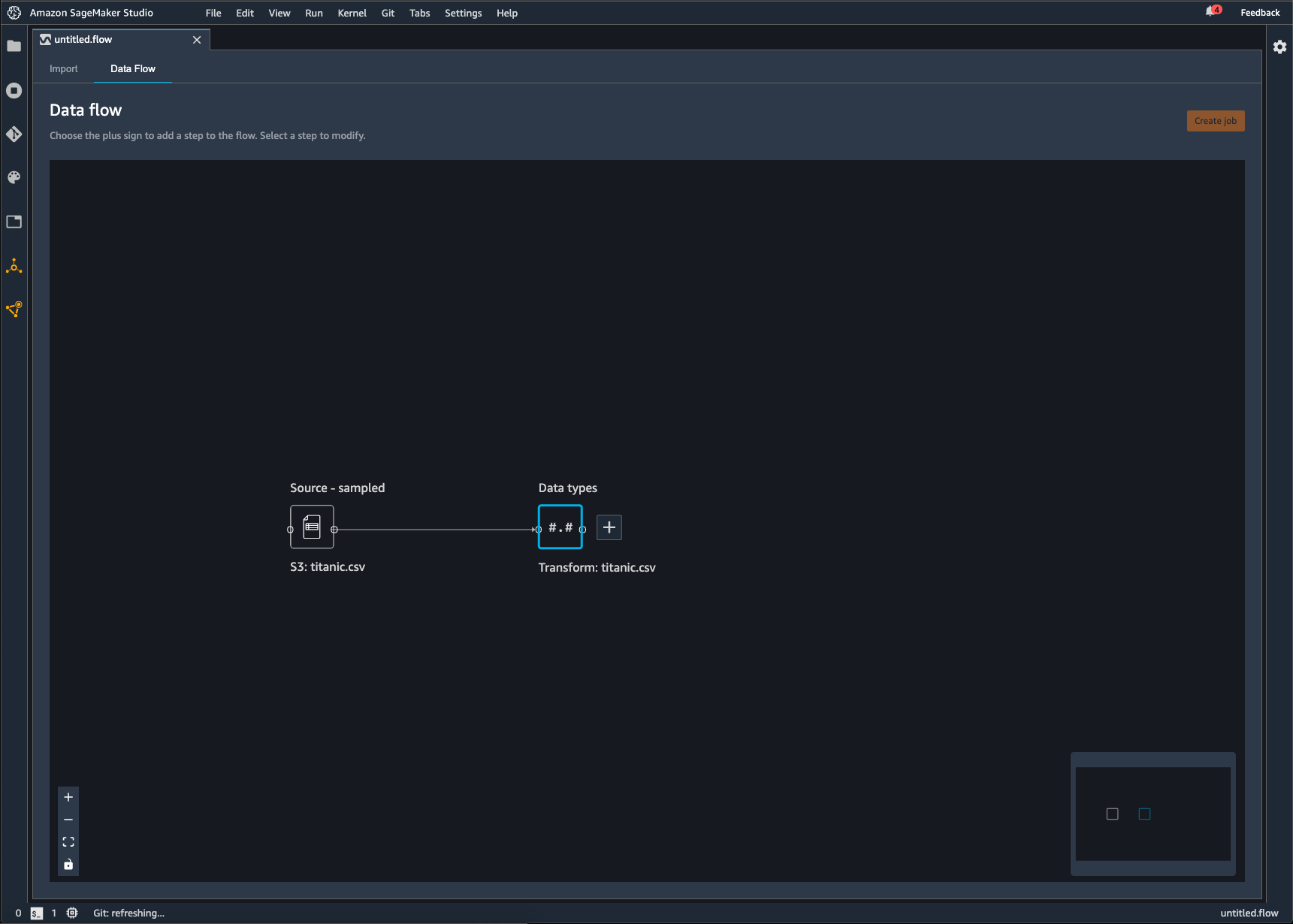
Gambar sebelumnya menunjukkan aliran Data Wrangler dengan dua node. Node Source - sampel menunjukkan sumber data dari mana Anda telah mengimpor data Anda. Node tipe Data menunjukkan bahwa Data Wrangler telah melakukan transformasi untuk mengubah kumpulan data menjadi format yang dapat digunakan.
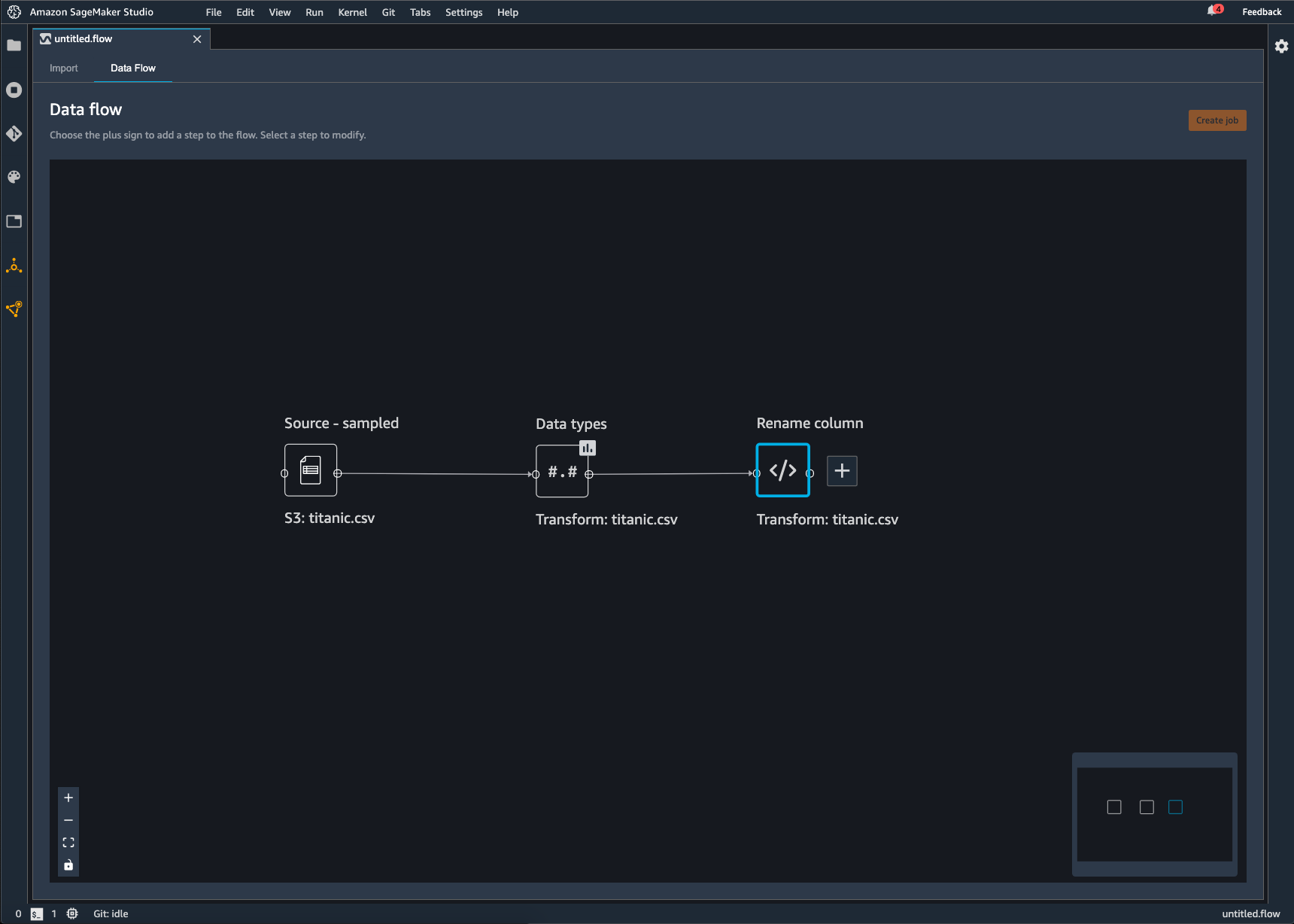
Setiap transformasi yang Anda tambahkan ke aliran Data Wrangler muncul sebagai node tambahan. Untuk informasi tentang transformasi yang dapat Anda tambahkan, lihatTransformasi Data. Gambar berikut menunjukkan aliran Data Wrangler yang memiliki Rename-columnnode untuk mengubah nama kolom dalam dataset.
Anda dapat mengekspor transformasi data Anda ke yang berikut:
-
Amazon S3
-
Jalur
-
Toko SageMaker Fitur Amazon
-
Kode Python
penting
Kami menyarankan Anda menggunakan kebijakan AmazonSageMakerFullAccess terkelola IAM untuk memberikan AWS izin menggunakan Data Wrangler. Jika tidak menggunakan kebijakan terkelola, Anda dapat menggunakan kebijakan IAM yang memberikan akses Data Wrangler ke bucket Amazon S3. Untuk informasi lebih lanjut tentang kebijakan ini, lihatKeamanan dan Izin.
Saat mengekspor aliran data, Anda dikenakan biaya untuk AWS sumber daya yang Anda gunakan. Anda dapat menggunakan tag alokasi biaya untuk mengatur dan mengelola biaya sumber daya tersebut. Anda membuat tag ini untuk profil pengguna Anda dan Data Wrangler secara otomatis menerapkannya ke sumber daya yang digunakan untuk mengekspor aliran data. Untuk informasi selengkapnya, lihat Menggunakan Tag Alokasi Biaya.
Ekspor ke Amazon S3
Data Wrangler memberi Anda kemampuan untuk mengekspor data ke lokasi dalam bucket Amazon S3. Anda dapat menentukan lokasi menggunakan salah satu metode berikut:
-
Node tujuan — Dimana Data Wrangler menyimpan data setelah memprosesnya.
-
Ekspor ke — Mengekspor data yang dihasilkan dari transformasi ke Amazon S3.
-
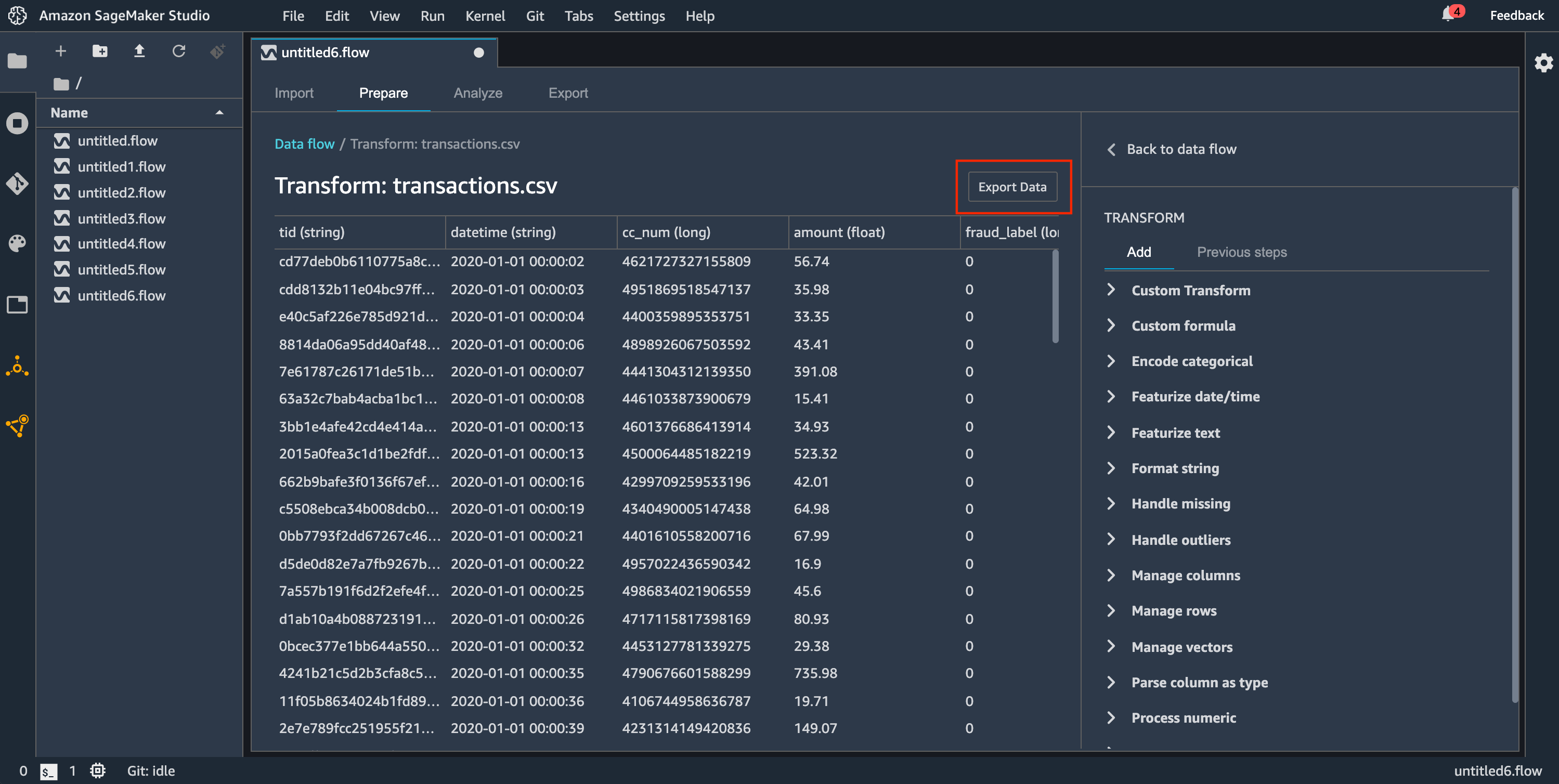
Ekspor data — Untuk kumpulan data kecil, dapat dengan cepat mengekspor data yang telah Anda ubah.
Gunakan bagian berikut untuk mempelajari lebih lanjut tentang masing-masing metode ini.
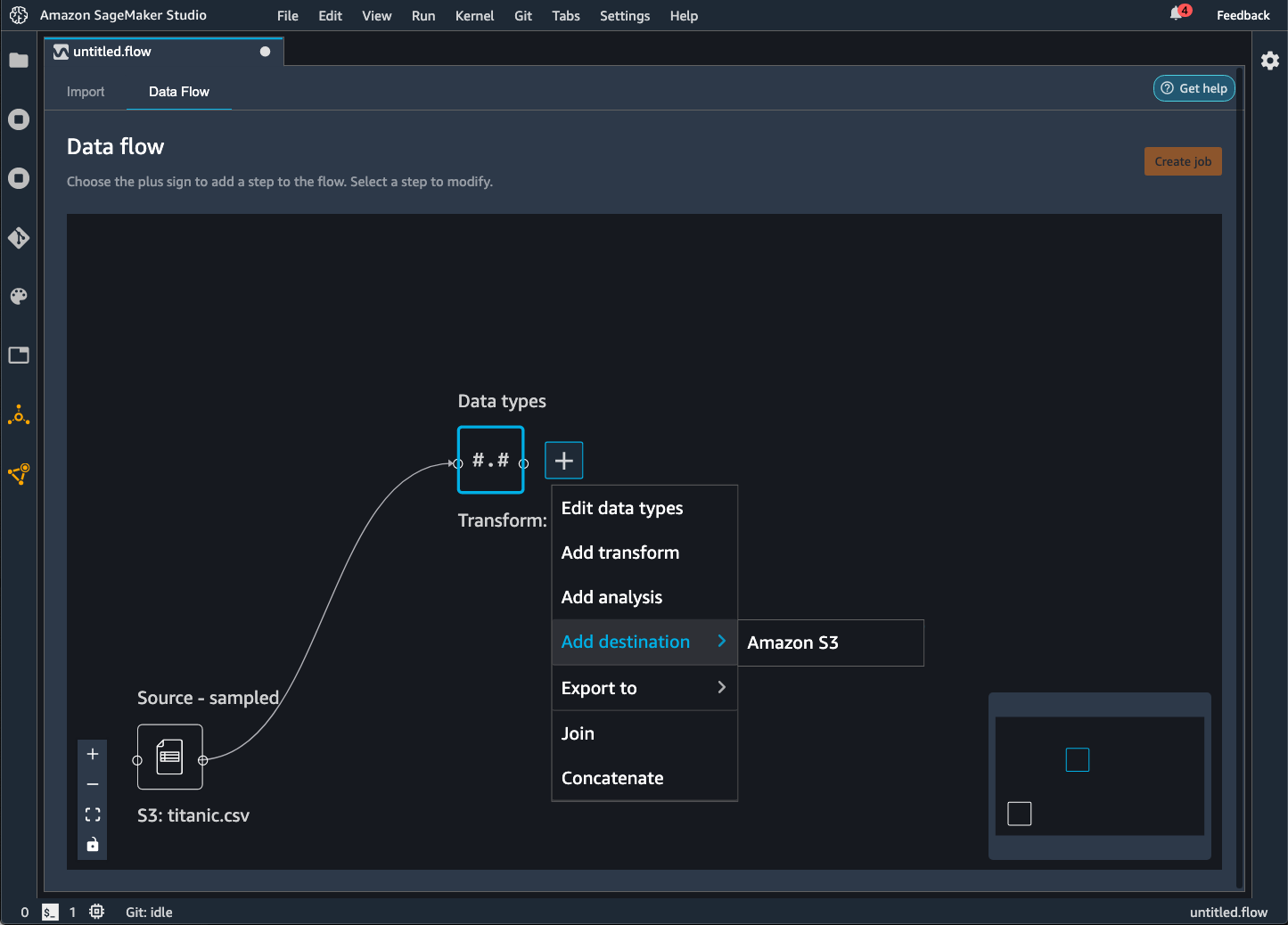
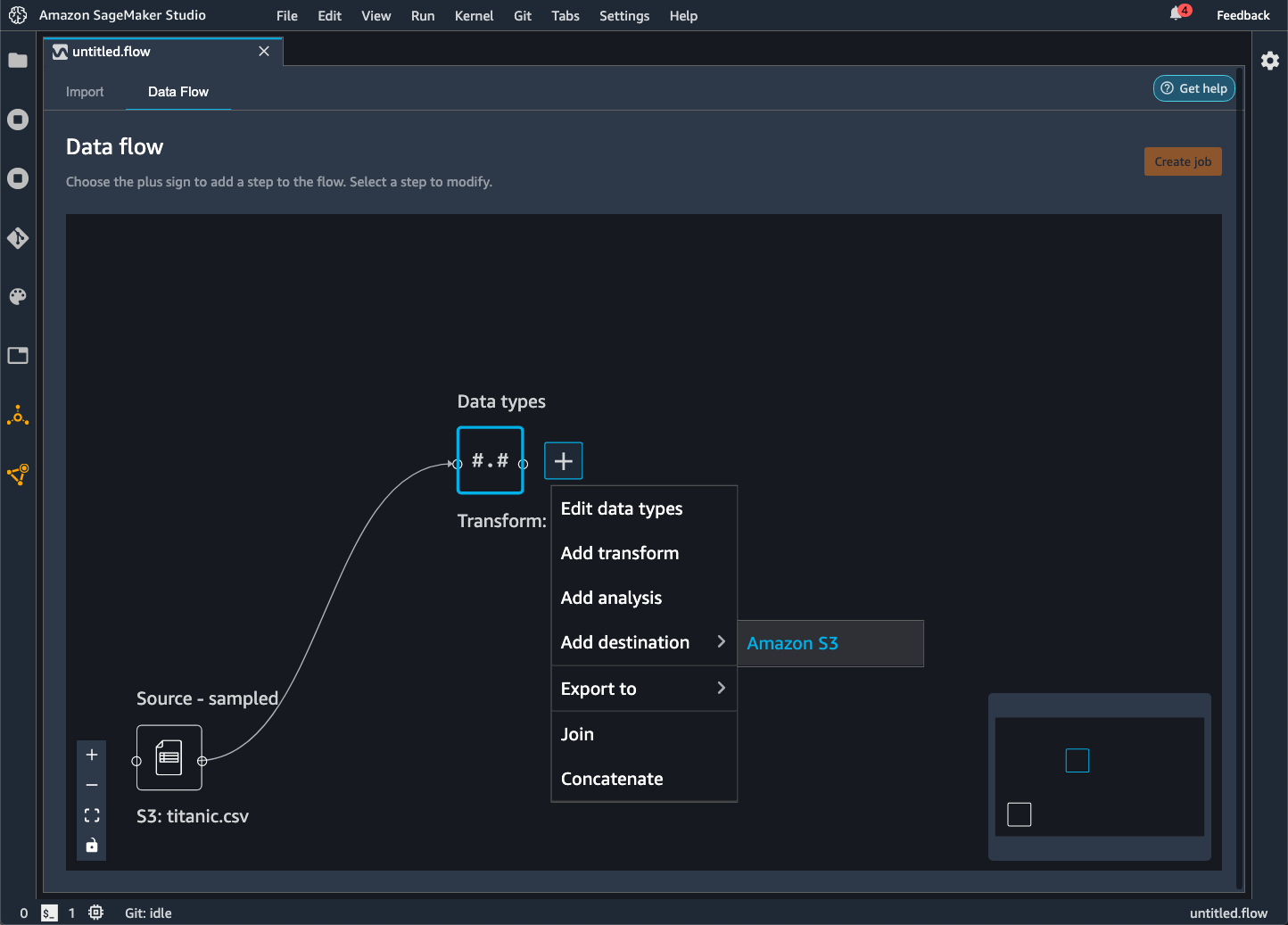
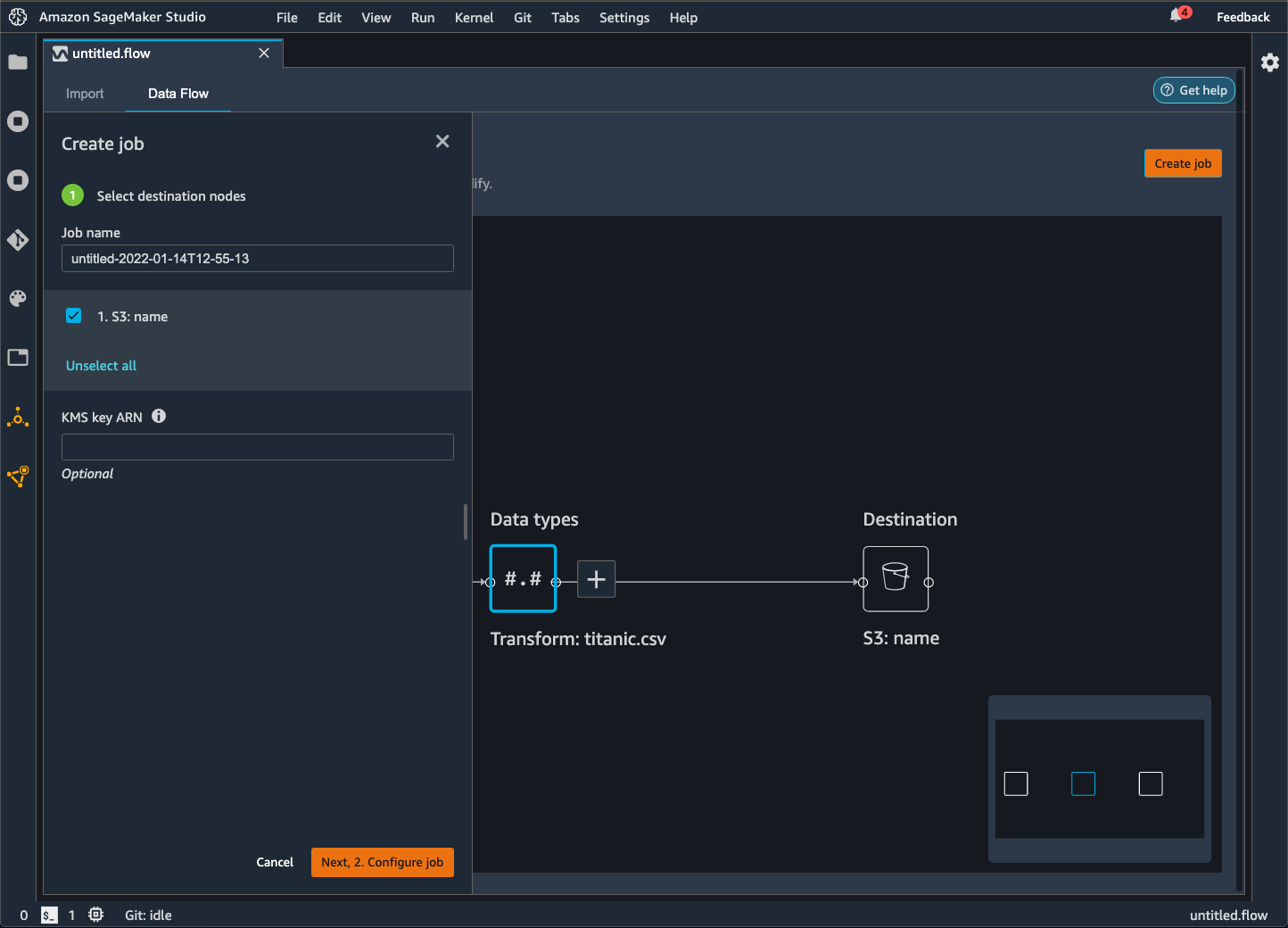
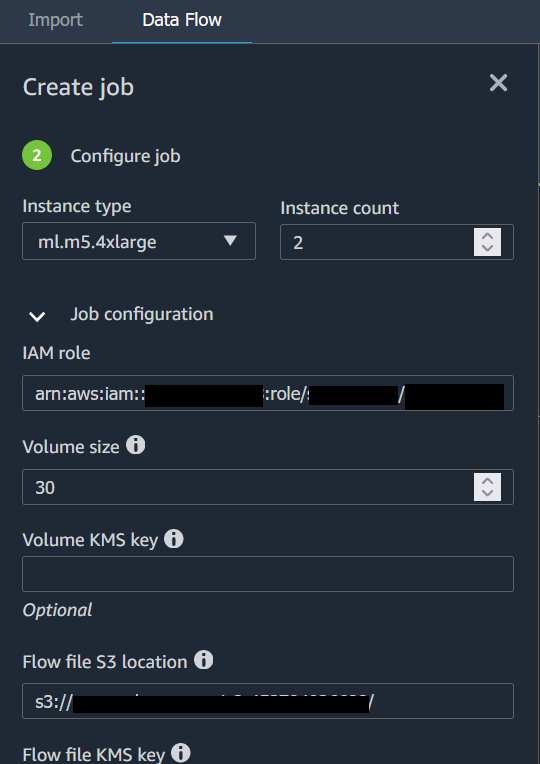
Saat Anda mengekspor aliran data ke bucket Amazon S3, Data Wrangler menyimpan salinan file alur di bucket S3. Ini menyimpan file aliran di bawah awalan data_wrangler_flows. Jika Anda menggunakan bucket Amazon S3 default untuk menyimpan file flow, bucket ini menggunakan konvensi penamaan berikut:. sagemaker- Misalnya, jika nomor akun Anda 111122223333 dan Anda menggunakan Studio Classic di us-east-1, kumpulan data yang Anda impor akan disimpan. region-account
numbersagemaker-us-east-1-111122223333 Dalam contoh ini, file.flow Anda yang dibuat di us-east-1 disimpan di. s3://sagemaker- region-account
number/data_wrangler_flows/
Ekspor ke Pipa
Saat ingin membangun dan menerapkan alur kerja machine learning (ML) skala besar, Anda dapat menggunakan Pipelines untuk membuat alur kerja yang mengelola dan menerapkan pekerjaan AI. SageMaker Dengan Pipelines, Anda dapat membangun alur kerja yang mengelola persiapan data SageMaker AI, pelatihan model, dan memodelkan pekerjaan penerapan. Anda dapat menggunakan algoritme pihak pertama yang ditawarkan SageMaker AI dengan menggunakan Pipelines. Untuk informasi lebih lanjut tentang Pipelines, lihat SageMaker Pipelines.
Saat Anda mengekspor satu atau beberapa langkah dari aliran data ke Pipelines, Data Wrangler akan membuat buku catatan Jupyter yang dapat Anda gunakan untuk menentukan, membuat instance, menjalankan, dan mengelola pipeline.
Menggunakan Notebook Jupyter untuk Membuat Pipeline
Gunakan prosedur berikut untuk membuat notebook Jupyter untuk mengekspor aliran Data Wrangler Anda ke Pipelines.
Gunakan prosedur berikut untuk membuat notebook Jupyter dan menjalankannya untuk mengekspor aliran Data Wrangler Anda ke Pipelines.
-
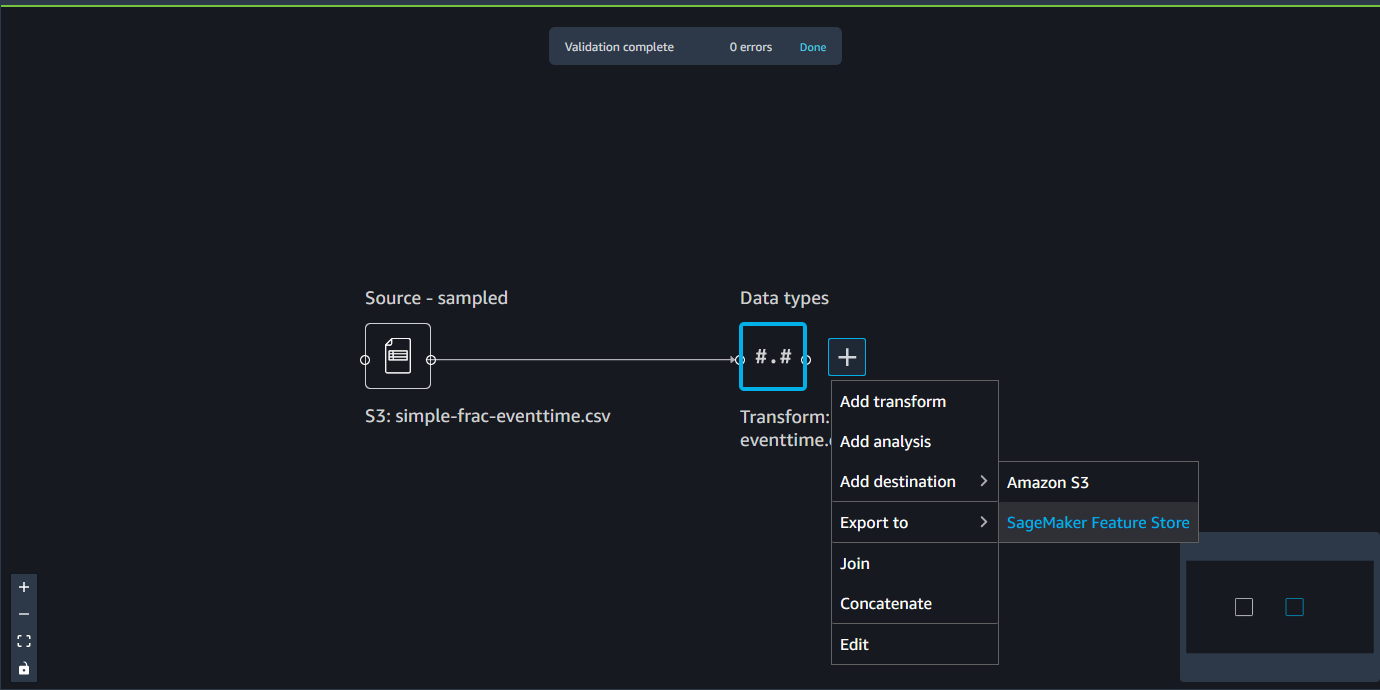
Pilih + di sebelah simpul yang ingin Anda ekspor.
-
Pilih Ekspor ke.
-
Pilih Pipelines (melalui Jupyter Notebook).
-
Jalankan notebook Jupyter.
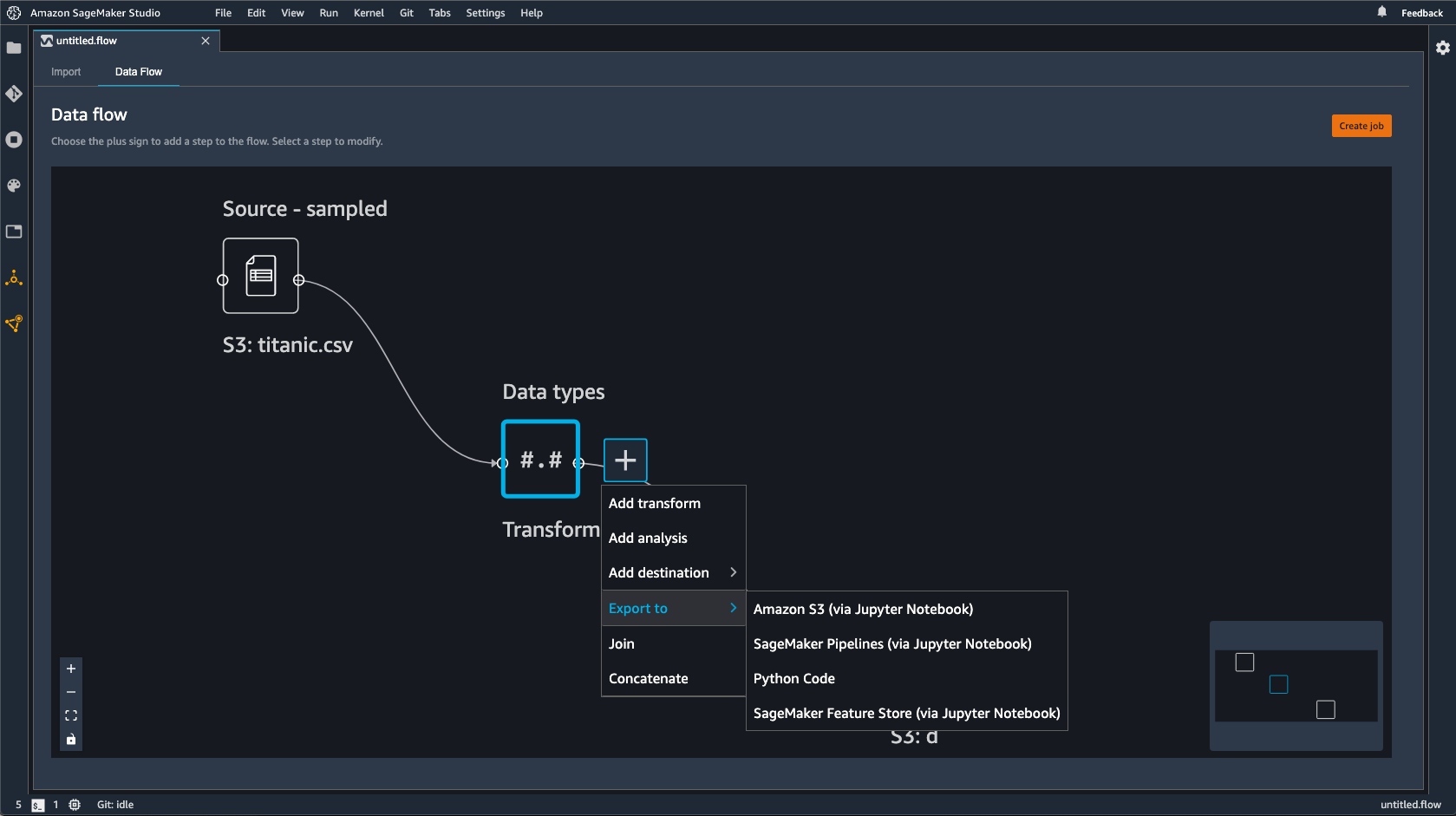
Anda dapat menggunakan notebook Jupyter yang dihasilkan Data Wrangler untuk menentukan pipeline. Pipeline mencakup langkah-langkah pemrosesan data yang ditentukan oleh alur Data Wrangler Anda.
Anda dapat menambahkan langkah tambahan ke pipeline dengan menambahkan langkah-langkah ke steps daftar dalam kode berikut di buku catatan:
pipeline = Pipeline(
    name=pipeline_name,
    parameters=[instance_type, instance_count],
    steps=[step_process], #Add more steps to this list to run in your Pipeline
)
Untuk informasi selengkapnya tentang mendefinisikan pipeline, lihat Mendefinisikan Pipeline SageMaker AI.
Ekspor ke Endpoint Inferensi
Gunakan alur Data Wrangler Anda untuk memproses data pada saat inferensi dengan membuat pipeline inferensi serial SageMaker AI dari alur Data Wrangler Anda. Pipa inferensi adalah serangkaian langkah yang menghasilkan model terlatih yang membuat prediksi pada data baru. Pipa inferensi serial dalam Data Wrangler mengubah data mentah dan menyediakannya ke model pembelajaran mesin untuk prediksi. Anda membuat, menjalankan, dan mengelola pipeline inferensi dari notebook Jupyter dalam Studio Classic. Untuk informasi selengkapnya tentang mengakses buku catatan, lihatMenggunakan Notebook Jupyter untuk membuat titik akhir inferensi.
Di dalam buku catatan, Anda dapat melatih model pembelajaran mesin atau menentukan model yang sudah Anda latih. Anda dapat menggunakan Amazon SageMaker Autopilot atau XGBoost untuk melatih model menggunakan data yang telah Anda ubah dalam alur Data Wrangler Anda.
Pipeline menyediakan kemampuan untuk melakukan inferensi batch atau real-time. Anda juga dapat menambahkan aliran Data Wrangler ke SageMaker Model Registry. Untuk informasi selengkapnya tentang model hosting, lihatMulti-model titik akhir.
penting
Anda tidak dapat mengekspor aliran Data Wrangler ke titik akhir inferensi jika memiliki transformasi berikut:
-
Join
-
Bersambung
-
Grup oleh
Jika Anda harus menggunakan transformasi sebelumnya untuk menyiapkan data Anda, gunakan prosedur berikut.
Untuk mempersiapkan data Anda untuk inferensi dengan transformasi yang tidak didukung
-
Buat alur Data Wrangler.
-
Terapkan transformasi sebelumnya yang tidak didukung.
-
Ekspor data ke bucket Amazon S3.
-
Buat alur Data Wrangler terpisah.
-
Impor data yang telah Anda ekspor dari alur sebelumnya.
-
Terapkan transformasi yang tersisa.
-
Buat pipeline inferensi serial menggunakan notebook Jupyter yang kami sediakan.
Untuk informasi tentang mengekspor data ke bucket Amazon S3, lihat. Ekspor ke Amazon S3 Untuk informasi tentang membuka notebook Jupyter yang digunakan untuk membuat pipeline inferensi serial, lihat. Menggunakan Notebook Jupyter untuk membuat titik akhir inferensi
Data Wrangler mengabaikan transformasi yang menghapus data pada saat inferensi. Misalnya, Data Wrangler mengabaikan Tangani Nilai yang Hilang transformasi jika Anda menggunakan konfigurasi Drop missing.
Jika Anda telah mereparasi transformasi ke seluruh kumpulan data Anda, transformasi terbawa ke saluran inferensi Anda. Misalnya, jika Anda menggunakan nilai median untuk mengimputasi nilai yang hilang, nilai median dari refitting transformasi diterapkan ke permintaan inferensi Anda. Anda dapat mereparasi transformasi dari alur Data Wrangler saat menggunakan notebook Jupyter atau saat mengekspor data ke pipeline inferensi. Untuk informasi tentang memperbaiki transformasi, lihat. Reparasi Transformasi ke Seluruh Dataset dan Ekspor Mereka
Pipa inferensi serial mendukung tipe data berikut untuk string input dan output. Setiap tipe data memiliki seperangkat persyaratan.
Tipe data yang didukung
-
text/csv— tipe data untuk string CSV-
String tidak dapat memiliki header.
-
Fitur yang digunakan untuk pipa inferensi harus dalam urutan yang sama dengan fitur dalam kumpulan data pelatihan.
-
Harus ada pembatas koma di antara fitur.
-
Catatan harus dibatasi oleh karakter baris baru.
Berikut ini adalah contoh string CSV yang diformat secara valid yang dapat Anda berikan dalam permintaan inferensi.
abc,0.0,"Doe, John",12345\ndef,1.1,"Doe, Jane",67890 -
-
application/json— tipe data untuk string JSON-
Fitur yang digunakan dalam kumpulan data untuk pipa inferensi harus dalam urutan yang sama dengan fitur dalam kumpulan data pelatihan.
-
Data harus memiliki skema tertentu. Anda mendefinisikan skema sebagai
instancesobjek tunggal yang memiliki satu set.featuresSetiapfeaturesobjek mewakili pengamatan.
Berikut ini adalah contoh string JSON yang diformat secara valid yang dapat Anda berikan dalam permintaan inferensi.
{ "instances": [ { "features": ["abc", 0.0, "Doe, John", 12345] }, { "features": ["def", 1.1, "Doe, Jane", 67890] } ] } -
Menggunakan Notebook Jupyter untuk membuat titik akhir inferensi
Gunakan prosedur berikut untuk mengekspor alur Data Wrangler Anda untuk membuat pipeline inferensi.
Untuk membuat pipeline inferensi menggunakan notebook Jupyter, lakukan hal berikut.
-
Pilih + di sebelah simpul yang ingin Anda ekspor.
-
Pilih Ekspor ke.
-
Pilih SageMaker AI Inference Pipeline (melalui Jupyter Notebook).
-
Jalankan notebook Jupyter.
Saat Anda menjalankan notebook Jupyter, itu menciptakan artefak aliran inferensi. Artefak aliran inferensi adalah file aliran Data Wrangler dengan metadata tambahan yang digunakan untuk membuat pipeline inferensi serial. Node yang Anda ekspor mencakup semua transformasi dari node sebelumnya.
penting
Data Wrangler membutuhkan artefak aliran inferensi untuk menjalankan pipa inferensi. Anda tidak dapat menggunakan file aliran Anda sendiri sebagai artefak. Anda harus membuatnya dengan menggunakan prosedur sebelumnya.
Ekspor ke Kode Python
Untuk mengekspor semua langkah dalam aliran data Anda ke file Python yang dapat Anda integrasikan secara manual ke dalam alur kerja pemrosesan data apa pun, gunakan prosedur berikut.
Gunakan prosedur berikut untuk menghasilkan notebook Jupyter dan menjalankannya untuk mengekspor aliran Data Wrangler Anda ke Kode Python.
-
Pilih + di sebelah simpul yang ingin Anda ekspor.
-
Pilih Ekspor ke.
-
Pilih Kode Python.
-
Jalankan notebook Jupyter.
Anda mungkin perlu mengonfigurasi skrip Python untuk membuatnya berjalan di pipeline Anda. Misalnya, jika Anda menjalankan lingkungan Spark, pastikan Anda menjalankan skrip dari lingkungan yang memiliki izin untuk mengakses AWS sumber daya.
Ekspor ke Toko SageMaker Fitur Amazon
Anda dapat menggunakan Data Wrangler untuk mengekspor fitur yang telah Anda buat ke Amazon SageMaker Feature Store. Fitur adalah kolom dalam dataset Anda. Feature Store adalah toko terpusat untuk fitur dan metadata terkait. Anda dapat menggunakan Feature Store untuk membuat, berbagi, dan mengelola data yang dikurasi untuk pengembangan machine learning (ML). Toko terpusat membuat data Anda lebih mudah ditemukan dan dapat digunakan kembali. Untuk informasi selengkapnya tentang Toko Fitur, lihat Toko SageMaker Fitur Amazon.
Konsep inti di Feature Store adalah grup fitur. Grup fitur adalah kumpulan fitur, catatan mereka (pengamatan), dan metadata terkait. Ini mirip dengan tabel dalam database.
Anda dapat menggunakan Data Wrangler untuk melakukan salah satu hal berikut:
-
Perbarui grup fitur yang ada dengan catatan baru. Catatan adalah pengamatan dalam dataset.
-
Buat grup fitur baru dari node dalam alur Data Wrangler Anda. Data Wrangler menambahkan pengamatan dari kumpulan data Anda sebagai catatan dalam grup fitur Anda.
Jika Anda memperbarui grup fitur yang ada, skema kumpulan data Anda harus cocok dengan skema grup fitur. Semua catatan dalam grup fitur diganti dengan pengamatan di kumpulan data Anda.
Anda dapat menggunakan notebook Jupyter atau node tujuan untuk memperbarui grup fitur Anda dengan pengamatan dalam kumpulan data.
Jika grup fitur Anda dengan format tabel Iceberg memiliki kunci enkripsi toko offline khusus, pastikan Anda memberikan IAM yang Anda gunakan untuk izin pekerjaan Amazon SageMaker Processing untuk menggunakannya. Minimal, Anda harus memberikan izin untuk mengenkripsi data yang Anda tulis ke Amazon S3. Untuk memberikan izin, berikan peran IAM kemampuan untuk menggunakan. GenerateDataKey Untuk informasi selengkapnya tentang pemberian izin peran IAM untuk menggunakan kunci, lihat AWS KMS https://docs.aws.amazon.com/kms/latest/developerguide/key-policies.html
Notebook menggunakan konfigurasi ini untuk membuat grup fitur, memproses data Anda dalam skala besar, dan kemudian memasukkan data yang diproses ke toko fitur online dan offline Anda. Untuk mempelajari lebih lanjut, lihat Sumber Data dan Penyerapan.
Reparasi Transformasi ke Seluruh Dataset dan Ekspor Mereka
Saat Anda mengimpor data, Data Wrangler menggunakan sampel data untuk menerapkan pengkodean. Secara default, Data Wrangler menggunakan 50.000 baris pertama sebagai sampel, tetapi Anda dapat mengimpor seluruh kumpulan data atau menggunakan metode pengambilan sampel yang berbeda. Untuk informasi selengkapnya, lihat Impor.
Transformasi berikut menggunakan data Anda untuk membuat kolom dalam kumpulan data:
Jika Anda menggunakan sampling untuk mengimpor data Anda, transformasi sebelumnya hanya menggunakan data dari sampel untuk membuat kolom. Transformasi mungkin tidak menggunakan semua data yang relevan. Misalnya, jika Anda menggunakan transformasi Encode Categorical, mungkin ada kategori di seluruh kumpulan data yang tidak ada dalam sampel.
Anda dapat menggunakan node tujuan atau notebook Jupyter untuk mereparasi transformasi ke seluruh kumpulan data. Ketika Data Wrangler mengekspor transformasi dalam aliran, itu menciptakan pekerjaan Pemrosesan. SageMaker Saat pekerjaan pemrosesan selesai, Data Wrangler menyimpan file berikut di lokasi Amazon S3 default atau lokasi S3 yang Anda tentukan:
-
File aliran Data Wrangler yang menentukan transformasi yang direparasi ke kumpulan data
-
Dataset dengan transformasi reparasi diterapkan padanya
Anda dapat membuka file aliran Data Wrangler dalam Data Wrangler dan menerapkan transformasi ke kumpulan data yang berbeda. Misalnya, jika Anda telah menerapkan transformasi ke kumpulan data pelatihan, Anda dapat membuka dan menggunakan file aliran Data Wrangler untuk menerapkan transformasi ke kumpulan data yang digunakan untuk inferensi.
Untuk informasi tentang penggunaan node tujuan untuk mereparasi transformasi dan ekspor, lihat halaman berikut:
Gunakan prosedur berikut untuk menjalankan notebook Jupyter untuk mereparasi transformasi dan mengekspor data.
Untuk menjalankan notebook Jupyter dan untuk mereparasi transformasi dan mengekspor aliran Data Wrangler Anda, lakukan hal berikut.
-
Pilih + di sebelah simpul yang ingin Anda ekspor.
-
Pilih Ekspor ke.
-
Pilih lokasi tempat Anda mengekspor data.
-
Untuk
refit_trained_paramsobjek, aturrefitkeTrue. -
Untuk
output_flowbidang, tentukan nama file aliran output dengan transformasi reparasi. -
Jalankan notebook Jupyter.
Buat Jadwal untuk Memproses Data Baru Secara Otomatis
Jika Anda memproses data secara berkala, Anda dapat membuat jadwal untuk menjalankan pekerjaan pemrosesan secara otomatis. Misalnya, Anda dapat membuat jadwal yang menjalankan pekerjaan pemrosesan secara otomatis saat Anda mendapatkan data baru. Untuk informasi selengkapnya tentang memproses pekerjaan, lihat Ekspor ke Amazon S3 danEkspor ke Toko SageMaker Fitur Amazon.
Saat Anda membuat pekerjaan, Anda harus menentukan peran IAM yang memiliki izin untuk membuat pekerjaan. Secara default, peran IAM yang Anda gunakan untuk mengakses Data Wrangler adalah. SageMakerExecutionRole
Izin berikut memungkinkan Data Wrangler mengakses EventBridge dan memungkinkan EventBridge untuk menjalankan pekerjaan pemrosesan:
-
Tambahkan kebijakan AWS Terkelola berikut ke peran eksekusi Amazon SageMaker Studio Classic yang memberikan izin kepada Data Wrangler untuk digunakan: EventBridge
arn:aws:iam::aws:policy/AmazonEventBridgeFullAccessUntuk informasi selengkapnya tentang kebijakan, lihat kebijakan AWS terkelola untuk EventBridge.
-
Tambahkan kebijakan berikut ke peran IAM yang Anda tentukan saat membuat pekerjaan di Data Wrangler:
Jika Anda menggunakan peran IAM default, Anda menambahkan kebijakan sebelumnya ke peran eksekusi Amazon SageMaker Studio Classic.
Tambahkan kebijakan kepercayaan berikut ke peran untuk memungkinkan untuk EventBridge mengasumsikannya.
{
    "Effect": "Allow",
    "Principal": {
        "Service": "events.amazonaws.com"
    },
    "Action": "sts:AssumeRole"
}
penting
Saat Anda membuat jadwal, Data Wrangler membuat eventRule in. EventBridge Anda dikenakan biaya untuk aturan acara yang Anda buat dan instance yang digunakan untuk menjalankan pekerjaan pemrosesan.
Untuk informasi tentang EventBridge harga, lihat EventBridge harga Amazon
Anda dapat mengatur jadwal menggunakan salah satu metode berikut:
-
catatan
Data Wrangler tidak mendukung ekspresi berikut:
-
LW#
-
Singkatan untuk hari
-
Singkatan untuk bulan
-
-
Berulang — Tetapkan interval per jam atau harian untuk menjalankan pekerjaan.
-
Waktu spesifik - Tetapkan hari dan waktu tertentu untuk menjalankan pekerjaan.
Bagian berikut menyediakan prosedur untuk menciptakan lapangan kerja.
Anda dapat menggunakan Amazon SageMaker Studio Classic melihat pekerjaan yang dijadwalkan untuk dijalankan. Pekerjaan pemrosesan Anda berjalan di dalam Pipelines. Setiap pekerjaan pemrosesan memiliki pipa sendiri. Ini berjalan sebagai langkah pemrosesan di dalam pipa. Anda dapat melihat jadwal yang telah Anda buat dalam pipeline. Untuk informasi tentang melihat pipeline, lihatLihat detail pipa.
Gunakan prosedur berikut untuk melihat pekerjaan yang telah Anda jadwalkan.
Untuk melihat pekerjaan yang telah Anda jadwalkan, lakukan hal berikut.
-
Buka Amazon SageMaker Studio Classic.
-
Buka Pipa
-
Lihat saluran pipa untuk pekerjaan yang telah Anda buat.
Pipeline yang menjalankan pekerjaan menggunakan nama pekerjaan sebagai awalan. Misalnya, jika Anda telah membuat pekerjaan bernama
housing-data-feature-enginnering, nama pipeline adalahdata-wrangler-housing-data-feature-engineering. -
Pilih pipeline yang berisi pekerjaan Anda.
-
Lihat status jaringan pipa. Pipelines dengan Status Sukses telah menjalankan pekerjaan pemrosesan dengan sukses.
Untuk menghentikan pekerjaan pemrosesan berjalan, lakukan hal berikut:
Untuk menghentikan pekerjaan pemrosesan agar tidak berjalan, hapus aturan acara yang menentukan jadwal. Menghapus aturan acara menghentikan semua pekerjaan yang terkait dengan jadwal berjalan. Untuk informasi tentang menghapus aturan, lihat Menonaktifkan atau menghapus aturan Amazon. EventBridge
Anda dapat menghentikan dan menghapus saluran pipa yang terkait dengan jadwal juga. Untuk informasi tentang menghentikan pipa, lihat StopPipelineExecution. Untuk informasi tentang menghapus pipeline, lihat DeletePipeline.
