Terjemahan disediakan oleh mesin penerjemah. Jika konten terjemahan yang diberikan bertentangan dengan versi bahasa Inggris aslinya, utamakan versi bahasa Inggris.
Memulai evaluasi sesuai permintaan
Ikuti langkah-langkah berikut untuk menyiapkan dan menjalankan evaluasi sesuai permintaan pertama Anda.
Topik
Prasyarat
Untuk menggunakan fitur AgentCore OnDemand Evaluasi Evaluasi, Anda memerlukan:
-
AWS Akun dengan izin IAM yang sesuai
-
Akses Amazon Bedrock dengan izin pemanggilan model
-
Pencarian Transaksi diaktifkan di CloudWatch - lihat Aktifkan Pencarian Transaksi
-
Python 3.10 atau yang lebih baru diinstal
-
Per OpenTelemetry pustakaan - Sertakan
aws-opentelemetry-distro(ADOT) dalam file Andarequirements.txt
Kerangka kerja yang didukung
Bangun agen Anda dengan perpustakaan kerangka kerja dan instrumentasi yang didukung AgentCore Evaluasi. Untuk informasi selengkapnya tentang kerangka kerja dan pustaka instrumentasi yang didukung, lihat Kerangka kerja agen yang didukung.
Langkah 1: Buat dan terapkan agen Anda
catatan
Jika Anda memiliki agen yang sudah aktif dan berjalan di AgentCore Runtime, Anda dapat langsung pindah ke langkah 2
Buat dan terapkan agen Anda dengan mengikuti panduan Memulai untuk AgentCore Runtime. Anda dapat menemukan contoh tambahan di Sampel AgentCore Evaluasi
Langkah 2: Panggil agen Anda
Panggil agen Anda menggunakan perintah berikut dan lihat jejak, sesi, dan metrik di dasbor Pengamatan GenAI. CloudWatch
Contoh invoke_agent.py
import boto3
import json
import uuid

region = "region-code"
ace_demo_agent_arn = "agent-arn from step-2"

agent_core_client = boto3.client('bedrock-agentcore', region_name=region)

text_to_analyze = "Sample text to test agent for agentcore evaluations demo"

payload = json.dumps({
    "prompt": f"Can you analyze this text and tell me about its statistics: {text_to_analyze}"
})

# random session-id, you can set your own here
session_id = "test-ace-demo-session-18a1dba0-62a0-462g"

response = agent_core_client.invoke_agent_runtime(
    agentRuntimeArn=ace_demo_agent_arn,
    runtimeSessionId=session_id,
    payload=payload,
    qualifier="DEFAULT"
)

response_body = response['response'].read()
response_data = json.loads(response_body)
print("Agent Response:", response_data)
print("SessionId:", session_id)
Langkah 3: Evaluasi agen
Setelah Anda membuat beberapa panggilan ke agen Anda, Anda siap untuk mengevaluasinya. Untuk evaluasi kami membutuhkan:
-
EvaluatorId: ini bisa menjadi id untuk evaluator bawaan atau yang dibuat khusus -
SessionSpans: rentang adalah blok telemetri yang dipancarkan saat Anda berinteraksi dengan aplikasi. Aplikasi dalam contoh kita adalah agen yang dihosting di AgentCore Runtime.-
Untuk evaluasi sesuai permintaan, kita perlu mengunduh rentang dari CloudWatch grup log dan menggunakannya untuk evaluasi.
-
AgentCore CLI melakukan ini untuk Anda secara otomatis dan merupakan yang termudah untuk memulai.
-
Jika Anda tidak menggunakan AgentCore CLI, kami akan menunjukkan cara mengunduh log menggunakan session-id dan menggunakannya untuk evaluasi menggunakan SDK. AWS
-
Contoh kode untuk AgentCore CLI dan SDK AgentCore
Contoh kode berikut menunjukkan cara menjalankan evaluasi sesuai permintaan menggunakan pendekatan pengembangan yang berbeda. Pilih metode yang paling sesuai dengan lingkungan pengembangan dan preferensi Anda.
contoh
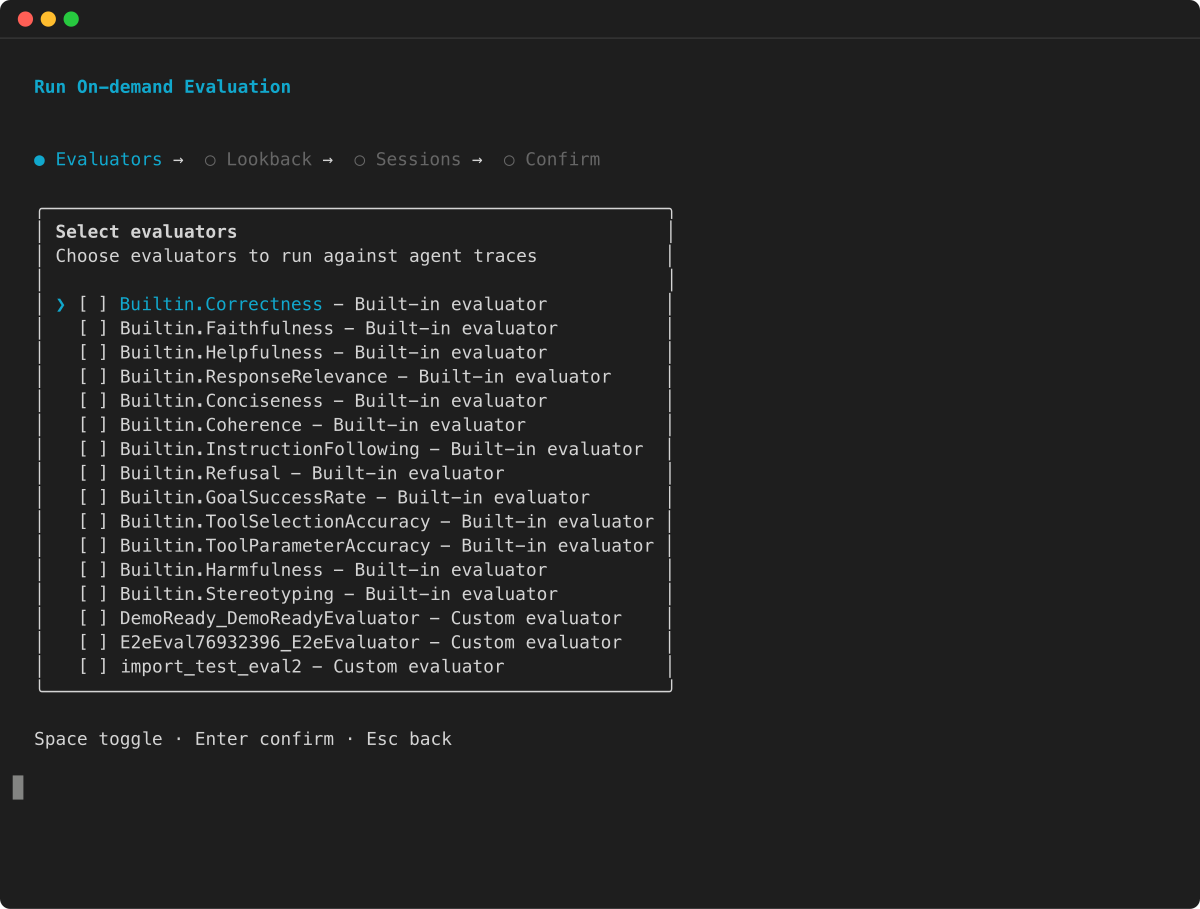
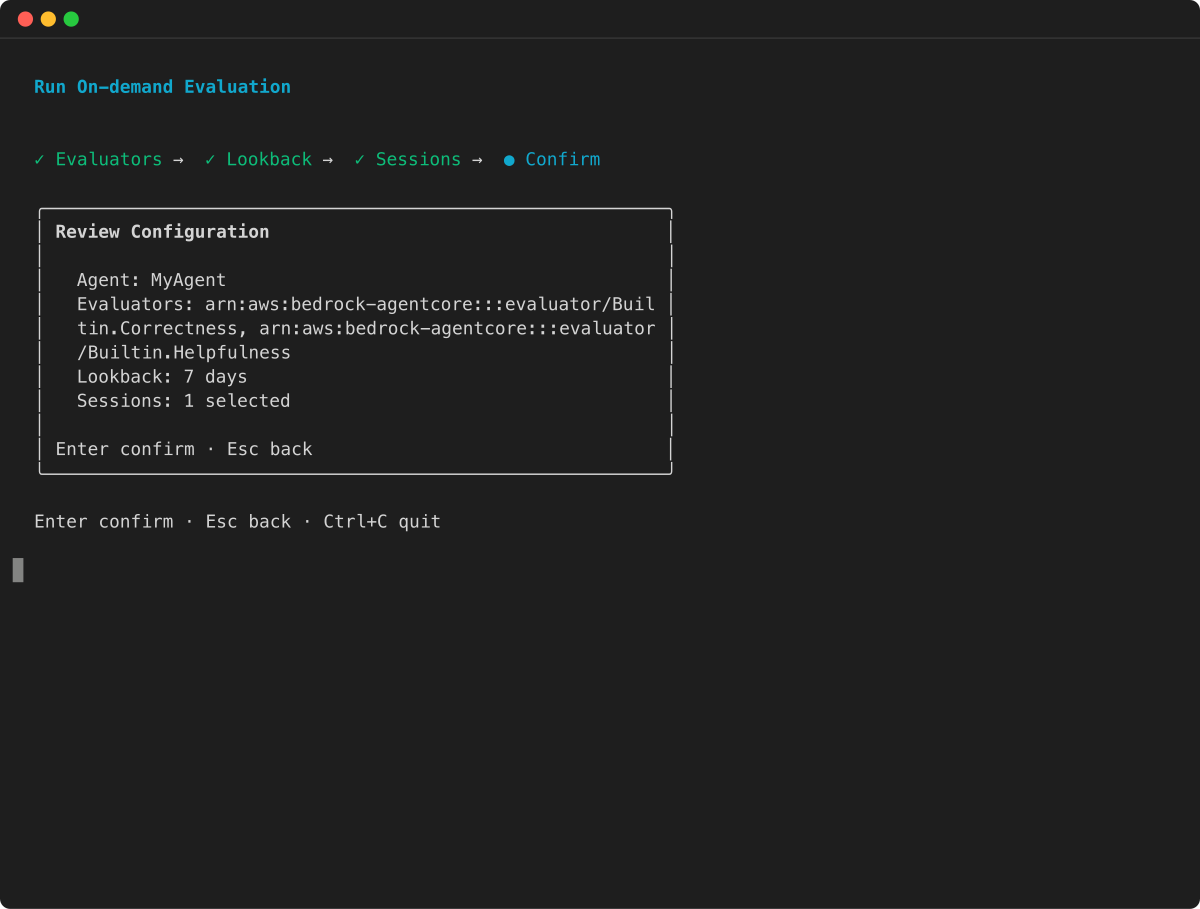
AWS SDK
Unduh span-logs dari CloudWatch
Sebelum memanggil Evaluate API, Anda perlu mengunduh log span dari CloudWatch. Anda dapat menggunakan kode Python di bawah ini untuk melakukannya dan secara opsional menyimpannya dalam file JSON. Ini membuatnya lebih mudah untuk membuat permintaan untuk sesi yang sama dengan evaluator yang berbeda.
catatan
Dibutuhkan beberapa menit agar log diisi CloudWatch, jadi ada kemungkinan bahwa jika Anda mencoba menjalankan skrip di bawah ini “segera” setelah pemanggilan agen, log kosong atau tidak lengkap
import boto3
import time
import json
from datetime import datetime, timedelta

region = "region-code"
agent_id = "agent-id-from-step-2"
session_id = "session-id-from-step-3"

def query_logs(log_group_name, query_string):
    client = boto3.client('logs', region_name=region)
    start_time = datetime.now() - timedelta(minutes=60) # past 1 hour
    end_time = datetime.now()

    query_id = client.start_query(
        logGroupName=log_group_name,
        startTime=int(start_time.timestamp()),
        endTime=int(end_time.timestamp()),
        queryString=query_string
    )['queryId']

    while (result := client.get_query_results(queryId=query_id))['status'] not in ['Complete', 'Failed']:
        time.sleep(1)

    if result['status'] == 'Failed':
        raise Exception("Query failed")
    return result['results']

def query_session_logs(log_group_name, session_id, **kwargs):
    query = f"""fields @timestamp, @message
    | filter ispresent(scope.name) and ispresent(attributes.session.id)
    | filter attributes.session.id = "{session_id}"
    | sort @timestamp asc"""
    return query_logs(log_group_name, query, **kwargs)

def query_agent_runtime_logs(agent_id, endpoint, session_id, **kwargs):
    return query_session_logs(
        f"/aws/bedrock-agentcore/runtimes/{agent_id}-{endpoint}",
        session_id, **kwargs)

def query_aws_spans_logs(session_id, **kwargs):
    return query_session_logs("aws/spans", session_id, **kwargs)

def extract_messages_as_json(query_results):
    return [json.loads(f['value']) for row in query_results
            for f in row if f['field'] == '@message'
            and f['value'].strip().startswith('{')]

def get_session_span_logs():
    agent_runtime_logs = query_agent_runtime_logs(
        agent_id=agent_id, endpoint="DEFAULT", session_id=session_id
    )
    print(f"Downloaded {len(agent_runtime_logs)} runtime-log entries")

    aws_span_logs = query_aws_spans_logs(session_id=session_id)
    print(f"Downloaded {len(aws_span_logs)} aws/span entries")

    session_span_logs = extract_messages_as_json(aws_span_logs) + extract_messages_as_json(agent_runtime_logs)
    print(f"Returning {len(aws_span_logs) + len(agent_runtime_logs)} total records")
    return session_span_logs

# get the spans from cloudwatch
session_span_logs = get_session_span_logs()

# optional (dump in a json file for reuse)
session_span_logs_file_name = "ace-demo-session.json"
with open(session_span_logs_file_name, "w") as f:
    json.dump(session_span_logs, f, indent=2)
Hubungi Evaluasi
Setelah Anda memiliki rentang input, Anda dapat memanggil API. Evaluate Harap dicatat bahwa tanggapan mungkin memakan waktu beberapa saat karena model bahasa besar menilai jejak Anda.
# initialise client
ace_dp_client = boto3.client('bedrock-agentcore', region_name = region)

# call evaluate
response = ace_dp_client.evaluate(
    evaluatorId = "Builtin.Helpfulness", # can be a custom evaluator id as well
    evaluationInput = {"sessionSpans": session_span_logs})

print(response["evaluationResults"])
Jika Anda menggunakan di atas dan membuang rentang sesi dalam file json, Anda juga dapat menjalankan evaluasi seperti di bawah ini
with open(session_span_logs_file_name, "r") as f:
    session_span_logs = json.load(f)

# initialise client
ace_dp_client = boto3.client('bedrock-agentcore', region_name = region)

# call evaluate
response = ace_dp_client.evaluate(
    evaluatorId = "Builtin.ToolSelectionAccuracy", # can be a custom evaluator id as well
    evaluationInput = {"sessionSpans": session_span_logs})

print(response["evaluationResults"])
Menggunakan target evaluasi
Untuk mengevaluasi pelacakan atau alat tertentu dalam sesi, Anda dapat menentukan target menggunakan evaluationTarget parameter dalam permintaan Anda.
Session-level evaluator
Karena layanan hanya mendukung satu sesi per evaluasi, Anda tidak perlu menetapkan target evaluasi secara eksplisit.
Trace-level evaluator
Untuk evaluator tingkat jejak (seperti Builtin.Helpfulness atauBuiltin.Correctness), atur ID jejak di parameter: evaluationTarget
response = ace_dp_client.evaluate(
    evaluatorId = "Builtin.Helpfulness",
    evaluationInput = {"sessionSpans": session_span_logs},
    evaluationTarget = {"traceIds": ["trace-id-1", "trace-id-2"]}
)
Evaluator tingkat panggilan alat
Untuk evaluator rentang level (sepertiBuiltin.ToolSelectionAccuracy), atur ID rentang di parameter: evaluationTarget
response = ace_dp_client.evaluate(
    evaluatorId = "Builtin.ToolSelectionAccuracy",
    evaluationInput = {"sessionSpans": session_span_logs},
    evaluationTarget = {"spanIds": ["span-id-1", "span-id-2"]}
)
Langkah 4: Hasil evaluasi
Setiap panggilan Evaluate API mengembalikan respons yang berisi daftar hasil evaluator. Karena satu sesi dapat menyertakan beberapa jejak dan panggilan alat, elemen-elemen ini dievaluasi sebagai entitas terpisah. Akibatnya, panggilan API tunggal dapat mengembalikan beberapa hasil evaluasi.
{
    "evaluationResults": [ {evaluation-result-1}, {evaluation-result_2},.... ]
}
Topik
Batas hasil
Jumlah evaluasi yang dikembalikan per panggilan API dibatasi hingga 10 hasil. Misalnya, jika Anda mengevaluasi sesi yang berisi 15 jejak menggunakan evaluator tingkat jejak, respons mencakup maksimum 10 hasil. Secara default, API mengembalikan 10 evaluasi terakhir, karena ini biasanya berisi konteks paling relevan dengan kualitas evaluasi.
Kegagalan sebagian
Panggilan API dapat memproses n evaluasi sementara m di antaranya gagal. Kegagalan dapat terjadi karena berbagai alasan, termasuk:
-
Pelambatan dari penyedia model
-
Kesalahan parsing
-
Batas waktu model
-
Masalah pemrosesan lainnya
Dalam kasus kegagalan sebagian, respons mencakup evaluasi yang berhasil dan gagal. Hasil yang gagal mencakup kode kesalahan dan pesan kesalahan untuk membantu Anda mendiagnosis masalah.
Konteks rentang
Setiap hasil evaluator memiliki spanContext bidang yang mengidentifikasi entitas yang dievaluasi:
-
Untuk evaluator tingkat sesi, hanya
sessionIdhadir. -
Untuk evaluator tingkat jejak,
sessionIddantraceIdhadir. -
Untuk evaluator tingkat alat,,
sessionIdtraceId, danspanIdhadir.
Contoh entri hasil yang berhasil
Ini hanya satu entri. Jika sesi memiliki beberapa jejak, Anda akan melihat beberapa entri tersebut, satu untuk setiap jejak. Demikian pula untuk evaluator tingkat alat, jika ada beberapa panggilan alat dan evaluator alat (sepertiBuiltin.ToolSelectionAccuracy) disediakan, akan ada satu hasil per rentang alat.
{
  "evaluatorArn": "arn:aws:bedrock-agentcore:::evaluator/Builtin.Helpfulness",
  "evaluatorId": "Builtin.Helpfulness",
  "evaluatorName": "Builtin.Helpfulness",
  "explanation": ".... evaluation explanation will be added here ...",
  "context": {
    "spanContext": {
      "sessionId": "test-ace-demo-session-18a1dba0-62a0-462e",
      "traceId": "....trace_id......."
    }
  },
  "value": 0.83,
  "label": "Very Helpful",
  "tokenUsage": {
    "inputTokens": 958,
    "outputTokens": 211,
    "totalTokens": 1169
  }
}
Contoh entri hasil gagal
{
    "evaluatorArn": "arn:aws:bedrock-agentcore:::evaluator/Builtin.Helpfulness",
    "evaluatorId": "Builtin.Helpfulness",
    "evaluatorName": "Builtin.Helpfulness",
    "context": {
        "spanContext": {
            "sessionId": "test-ace-demo-session-18a1dba0-62a0-462e",
            "traceId": "....trace_id......."
        }
    },
    "errorMessage": ".... details of the error....",
    "errorCode": ".... name/code of the error...."
}
