Configurer la sortie VPC d'Amazon Bedrock AgentCore Gateway pour les cibles de passerelle
Le service AgentCore Gateway fournit une gestion sécurisée et contrôlée du trafic de sortie pour vos applications, permettant ainsi une communication fluide avec les ressources de votre Virtual Private Cloud (VPC). Ce document décrit comment le trafic de sortie passe par la AgentCore passerelle pour atteindre les ressources VPC. Vous découvrirez les types de cibles de passerelle pris en charge (serveurs Lambda, API Gateway et MCP via AgentCore Runtime), leurs exigences de configuration et les méthodes d'authentification prises en charge pour chaque type de cible. Ce guide couvre les considérations de sécurité, les mécanismes de routage et les meilleures pratiques nécessaires pour permettre un flux de trafic de sortie approprié tout en maintenant l'isolation du réseau et en respectant le principe du moindre privilège dans l'ensemble de votre architecture.
MCP
AgentCore Gateway prend en charge les serveurs MCP (Model Context Protocol) en tant que points de terminaison cibles, offrant ainsi des options de déploiement flexibles pour répondre aux diverses exigences des clients. Les serveurs MCP peuvent être configurés de différentes manières en fonction des besoins de votre infrastructure et de vos exigences en matière de sécurité.
Vos cibles MCP peuvent être de deux types, non hébergées ou hébergées sur AgentCore Runtime ou Gateway. AgentCore Nous discutons des deux ci-dessous.
Les MCP ne sont pas hébergés sur AgentCore
AgentCore Gateway prend en charge la connexion à des serveurs MCP auto-hébergés exécutés au sein de votre VPC à l'aide de points de terminaison privés alimentés par Amazon VPC Lattice. Vous pouvez configurer une cible privateEndpoint sur votre passerelle pour acheminer le trafic en privé vers votre serveur MCP sans l'exposer à l'Internet public.
L'exemple suivant crée une cible de serveur MCP privée à l'aide de Lattice géré :
{
  "name": "my-private-mcp-target",
  "privateEndpoint": {
    "managedVpcResource": {
      "vpcIdentifier": "vpc-0abc123def456",
      "subnetIds": ["subnet-0abc123", "subnet-0def456"],
      "endpointIpAddressType": "IPV4",
      "securityGroupIds": ["sg-0abc123def"]
    }
  },
  "targetConfiguration": {
    "mcp": {
      "mcpServer": {
        "endpoint": "https://my-mcp-server.internal.example.com/mcp"
      }
    }
  }
}
Si vous souhaitez acheminer le trafic via un composant intermédiaire tel qu'un point de terminaison VPC ou un équilibreur de charge interne, vous pouvez spécifier un. routingDomain Pour plus d'informations, consultez la section Acheminer le trafic via un domaine intermédiaire.
Si votre serveur MCP utilise un certificat TLS émis par une autorité de certification privée, vous pouvez placer un Application Load Balancer interne avec un certificat ACM public devant celui-ci. Pour plus d'informations, voir Solution pour les certificats privés : ALB.
Pour en savoir plus sur Lattice autogéré, les configurations entre comptes et les configurations avancées, voir Se connecter aux ressources privées de votre VPC à l'aide de VPC Lattice.
AgentCore Runtime ou Gateway
AgentCore Runtime fournit un support natif pour communiquer avec les ressources de votre VPC grâce à une approche d'infrastructure gérée. Toutes les communications entre AgentCore Gateway et AgentCore Runtime restent sur le AWS backbone, ce qui garantit que vos données ne transitent jamais par l'Internet public (à l'exception des appels interrégionaux vers des centres de données en Chine). Pour plus d'informations, consultez la section Connectivité
Pour les autorisations sortantes de AgentCore Gateway to AgentCore Runtime, deux méthodes d'authentification sont prises en charge : aucune autorisation (déconseillée pour une utilisation en production) et OAuth avec attribution d'informations d'identification client (pour l'authentification de machine à machine). Lorsqu'aucune autorisation n'est configurée, la demande de AgentCore Gateway to AgentCore Runtime ne contient aucun jeton d'authentification. Cette architecture fournit une voie de connexion fluide tout en maintenant l'isolation de sécurité. La meilleure pratique en matière de sécurité consiste à configurer des autorisations d'authentification et d'autorisation restrictives pour AgentCore Runtime et AgentCore Gateway, en limitant l'accès aux seules ressources et opérations nécessaires à votre cas d'utilisation spécifique. Pour configurer une identité OAuth à utiliser par AgentCore Gateway pour la sortie et l'entrée pour AgentCore Runtime, utilisez les documents suivants :
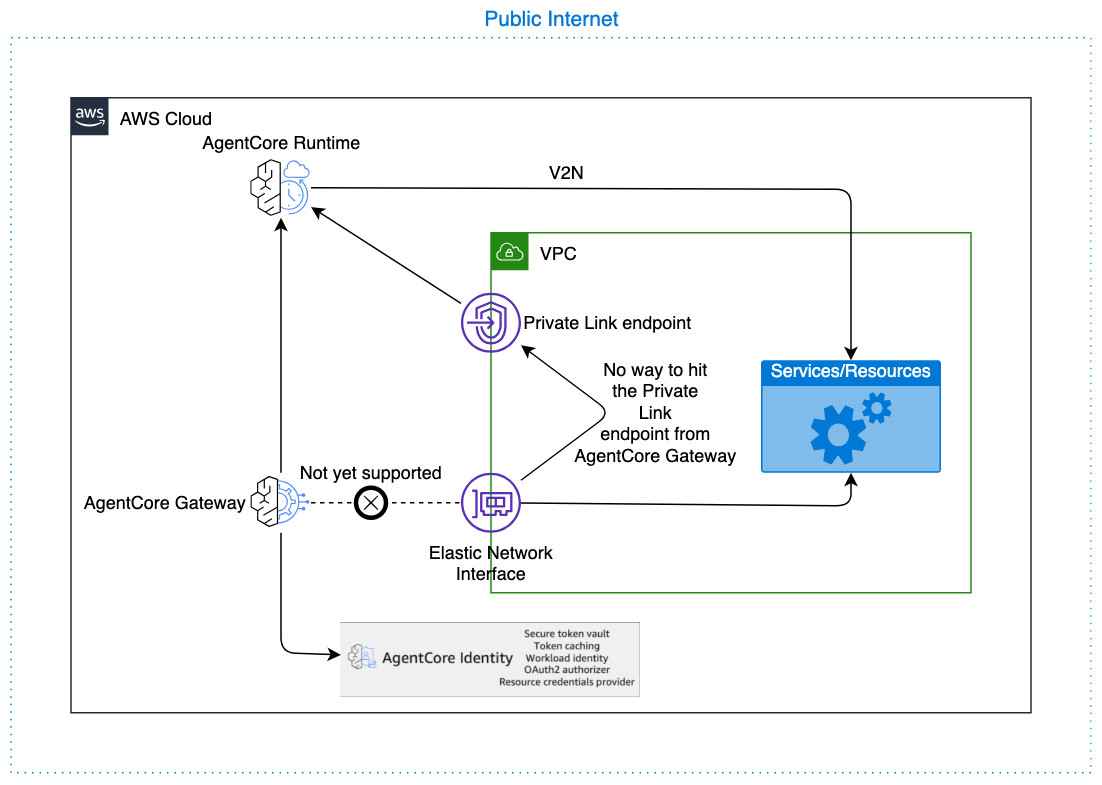
Exemple CreateGatewayTarget avec AgentCore Runtime comme cible
L'exemple suivant montre comment créer une cible de passerelle avec AgentCore Runtime :
POST /gateways/gatewayIdentifier/targets/ HTTP/1.1
Content-type: application/json

    {
    "clientToken": "string",
    "credentialProviderConfigurations": [
      {
         "credentialProvider": {
            "oauthCredentialProvider": {
               "providerArn": "string",
               "scopes": [ "string" ],
               ...
            }
         },
         "credentialProviderType": "OAUTH"
      }
    ],
    "description": "string",
    "metadataConfiguration": {
      "allowedQueryParameters": [ "string" ],
      "allowedRequestHeaders": [ "string" ],
      "allowedResponseHeaders": [ "string" ]
    },
    "name": "string",
    "targetConfiguration": {
      "mcp": {
         "mcpServer": {
            "endpoint": "https://bedrock-agentcore.<region>.amazonaws.com/runtimes/<runtime-id>/invocations?qualifier=DEFAULT&accountId=<account-id>"
         }
      }
    }
}
Note
Évitez d'utiliser une URL de point de terminaison VPC (VPCE) avec privateEndpoint pour éviter un saut de réseau supplémentaire inutile. Utilisez plutôt le point de terminaison AgentCore Runtime direct, avec lequel le trafic reste sur le AWS backbone.
Cible d'API ouverte
Point de terminaison API Gateway via Open API Target
Si votre API Gateway ne peut pas être directement ajoutée en tant que cible, vous pouvez toujours exporter la ressource en tant que spécification OpenAPI et importer la spécification dans Gateway en AgentCore tant que cible OpenAPI.
Si vous avez des API REST privées dans API Gateway, suivez les instructions ici : API REST privées dans API Gateway.
Autres points de terminaison
Vous pouvez configurer des cibles d'API ouvertes pour atteindre des points de terminaison privés au sein de votre VPC à l'aide privateEndpoint de la configuration. AgentCore Gateway utilise Amazon VPC Lattice pour établir une connectivité privée avec votre point de terminaison sans l'exposer à l'Internet public.
L'exemple suivant crée une cible OpenAPI privée à l'aide de Lattice managé :
{
  "name": "my-private-openapi-target",
  "privateEndpoint": {
    "managedVpcResource": {
      "vpcIdentifier": "vpc-0abc123def456",
      "subnetIds": ["subnet-0abc123", "subnet-0def456"],
      "endpointIpAddressType": "IPV4",
      "securityGroupIds": ["sg-0abc123def"]
    }
  },
  "targetConfiguration": {
    "mcp": {
      "openApiSchema": {
        "inlinePayload": "<your OpenAPI spec JSON with server URL pointing to your private endpoint>"
      }
    }
  }
}
Si vous souhaitez acheminer le trafic via un composant intermédiaire tel qu'un point de terminaison VPC ou un équilibreur de charge interne, vous pouvez spécifier un. routingDomain Pour plus d'informations, consultez la section Acheminer le trafic via un domaine intermédiaire.
Si votre point de terminaison utilise un certificat TLS émis par une autorité de certification privée, vous pouvez placer un Application Load Balancer interne avec un certificat ACM public devant celui-ci. Pour plus d'informations, voir Solution pour les certificats privés : ALB.
Pour en savoir plus sur Lattice autogéré, les configurations entre comptes et les configurations avancées, voir Se connecter aux ressources privées de votre VPC à l'aide de VPC Lattice.
Note
La privateEndpoint configuration s'applique à un seul domaine de votre schéma OpenAPI. Si votre schéma fait référence à plusieurs points de terminaison de serveur avec différents domaines, ouvrez un dossier de AWS supportprivateEndpointOverrides demander de l'aide.
Cible de Smithy
La configuration du point de terminaison privé (privateEndpoint) n'est actuellement pas prise en charge pour les cibles Smithy. Si votre cible Smithy a besoin d'une connexion privée, ouvrez un dossier d'AWS assistance
API Gateway
AgentCore Gateway prend en charge API Gateway en tant que type de cible, qui peut servir de couche intermédiaire pour accéder aux ressources VPC. AgentCore Gateway prend spécifiquement en charge les passerelles d'API REST configurées uniquement avec des points de terminaison régionaux. Bien que la communication VPC directe depuis la passerelle ne soit pas disponible pour le moment (cette fonctionnalité est prévue pour une future version), la passerelle communique avec API Gateway via le AWS backbone, garantissant ainsi que le trafic ne traverse jamais l'Internet public (à l'exception des appels interrégionaux vers des centres de données chinois). L'API Gateway peut ensuite communiquer avec les ressources à l'aide de VPC Link, créant ainsi un chemin sécurisé permettant à la AgentCore passerelle d'accéder aux services internes tout en maintenant l'isolation du réseau.
Pour mettre en œuvre les meilleures pratiques de sécurité, configurez votre API Gateway de manière à limiter le trafic entrant exclusivement au principal du service AgentCore Gateway ou à la clé d'API configurée, afin d'empêcher tout accès non autorisé provenant d'autres sources. Pour les autorisations sortantes de AgentCore Gateway vers API Gateway, seules deux méthodes d'authentification sont prises en charge : l' IAM-based authentification (utilisation du rôle de service de passerelle pour s'authentifier avec AWS Signature Version 4) et l'authentification par clé d'API (gérée par AgentCore Gateway) ; les passerelles d' OAuth-based autorisation et d'API multi-comptes ne sont pas prises en charge pour les cibles API Gateway, veuillez utiliser le point de terminaison API Gateway via Open API Target pour celles-ci. Limitez les autorisations du rôle d'exécution de la AgentCore passerelle pour appeler uniquement le point de terminaison API Gateway spécifique requis, plutôt que d'accorder un accès étendu à API Gateway, de manière à ce que la passerelle ne puisse pas interagir avec des ressources d'API inattendues et en maintenant le principe du moindre privilège dans l'ensemble de votre architecture.
Étapes de l'API REST Amazon API Gateway en tant que cibles
Autorisations pour l'intégration d'API Gateway à l'aide d'IAM Auth
Politique de ressources API Gateway verrouillée à la AgentCore passerelle
La politique de ressources suivante restreint l'accès d'API Gateway à AgentCore Gateway :
{
"Version": "2012-10-17",
    "Statement": [
      {
        "Effect": "Allow",
        "Principal": {
          "Service": "bedrock-agentcore.amazonaws.com"
        },
        "Action": "execute-api:Invoke",
        "Resource": [
          "arn:aws:execute-api:us-west-2:111122223333:rest-api-id/api-stage/*/*"
        ],
        "Condition": {
          "ArnEquals": {
            "aws:SourceArn": "arn:aws:bedrock-agentcore:us-west-2:111122223333:gateway/my-gateway-d4jrgkaske"
          }
        }
      }
    ]
}
AgentCore Politique relative aux rôles d'exécution de la passerelle
La politique suivante accorde à la passerelle l'autorisation d'appeler l'API Gateway :
{
"Version": "2012-10-17",
    "Statement": [
      {
        "Effect": "Allow",
        "Action": [
          "execute-api:Invoke"
        ],
        "Resource": [
          "arn:aws:execute-api:us-west-2:111122223333:abcd123/prod/*/*"
        ]
      }
    ]
}
AgentCore Politique de confiance relative au rôle d'exécution de la passerelle
La politique de confiance suivante permet à AgentCore Gateway d'assumer le rôle d'exécution :
{
"Version": "2012-10-17",
    "Statement": [
      {
        "Effect": "Allow",
        "Principal": {
          "Service": "bedrock-agentcore.amazonaws.com"
        },
        "Action": "sts:AssumeRole",
        "Condition": {
          "StringEquals": {
            "aws:SourceAccount": "111122223333"
          },
          "ArnLike": {
            "aws:SourceArn": "arn:aws:bedrock-agentcore:us-west-2:111122223333:gateway/*"
          }
        }
      }
    ]
}
API REST privées dans API Gateway
Les cibles API Gateway dotées de points de terminaison privés ne sont pas prises en charge de manière native. Cependant, vous pouvez exporter votre API Gateway privée en tant que schéma OpenAPI et utiliser une cible Open API avec ce schéma, configurée avec un. privateEndpoint Définissez le nom DNS routingDomain de votre point de terminaison VPC API Gateway (VPCE) et assurez-vous que l'URL du serveur de schéma OpenAPI utilise le domaine correspondant à votre certificat TLS public.
{
  "name": "my-private-apigw-target",
  "privateEndpoint": {
    "managedVpcResource": {
      "vpcIdentifier": "vpc-0123456789abcdef0",
      "subnetIds": ["subnet-0123456789abcdef0", "subnet-0abcdef1234567890"],
      "endpointIpAddressType": "IPV4",
      "routingDomain": "<vpce-id>.execute-api.<region>.vpce.amazonaws.com"
    }
  },
  "targetConfiguration": {
    "mcp": {
      "openApiSchema": {
        "inlinePayload": "<OpenAPI spec JSON with server URL matching the public certificate domain for your API Gateway, for example https://<api-id>.execute-api.<region>.amazonaws.com>"
      }
    }
  }
}
Pour plus de détails sur la configuration des points de terminaison privés, consultez Se connecter aux ressources privées de votre VPC à l'aide de VPC Lattice.
Lambda
AgentCore Gateway prend en charge les cibles Lambda comme l'un de ses types de cibles, ce qui permet d'invoquer en toute transparence des fonctions Lambda capables de communiquer avec les ressources de votre VPC. Cette fonctionnalité est disponible prête à l'emploi et ne nécessite aucune configuration supplémentaire de la part des clients. La passerelle peut immédiatement invoquer des fonctions Lambda configurées avec un accès VPC pour accéder à vos ressources internes telles que les bases de données, les API ou d'autres services. Pour maintenir les meilleures pratiques en matière de sécurité, il est vivement recommandé de configurer le rôle d'exécution de la AgentCore passerelle avec des autorisations minimales, en le limitant spécifiquement à invoquer uniquement la fonction Lambda prévue plutôt que d'accorder des autorisations d'exécution Lambda étendues. Ce principe du moindre privilège garantit que la passerelle, ou tout autre appelant utilisant le même rôle, ne peut pas invoquer par inadvertance des fonctions Lambda involontaires, réduisant ainsi votre surface d'attaque de sécurité et maintenant des contrôles d'accès stricts au sein de votre environnement. AWS
Fournisseurs d'identité privés
AgentCore prend désormais en charge la connexion à des fournisseurs d'identité OAuth privés pour les fournisseurs d'autorisations JWT entrants et sortants d'informations d'identification OAuth. Cela vous permet d'utiliser des serveurs auto-hébergés IdPs tels que Keycloak ou d'autres serveurs d' OIDC-compliant autorisation exécutés au sein de votre VPC sans les exposer à l'Internet public. PingFederate
Pour obtenir des instructions de configuration détaillées, consultez Connect to private identity providers in your VPC.
Vous pouvez également utiliser une fonction Lambda d'interception pour l'authentification entrante et remplacer l'en-tête d'autorisation dans l'intercepteur Lambda pour l'utiliser avec l'authentification sortante :
Limites et considérations
-
Autorisation entrante requise : les cibles de passerelle configurées avec un
privateEndpointne peuvent pas être utiliséesNO_AUTHcomme type d'autorisateur entrant à moins qu'un intercepteur Lambda ne soit configuré sur la passerelle.
Pour connaître les limites supplémentaires liées à la connectivité entre comptes et à la configuration TTL du DNS, consultez Limitations et considérations dans la section Connexion aux ressources privées de votre VPC à l'aide de VPC Lattice.
