Add text-to-speech to prompts in flow blocks in Amazon Polly
You can enter text-to-speech prompts in the following flow blocks:
Amazon Polly converts text-to-speech
To convert text-to-speech, Connect Customer uses Amazon Polly, a service that converts text into lifelike speech using SSML.
Amazon Polly default voices such as Amazon Polly Neural and Standard voices are free.
-
You will be charged for using the Amazon Polly Generative voices. For more details on pricing, see the Amazon Polly Pricing Details
-
If you are onboarded to Next Gen Amazon Connect, the Generative voices are included as part of the Next Gen Amazon Connect pricing.
-
You are also charged for using custom voices such as unique Brand Voices
that are associated with your account.
Amazon Polly best sounding voice
Amazon Polly periodically releases improved voices and speaking styles. You can choose to automatically resolve your text-to-speech to the most lifelike and natural sounding variant of a voice. For example, if your flows use Joanna, Connect Customer automatically resolves to Joanna's conversational speaking style.
Note
If no Neural version is available, Connect Customer defaults to the standard voice.
To automatically use the best sounding voice
-
Open the Connect Customer console at https://console.aws.amazon.com/connect/
. -
If prompted to login, enter your AWS account credentials.
-
Choose the name of the instance from the Instance alias column.

-
In the navigation pane, choose Flows.
-
In the Amazon Polly section, choose Use the best available voice.
How to add text-to-speech
-
In a flow, add the block that will play the prompt. For example, add a Play prompt block.
-
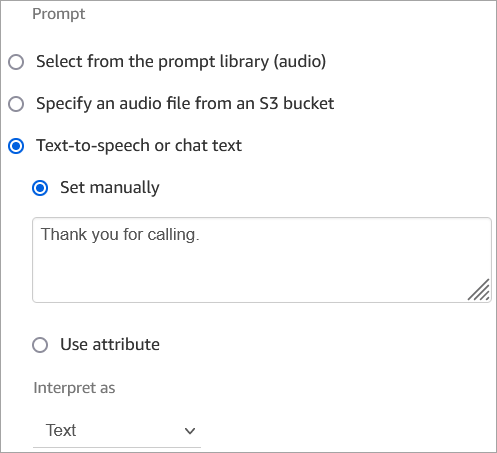
In the Properties, choose Text-to-speech.
-
Enter plain text. For example, the following image shows Thank you for calling.
Or enter SSML, as shown in the following image:

SSML-enhanced input text gives you more control over how Connect Customer generates speech from the text you provide. You can customize and control aspects of speech such as pronunciation, volume, and speed.
For a list of SSML tags you can use with Connect Customer, see SSML tags supported by Connect Customer.
For more information about Amazon Polly, see Using SSML in the Amazon Polly Developer Guide.
