Enable post-chat survey
Post-chat survey enables you to collect end customer feedback immediately after a chat conversation ends. With the DisconnectOnCustomerExit parameter in the StartChatContact API, you can configure automatic agent disconnection when end customer disconnects, ensuring that disconnect flow is triggered consistently regardless of which participant disconnects first.
Implementation options
There are two ways to enable post-chat survey:
For Custom Chat Widget
If you're using a custom chat implementation:
-
Upgrade to the latest version of amazon-connect-chatjs
. -
Add the
DisconnectOnCustomerExitparameter to your StartChatContact API request:{ "DisconnectOnCustomerExit": ["AGENT"], // ... other StartChatContact parameters }
For Connect Customer Communication Widget
If you're using the Connect Customer Communication Widget:
-
Open the Connect Customer console and navigate to Communication widgets.
-
Enable the post-chat survey setting through the Communication Widgets page.
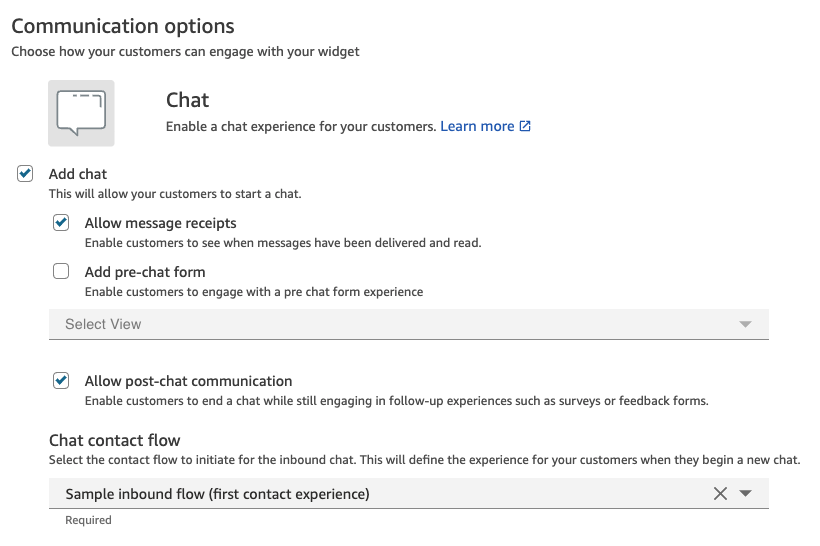
Update contact flow to add post-chat survey as a disconnect flow
To enable post-chat survey, you'll need to update the disconnect flow that's connected to your chat solution. Once configured, the survey will automatically trigger when customers end their chat sessions.
For information about creating a disconnect flow, see Example chat scenario.
There are two ways to implement a survey in your disconnect flow:
-
Option #1: Using ShowView block - Use the Flow block in Connect Customer: Show view to display a custom survey interface.
-
Option #2: Using Lex - Integrate with Amazon Lex for text-based survey collection. For more information, see Add an Amazon Lex bot to Connect Customer.
Note
For supervisor barge-in scenarios, ensure you add a Flow block in Connect Customer: Set working queue block before Transfer to Queue. Omitting it will cause chat contacts to terminate rather than transfer for this feature.

Contact Trace Records
When a customer ends a chat session, Connect Customer sets disconnectReason to CUSTOMER_DISCONNECT in the ContactTraceRecord. When DisconnectOnCustomerExit is configured, the system generates a new contact ID (nextContactId) and initiates the configured disconnect flow.
Example:
{
    "contactId": "104c05e3-abscdfre",
    "nextContactId": "4cbae06d-ca5b-1234567",
    "channel": "CHAT",
    "initiationMethod": "DISCONNECT",
    "disconnectReason": "CUSTOMER_DISCONNECT"
}
How contact attributes work in Connect Customer will update in Contact Search and Contact Details.

Additional resources
