Die vorliegende Übersetzung wurde maschinell erstellt. Im Falle eines Konflikts oder eines Widerspruchs zwischen dieser übersetzten Fassung und der englischen Fassung (einschließlich infolge von Verzögerungen bei der Übersetzung) ist die englische Fassung maßgeblich.
Konfigurieren Sie Text-to-Speech (TTS) -Anbieter von Drittanbietern
Verwenden Sie die folgenden Anweisungen, um einen Drittanbieter für Text-to-Speech (TTS) zu konfigurieren.
Voraussetzungen
-
Es ist ein Kontakt-Flow vorhanden (oder Sie haben die Erlaubnis, einen zu erstellen).
-
Ein API-Schlüssel eines TTS-Drittanbieters ist in AWS Secrets Manager gespeichert. Weitere Informationen zum Speichern von API-Schlüsseln als Geheimnisse in Secrets Manager finden Sie unter Create an AWS Secrets Manager secret.
-
Eine Secrets Manager-Ressourcenrichtlinie, die es Connect Customer ermöglicht, den Schlüssel abzurufen. Weitere Informationen finden Sie unter Verwaltung von Geheimnissen und Ressourcenrichtlinien.
-
AWS KMS key Berechtigungen, die eine Entschlüsselung ermöglichen. Weitere Informationen finden Sie unter Verwaltung von Geheimnissen und Ressourcenrichtlinien.
-
Provider-specific Modell- und Sprachwerte.
Schritt 1: Öffnen Sie den Kontaktfluss
-
Melden Sie sich auf der Admin-Website von Connect Customer an.
-
Wählen Sie Flows.
-
Wählen Sie einen vorhandenen Flow oder erstellen Sie einen neuen.
Schritt 2: Füge einen Set-Sprachblock hinzu oder wähle ihn aus
-
Suche im Flow-Designer nach Set Voice.
-
Ziehe den Block auf die Leinwand oder wähle einen vorhandenen aus.
-
Wählen Sie den Block aus, um sein Konfigurationsfenster zu öffnen.
Schritt 3: Wählen Sie einen TTS-Drittanbieter
Wählen Sie in der Dropdownliste Sprachanbieter den Drittanbieter für Text-to-Speech aus, den Sie verwenden möchten.
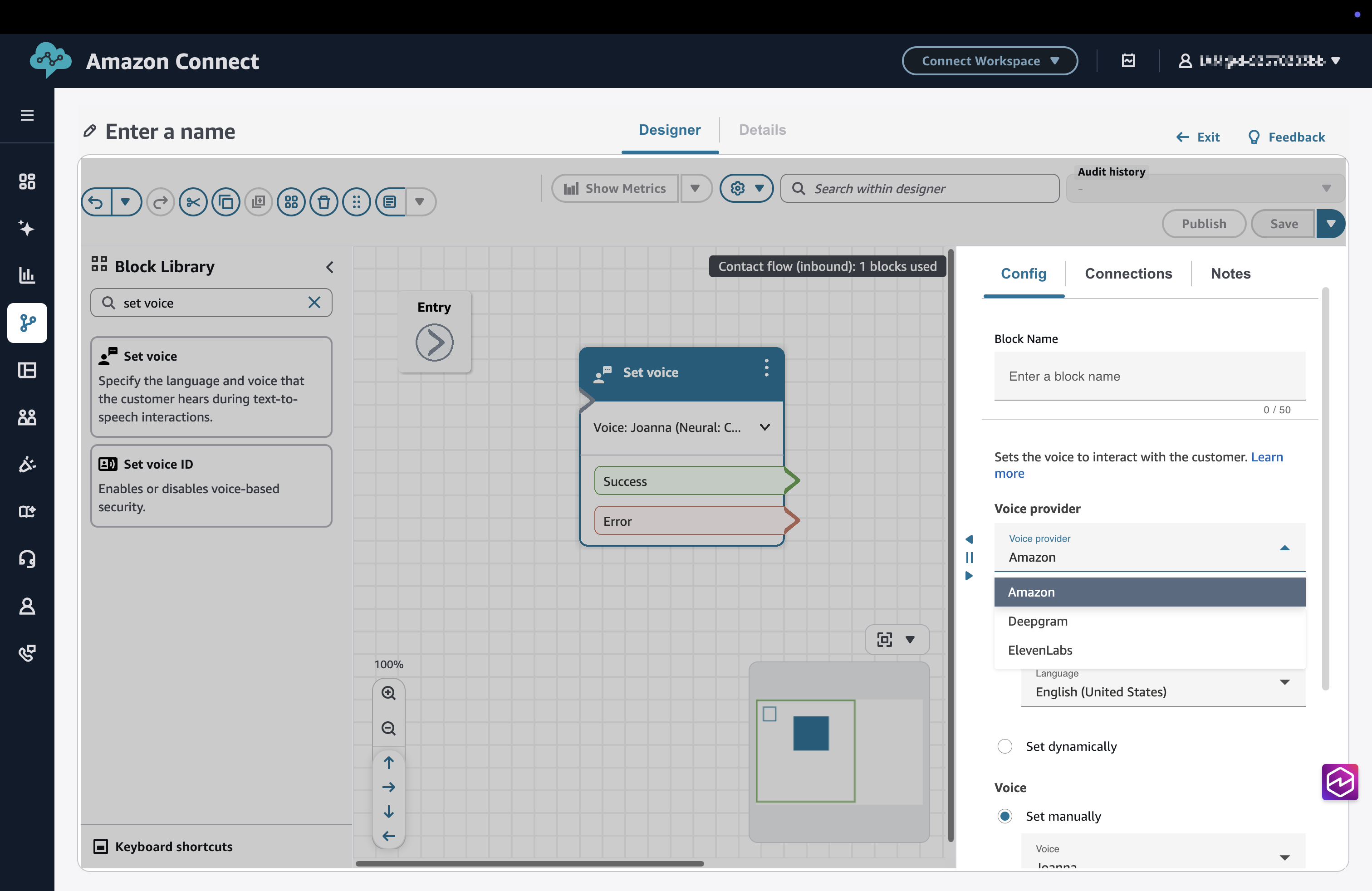
Schritt 4: Geben Sie Modell, Stimme, Secrets Manager-ARN und Sprache an
-
Wählen Sie unter Modell die Option Manuell festlegen aus und geben Sie das Anbietermodell ein.
-
Wählen Sie unter Voice die Option Manuell einrichten aus und geben Sie die Stimme des Anbieters ein.
-
Wählen Sie unter Secrets Manager ARN die Option Manuell festlegen aus und geben Sie den ARN des Provider-Geheimnisses ein.
-
Das Geheimnis muss im selben enthalten sein AWS-Region.
-
AWS Secrets Manager und die KMS-Richtlinien müssen das Abrufen und Entschlüsseln zulassen. Weitere Informationen finden Sie unter Verwaltung von Geheimnissen und Ressourcenrichtlinien.
-
-
Wählen Sie unter Sprache die Option Manuell festlegen und wählen Sie eine Sprache aus, die von der Provider-Sprache unterstützt wird.
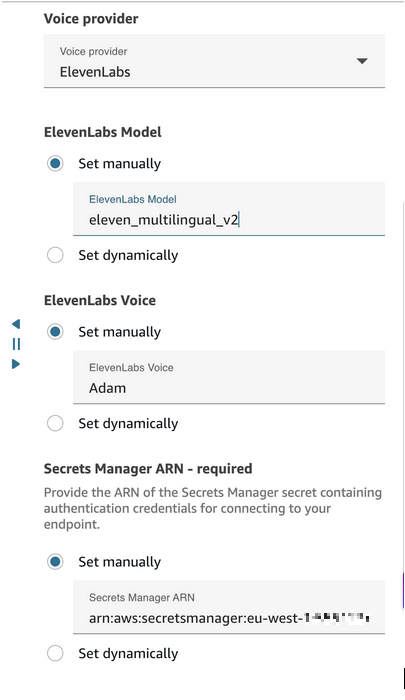
Schritt 5: Speichern und veröffentlichen Sie den Flow
-
Wählen Sie im Flow-Designer Speichern.
-
Wählen Sie Veröffentlichen, um die aktualisierten Flow-Einstellungen zu aktivieren.
Laufzeitverhalten (TTS)
-
Der Connect-Kunde sendet Text zur Synthese an den TTS-Anbieter.
-
Das zurückgegebene Audio wird dem Kunden wiedergegeben.
-
Die Ausführungsprotokolle enthalten Providerfehler wie ungültige Anmeldeinformationen oder Modellwerte.
Problembehandlung (TTS)
-
Keine Audioausgabe: Überprüfen Sie die Modell- und Sprachwerte.
-
Authentifizierungsfehler: Überprüfen Sie die Secrets Manager- und KMS-Berechtigungen.
-
Dynamische Attribute: Stellen Sie sicher, dass Laufzeitwerte in gültige Anbieterparameter aufgelöst werden.
-
Hohe Latenz: Überprüfen Sie die Ausrichtung der Anbieterregion.
