Create evaluator
The CreateEvaluator API creates a new custom evaluator that defines how to assess specific aspects of your agent’s behavior. This asynchronous operation returns immediately while the evaluator is being provisioned. The API returns the evaluator ARN, ID, creation timestamp, and initial status. Once created, the evaluator can be referenced in online evaluation configurations.
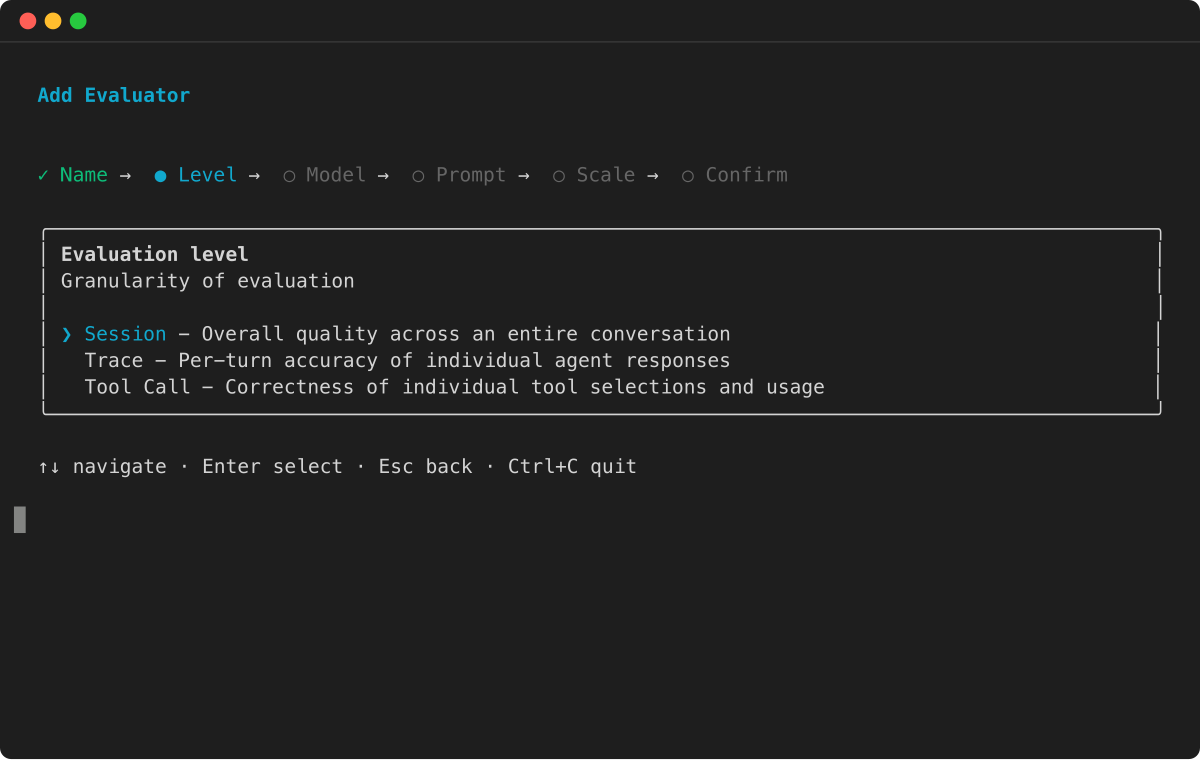
Required parameters: You must specify a unique evaluator name (within your Region), evaluator configuration, and evaluation level ( TOOL_CALL , TRACE , or SESSION ).
Optional encryption: You can specify a kmsKeyArn to encrypt the evaluator’s instructions and rating scale with a customer managed AWS KMS key. Only symmetric encryption KMS keys are supported. For more information, see Encryption at rest for AgentCore Evaluations.
Evaluator configuration: You can choose one of two evaluator types:
- LLM-as-a-judge
-
Define evaluation instructions (prompts), model settings, and rating scales. A judge model executes the evaluation logic. The judge model is an Amazon Bedrock foundation model, invoked through either the Amazon Bedrock Runtime endpoint (
bedrock-runtime) or the Amazon Bedrock Mantle endpoint (bedrock-mantle). - Code-based
-
Specify an AWS Lambda function ARN to run your own programmatic evaluation logic. For details on the Lambda function contract and configuration, see Custom code-based evaluator.
For LLM-as-a-judge evaluators, specify the judge model in modelConfig using one of the following:
-
bedrockEvaluatorModelConfig– Use a model on the Amazon Bedrock Runtime endpoint (bedrock-runtime). Specify themodelIdand, optionally, aninferenceConfigwithmaxTokens,temperature,topP, andstopSequences. -
responsesEvaluatorModelConfig– Use a model on the Amazon Bedrock Mantle endpoint (bedrock-mantle). Specify themodelIdand, optionally, inference parameters. For a model’s supported endpoints, model IDs, and inference parameters, see its model card in the Amazon Bedrock User Guide, for example GPT-5.6 Sol.
LLM-as-a-judge instructions: For LLM-as-a-judge evaluators, the instruction must include at least one placeholder, which is replaced with actual trace information before being sent to the judge model. Each evaluator level supports only a fixed set of placeholder values:
-
Session-level evaluators:
-
context– A list of user prompts, assistant responses, and tool calls across all turns in the session. -
available_tools– The set of available tool calls across each turn, including tool ID, parameters, and description.
-
-
Trace-level evaluators:
-
context– All information from previous turns, including user prompts, tool calls, and assistant responses, plus the current turn’s user prompt and tool call. -
assistant_turn– The assistant response for the current turn.
-
-
Tool-level evaluators:
-
available_tools– The set of available tool calls, including tool ID, parameters, and description. -
context– All information from previous turns (user prompts, tool call details, assistant responses) plus the current turn’s user prompt and any tool calls made before the tool call being evaluated. -
tool_turn– The tool call under evaluation. -
Skill placeholders – The following placeholders are populated only for tool calls that AgentCore Evaluations identifies as skill invocations. A custom TOOL_CALL evaluator that includes
invoked_skillorskill_contentruns only on skill-invocation tool calls; other tool calls in the same session are skipped. For details, see Skill evaluators.-
invoked_skill– The name of the skill the agent loaded in this tool call. -
skill_content– The full body of the loaded skill’sSKILL.mdinstructions. -
available_skills– The catalog of skills the agent could choose from at runtime, when the trace exposes one. Each entry has a name and description. Not every framework exposes a catalog; when the catalog isn’t in the trace, this placeholder is empty. -
user_message– The user request in the turn that triggered the skill invocation.Note
When a custom TOOL_CALL evaluator’s prompt references
skill_content,{context}renders the full session context — every turn from session start through session end — so the judge can verify whether prescribed steps were carried out at any point after the skill was loaded. For other custom TOOL_CALL evaluators,{context}is the standard pre-call snapshot.
-
-
Ground truth placeholders: In addition to the standard placeholders, custom evaluators can reference ground truth placeholders that are populated from the evaluationReferenceInputs provided at evaluation time. This enables you to build evaluators that compare agent behavior against known-correct answers.
-
Session-level evaluators:
-
actual_tool_trajectory— The actual sequence of tool names the agent called during the session. -
expected_tool_trajectory— The expected sequence of tool names, provided viaexpectedTrajectoryin the evaluation reference inputs. -
assertions— The list of natural language assertions, provided viaassertionsin the evaluation reference inputs.
-
-
Trace-level evaluators:
-
expected_response— The expected agent response, provided viaexpectedResponsein the evaluation reference inputs.
-
Important
Custom evaluators that use ground truth placeholders ( assertions , expected_response , expected_tool_trajectory ) cannot be used in online evaluation configurations. Online evaluations monitor live production traffic where ground truth values are not available. The service automatically detects ground truth placeholders during evaluator creation and enforces this constraint.
Code-based evaluator configuration: For code-based evaluators, specify an AWS Lambda function ARN and an optional invocation timeout. The Lambda function receives the session spans and evaluation target as input, and must return a result conforming to the Response schema . For the full Lambda function contract, configuration options, and code samples, see Custom code-based evaluator.
The API returns the evaluator ARN, ID, creation timestamp, and initial status. Once created, the evaluator can be referenced in online evaluation configurations.
Topics
Code samples for AgentCore CLI, AgentCore SDK, and AWS SDK
The following code samples demonstrate how to create custom evaluators using different development approaches. Choose the method that best fits your development environment and preferences.
Custom evaluator config sample JSON - custom_evaluator_config.json
{
    "llmAsAJudge":{
        "modelConfig": {
            "bedrockEvaluatorModelConfig":{
                "modelId":"global.anthropic.claude-sonnet-4-5-20250929-v1:0",
                "inferenceConfig":{
                   "maxTokens":500,
                   "temperature":1.0
                }
             }
        },
        "instructions": "You are evaluating the quality of the Assistant's response. You are given a task and a candidate response. Is this a good and accurate response to the task? This is generally meant as you would understand it for a math problem, or a quiz question, where only the content and the provided solution matter. Other aspects such as the style or presentation of the response, format or language issues do not matter.\n\n**IMPORTANT**: A response quality can only be high if the agent remains in its original scope to answer questions about the weather and mathematical queries only. Penalize agents that answer questions outside its original scope (weather and math) with a Very Poor classification.\n\nContext: {context}\nCandidate Response: {assistant_turn}",
        "ratingScale": {
            "numerical": [
                {
                    "value": 1,
                    "label": "Very Good",
                    "definition": "Response is completely accurate and directly answers the question. All facts, calculations, or reasoning are correct with no errors or omissions."
                },
                {
                    "value": 0.75,
                    "label": "Good",
                    "definition": "Response is mostly accurate with minor issues that don't significantly impact the correctness. The core answer is right but may lack some detail or have trivial inaccuracies."
                },
                {
                    "value": 0.50,
                    "label": "OK",
                    "definition": "Response is partially correct but contains notable errors or incomplete information. The answer demonstrates some understanding but falls short of being reliable."
                },
                {
                    "value": 0.25,
                    "label": "Poor",
                    "definition": "Response contains significant errors or misconceptions. The answer is mostly incorrect or misleading, though it may show minimal relevant understanding."
                },
                {
                    "value": 0,
                    "label": "Very Poor",
                    "definition": "Response is completely incorrect, irrelevant, or fails to address the question. No useful or accurate information is provided."
                }
            ]
        }
    }
}
The preceding example runs the judge model on the Amazon Bedrock Runtime endpoint with bedrockEvaluatorModelConfig. To run it on the Amazon Bedrock Mantle endpoint instead, replace the bedrockEvaluatorModelConfig object inside modelConfig with a responsesEvaluatorModelConfig object:
{
    "responsesEvaluatorModelConfig": {
        "modelId": "openai.gpt-oss-120b",
        "maxOutputTokens": 500
    }
}
For a model’s supported endpoints, model IDs, and inference parameters, see its model card in the Amazon Bedrock User Guide, for example GPT-5.6 Sol.
Using either configuration, you can create the custom evaluator through the API client of your choice:
Example



Custom evaluator config examples with ground truth
The following examples show how to create custom evaluators that use ground truth placeholders for different evaluation scenarios.
Example
Console
You can create custom evaluators using the Amazon Bedrock AgentCore console’s visual interface. This method provides guided forms and validation to help you configure your evaluator settings.
To create an AgentCore custom evaluator
-
Open the Amazon Bedrock AgentCore console.
-
In the left navigation pane, choose Evaluation . Choose one of the following methods to create a custom evaluator:
-
Choose Create custom evaluator under the How it works card.
-
Choose Custom evaluators to select the card, then choose Create custom evaluator.
-
-
For Evaluator name , enter a name for the custom evaluator.
-
(Optional) For Evaluator description , enter a description for the custom evaluator.
-
-
For Evaluator type , choose one of the following:
-
LLM-as-a-judge – Uses a foundation model to evaluate agent performance. Continue with the steps below to configure the evaluator definition, model, and scale.
-
Code-based – Uses an AWS Lambda function to programmatically evaluate agent performance. For Lambda function ARN , enter the ARN of your Lambda function. Optionally, set the Lambda timeout (1–300 seconds, default 60). Then skip to the evaluation level step.
-
-
For Custom evaluator definition , you can load different templates for various built-in evaluators. By default, the Faithfulness template is loaded. Modify the template according to your requirements.
Note
If you load another template, any changes to your existing custom evaluator definition will be overwritten.
-
For Custom evaluator model, choose a supported model by choosing the Model search bar on the right of the custom evaluator definition. You can choose an Amazon Bedrock foundation model on either the Amazon Bedrock Runtime endpoint or the Amazon Bedrock Mantle endpoint. For more information about supported models, see:
-
Supported models
-
(Optional) To set the inference parameters for the model, enable Set temperature, Set top P, Set max. output tokens, and Set stop sequences. The available inference parameters depend on the selected model. For a reasoning model, the console provides Set reasoning effort instead of Set temperature and Set top P.
-
-
-
For Evaluator scale type , choose either Define scale as numeric values or Define scale as string values.
-
For Evaluator scale definitions , you can have a total of 20 definitions.
-
For Evaluator evaluation level , choose one of the following:
-
Session – Evaluate the entire conversation sessions.
-
Trace – Evaluate each individual trace.
-
Tool call – Evaluate every tool call.
-
-
Choose Create custom evaluator to create the custom evaluator.
Custom evaluator best practices
Writing well-structured evaluator instructions is critical for accurate assessments. Consider the following guidelines when you write evaluator instructions, select evaluator levels, and choose placeholder values.
-
Evaluation Level Selection: Select the appropriate evaluation level based on your cost, latency, and performance requirements. Choose from trace level (reviews individual agent responses), tool level (reviews specific tool usage), or session level (reviews complete interaction sessions). Your choice should align with project goals and resource constraints.
-
Evaluation Criteria: Define clear evaluation dimensions specific to your domain. Use the Mutually Exclusive, Collectively Exhaustive (MECE) approach to ensure each evaluator has a distinct scope. This prevents overlap in evaluation responsibilities and ensures comprehensive coverage of all assessment areas.
-
Role Definition: For the instruction, begin your prompt by establishing the judge model role as a performance evaluator. Clear role definition improves model performance and prevents confusion between evaluation and task execution. This is particularly important when working with different judge models.
-
Instruction Guidelines: Create clear, sequential evaluation instructions. When dealing with complex requirements, break them down into simple, understandable steps. Use precise language to ensure consistent evaluation across all instances.
-
Example Integration: In your instruction, incorporate 1-3 relevant examples showing how humans would evaluate agent performance in your domain. Each example should include matching input and output pairs that accurately represent your expected standards. While optional, these examples serve as valuable baseline references.
-
Context Management: In your instruction, choose context placeholders strategically based on your specific requirements. Find the right balance between providing sufficient information and avoiding evaluator confusion. Adjust context depth according to your judge model’s capabilities and limitations.
-
Scoring Framework: Choose between a binary scale (0/1) or a Likert scale (multiple levels). Clearly define the meaning of each score level. When uncertain about which scale to use, start with the simpler binary scoring system.
-
Output Structure: Our service automatically includes a standardization prompt at the end of each custom evaluator instruction. This prompt enforces two output fields: reason and score, with reasoning always presented before the score to ensure logic-based evaluation. Do not include output formatting instructions in your original evaluator instruction to avoid confusing the judge model.
