本文為英文版的機器翻譯版本,如內容有任何歧義或不一致之處,概以英文版為準。
# 使用有毒語音偵測
## 在批次轉錄中使用有毒語音偵測
若要將有毒語音偵測與批次轉錄搭配使用,請參閱下列範例:
### AWS 管理主控台
1. 登入 [AWS 管理主控台](https://console.aws.amazon.com/transcribe/)。
1. 在導覽窗格中,選擇**轉錄作業**,然後選擇**建立作業**(右上角)。這會開啟**指定作業詳細資訊**頁面。
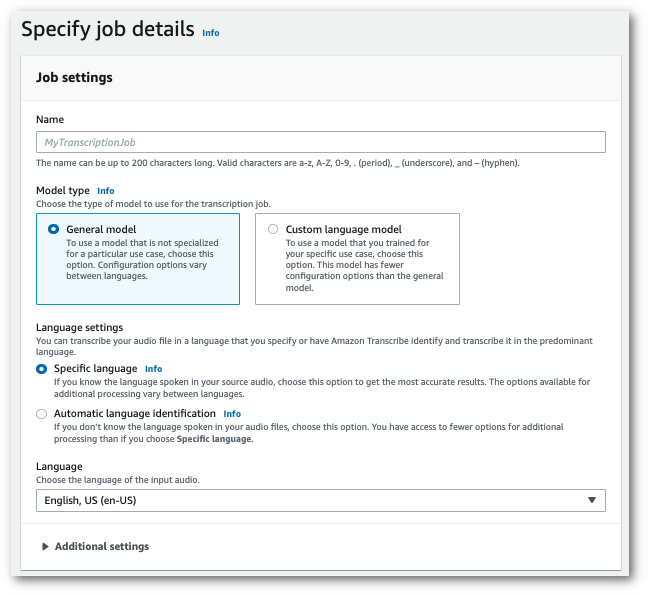
1. 在**指定作業詳細資訊**頁面上,您也可以視需要啟用 PII 修訂。請注意,毒性偵測不支援其他列出的選項。選擇**下一步**。這會引導您前往**設定工作 - 選擇性**頁面。在**音訊設定**面板中,選擇**毒性偵測**。
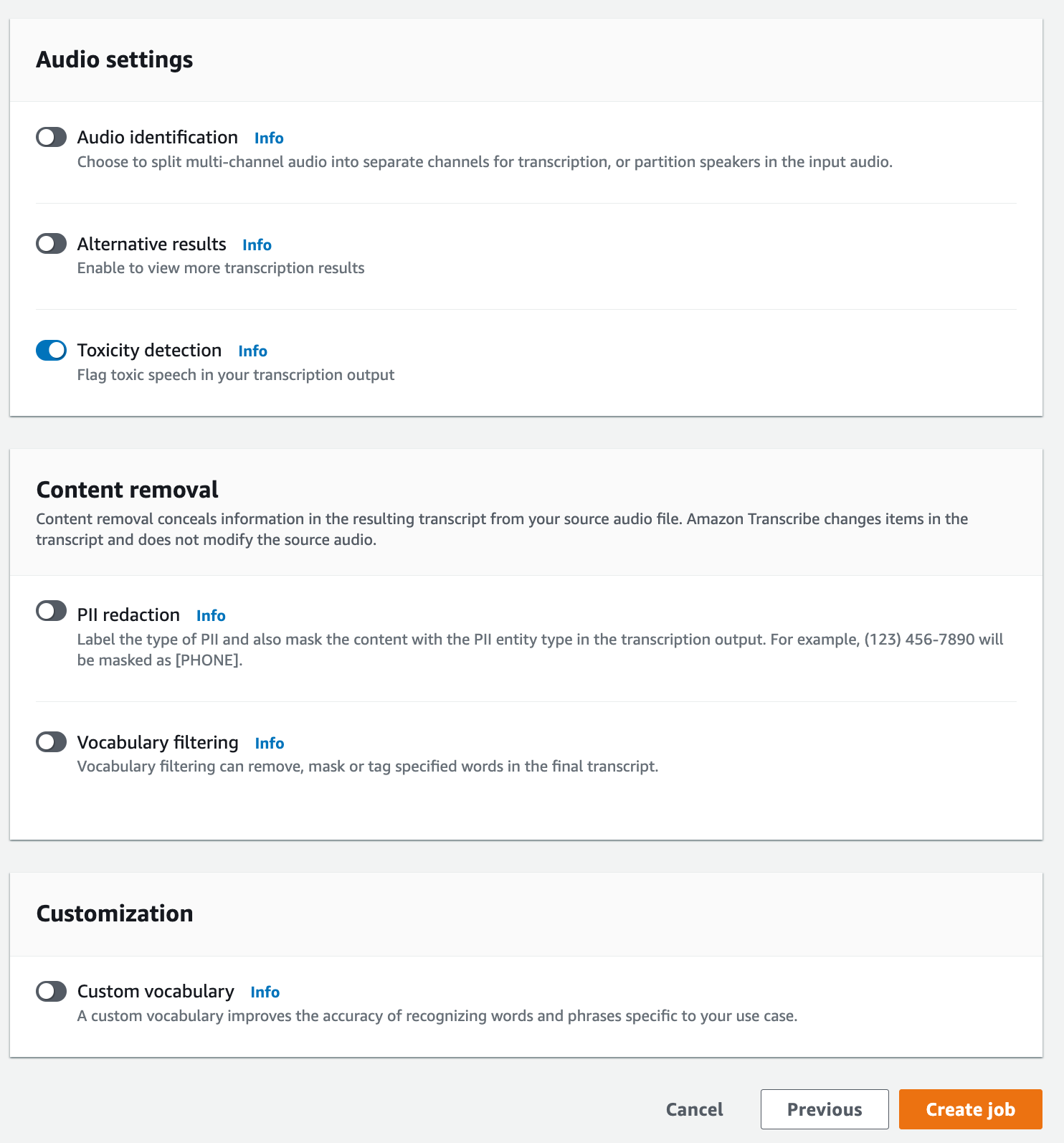
1. 選擇**建立作業**以執行轉錄作業。
1. 轉錄作業完成後,您可以從轉錄作業詳細資訊頁面的**下載**下拉式功能表下載您的文字記錄。
### AWS CLI
此範例使用 [start-transcription-job](https://awscli.amazonaws.com/v2/documentation/api/latest/reference/transcribe/start-transcription-job.html) 指令和 `ToxicityDetection` 參數。如需詳細資訊,請參閱[https://docs.aws.amazon.com/transcribe/latest/APIReference/API_StartTranscriptionJob.html](https://docs.aws.amazon.com/transcribe/latest/APIReference/API_StartTranscriptionJob.html)及[https://docs.aws.amazon.com/transcribe/latest/APIReference/API_ToxicityDetection.html](https://docs.aws.amazon.com/transcribe/latest/APIReference/API_ToxicityDetection.html)。
```
aws transcribe start-transcription-job \
--region {{us-west-2}} \
--transcription-job-name {{my-first-transcription-job}} \
--media MediaFileUri={{s3://amzn-s3-demo-bucket/my-input-files/my-media-file.flac}} \
--output-bucket-name {{amzn-s3-demo-bucket}} \
--output-key {{my-output-files/}} \
--language-code en-US \
--toxicity-detection ToxicityCategories=ALL
```
以下是使用 [start-transcription-job](https://awscli.amazonaws.com/v2/documentation/api/latest/reference/transcribe/start-transcription-job.html) 指令的另一個範例,以及包含替代毒性偵測的請求內文。
```
aws transcribe start-transcription-job \
--region {{us-west-2}} \
--cli-input-json {{file://filepath/my-first-toxicity-job.json}}
```
檔案 *my-first-toxicity-job.json* 包含以下請求內文。
```
{
"TranscriptionJobName": "{{my-first-transcription-job}}",
"Media": {
"MediaFileUri": "{{s3://amzn-s3-demo-bucket/my-input-files/my-media-file.flac}}"
},
"OutputBucketName": "{{amzn-s3-demo-bucket}}",
"OutputKey": "{{my-output-files/}}",
"LanguageCode": "en-US",
"ToxicityDetection": [
{
"ToxicityCategories": [ "ALL" ]
}
]
}
```
### 適用於 Python (Boto3) 的 AWS SDK
此範例使用 適用於 Python (Boto3) 的 AWS SDK 為 [start\_transcription\_job](https://boto3.amazonaws.com/v1/documentation/api/latest/reference/services/transcribe.html#TranscribeService.Client.start_transcription_job) `ToxicityDetection` 方法啟用 。如需詳細資訊,請參閱[https://docs.aws.amazon.com/transcribe/latest/APIReference/API_StartTranscriptionJob.html](https://docs.aws.amazon.com/transcribe/latest/APIReference/API_StartTranscriptionJob.html)及[https://docs.aws.amazon.com/transcribe/latest/APIReference/Welcome.html](https://docs.aws.amazon.com/transcribe/latest/APIReference/Welcome.html)。
如需使用 AWS SDKs 的其他範例,包括功能特定、案例和跨服務範例,請參閱 [使用 AWS SDKs 的 Amazon Transcribe 程式碼範例](service_code_examples.md)章節。
```
from __future__ import print_function
import time
import boto3
transcribe = boto3.client('transcribe', '{{us-west-2}}')
job_name = "{{my-first-transcription-job}}"
job_uri = "{{s3://amzn-s3-demo-bucket/my-input-files/my-media-file.flac}}"
transcribe.start_transcription_job(
TranscriptionJobName = job_name,
Media = {
'MediaFileUri': job_uri
},
OutputBucketName = '{{amzn-s3-demo-bucket}}',
OutputKey = '{{my-output-files/}}',
LanguageCode = 'en-US',
ToxicityDetection = [
{
'ToxicityCategories': ['ALL']
}
]
)
while True:
status = transcribe.get_transcription_job(TranscriptionJobName = job_name)
if status['TranscriptionJob']['TranscriptionJobStatus'] in ['COMPLETED', 'FAILED']:
break
print("Not ready yet...")
time.sleep(5)
print(status)
```
## 範例輸出
在您的轉錄輸出中標記有毒語音並進行分類。有毒語音的每個執行個體都會分類並指定可信度分數 (介於 0 和 1 之間的值)。可信度值較高表示內容在指定類別中是有毒語音的可能性越高。
### 範例輸出(JSON)
以下是 JSON 格式的範例輸出,顯示具有相關可信度分數的分類有毒語音。
```
{
"jobName": "{{my-toxicity-job}}",
"accountId": "{{111122223333}}",
"results": {
"transcripts": [...],
"items":[...],
"toxicity_detection": [
{
"text": "What the * are you doing man? That's why I didn't want to play with your * . man it was a no, no I'm not calming down * man. I well I spent I spent too much * money on this game.",
"toxicity": 0.7638,
"categories": {
"profanity": 0.9913,
"hate_speech": 0.0382,
"sexual": 0.0016,
"insult": 0.6572,
"violence_or_threat": 0.0024,
"graphic": 0.0013,
"harassment_or_abuse": 0.0249
},
"start_time": 8.92,
"end_time": 21.45
},
Items removed for brevity
{
"text": "What? Who? What the * did you just say to me? What's your address? What is your * address? I will pull up right now on your * * man. Take your * back to , tired of this **.",
"toxicity": 0.9816,
"categories": {
"profanity": 0.9865,
"hate_speech": 0.9123,
"sexual": 0.0037,
"insult": 0.5447,
"violence_or_threat": 0.5078,
"graphic": 0.0037,
"harassment_or_abuse": 0.0613
},
"start_time": 43.459,
"end_time": 54.639
},
]
},
...
"status": "COMPLETED"
}
```