本文為英文版的機器翻譯版本,如內容有任何歧義或不一致之處,概以英文版為準。
建立通話後轉錄的類別
通話後分析支援建立自訂類別,讓您量身打造文字記錄分析,以適當滿足您的特定業務需求。
您可以根據需要,建立任意數量的類別,以涵蓋一系列不同的情況。您必須為您建立的每個類別建立 1 到 20 個規則。每個規則都依據四個標準之一:中斷、關鍵字、非通話時間或情緒。如需將這些條件與 CreateCallAnalyticsCategory 操作搭配使用的詳細資訊,請參閱 通話後分析類別的規則條件 一節。
如果媒體中的內容符合您在指定類別中指定的所有規則, Amazon Transcribe 將標示輸出為該類別。如需 JSON 輸出中類別相符項目的範例,請參閱通話分類輸出。
以下是您可以使用自訂類別執行的幾個範例:
-
隔離具有特定特徵的通話,例如以負面客戶情緒結束的通話
-
標記和追蹤特定的關鍵字集以識別客戶問題的趨勢
-
監控合規性,例如通話的前幾秒鐘內,客服人員說出 (或省略) 特定片語
-
標記許多客服人員中斷和負面客戶情緒的通話,以取得對客戶體驗的見解
-
比較多個類別以衡量相關性,例如分析使用歡迎片語的客服人員是否與正面的客戶情緒相關
通話後與即時類別
建立新類別時,您可以指定建立為通話後分析類別 (POST_CALL) 或建立為即時通話分析類別 (REAL_TIME)。如果未指定選項,則預設會將類別建立為通話後類別。完成通話後分析轉錄後,可以在您的輸出中使用通話後分析類別相符的項目。
若要建立通話後分析的新類別,您可以使用 AWS 管理主控台、AWS CLI 或 AWS SDK;請參閱下列範例:
-
在導覽窗格中, Amazon Transcribe選擇Amazon Transcribe 通話分析。
-
選擇通話分析類別,將引導您進入通話分析類別頁面。選擇建立類別。

-
您現在已進入建立類別頁面。輸入類別的名稱,然後在類別類型下拉式功能表中,選擇「批次通話分析」。

-
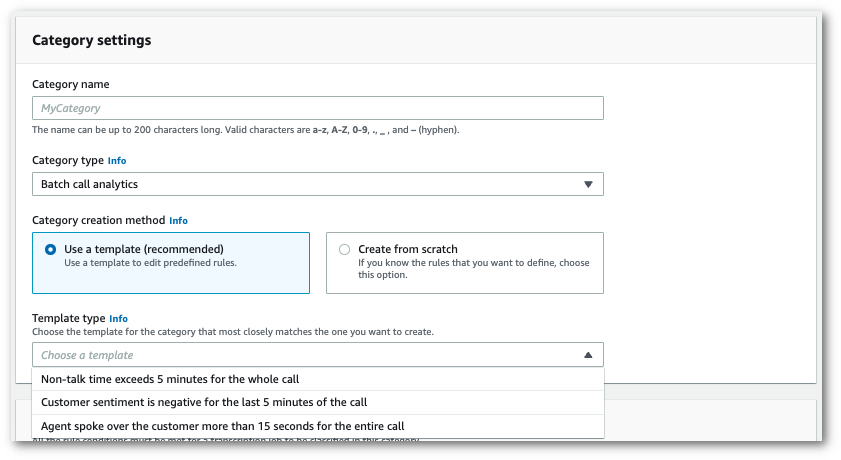
您可以選擇範本,以建立您的類別,也可以從頭開始建立範本。
如果使用範本:選擇使用範本 (建議選項),選擇您要的範本,然後選擇建立類別。
-
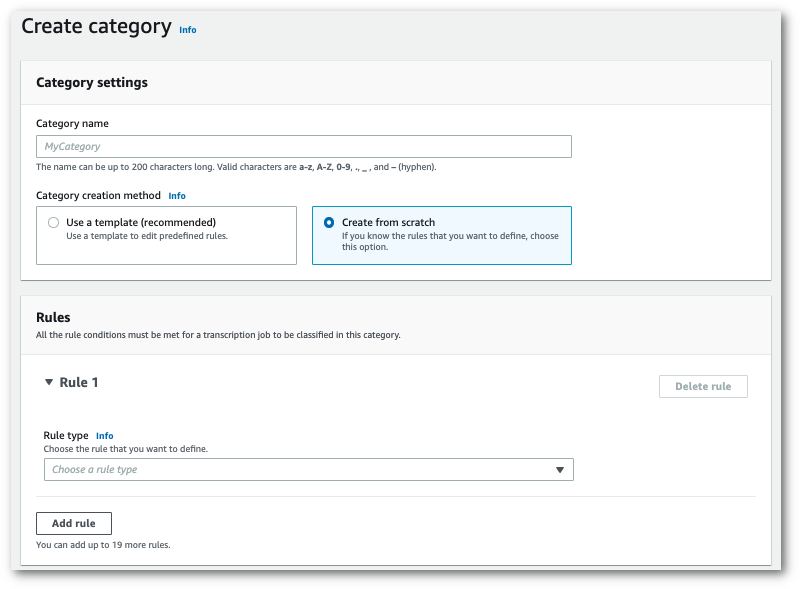
如果建立自訂類別:選擇從頭開始建立。
-
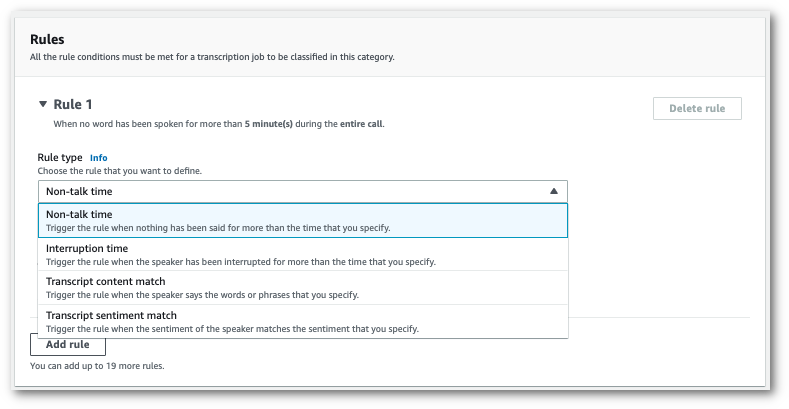
使用下拉式功能表將規則新增至您的類別。每個類別最多可新增 20 個規則。
-
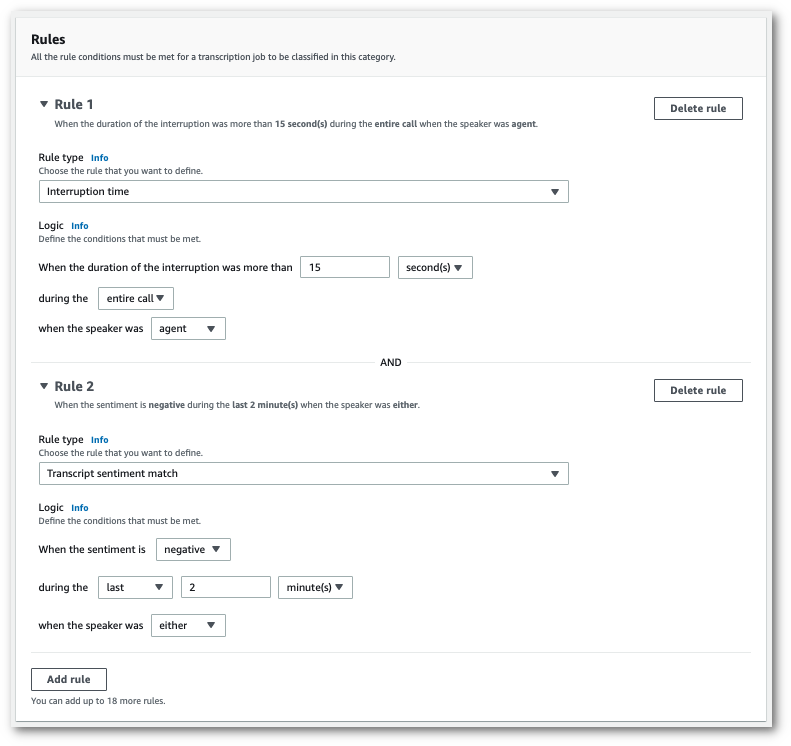
以下是帶兩個規則的類別範例:通話期間中斷客戶超過 15 秒的客服人員,以及在通話的最後兩分鐘內,客戶或客服人員感覺到負面情緒。
-
將規則新增至類別時,選擇建立類別。
此範例使用 create-call-analytics-categoryCreateCallAnalyticsCategory、CategoryProperties及Rule。
下列範例會建立帶規則的類別:
-
客戶在前 60,000 毫秒內被中斷。這些中斷的持續時間至少持續 10,000 毫秒。
-
進入通話的 10% 到 80% 間,靜音持續至少 20,000 毫秒。
-
客服人員在通話中的某個時段有負面情緒。
-
在通話的前 10,000 毫秒中,未使用「歡迎」或「您好」單詞。
此範例使用 create-call-analytics-category
aws transcribe create-call-analytics-category \
--cli-input-json file://filepath/my-first-analytics-category.json
檔案 my-first-analytics-category.json 包含以下請求主文。
{ "CategoryName": "my-new-category", "InputType": "POST_CALL", "Rules": [ { "InterruptionFilter": { "AbsoluteTimeRange": { "First":60000}, "Negate":false, "ParticipantRole": "CUSTOMER", "Threshold":10000} }, { "NonTalkTimeFilter": { "Negate":false, "RelativeTimeRange": { "EndPercentage":80, "StartPercentage":10}, "Threshold":20000} }, { "SentimentFilter": { "ParticipantRole": "AGENT", "Sentiments": [ "NEGATIVE" ] } }, { "TranscriptFilter": { "Negate":true, "AbsoluteTimeRange": { "First":10000}, "Targets": [ "welcome", "hello" ], "TranscriptFilterType": "EXACT" } } ] }
此範例會使用 create_call_analytics_categoryCategoryName和 Rules引數 適用於 Python (Boto3) 的 AWS SDK 來建立類別。如需詳細資訊,請參閱CreateCallAnalyticsCategory、CategoryProperties及Rule。
如需使用 AWS SDKs 的其他範例,包括功能特定、案例和跨服務範例,請參閱 使用 AWS SDKs 的 Amazon Transcribe 程式碼範例章節。
下列範例會建立帶規則的類別:
-
客戶在前 60,000 毫秒內被中斷。這些中斷的持續時間至少持續 10,000 毫秒。
-
進入通話的 10% 到 80% 間,靜音持續至少 20,000 毫秒。
-
客服人員在通話中的某個時段有負面情緒。
-
在通話的前 10,000 毫秒中,未使用「歡迎」或「您好」單詞。
from __future__ import print_function import time import boto3 transcribe = boto3.client('transcribe', 'us-west-2') category_name = "my-new-category" transcribe.create_call_analytics_category( CategoryName = category_name, InputType =POST_CALL, Rules = [ { 'InterruptionFilter': { 'AbsoluteTimeRange': { 'First':60000}, 'Negate':False, 'ParticipantRole': 'CUSTOMER', 'Threshold':10000} }, { 'NonTalkTimeFilter': { 'Negate':False, 'RelativeTimeRange': { 'EndPercentage':80, 'StartPercentage':10}, 'Threshold':20000} }, { 'SentimentFilter': { 'ParticipantRole': 'AGENT', 'Sentiments': [ 'NEGATIVE' ] } }, { 'TranscriptFilter': { 'Negate':True, 'AbsoluteTimeRange': { 'First':10000}, 'Targets': [ 'welcome', 'hello' ], 'TranscriptFilterType': 'EXACT' } } ] ) result = transcribe.get_call_analytics_category(CategoryName = category_name) print(result)
通話後分析類別的規則條件
本節概述您可以使用 CreateCallAnalyticsCategory API 操作建立的自訂 POST_CALL 規則類型。
中斷配對
使用中斷 (InterruptionFilter資料類型) 的規則設計為符合下列項目:
-
客服人員中斷客戶的範例
-
客戶中斷客服人員的範例
-
中斷其他參與者的參與者
-
缺乏中斷
以下是可搭配 InterruptionFilter 使用的參數範例:
"InterruptionFilter": { "AbsoluteTimeRange": {Specify the time frame, in milliseconds, when the match should occur}, "RelativeTimeRange": {Specify the time frame, in percentage, when the match should occur}, "Negate":Specify if you want to match the presence or absence of interruptions, "ParticipantRole":Specify if you want to match speech from the agent, the customer, or both, "Threshold":Specify a threshold for the amount of time, in seconds, interruptions occurred during the call},
請參閱 CreateCallAnalyticsCategory 及 InterruptionFilter,了解這些參數與這些參數相關的有效值的詳細資訊。
關鍵字配對
使用關鍵字 (TranscriptFilter 資料類型) 的規則設計為符合下列項目:
-
客服人員、客戶或兩者說出的自訂單字或片語
-
客服人員、客戶或兩者都未說出的自訂單字或片語
-
在特定時間範圍內發生的自訂單字或片語
以下是可搭配 TranscriptFilter 使用的參數範例:
"TranscriptFilter": { "AbsoluteTimeRange": {Specify the time frame, in milliseconds, when the match should occur}, "RelativeTimeRange": {Specify the time frame, in percentage, when the match should occur}, "Negate":Specify if you want to match the presence or absence of your custom keywords, "ParticipantRole":Specify if you want to match speech from the agent, the customer, or both, "Targets": [The custom words and phrases you want to match], "TranscriptFilterType":Use this parameter to specify an exact match for the specified targets}
請參閱 CreateCallAnalyticsCategory 及 TranscriptFilter,了解這些參數與這些參數相關的有效值的詳細資訊。
非通話時間配對
使用非通話時間 (NonTalkTimeFilter 資料類型) 的規則設計為符合下列項目:
-
在整個通話的指定時間內出現靜音
-
在整個通話的指定時間內說話
以下是可搭配 NonTalkTimeFilter 使用的參數範例:
"NonTalkTimeFilter": { "AbsoluteTimeRange": {Specify the time frame, in milliseconds, when the match should occur}, "RelativeTimeRange": {Specify the time frame, in percentage, when the match should occur}, "Negate":Specify if you want to match the presence or absence of speech, "Threshold":Specify a threshold for the amount of time, in seconds, silence (or speech) occurred during the call},
請參閱 CreateCallAnalyticsCategory 及 NonTalkTimeFilter,了解這些參數與這些參數相關的有效值的詳細資訊。
情緒配對
使用情緒 (SentimentFilter 資料類型) 的規則設計為符合下列項目:
-
客戶、客服人員或兩者是否在通話的指定點表達出正面情緒
-
客戶、客服人員或兩者是否在通話的指定點表達出負面情緒
-
客戶、客服人員或兩者是否在通話的指定點表達出中性情緒
-
客戶、客服人員或兩者是否在通話的指定點表達出混合情緒
以下是可搭配 SentimentFilter 使用的參數範例:
"SentimentFilter": { "AbsoluteTimeRange": {Specify the time frame, in milliseconds, when the match should occur}, "RelativeTimeRange": {Specify the time frame, in percentage, when the match should occur}, "Negate":Specify if you want to match the presence or absence of your chosen sentiment, "ParticipantRole":Specify if you want to match speech from the agent, the customer, or both, "Sentiments": [The sentiments you want to match] },
請參閱 CreateCallAnalyticsCategory 及 SentimentFilter,了解這些參數與這些參數相關的有效值的詳細資訊。
