本文為英文版的機器翻譯版本,如內容有任何歧義或不一致之處,概以英文版為準。
# 轉錄多聲道音訊
如果您的音訊有兩個聲道,您可以使用聲道識別來分別轉錄每個聲道的語音。 目前 Amazon Transcribe 不支援具有兩個以上聲道的音訊。
在您的文字記錄中,聲道會指定標籤 `ch_0` 和 `ch_1`。
除了[標準文字記錄區段](how-input.md#how-it-works-output) (`transcripts` 和 `items`) 之外,啟用聲道識別的請求還包括一個 `channel_labels` 區段。此區段包含每個語音符號或標點符號,並依聲道分組,以及其相關的聲道標籤、時間戳記和可信度分數。
```
"channel_labels": {
"channels": [
{
"channel_label": "ch_0",
"items": [
{
"channel_label": "ch_0",
"start_time": "4.86",
"end_time": "5.01",
"alternatives": [
{
"confidence": "1.0",
"content": "I've"
}
],
"type": "pronunciation"
},
{{...}}
"channel_label": "ch_1",
"items": [
{
"channel_label": "ch_1",
"start_time": "8.5",
"end_time": "8.89",
"alternatives": [
{
"confidence": "1.0",
"content": "Sorry"
}
],
"type": "pronunciation"
},
{{...}}
"number_of_channels": 2
},
```
請注意,如果某個聲道上的使用者與不同聲道上的使用者同時說話,則每個聲道的時間戳記會重疊,而個人彼此交談。
若要檢視具有通道識別功能的完整範例記錄,請參閱 [範例聲道識別輸出 (批次處理)](channel-id-output-batch.md)。
## 批次轉錄中使用聲道識別
若要識別批次轉錄中的聲道,您可以使用 **AWS 管理主控台**、**AWS CLI** 或 **AWS SDK**;請參閱下列範例:
### AWS 管理主控台
1. 登入 [AWS 管理主控台](https://console.aws.amazon.com/transcribe/)。
1. 在導覽窗格中,選擇**轉錄作業**,然後選擇**建立作業**(右上角)。這會開啟**指定作業詳細資訊**頁面。
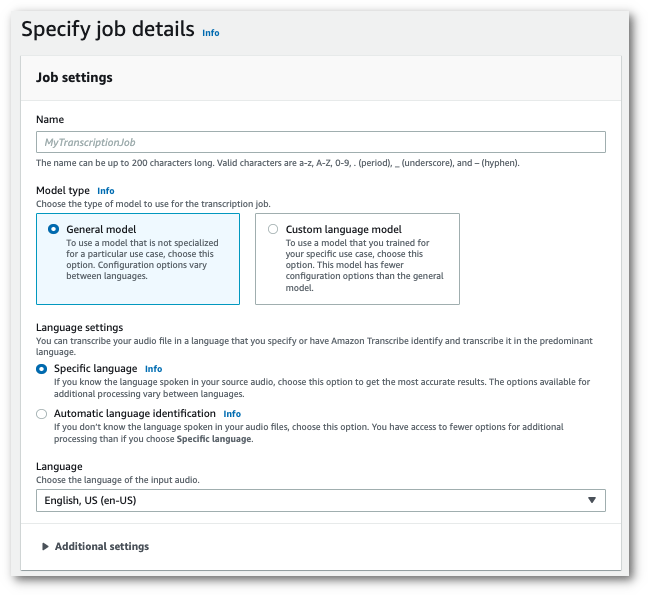
1. 填寫您要包含在**指定作業詳細資訊**頁面上的任何欄位,然後選擇**下一步**。這會引導您前往**設定工作 - *選擇性***頁面。
在 **音訊設定** 面板中,選擇 **聲道識別**(在「音訊識別類型」標題下)。

1. 選擇**建立作業**以執行轉錄作業。
### AWS CLI
此範例使用 [start-transcription-job](https://awscli.amazonaws.com/v2/documentation/api/latest/reference/transcribe/start-transcription-job.html)。如需詳細資訊,請參閱[https://docs.aws.amazon.com/transcribe/latest/APIReference/API_StartTranscriptionJob.html](https://docs.aws.amazon.com/transcribe/latest/APIReference/API_StartTranscriptionJob.html)。
```
aws transcribe start-transcription-job \
--region {{us-west-2}} \
--transcription-job-name {{my-first-transcription-job}} \
--media MediaFileUri=s3://{{amzn-s3-demo-bucket}}/{{my-input-files}}/{{my-media-file}}.{{flac}} \
--output-bucket-name {{amzn-s3-demo-bucket}} \
--output-key {{my-output-files}}/ \
--language-code {{en-US}} \
--settings ChannelIdentification=true
```
以下是使用 [start-transcription-job](https://awscli.amazonaws.com/v2/documentation/api/latest/reference/transcribe/start-transcription-job.html) 的另一個範例,以及啟用該工作的聲道識別的請求主文。
```
aws transcribe start-transcription-job \
--region {{us-west-2}} \
--cli-input-json file://{{my-first-transcription-job}}.json
```
檔案 *my-first-transcription-job.json* 包含以下請求主文。
```
{
"TranscriptionJobName": "{{my-first-transcription-job}}",
"Media": {
"MediaFileUri": "s3://{{amzn-s3-demo-bucket}}/{{my-input-files}}/{{my-media-file}}.{{flac}}"
},
"OutputBucketName": "{{amzn-s3-demo-bucket}}",
"OutputKey": "{{my-output-files}}/",
"LanguageCode": "{{en-US}}",
"Settings": {
"ChannelIdentification": true
}
}
```
### 適用於 Python (Boto3) 的 AWS SDK
此範例使用 適用於 Python (Boto3) 的 AWS SDK 來識別使用 [start\_transcription\_job](https://boto3.amazonaws.com/v1/documentation/api/latest/reference/services/transcribe.html#TranscribeService.Client.start_transcription_job) 方法的頻道。如需詳細資訊,請參閱 [StartTranscriptionJob](https://docs.aws.amazon.com/transcribe/latest/APIReference/API_StartTranscriptionJob.html)。
```
from __future__ import print_function
import time
import boto3
transcribe = boto3.client('transcribe', '{{us-west-2}}')
job_name = "{{my-first-transcription-job}}"
job_uri = "s3://{{amzn-s3-demo-bucket}}/{{my-input-files}}/{{my-media-file}}.{{flac}}"
transcribe.start_transcription_job(
TranscriptionJobName = job_name,
Media = {
'MediaFileUri': job_uri
},
OutputBucketName = '{{amzn-s3-demo-bucket}}',
OutputKey = '{{my-output-files}}/',
LanguageCode = '{{en-US}}',
Settings = {
'ChannelIdentification':True
}
)
while True:
status = transcribe.get_transcription_job(TranscriptionJobName = job_name)
if status['TranscriptionJob']['TranscriptionJobStatus'] in ['COMPLETED', 'FAILED']:
break
print("Not ready yet...")
time.sleep(5)
print(status)
```
## 在串流轉錄中使用聲道識別
若要識別串流轉錄中的聲道,您可以使用 **HTTP/2** 或 **WebSockets**;請參閱下列範例:
### HTTP/2 串流
此範例會建立 HTTP/2 要求,以分隔轉錄輸出中的聲道。如需搭配 使用 HTTP/2 串流的詳細資訊 Amazon Transcribe,請參閱 [設定 HTTP/2 串流](streaming-setting-up.md#streaming-http2)。如需 Amazon Transcribe特定參數和標頭的詳細資訊,請參閱 [StartStreamTranscription](https://docs.aws.amazon.com/transcribe/latest/APIReference/API_streaming_StartStreamTranscription.html)。
```
POST /stream-transcription HTTP/2
host: transcribestreaming.{{us-west-2}}.amazonaws.com
X-Amz-Target: com.amazonaws.transcribe.Transcribe.{{StartStreamTranscription}}
Content-Type: application/vnd.amazon.eventstream
X-Amz-Content-Sha256: {{string}}
X-Amz-Date: {{20220208}}T{{235959}}Z
Authorization: AWS4-HMAC-SHA256 Credential={{access-key}}/{{20220208}}/{{us-west-2}}/transcribe/aws4_request, SignedHeaders=content-type;host;x-amz-content-sha256;x-amz-date;x-amz-target;x-amz-security-token, Signature={{string}}
x-amzn-transcribe-language-code: {{en-US}}
x-amzn-transcribe-media-encoding: {{flac}}
x-amzn-transcribe-sample-rate: {{16000}}
x-amzn-channel-identification: TRUE
transfer-encoding: chunked
```
您可以在 [API 參考](https://docs.aws.amazon.com/transcribe/latest/APIReference/API_Reference.html)中找到參數定義;所有 AWS API 操作通用的參數都列在[通用參數](https://docs.aws.amazon.com/transcribe/latest/APIReference/CommonParameters.html)區段中。
### WebSocket 串流
此範例會建立預先簽署的 URL,以分隔轉錄輸出中的聲道。已加入分行符號以提高可讀性。如需搭配 使用 WebSocket 串流的詳細資訊 Amazon Transcribe,請參閱 [設定 WebSocket 串流](streaming-setting-up.md#streaming-websocket)。如需參數詳細資訊,請參閱 [https://docs.aws.amazon.com/transcribe/latest/APIReference/API_streaming_StartStreamTranscription.html](https://docs.aws.amazon.com/transcribe/latest/APIReference/API_streaming_StartStreamTranscription.html)。
```
GET wss://transcribestreaming.{{us-west-2}}.amazonaws.com:8443/stream-transcription-websocket?
&X-Amz-Algorithm=AWS4-HMAC-SHA256
&X-Amz-Credential={{AKIAIOSFODNN7EXAMPLE}}%2F{{20220208}}%2F{{us-west-2}}%2F{{transcribe}}%2Faws4_request
&X-Amz-Date={{20220208}}T{{235959}}Z
&X-Amz-Expires={{300}}
&X-Amz-Security-Token={{security-token}}
&X-Amz-Signature={{string}}
&X-Amz-SignedHeaders=content-type%3Bhost%3Bx-amz-date
&language-code=en-US
&specialty={{PRIMARYCARE}}
&type={{DICTATION}}
&media-encoding={{flac}}
&sample-rate={{16000}}
&channel-identification=TRUE
```
您可以在 [API 參考](https://docs.aws.amazon.com/transcribe/latest/APIReference/API_Reference.html)中找到參數定義;所有 AWS API 操作通用的參數都列在[通用參數](https://docs.aws.amazon.com/transcribe/latest/APIReference/CommonParameters.html)區段中。