本文為英文版的機器翻譯版本,如內容有任何歧義或不一致之處,概以英文版為準。
# Aurora 狀態和 Step Functions 狀態機
本節涵蓋容錯移轉和故障回復 Amazon Aurora 叢集的特定程序和狀態機器。叢集會設定為全域資料庫。
**注意**
為了演示目的,這個例子使用了 Aurora MySQL 兼容版本。對於 Aurora PostgreSQL 兼容版本,您可以使用類似的步驟。
## 穩定狀態
在穩定狀態下,已建立具有兩個資料庫叢集的 Amazon Aurora 與 MySQL 相容的全域資料庫 (`dr-globaldb-cluster-mysql`)。已在主要 (`db-cluster-01`) 中建立第一個資料庫叢集 AWS 區域 (`us-east-1`) 以提供讀取/寫入工作負載。第二個資料庫叢集 (`db-cluster-02`)**** 已在次要區域 (`us-west-2`) 中建立,以伺服唯讀工作負載。
除了提供 DR 解決方案之外,您還可以將讀取查詢從應用程式路由傳送至次要資料庫叢集,以減少主要資料庫叢集的負載。這些叢集中的每一個都包含一個名為`dbcluster-01-use1-instance-1`和`dbcluster-02-usw2-instance-2`的資料庫執行個體。
## 事件狀態
透過使用 Amazon Aurora 全球資料庫,您可以相當快速地規劃災難並從災難中復原。從災難復原通常使用復原時間目標 (RTO) 和復原點目標 (RPO) 的值來衡量。如需詳細資訊,請參閱在 [Amazon Aurora 全球資料庫中使用切換或容錯移轉](https://docs.aws.amazon.com/AmazonRDS/latest/AuroraUserGuide/aurora-global-database-disaster-recovery.html)。
使用 Aurora 全域資料庫時,有兩種不同的容錯移轉方法:
+ 切換 (受管理的計劃容錯移轉)
+ 容錯移轉 (手動意外容錯移轉,或*卸離和升級*)
### 切換
轉換適用於受控環境,例如操作維護和其他規劃的操作程序。透過使用受管的計劃容錯移轉,您可以將 Aurora 全域資料庫的主要資料庫叢集重新定位到其中一個次要區域。由於切換會等到次要資料庫叢集與主要資料庫同步處理,因此 RPO 為 0 (不會遺失資料)。若要進一步了解,請參閱[執行 Amazon Aurora 全球資料庫的轉換](https://docs.aws.amazon.com/AmazonRDS/latest/AuroraUserGuide/aurora-global-database-disaster-recovery.html#aurora-global-database-disaster-recovery.managed-failover)。
狀`dr-orchestrator-stepfunction-FAILOVER`態機會在*事件狀態*期間叫用,以將主要叢集切換到選擇的次要區域 (`us-west-2`)。
若要執行轉換,請執行下列動作:
1. 登入 AWS 管理主控台。
1. 將「區域」變更為 DR 區域 (`us-west-2`)。
1. 瀏覽至「**服務**」,然後選擇「**Step Functions**」。
1. 導覽至狀`dr-orchestrator-stepfunction-FAILOVER`態機器。
1. 選擇 [**開始執行**],然後在`Input - optional`區段中輸入下列 JSON 程式碼:
```
{
"StatePayload": [
{
"layer": 1,
"resources": [
{
"resourceType": "PlannedFailoverAurora",
"resourceName": "Switchover (planned failover) of Amazon Aurora global databases (MySQL)",
"parameters": {
"GlobalClusterIdentifier": "!Import dr-globaldb-cluster-mysql-global-identifier",
"DBClusterIdentifier": "!Import dr-globaldb-cluster-mysql-cluster-identifier"
}
}
]
}
]
}
```
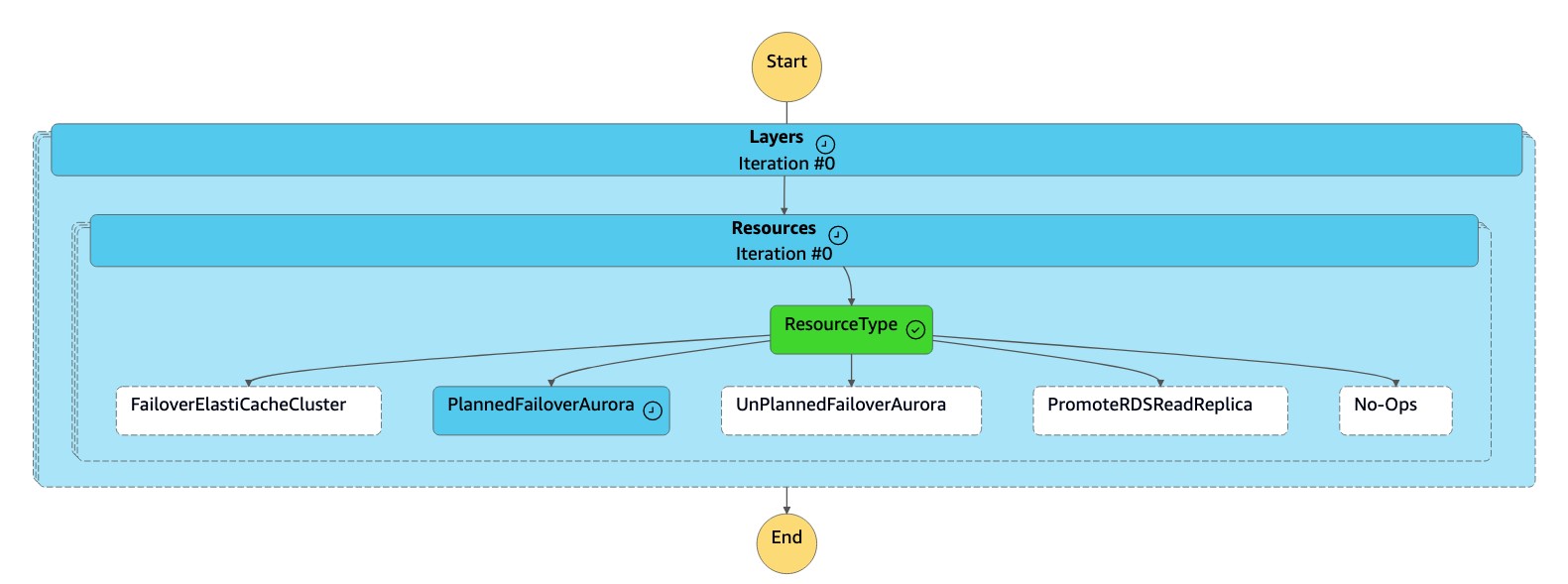
1. 狀`dr-orchestrator-stepfunction-FAILOVER`態機器會將資源類型讀取為 `PlannedFailoverAuroraMySQ` L,並呼叫`dr-orchestrator-stepfunction-planned-Aurora-failover`狀態機器以容錯移轉 Aurora 全域資料庫。
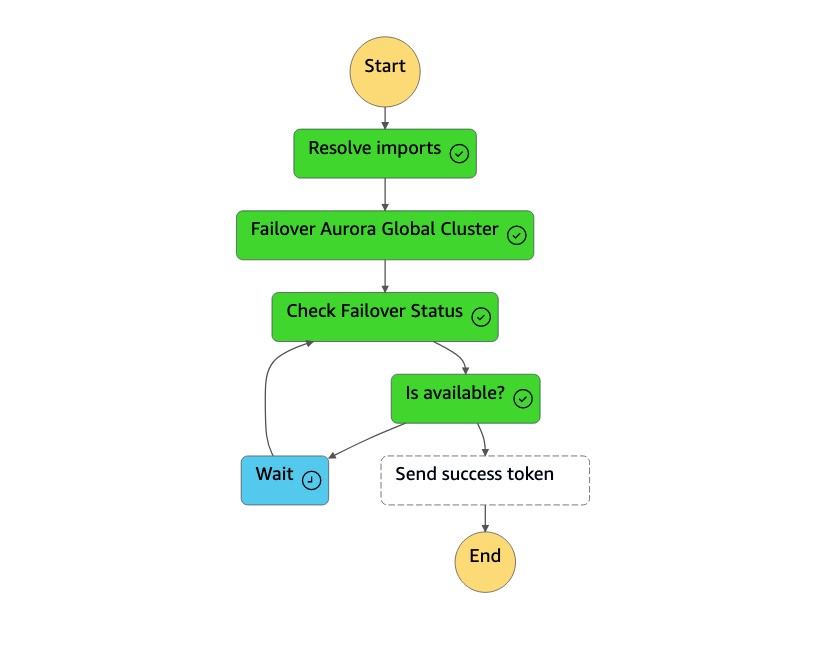
1. 狀`dr-orchestrator-stepfunction-planned-Aurora-failover`態機器會執行下列步驟,以切換至 Aurora MySQL 相容的全域資料庫角色。
[See the AWS documentation website for more details](http://docs.aws.amazon.com/zh_tw/prescriptive-guidance/latest/automate-dr-solution-relational-database/aurora-state-machines.html)
1. 導覽至 Amazon RDS 主控台。在「**狀態**」下,Aurora 全域資料庫的值將從「**可用**」變更為「**切換**」或「**修改**」。
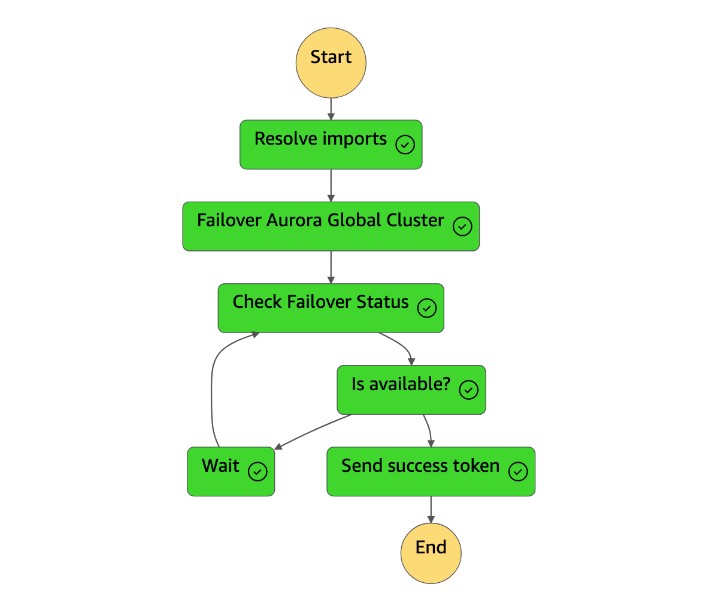
1. 狀`dr-orchestrator-stepfunction-planned-Aurora-failover`態機完成後,它會將成功令牌發送回狀`dr-orchestrator-stepfunction-FAILOVER`態機。
1. 狀`dr-orchestrator-stepfunction-FAILOVER`態機已完成。
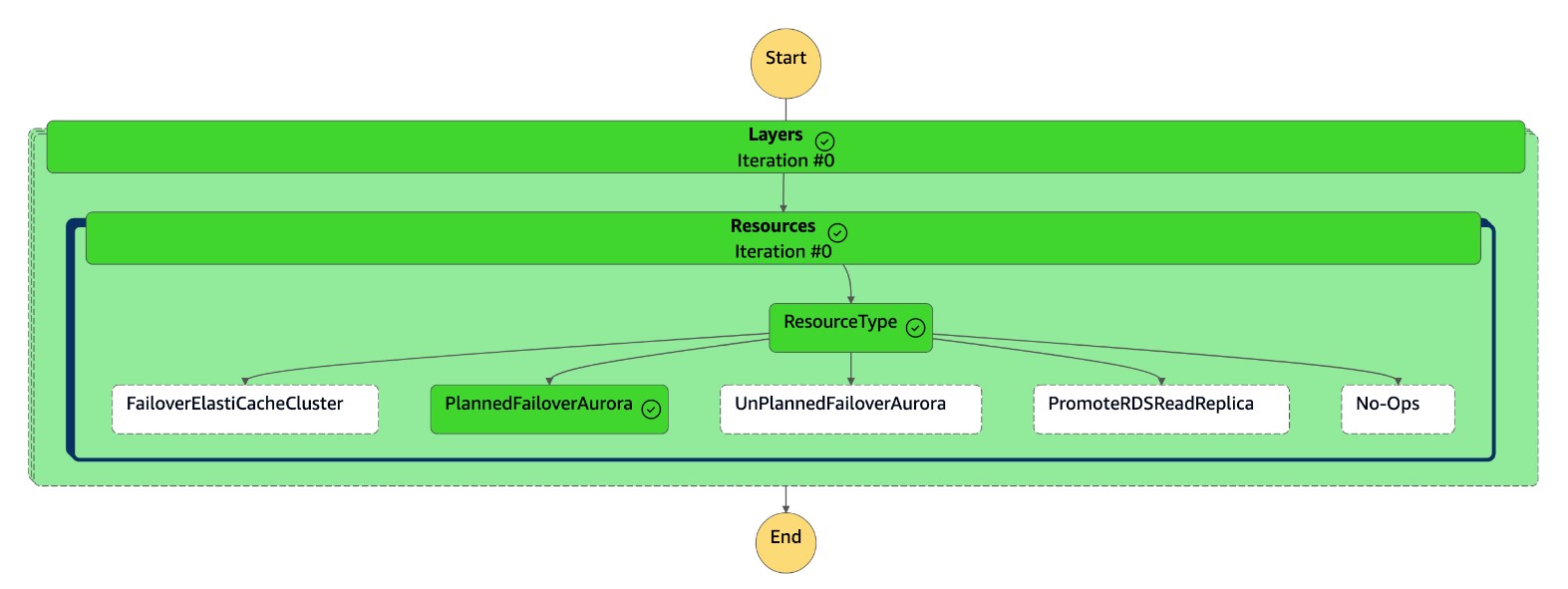
在主控台上,**次要叢集 (`dbcluster-02`) 的角色現在是主要叢****集,且叢集**已準備好為讀取/寫入工作負載提供服務。原始主要叢集 (`dbcluster-01`) 的角色現在會列為**次要叢集**。
### 手動意外容錯移轉
在極少數情況下,您的 Aurora 全球資料庫可能會在主要資料庫中遇到意外中斷 AWS 區域。如果發生此情況,您的主要 Aurora 資料庫叢集及其寫入器節點將無法使用,而主要叢集和次要叢集之間的複寫則會停止。若要將停機時間 (RTO) 和資料遺失 (RPO) 降到最低,請快速執行跨區域容錯移轉並重建 Aurora 全域資料庫。如需詳細資訊,請參閱[從意外中斷中復原 Amazon Aurora 全球資料庫](https://docs.aws.amazon.com/AmazonRDS/latest/AuroraUserGuide/aurora-global-database-disaster-recovery.html#aurora-global-database-failover)。
您必須從 Aurora 全域資料庫中斷連接次要叢集,才能執行意外的容錯移轉。在執行意外的容錯移轉之前,請先停止主要 Aurora 資料庫叢集上的應用程式寫入。順利完成容錯移轉之後,請重新設定應用程式以寫入新的主要資料庫叢集。這種方法有助於防止數據丟失。如果主要寫入器節點在容錯移轉過程中恢復線上狀態,這也有助於避免資料不一致。
若要執行意外的容錯移轉,請呼叫狀`dr-orchestrator-stepfunction-FAILOVER`態機器。在此範例中,**次要叢集** (`db-cluster-02`*)***** 處於穩定狀態的 DR 區域 (`us-west-2`) 中。
若要執行容錯移轉,請執行下列動作:
1. 登入 主控台。
1. 將「區域」變更為 DR 區域 (`us-west-2`)。
1. 瀏覽至「**服務**」,然後選擇「**Step Functions**」。
1. 導覽至狀`dr-orchestrator-stepfunction-FAILOVER`態機器。
1. 選擇 [**開始執行**],然後在`Input - optional`區段中輸入下列 JSON 程式碼,`UnPlannedFailoverAurora`如下所示 `resourceType`*:*
```
{
"StatePayload": [
{
"layer": 1,
"resources": [
{
"resourceType": "UnPlannedFailoverAurora",
"resourceName": "Performing unplanned failover for Amazon Aurora global databases (MySQL)",
"parameters": {
"GlobalClusterIdentifier": "!Import dr-globaldb-cluster-mysql-global-identifier",
"DBClusterIdentifier": "!Import dr-globaldb-cluster-mysql-cluster-identifier",
"ClusterRegion": "!Import dr-globaldb-cluster-mysql-cluster-region"
}
}
]
}
]
}
```
1. 狀`dr-orchestrator-stepfunction-FAILOVER`態機讀取資源類型,`UnPlannedFailoverAuroraMySQL`並`Detach Cluster from Global Database`從`dr-orchestrator-stepfunction-unplanned-Aurora-failover`狀態機調用任務。
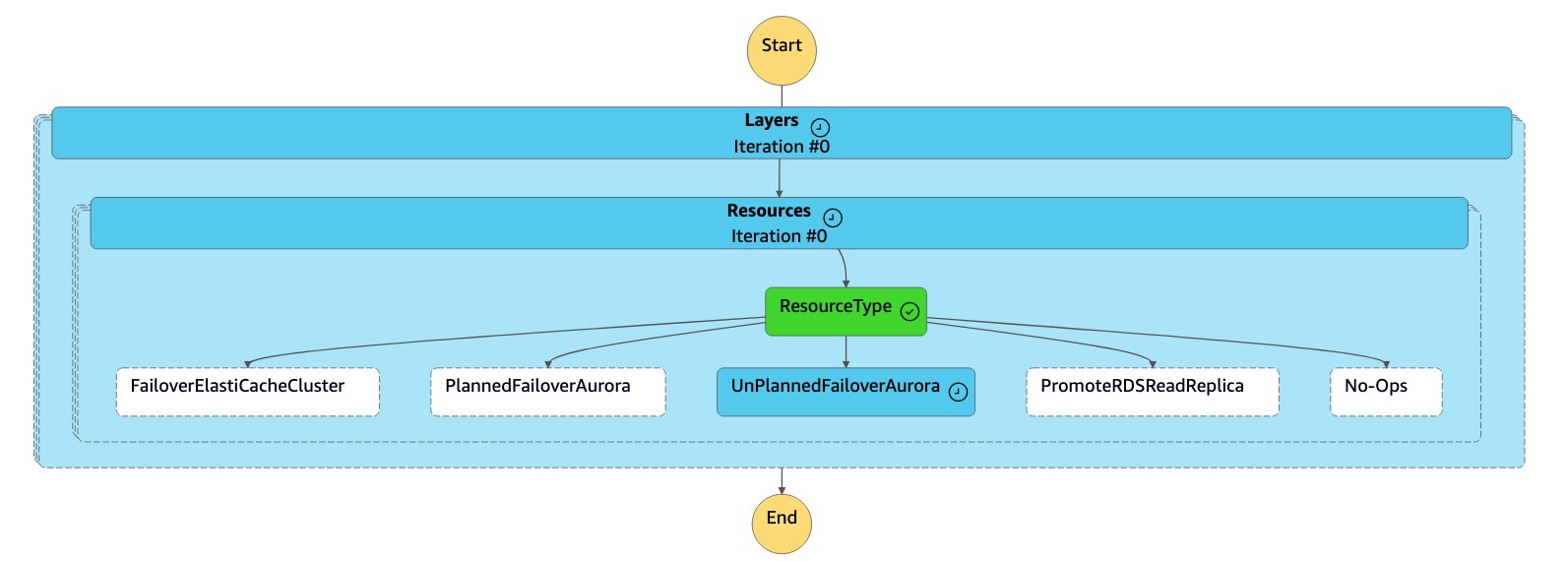
1. 此工`Detach Cluster from Global Database`作會從全域資料庫中卸離 (移除) 次要叢集。
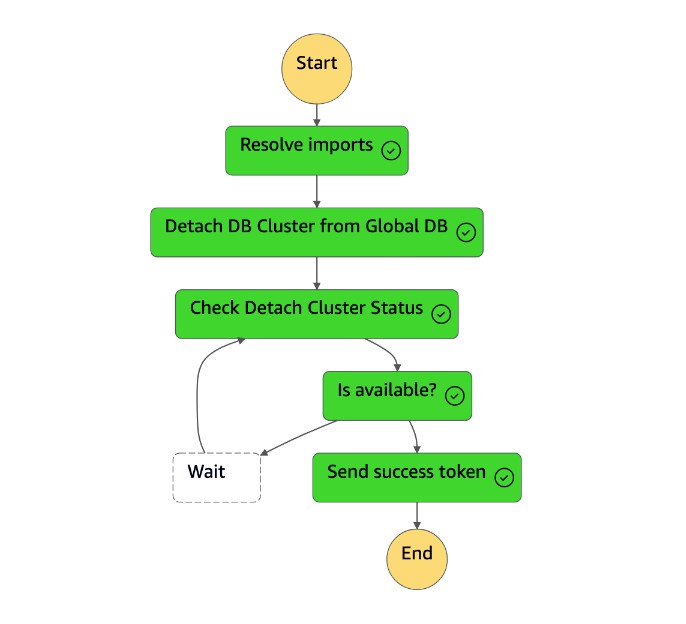
1. 次要叢集 (`dbcluster-02`) 會提升為獨立叢集,並可提供讀取/寫入工作負載。
1. 狀`dr-orchestrator-stepfunction-FAILOVER`態機已完成。
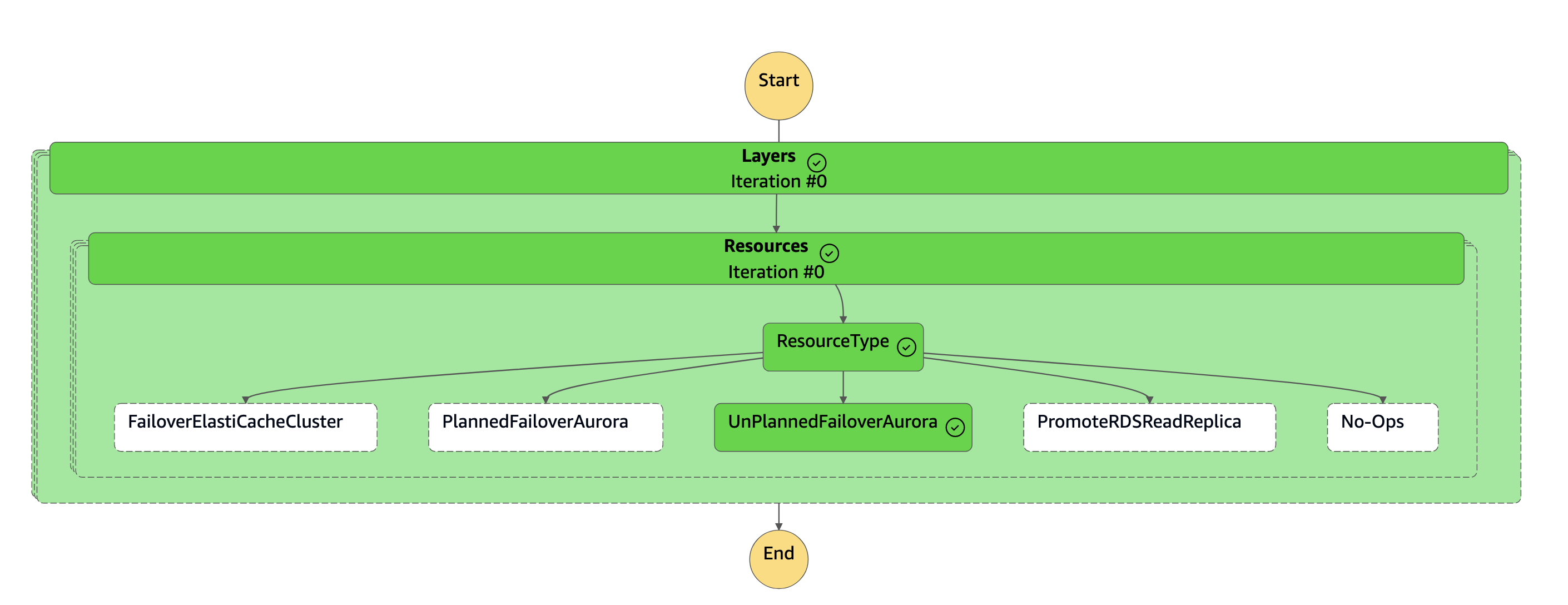
1. 次要叢集 (`dbcluster-02`) 已從 Aurora 全域資料庫中斷連線,並成為獨立叢集,以提供讀取/寫入器工作負載。
1. 重新設定應用程式,使其使用新的叢集端點,將所有寫入作業傳送至此新的獨立 Aurora DB 叢集。
## 容錯回復
在解決災難 (或排定的事件) 之後,容錯回復會將您的資料庫傳回原始 (或新的) 主要位置。解決意外中斷後,您可能想要將原先的主要區域新增回 Aurora 全球資料庫。您必須先從原有的主要區域刪除現有的資料庫叢集,從新的主要區域建立新的資料庫叢集,然後使用受管理的規劃容錯移轉程序來切換新叢集的角色。
這可視為您可以在離峰時段或週末執行的計劃活動。
您必須手動[修改 Amazon Aurora 資料庫叢集](https://docs.aws.amazon.com/AmazonRDS/latest/AuroraUserGuide/Aurora.Modifying.html)並停用,`DeletionProtection`****然後再從原主要區域 (`us-east-1`) 執行`DR Orchestrator FAILBACK`狀態機器,因為它是使用建立的`DeletionProtection`。
DR Orchestrator 架構使用狀`dr-orchestrator-stepfunction-FAILBACK`態機器自動化刪除現有叢集的步驟,並在原主要區域中建立新叢集。
若要停用`DeletionProtection`,請執行下列動作:
1. 登入 主控台。
1. 將「區域」變更為先前的主要「區域」(`us-east-1`)。
1. 導覽至 Amazon RDS 主控台,選取叢集名稱 (`dbcluster-01`),然後選擇**修改**。
1. 在 [**刪除防護**] 下,清除 [**啟用刪除保護**] 核取方塊,然後選擇 [**繼續**]。
1. 選擇 [**立即套用**],然後選擇 [**修改叢集**]。
狀`DR Orchestrator FAILBACK`態機器會在前一個主要區域 (`us-east-1`) 的容錯回復程序期間叫用。
若要執行容錯回復,請執行下列動作:
1. 登入 主控台。
1. 將「區域」變更為先前的主要「區域」(`us-east-1`)。
1. 瀏覽至 [**服務**],然後選擇 [**Step Functions**]。
1. 導覽至狀`DR Orchestrator FAILBACK`態機器。
1. 選擇 [**開始執行**],然後在`Input - optional`區段中輸入下列 JSON 程式碼:
```
{
"StatePayload": [
{
"layer": 1,
"resources": [
{
"resourceType": "CreateAuroraSecondaryDBCluster",
"resourceName": "To create secondary Aurora MySQL Global Database Cluster",
"parameters": {
"GlobalClusterIdentifier": "!Import dr-globaldb-cluster-mysql-global-identifier",
"DBClusterIdentifier": "!Import dr-globaldb-cluster-mysql-cluster-identifier",
"DBClusterName": "!Import dr-globaldb-cluster-mysql-cluster-name",
"SourceDBClusterIdentifier": "!Import dr-globaldb-cluster-mysql-source-cluster-identifier",
"DBInstanceIdentifier": "!Import dr-globaldb-cluster-mysql-instance-identifier",
"Port": "!Import dr-globaldb-cluster-mysql-port",
"DBInstanceClass": "!Import dr-globaldb-cluster-mysql-instance-class",
"DBSubnetGroupName": "!Import dr-globaldb-cluster-mysql-subnet-group-name",
"VpcSecurityGroupIds": "!Import dr-globaldb-cluster-mysql-vpc-security-group-ids",
"Engine": "!Import dr-globaldb-cluster-mysql-engine",
"EngineVersion": "!Import dr-globaldb-cluster-mysql-engine-version",
"KmsKeyId": "!Import dr-globaldb-cluster-mysql-KmsKeyId",
"SourceRegion": "!Import dr-globaldb-cluster-mysql-source-region",
"ClusterRegion": "!Import dr-globaldb-cluster-mysql-cluster-region",
"BackupRetentionPeriod": "7",
"MonitoringInterval": "60",
"StorageEncrypted": "True",
"EnableIAMDatabaseAuthentication": "True",
"DeletionProtection": "True",
"CopyTagsToSnapshot": "True",
"AutoMinorVersionUpgrade": "True",
"MonitoringRoleArn": "!Import rds-mysql-instance-RDSMonitoringRole"
}
}
]
}
]
}
```
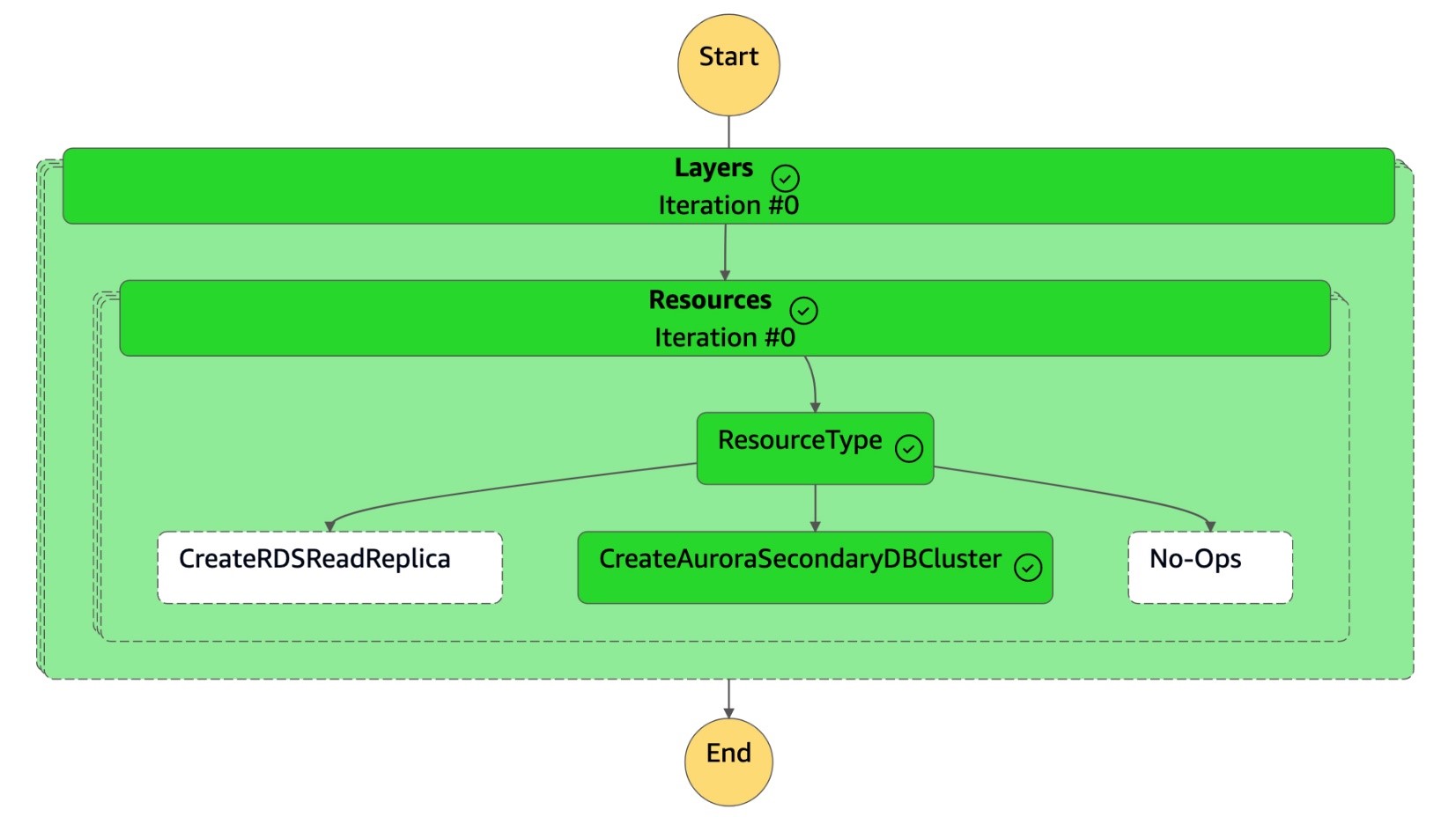
1. 狀`DR Orchestrator FAILBACK`態機讀取資源類型`CreateAuroraSecondaryDBCluster`,並調用狀`dr-orchestrator-stepfunction-create-Aurora-Secondary-cluster`態機。
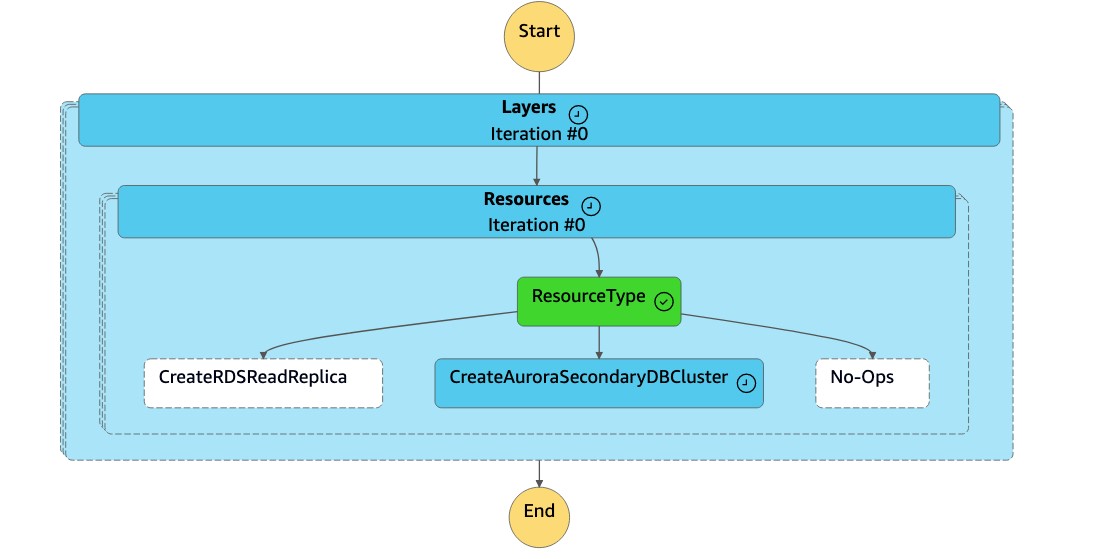
1. 狀`dr-orchestrator-stepfunction-create-Aurora-Secondary-cluster`態機器會從原有的主要區域 (`dbcluster-01`) 中刪除現有的叢集 (`us-east-1`)。
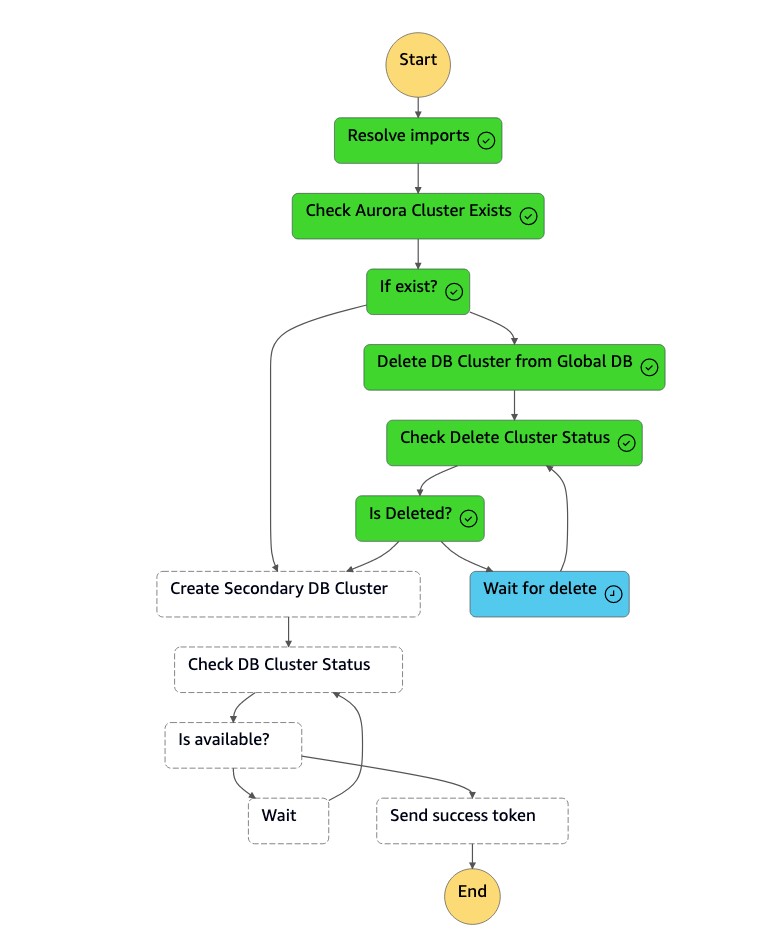
1. 刪除叢集 (`dbcluster-01`) 後,狀態機器會與資料庫執行個體一起建立新的叢集 (`dbcluster-01`),並將 Aurora 全域資料庫加入為次要叢集,以提供唯讀工作負載。
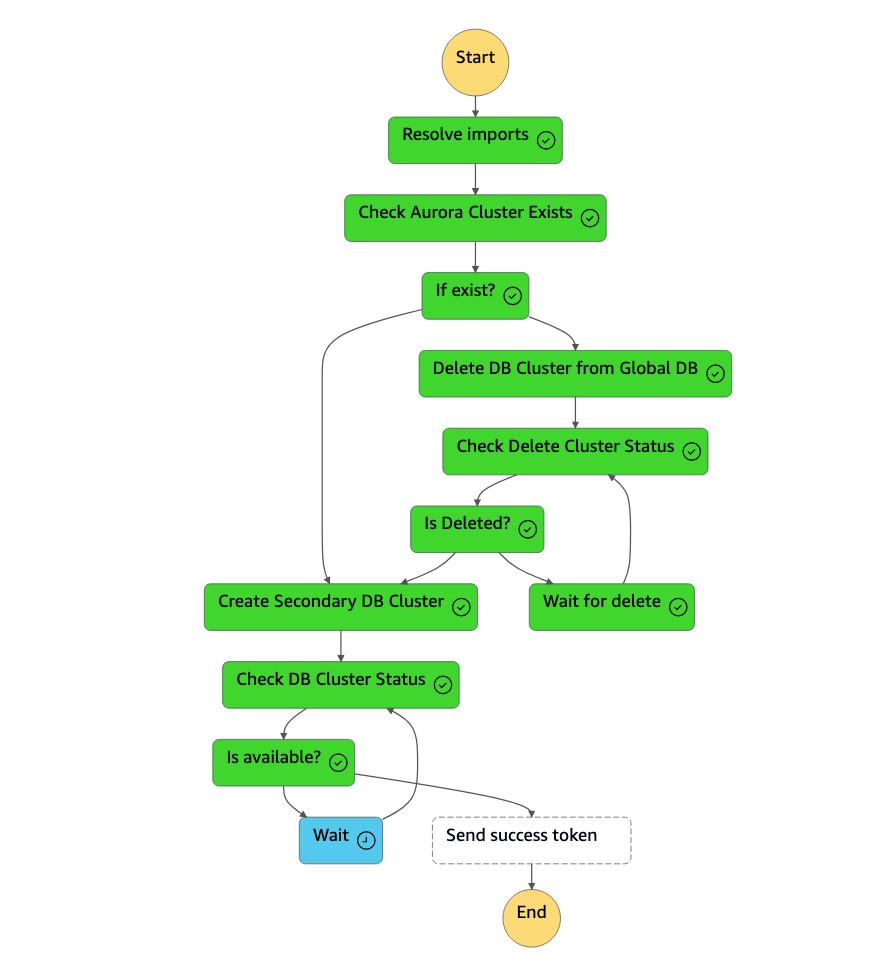
1. 次要叢集可用之後,狀`dr-orchestrator-stepfunction-create-Aurora-Secondary-cluster`態機器就會完成,並將成功 Token 傳送回狀`DR Orchestrator Failback`態機器。
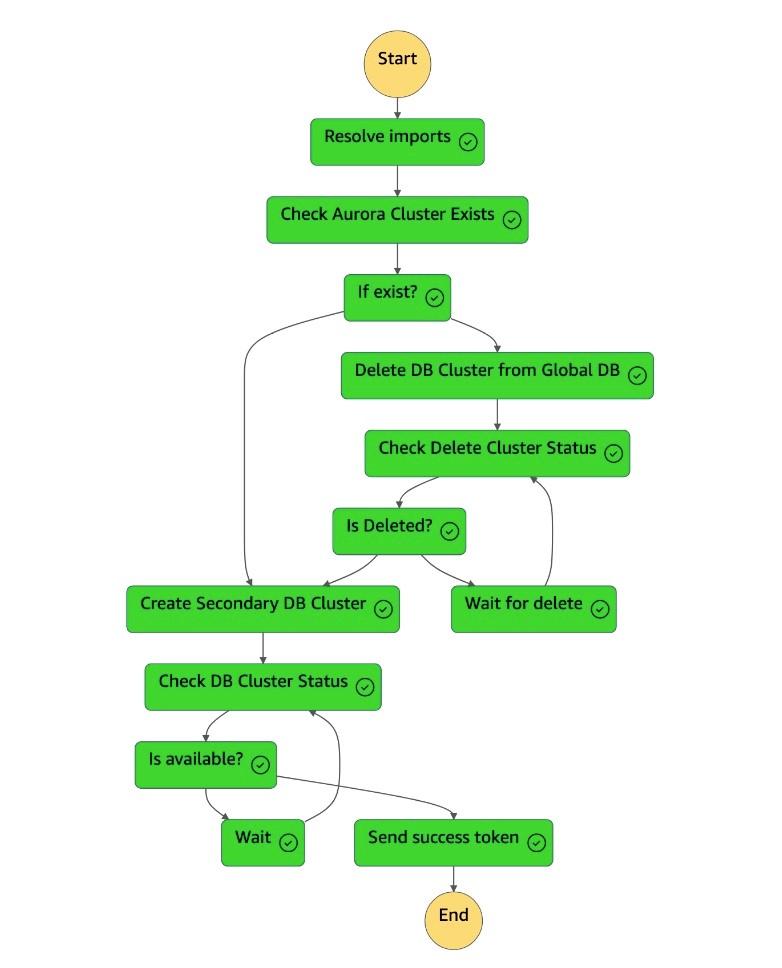
1. 狀`dr-orchestrator-stepfunction-FAILBACK`態機已完成。
1. 您可以在 Amazon RDS 主控台上驗證 Aurora 全球資料庫。
[如果您想要將主要資料庫叢集重新定位為 us-east-1,則可以按照「轉換」一節中提到的步驟執行。](#switchover)