View a markdown version of this page

管理要供 Neptune DFE 使用的統計資料 - Amazon Neptune

本文為英文版的機器翻譯版本,如內容有任何歧義或不一致之處,概以英文版為準。

管理要供 Neptune DFE 使用的統計資料

注意

對 openCypher 的支援取決於 Neptune 中的 DFE 查詢引擎。

DFE 引擎是使用neptune_dfe_query_engine執行個體資料庫參數群組中的執行個體參數來控制。

DFE 引擎會在規劃查詢執行時,使用 Neptune 圖形中的資料相關資訊,進行有效的權衡。這項資訊採取統計資料的形式,其中包括所謂的特性集和述詞統計資料,可以引導查詢規劃。

引擎 1.2.1.0 版開始,您可以使用 GetGraphSummary API 或 summary 端點,從這些統計資料中擷取有關圖形的摘要資訊

目前,每當圖形中超過 10% 的資料已變更或最新統計資料已過了 10 天時,就會重新產生這些 DFE 統計資料。不過,這些觸發條件日後可能會變更。

注意

統計資料產生會在 T3T4g 執行個體上停用,因為它可能超過這些執行個體類型的記憶體容量。

您可以透過下列其中一個端點管理 DFE 統計資料的產生:

  • https://your-neptune-host:port/rdf/statistics (適用於 SPARQL)。

  • https://your-neptune-host:port/propertygraph/statistics (適用於 Gremlin 和 openCypher),以及它的替代版本:https://your-neptune-host:port/pg/statistics

注意

引擎 1.1.1.0 版開始,Gramlin 統計資料端點 (https://your-neptune-host:port/gremlin/statistics) 已被棄用以支持 propertygraphpg 端點。基於回溯相容性仍支援它,但可能會在未來的版本中將其移除。

引擎 1.2.1.0 版開始,SPARQL 統計資料端點 (https://your-neptune-host:port/sparql/statistics) 已被棄用以支持 rdf 端點。基於回溯相容性仍支援它,但可能會在未來的版本中將其移除。

注意

如果 DFE 統計資料端點位於讀取器執行個體上,則它可以處理的唯一請求是狀態請求。其他請求將由於 ReadOnlyViolationException 而失敗。

對 DFE 統計資料產生的大小限制

目前,如果達到下列任一大小限制,DFE 統計資料產生便會中止:

  • 所產生的特性集數目不得超過 50,000 個。

  • 所產生的述詞統計資料數目不得超過一百萬個。

這些限制可能會變更。

DEF 統計資枓的目前狀態。

您可以檢查 DFE 統計資料的目前狀態,如下所示:

注意

下列範例使用 屬性圖形端點和命令。對於 RDF 資料,請將 get-sparql-statistics 用於 AWS CLI,將 /rdf/statistics 用於 REST 端點。

AWS CLI
aws neptunedata get-propertygraph-statistics \ --endpoint-url https://your-neptune-endpoint:port \ --region us-east-1
注意

us-east-1 取代為 Neptune 叢集的區域。--region 如果您已設定預設區域,您可以省略 。

如需詳細資訊,請參閱《 AWS CLI 命令參考》中的 get-propertygraph-statistics

SDK
import boto3 import json from botocore.config import Config client = boto3.client( 'neptunedata', endpoint_url='https://your-neptune-endpoint:port', config=Config(read_timeout=None, retries={'total_max_attempts': 1}) ) response = client.get_propertygraph_statistics() print(json.dumps(response['payload'], indent=2, default=str))
awscurl
awscurl https://your-neptune-endpoint:port/propertygraph/statistics \ --region us-east-1 \ --service neptune-db
注意

此範例假設您的 AWS 登入資料已在您的環境中設定。將 us-east-1 取代為 Neptune 叢集的區域。

如需使用 awscurl搭配 IAM 身分驗證的詳細資訊,請參閱 使用 awscurl 搭配臨時憑證,安全地連線至啟用 IAM 身分驗證的資料庫叢集

curl
curl -G https://your-neptune-endpoint:port/propertygraph/statistics

對狀態請求的回應包含下列欄位:

  • status – 請求的 HTTP 傳回碼。如果請求成功,則傳回碼為 200。如需常見錯誤的清單,請參閱 常見錯誤

  • payload:

    • autoCompute – (布林值) 指示是否啟用自動產生統計資料。

    • active – (布林值) 指示是否完全啟用 DFE 統計資料產生。

    • statisticsId – 報告目前統計資料產生執行的 ID。值 -1 指示尚未產生任何統計資料。

    • date – 最近產生 DFE 統計資料的 UTC 時間,以 ISO 8601 格式表示。

      注意

      引擎 1.2.1.0 版之前,這是以分鐘精確度表示,但從引擎 1.2.1.0 版開始,它是以毫秒精確度表示 (例如,2023-01-24T00:47:43.319Z)。

    • note – 關於統計資料無效情況下問題的說明。

    • signatureInfo – 包含統計資料中所產生之特性集的相關資訊 (在引擎 1.2.1.0 版之前,此欄位已命名為 summary)。這些通常不能直接採取行動:

      • signatureCount – 所有特性集的簽章總數。

      • instanceCount – 特性集執行個體的總數。

      • predicateCount – 唯一述詞的總數。

未產生統計資料時,對狀態請求的回應如下所示:

{ "status" : "200 OK", "payload" : { "autoCompute" : true, "active" : false, "statisticsId" : -1 } }

如果 DFE 統計資料可用,回應如下所示:

{ "status" : "200 OK", "payload" : { "autoCompute" : true, "active" : true, "statisticsId" : 1588893232718, "date" : "2020-05-07T23:13Z", "summary" : { "signatureCount" : 5, "instanceCount" : 1000, "predicateCount" : 20 } } }

如果 DFE 統計資料產生失敗,例如因為其超出統計資料大小限制,回應如下所示:

{ "status" : "200 OK", "payload" : { "autoCompute" : true, "active" : false, "statisticsId" : 1588713528304, "date" : "2020-05-05T21:18Z", "note" : "Limit reached: Statistics are not available" } }

停用自動產生 DFE 統計資料

根據預設,啟用 DFE 時,會啟用自動產生 DFE 統計資料。

您可以停用自動產生,如下所示:

注意

下列範例使用 屬性圖形端點和命令。對於 RDF 資料,請將 manage-sparql-statistics 用於 AWS CLI,將 /rdf/statistics 用於 REST 端點。

AWS CLI
aws neptunedata manage-propertygraph-statistics \ --endpoint-url https://your-neptune-endpoint:port \ --mode disableAutoCompute

如需詳細資訊,請參閱《 AWS CLI 命令參考》中的 manage-propertygraph-statistics

SDK
import boto3 from botocore.config import Config client = boto3.client( 'neptunedata', endpoint_url='https://your-neptune-endpoint:port', config=Config(read_timeout=None, retries={'total_max_attempts': 1}) ) response = client.manage_propertygraph_statistics(mode='disableAutoCompute') print(response['status'])
awscurl
awscurl https://your-neptune-endpoint:port/propertygraph/statistics \ --region us-east-1 \ --service neptune-db \ -X POST \ -H 'Content-Type: application/json' \ -d '{"mode":"disableAutoCompute"}'
注意

此範例假設您的 AWS 登入資料已在您的環境中設定。將 us-east-1 取代為 Neptune 叢集的區域。

如需使用 awscurl搭配 IAM 身分驗證的詳細資訊,請參閱 使用 awscurl 搭配臨時憑證,安全地連線至啟用 IAM 身分驗證的資料庫叢集

curl
curl -X POST -d '{ "mode" : "disableAutoCompute" }' https://your-neptune-endpoint:port/propertygraph/statistics

如果請求成功,HTTP 回應代碼為 200,且回應為:

{ "status" : "200 OK" }

您可以發出狀態請求並檢查回應中的 autoCompute 欄位是否設定為 false,以確認已停用自動產生。

停用自動產生統計資料並不會終止進行中的統計資料計算。

如果您提出請求,停用讀取器執行個體的自動產生,而不是資料庫叢集的寫入器執行個體的自動產生,則請求會失敗,HTTP 傳回碼為 400,且輸出如下所示:

{ "detailedMessage" : "Writes are not permitted on a read replica instance", "code" : "ReadOnlyViolationException", "requestId":"8eb8d3e5-0996-4a1b-616a-74e0ec32d5f7" }

如需其他常見錯誤的清單,請參閱 常見錯誤

重新啟用自動產生 DFE 統計資料

根據預設,啟用 DFE 時,已啟用自動產生 DFE 統計資料。如果您停用自動產生,您可以稍後重新啟用它,如下所示:

注意

下列範例使用 屬性圖形端點和命令。對於 RDF 資料,請將 manage-sparql-statistics 用於 AWS CLI,將 /rdf/statistics 用於 REST 端點。

AWS CLI
aws neptunedata manage-propertygraph-statistics \ --endpoint-url https://your-neptune-endpoint:port \ --mode enableAutoCompute

如需詳細資訊,請參閱《 AWS CLI 命令參考》中的 manage-propertygraph-statistics

SDK
import boto3 from botocore.config import Config client = boto3.client( 'neptunedata', endpoint_url='https://your-neptune-endpoint:port', config=Config(read_timeout=None, retries={'total_max_attempts': 1}) ) response = client.manage_propertygraph_statistics(mode='enableAutoCompute') print(response['status'])
awscurl
awscurl https://your-neptune-endpoint:port/propertygraph/statistics \ --region us-east-1 \ --service neptune-db \ -X POST \ -H 'Content-Type: application/json' \ -d '{"mode":"enableAutoCompute"}'
注意

此範例假設您的 AWS 登入資料已在您的環境中設定。將 us-east-1 取代為 Neptune 叢集的區域。

如需使用 awscurl搭配 IAM 身分驗證的詳細資訊,請參閱 使用 awscurl 搭配臨時憑證,安全地連線至啟用 IAM 身分驗證的資料庫叢集

curl
curl -X POST -d '{ "mode" : "enableAutoCompute" }' https://your-neptune-endpoint:port/propertygraph/statistics

如果請求成功,HTTP 回應代碼為 200,且回應為:

{ "status" : "200 OK" }

您可以發出狀態請求並檢查回應中的 autoCompute 欄位是否設定為 true,以確認已啟用自動產生。

手動觸發 DFE 統計資料的產生

您可以手動啟動 DFE 統計資料產生,如下所示:

注意

下列範例使用 屬性圖形端點和命令。對於 RDF 資料,請將 manage-sparql-statistics 用於 AWS CLI,將 /rdf/statistics 用於 REST 端點。

AWS CLI
aws neptunedata manage-propertygraph-statistics \ --endpoint-url https://your-neptune-endpoint:port \ --mode refresh

如需詳細資訊,請參閱《 AWS CLI 命令參考》中的 manage-propertygraph-statistics

SDK
import boto3 import json from botocore.config import Config client = boto3.client( 'neptunedata', endpoint_url='https://your-neptune-endpoint:port', config=Config(read_timeout=None, retries={'total_max_attempts': 1}) ) response = client.manage_propertygraph_statistics(mode='refresh') print(json.dumps(response['payload'], indent=2, default=str))
awscurl
awscurl https://your-neptune-endpoint:port/propertygraph/statistics \ --region us-east-1 \ --service neptune-db \ -X POST \ -H 'Content-Type: application/json' \ -d '{"mode":"refresh"}'
注意

此範例假設您的 AWS 登入資料已在您的環境中設定。將 us-east-1 取代為 Neptune 叢集的區域。

如需使用 awscurl搭配 IAM 身分驗證的詳細資訊,請參閱 使用 awscurl 搭配臨時憑證,安全地連線至啟用 IAM 身分驗證的資料庫叢集

curl
curl -X POST -d '{ "mode" : "refresh" }' https://your-neptune-endpoint:port/propertygraph/statistics

如果請求成功,則輸出如下,HTTP 傳回碼為 200:

{ "status" : "200 OK", "payload" : { "statisticsId" : 1588893232718 } }

輸出中的 statisticsId 是目前正在發生之統計資料產生執行的識別符。如果執行已在請求時已處理中,則請求會傳回該執行的 ID,而不是啟動新的 ID。一次僅能發生一個統計資料產生執行。

如果在產生 DFE 統計資料時發生容錯移轉,新的寫入器節點會取得上次處理的檢查點,並從該處繼續統計資料執行。

使用 StatsNumStatementsScanned CloudWatch 指標監控統計資料計算

StatsNumStatementsScanned CloudWatch 指標會傳回自伺服器啟動以來針對統計資料計算掃描的陳述式總數。它是在每個統計資料計算部分處更新。

每次觸發統計資料計算時,這個數字都會增加,並且當沒有計算發生時,它會保持不變。因此,查看隨時間變化的 StatsNumStatementsScanned 值圖,可以很清楚地了解統計資料計算何時發生以及有多快:
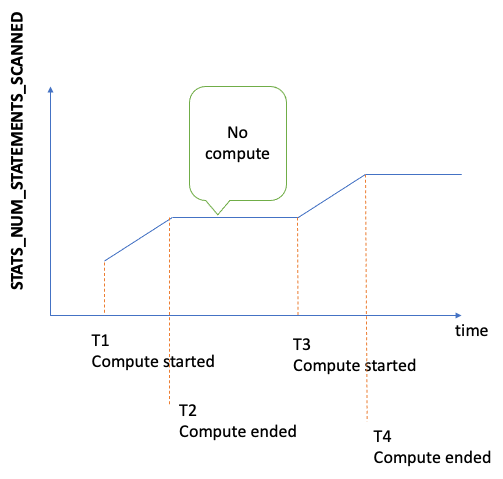
StatsNumStatementsScanned 指標值的圖形

進行計算時,圖形的斜坡會向您顯示有多快 (斜坡越陡,統計資料的計算速度越快)。

如果圖形只是一條位於 0 的平直線,表示已啟用統計資料功能,但根本沒有計算任何統計資料。如果已停用統計資料功能,或者如果您使用的引擎版本不支援統計資料計算,則 StatsNumStatementsScanned 不存在。

如先前所述,您可以使用統計資料 API 停用統計資料計算,但是將其保留關閉狀態可能會導致統計資料不是最新的,進而導致針對 DFE 引擎產生不良的查詢計畫。

如需如何使用 CloudWatch 的相關資訊,請參閱 使用 Amazon CloudWatch 監控 Neptune

搭配 DFE 統計資料端點使用 AWS Identity and Access Management (IAM) 身分驗證

您可以使用 AWS CLI、awscurl 或任何其他可與 HTTPS 和 IAM 搭配使用的工具,透過 IAM 身分驗證安全地存取 DFE 統計資料端點。如需設定適當登入資料的資訊,請參閱 使用 awscurl 搭配臨時憑證,安全地連線至啟用 IAM 身分驗證的資料庫叢集

下列範例示範如何提出已驗證狀態請求:

注意

下列範例使用 屬性圖形端點和命令。對於 RDF 資料,請針對 使用同等 SPARQL 命令 (get-sparql-statisticsmanage-sparql-statistics) AWS CLI,針對 REST 端點/rdf/statistics使用 和 。

AWS CLI
aws neptunedata get-propertygraph-statistics \ --endpoint-url https://your-neptune-endpoint:port

會使用您設定的登入資料自動 AWS CLI 處理 IAM 身分驗證。

SDK
import boto3 import json from botocore.config import Config client = boto3.client( 'neptunedata', endpoint_url='https://your-neptune-endpoint:port', config=Config(read_timeout=None, retries={'total_max_attempts': 1}) ) response = client.get_propertygraph_statistics() print(json.dumps(response['payload'], indent=2, default=str))

SDK 會使用您設定的登入資料自動處理 IAM 身分驗證。

awscurl
awscurl https://your-neptune-endpoint:port/propertygraph/statistics \ --region us-east-1 \ --service neptune-db
注意

us-east-1 取代為 Neptune 叢集的區域。

curl
curl -G https://your-neptune-endpoint:port/propertygraph/statistics
注意

此範例不包含 IAM 身分驗證。若要搭配 使用 IAM 身分驗證curl,您必須手動簽署請求。請考慮改用 AWS CLI、 SDK 或 awscurl

下列範例使用身分驗證手動啟動統計資料產生:

AWS CLI
aws neptunedata manage-propertygraph-statistics \ --endpoint-url https://your-neptune-endpoint:port \ --mode refresh
SDK
import boto3 import json from botocore.config import Config client = boto3.client( 'neptunedata', endpoint_url='https://your-neptune-endpoint:port', config=Config(read_timeout=None, retries={'total_max_attempts': 1}) ) response = client.manage_propertygraph_statistics(mode='refresh') print(json.dumps(response['payload'], indent=2, default=str))
awscurl

建立名為 的 JSON 檔案request.json,其中包含:

{ "mode" : "refresh" }

然後執行:

awscurl https://your-neptune-endpoint:port/propertygraph/statistics \ --region us-east-1 \ --service neptune-db \ -X POST \ -H 'Content-Type: application/json' \ -d @request.json
curl
curl -X POST https://your-neptune-endpoint:port/propertygraph/statistics \ -H 'Content-Type: application/json' \ -d '{ "mode" : "refresh" }'
注意

此範例不包含 IAM 身分驗證。若要搭配 使用 IAM 身分驗證curl,您必須手動簽署請求。請考慮改用 AWS CLI、 SDK 或 awscurl

刪除 DEF 統計資料

您可以刪除資料庫中的所有統計資料,如下所示:

注意

下列範例使用 屬性圖形端點和命令。對於 RDF 資料,請將 delete-sparql-statistics 用於 AWS CLI,將 /rdf/statistics 用於 REST 端點。

AWS CLI
aws neptunedata delete-propertygraph-statistics \ --endpoint-url https://your-neptune-endpoint:port

如需詳細資訊,請參閱《 AWS CLI 命令參考》中的 delete-propertygraph-statistics

SDK
import boto3 import json from botocore.config import Config client = boto3.client( 'neptunedata', endpoint_url='https://your-neptune-endpoint:port', config=Config(read_timeout=None, retries={'total_max_attempts': 1}) ) response = client.delete_propertygraph_statistics() print(json.dumps(response['payload'], indent=2, default=str))
awscurl
awscurl https://your-neptune-endpoint:port/propertygraph/statistics \ --region us-east-1 \ --service neptune-db \ -X DELETE
注意

此範例假設您的 AWS 登入資料已在您的環境中設定。將 us-east-1 取代為 Neptune 叢集的區域。

如需使用 awscurl搭配 IAM 身分驗證的詳細資訊,請參閱 使用 awscurl 搭配臨時憑證,安全地連線至啟用 IAM 身分驗證的資料庫叢集

curl
curl -X DELETE https://your-neptune-endpoint:port/propertygraph/statistics

有效的 HTTP 傳回碼為:

  • 200 – 刪除成功。

    在此情況下,典型的回應如下所示:

    { "status" : "200 OK", "payload" : { "active" : false, "statisticsId" : -1 } }
  • 204 – 沒有任何要刪除的統計資料。

    在此情況下,回應是空白的 (沒有回應)。

如果將刪除請求傳送至讀取器節點上的統計資料端點,則會擲回 ReadOnlyViolationException

DFE 統計資料請求的常見錯誤代碼

以下是當您對統計資料端點提出請求時可能發生的常見錯誤清單:

  • AccessDeniedException傳回碼:400訊息:Missing Authentication Token

  • BadRequestException (適用於 Gremlin 和 openCypher) – 傳回碼:400訊息:Bad route: /pg/statistics

  • BadRequestException (適用於 RDF 資料) – 傳回碼:400訊息:Bad route: /rdf/statistics

  • InvalidParameterException傳回碼:400訊息:Statistics command parameter 'mode' has unsupported value 'the invalid value'

  • MissingParameterException傳回碼:400訊息:Content-type header not specified.

  • ReadOnlyViolationException傳回碼:400訊息:Writes are not permitted on a read replica instance

例如,如果您在未啟用 DFE 和統計資料時提出請求,您會得到如下的回應:

{ "code" : "BadRequestException", "requestId" : "b2b8f8ee-18f1-e164-49ea-836381a3e174", "detailedMessage" : "Bad route: /sparql/statistics" }