本文為英文版的機器翻譯版本,如內容有任何歧義或不一致之處,概以英文版為準。
步驟 6:使用 機器人
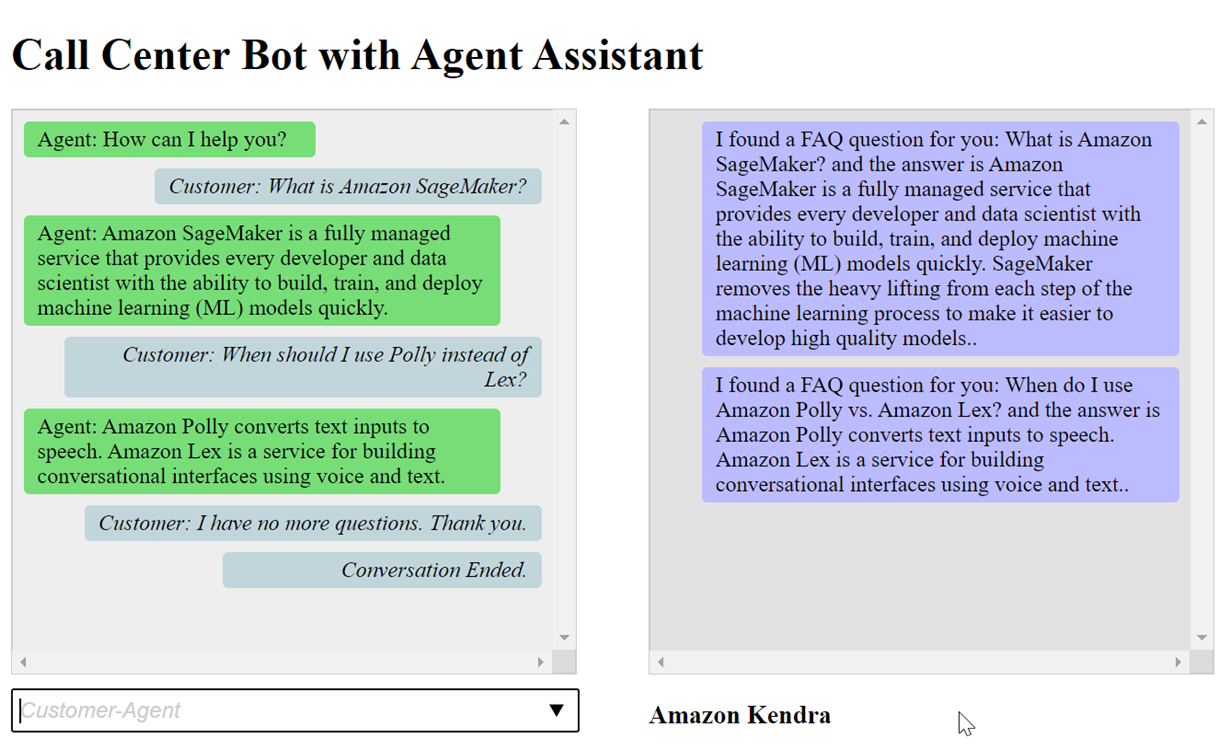
基於示範目的,您會以客戶和客服人員的身分向機器人提供輸入。為了區分兩者,客戶提出的問題以「客戶:」開頭,客服人員提供的答案以「客服人員:」開頭。您可以從建議的輸入功能表中進行選擇。
開啟 來執行您的 Web 應用程式index.html,與您的機器人進行對話,如下所示:
index.html 檔案中的 pushChat()函數說明如下。
            var endConversationStatement = "Customer: I have no more questions. Thank you."
            // If the agent has to send a message, start the message with 'Agent'
            var inputText = document.getElementById('input');
            if (inputText && inputText.value && inputText.value.trim().length > 0 && inputText.value[0]=='Agent') {
                showMessage(inputText.value, 'agentRequest','conversation');
                inputText.value = "";
            }
            // If the customer has to send a message, start the message with 'Customer'
            if(inputText && inputText.value && inputText.value.trim().length > 0 && inputText.value[0]=='Customer') {
                // disable input to show we're sending it
                var input = inputText.value.trim();
                inputText.value = '...';
                inputText.locked = true;
                customerInput = input.substring(2);

                // Send it to the Lex runtime
                var params = {
                    botAlias: '$LATEST',
                    botName: 'KendraTestBot',
                    inputText: customerInput,
                    userId: lexUserId,
                    sessionAttributes: sessionAttributes
                };

                showMessage(input, 'customerRequest', 'conversation');
                if(input== endConversationStatement){
                    showMessage('Conversation Ended.','conversationEndRequest','conversation');
                }
                lexruntime.postText(params, function(err, data) {
                    if (err) {
                        console.log(err, err.stack);
                        showMessage('Error:  ' + err.message + ' (see console for details)', 'lexError', 'conversation1')
                    }

                    if (data &&input!=endConversationStatement) {
                        // capture the sessionAttributes for the next cycle
                        sessionAttributes = data.sessionAttributes;

                            showMessage(data, 'lexResponse', 'conversation1');
                    }
                    // re-enable input
                    inputText.value = '';
                    inputText.locked = false;
                });
            }
            // we always cancel form submission
            return false;
當您以客戶身分提供輸入時,Amazon Lex V2 執行時間 API 會將其傳送至 Amazon Lex V2。
showMessage(daText, senderRequest, displayWindow) 函數會在聊天視窗中顯示客服人員與客戶之間的對話。Amazon Kendra 建議的回應會顯示在相鄰視窗中。當客戶說 時,對話就會結束 “I have no more questions. Thank you.”
注意:不使用時,請刪除您的 Amazon Kendra 索引。
