本文為英文版的機器翻譯版本,如內容有任何歧義或不一致之處,概以英文版為準。
# 建立用於安全儲存的自訂憑證處理常式
裝置憑證管理在加入受管整合中樞時至關重要。當憑證預設存放在檔案系統中時,您可以建立自訂憑證處理常式,以增強安全性和彈性的憑證管理。
受管整合 終端裝置 SDK 提供憑證處理常式來保護儲存介面,您可以將其實作為共用物件 (.so) 程式庫。建置您的安全儲存實作以讀取和寫入憑證,然後在執行時間將程式庫檔案連結至 HubOnboarding 程序。
## API 定義和元件
檢閱下列`secure_storage_cert_handler_interface.hpp`檔案,以了解實作的 API 元件和需求
**Topics**
+ [API 定義](#managedintegrations-sdk-v2-cookbook-certhandler-apidef)
+ [關鍵元件](#managedintegrations-sdk-v2-cookbook-certhandler-apicomp)
### API 定義
**`secure_storage_cert_hander_interface.hpp` 的內容**
```
/*
* Copyright 2024 Amazon.com, Inc. or its affiliates. All rights reserved.
*
* AMAZON PROPRIETARY/CONFIDENTIAL
*
* You may not use this file except in compliance with the terms and
* conditions set forth in the accompanying LICENSE.txt file.
*
* THESE MATERIALS ARE PROVIDED ON AN "AS IS" BASIS. AMAZON SPECIFICALLY
* DISCLAIMS, WITH RESPECT TO THESE MATERIALS, ALL WARRANTIES, EXPRESS,
* IMPLIED, OR STATUTORY, INCLUDING THE IMPLIED WARRANTIES OF MERCHANTABILITY,
* FITNESS FOR A PARTICULAR PURPOSE, AND NON-INFRINGEMENT.
*/
#ifndef SECURE_STORAGE_CERT_HANDLER_INTERFACE_HPP
#define SECURE_STORAGE_CERT_HANDLER_INTERFACE_HPP
#include
#include
namespace IoTManagedIntegrationsDevice {
namespace CertHandler {
/**
* @enum CERT_TYPE_T
* @brief enumeration defining certificate types.
*/
typedef enum { CLAIM = 0, DHA = 1, PERMANENT = 2 } CERT_TYPE_T;
class SecureStorageCertHandlerInterface {
public:
/**
* @brief Read certificate and private key value of a particular certificate
* type from secure storage.
*/
virtual bool read_cert_and_private_key(const CERT_TYPE_T cert_type,
std::string &cert_value,
std::string &private_key_value) = 0;
/**
* @brief Write permanent certificate and private key value to secure storage.
*/
virtual bool write_permanent_cert_and_private_key(
std::string_view cert_value, std::string_view private_key_value) = 0;
};
std::shared_ptr createSecureStorageCertHandler();
} //namespace CertHandler
} //namespace IoTManagedIntegrationsDevice
#endif //SECURE_STORAGE_CERT_HANDLER_INTERFACE_HPP
```
### 關鍵元件
+ CERT\_TYPE\_T - 中樞上不同類型的憑證。
+ 宣告 - 最初在中樞上的宣告憑證將交換為永久憑證。
+ Kubernetes - 目前未使用。
+ 永久 - 與受管整合端點連線的永久憑證。
+ read\_cert\_and\_private\_key - (FUNCTION TO BE IMPLEMENTED) 將 中的憑證和金鑰值讀取至參考輸入。此函數必須能夠同時讀取宣告和永久憑證,並依上述憑證類型區分。
+ write\_permanent\_cert\_and\_private\_key - (FUNCTION TO BE IMPLEMENTED) 會將永久憑證和金鑰值寫入所需的位置。
## 建置範例
將您的內部實作標頭與公有界面 (`secure_storage_cert_handler_interface.hpp`) 分開,以維護乾淨的專案結構。透過此區隔,您可以在建置憑證處理常式時管理公有和私有元件。
**注意**
宣告`secure_storage_cert_handler_interface.hpp`為公有。
**Topics**
+ [專案結構](#managedintegrations-sdk-v2-cookbook-proj)
+ [繼承界面](#managedintegrations-sdk-v2-cookbook-interface)
+ [實作](#managedintegrations-sdk-v2-cookbook-interimpl)
+ [CMakeList.txt](#managedintegrations-sdk-v2-cookbook-cmakelist)
### 專案結構
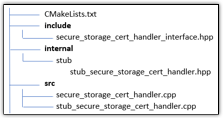
### 繼承界面
建立繼承界面的具體類別。在個別目錄下隱藏此標頭檔案和其他檔案,以便在建置時輕鬆區分私有和公有標頭。
```
#ifndef IOTMANAGEDINTEGRATIONSDEVICE_SDK_STUB_SECURE_STORAGE_CERT_HANDLER_HPP
#define IOTMANAGEDINTEGRATIONSDEVICE_SDK_STUB_SECURE_STORAGE_CERT_HANDLER_HPP
#include "secure_storage_cert_handler_interface.hpp"
namespace IoTManagedIntegrationsDevice::CertHandler {
class StubSecureStorageCertHandler : public SecureStorageCertHandlerInterface {
public:
StubSecureStorageCertHandler() = default;
bool read_cert_and_private_key(const CERT_TYPE_T cert_type,
std::string &cert_value,
std::string &private_key_value) override;
bool write_permanent_cert_and_private_key(
std::string_view cert_value, std::string_view private_key_value) override;
/*
* any other resource for function you might need
*/
};
}
#endif //IOTMANAGEDINTEGRATIONSDEVICE_SDK_STUB_SECURE_STORAGE_CERT_HANDLER_HPP
```
### 實作
實作上述定義的儲存體方案 `src/stub_secure_storage_cert_handler.cpp`。
```
/*
* Copyright 2024 Amazon.com, Inc. or its affiliates. All rights reserved.
*
* AMAZON PROPRIETARY/CONFIDENTIAL
*
* You may not use this file except in compliance with the terms and
* conditions set forth in the accompanying LICENSE.txt file.
*
* THESE MATERIALS ARE PROVIDED ON AN "AS IS" BASIS. AMAZON SPECIFICALLY
* DISCLAIMS, WITH RESPECT TO THESE MATERIALS, ALL WARRANTIES, EXPRESS,
* IMPLIED, OR STATUTORY, INCLUDING THE IMPLIED WARRANTIES OF MERCHANTABILITY,
* FITNESS FOR A PARTICULAR PURPOSE, AND NON-INFRINGEMENT.
*/
#include "stub_secure_storage_cert_handler.hpp"
using namespace IoTManagedIntegrationsDevice::CertHandler;
bool StubSecureStorageCertHandler::write_permanent_cert_and_private_key(
std::string_view cert_value, std::string_view private_key_value) {
// TODO: implement write function
return true;
}
bool StubSecureStorageCertHandler::read_cert_and_private_key(const CERT_TYPE_T cert_type,
std::string &cert_value,
std::string &private_key_value) {
std::cout<<"Using Stub Secure Storage Cert Handler, returning dummy values";
cert_value = "StubCertVal";
private_key_value = "StubKeyVal";
// TODO: implement read function
return true;
}
```
實作界面 中定義的原廠函數`src/secure_storage_cert_handler.cpp`。
```
#include "stub_secure_storage_cert_handler.hpp"
std::shared_ptr
IoTManagedIntegrationsDevice::CertHandler::createSecureStorageCertHandler() {
// TODO: replace with your implementation
return std::make_shared();
}
```
### CMakeList.txt
```
#project name must stay the same
project(SecureStorageCertHandler)
# Public Header files. The interface definition must be in top level with exactly the same name
#ie. Not in anotherDir/secure_storage_cert_hander_interface.hpp
set(PUBLIC_HEADERS
${PROJECT_SOURCE_DIR}/include
)
# private implementation headers.
set(PRIVATE_HEADERS
${PROJECT_SOURCE_DIR}/internal/stub
)
#set all sources
set(SOURCES
${PROJECT_SOURCE_DIR}/src/secure_storage_cert_handler.cpp
${PROJECT_SOURCE_DIR}/src/stub_secure_storage_cert_handler.cpp
)
# Create the shared library
add_library(${PROJECT_NAME} SHARED ${SOURCES})
target_include_directories(
${PROJECT_NAME}
PUBLIC
${PUBLIC_HEADERS}
PRIVATE
${PRIVATE_HEADERS}
)
# Set the library output location. Location can be customized but version must stay the same
set_target_properties(${PROJECT_NAME} PROPERTIES
LIBRARY_OUTPUT_DIRECTORY ${CMAKE_BINARY_DIR}/../lib
VERSION 1.0
SOVERSION 1
)
# Install rules
install(TARGETS ${PROJECT_NAME}
LIBRARY DESTINATION lib
ARCHIVE DESTINATION lib
)
install(FILES ${HEADERS}
DESTINATION include/SecureStorageCertHandler
)
```
## 用量
編譯之後,您會有一個`libSecureStorageCertHandler.so`共用物件程式庫檔案及其相關聯的符號連結。將程式庫檔案和符號連結同時複製到 HubOnboarding 二進位檔預期的程式庫位置。
**Topics**
+ [重要考量](#managedintegrations-sdk-v2-cookbook-certhandler-useconsider)
+ [使用安全儲存](#managedintegrations-sdk-v2-cookbook-certhandler-usagehowto)
### 重要考量
+ 確認您的使用者帳戶具有 HubOnboarding 二進位和程式`libSecureStorageCertHandler.so`庫的讀取和寫入許可。
+ 保留 `secure_storage_cert_handler_interface.hpp`做為您唯一的公有標頭檔案。所有其他標頭檔案應保留在您的私有實作中。
+ 驗證您的共用物件程式庫名稱。當您建置 時`libSecureStorageCertHandler.so`,HubOnboarding 可能需要檔案名稱中的特定版本,例如 `libSecureStorageCertHandler.so.1.0`。使用 `ldd`命令來檢查程式庫相依性,並視需要建立符號連結。
+ 如果您的共用程式庫實作具有外部相依性,請將它們存放在 HubOnboarding 可存取的目錄中,例如 `/usr/lib or the iotmi_common`目錄。
### 使用安全儲存
將 `iot_claim_cert_path`和 同時設定為 `iot_claim_pk_path`,以更新您的 `iotmi_config.json` 檔案**SECURE\_STORAGE**。
```
{
"ro": {
"iot_provisioning_method": "FLEET_PROVISIONING",
"iot_claim_cert_path": "SECURE_STORAGE",
"iot_claim_pk_path": "SECURE_STORAGE",
"fp_template_name": "device-integration-example",
"iot_endpoint_url": "[{{ACCOUNT-PREFIX}}]-ats.iot.{{AWS-REGION}}.amazonaws.com",
"SN": "1234567890",
"UPC": "1234567890"
},
"rw": {
"iot_provisioning_state": "NOT_PROVISIONED"
}
}
```