本文為英文版的機器翻譯版本,如內容有任何歧義或不一致之處,概以英文版為準。
FileFreshness
FileFreshness 會根據您提供的條件,確保您的資料檔案是全新的。其使用您檔案的上次修改時間,來確保資料檔案或整個資料夾是最新的。
此規則會收集兩個指標:
-
根據您所設定規則的 FileFreshness 合規性
-
規則掃描的檔案數目
Dataset.*.FileFreshness.Compliance: 1, Dataset.*.FileCount: 1
異常偵測不會考慮這些指標。
檢查檔案新鮮度
下列規則可確保 tickets.parquet 在過去 24 小時內建立。
FileFreshness "s3://amzn-s3-demo-bucket/artifacts/file/tickets/tickets.parquet" > (now() - 24 hours)
檢查資料夾新鮮度
如果資料夾中的所有檔案都在過去 24 小時內建立或修改,則下列規則會通過。
FileFreshness "s3://bucket/" >= (now() - 1 days)
FileFreshness "s3://amzn-s3-demo-bucket/artifacts/file/tickets/" >= (now() - 24 hours)
使用閾值檢查資料夾或檔案新鮮度
如果資料夾 "tickets" 中有 10% 的檔案是在過去 10 天內建立或修改的,則下列規則會通過。
FileFreshness "s3://amzn-s3-demo-bucket/artifacts/file/tickets/" > (now() - 10 days) with threshold > 0.1
檢查具有特定日期的檔案或資料夾
您可以檢查特定日期的檔案新鮮度。
FileFreshness "s3://amzn-s3-demo-bucket/artifacts/file/tickets/" > "2020-01-01"
FileFreshness "s3://amzn-s3-demo-bucket/artifacts/file/tickets/" between "2023-01-01" and "2024-01-01"
使用時間檢查檔案或資料夾
您可以使用 FileFreshness 來確保檔案已根據特定時間送達。
FileFreshness "s3://amzn-s3-demo-bucket/artifacts/file/tickets/" between (now() - 45 minutes) and now()
FileFreshness "s3://amzn-s3-demo-bucket/artifacts/file/tickets/" between "9:30 AM" and "9:30 PM"
FileFreshness "s3://amzn-s3-demo-bucket/artifacts/file/tickets/" > (now() - 10 minutes)
FileFreshness "s3://amzn-s3-demo-bucket/artifacts/file/tickets/" > now()
FileFreshness "s3://amzn-s3-demo-bucket/artifacts/file/tickets/" between (now() - 2 hours) and (now() + 15 minutes)
FileFreshness "s3://amzn-s3-demo-bucket/artifacts/file/tickets/" between (now() - 3 days) and (now() + 15 minutes)
FileFreshness "s3://amzn-s3-demo-bucket/artifacts/file/tickets/" between "2001-02-07" and (now() + 15 minutes)
FileFreshness "s3://amzn-s3-demo-bucket/artifacts/file/tickets/" > "21:45"
FileFreshness "s3://amzn-s3-demo-bucket/artifacts/file/tickets/" > "2024-01-01"
FileFreshness "s3://amzn-s3-demo-bucket/artifacts/file/tickets/" between "02:30" and "04:30"
FileFreshness "s3://amzn-s3-demo-bucket/artifacts/file/tickets/" between "9:30 AM" and "22:15"
關鍵考量事項:
-
FileFreshness 可以使用天、小時和分鐘單位來評估檔案
-
有時,其支援上午/下午和 24 小時
-
除非指定覆寫,否則時間會以 UTC 計算
-
日期按 UTC 時間 00:00 計算
以時間為基礎的 FileFreshness 運作方式如下:
FileFreshness "s3://amzn-s3-demo-bucket/artifacts/file/tickets/" > "21:45"
-
首先,時間 "21:45" 會與 UTC 格式的今天日期合併,以建立日期時間欄位
-
接著,如果指定時區覆寫,日期時間會轉換為該時區 (否則會使用 UTC)
-
最後,評估規則
選用的以檔案為基礎的規則標籤:
標籤可讓您控制規則行為。
recentFiles
此標籤會先保留最新的檔案,以限制處理的檔案數目。
FileFreshness "s3://amzn-s3-demo-bucket/" between (now() - 100 minutes) and (now() + 10 minutes) with recentFiles = 1
uriRegex
注意
此uriRegex標籤可在 AWS Glue 5.0 和更新版本中使用。
此標籤透過將 regex 模式套用至檔案路徑來篩選檔案。只會處理路徑符合模式的檔案。您也可以使用負 lookahead 來排除符合模式的檔案。
# Match only files with a .csv extension
FileFreshness "s3://amzn-s3-demo-bucket/" > (now() - 24 hours) with uriRegex = "\.csv$"
# Match Parquet files that contain "orders_" in the path
FileFreshness "s3://amzn-s3-demo-bucket/" > (now() - 24 hours) with uriRegex = ".*orders_.*\.parquet"
# Exclude files ending in .tmp using a negative lookahead
FileFreshness "s3://amzn-s3-demo-bucket/" > (now() - 24 hours) with uriRegex = "(?!.*\.tmp$).*"
filterOrder
注意
此filterOrder標籤可在 AWS Glue 5.0 和更新版本中使用。
當您同時使用多個篩選條件標籤,例如 recentFiles和 uriRegex 時,該filterOrder標籤會控制套用它們的順序。預設順序為 recentFiles ,然後是 uriRegex。
FileFreshness "s3://amzn-s3-demo-bucket/" > (now() - 24 hours) with recentFiles = 1 with uriRegex = "inventory_" with filterOrder = ["uriRegex","recentFiles"]
在上述範例中,會先套用uriRegex篩選條件,只選取符合 "inventory_" 的檔案,然後從該篩選集recentFiles = 1取得最新的檔案。如果沒有 filterOrder,預設行為會先採取單一最新檔案,然後套用 regex,如果最新檔案不符合模式,則可能會導致檔案不相符。
注意
filterOrder 清單中的所有值都必須參考相同規則上也存在的其他篩選條件標籤 (recentFiles 或 uriRegex)。非篩選條件標籤,例如 timeZone或 failFast 在 中無效filterOrder。
failFast
設為 時"true",規則會在第一個未通過更新條件的檔案上立即傳回失敗,而不是評估所有檔案並計算合規比率。
FileFreshness "s3://amzn-s3-demo-bucket/" > (now() - 24 hours) with failFast = "true"
timeZone
接受的時區覆寫,請參閱允許的時區
FileFreshness "s3://path/" > "21:45" with timeZone = "America/New_York"
FileFreshness "s3://path/" > "21:45" with timeZone = "America/Chicago"
FileFreshness "s3://path/" > "21:45" with timeZone = "Europe/Paris"
FileFreshness "s3://path/" > "21:45" with timeZone = "Asia/Shanghai"
FileFreshness "s3://path/" > "21:45" with timeZone = "Australia/Darwin"
直接從資料框推斷檔案名稱
您不一定必須提供檔案路徑。例如,當您在 AWS Glue Data Catalog 中編寫規則時,可能很難找到目錄資料表正在使用的資料夾。 AWS Glue Data Quality 可以找到用來填入資料框架的特定資料夾或檔案,並可以偵測它們是否新鮮。
注意
此功能只有在檔案成功讀取到 DynamicFrame 或 DataFrame 時才有效。
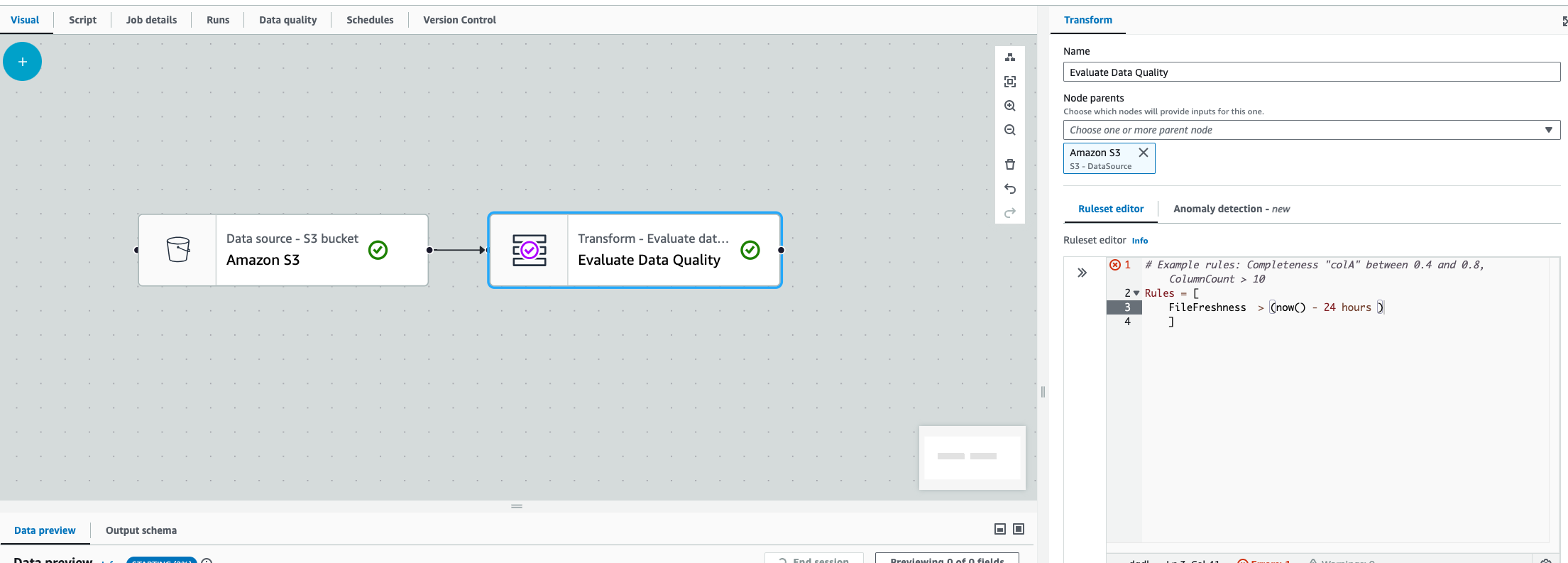
FileFreshness > (now() - 24 hours)
此規則會尋找用來填入動態框架或資料框的資料夾路徑或檔案。這適用於 Amazon S3 路徑或 Amazon S3 型 AWS Glue Data Catalog 資料表。有幾個考量:
-
在 AWS Glue ETL 中,您必須在 Amazon S3 或 Glue Data Catalog 轉換後立即進行 EvaluateDataQuality AWS 轉換。
-
此規則無法在 AWS Glue 互動式工作階段中運作。
如果您在這兩種情況下嘗試這麼做,或 AWS Glue 找不到檔案時, AWS Glue 會擲回下列錯誤: “Unable to parse file path from DataFrame”
