本文為英文版的機器翻譯版本,如內容有任何歧義或不一致之處,概以英文版為準。
指定編目程式可建立的資料表數目上限
您可以選擇TableThreshold透過 AWS Glue 主控台或 指定 ,指定允許爬蟲程式建立的資料表數目上限 AWS CLI。如果爬蟲程式在其網路爬取期間偵測到的資料表大於此輸入值,網路爬取就會失敗,且不會將任何資料寫入資料目錄。
當爬蟲程式偵測並建立的資料表比您預期的要大得多時,此參數非常有用。這可能有多種原因,例如:
使用 AWS Glue 任務填入 Amazon S3 位置時,最終可能會產生與資料夾相同層級的空檔案。在這種情況下,當您在此 Amazon S3 位置執行爬蟲程式時,由於檔案和資料夾存在於相同層級,爬蟲程式會建立多個資料表。
如果未設定
"TableGroupingPolicy": "CombineCompatibleSchemas",您最終可能會得到比預期更多的資料表。
您可以指定 TableThreshold 作為大於 0 的整數值。此值的設定是以每個爬蟲程式為基礎。也就是說,對於每個網路爬取,都會考慮此值。例如:爬蟲程式具有設定為 5 的 TableThreshold 值。在每個爬蟲程式中,會 AWS Glue 比較使用此資料表閾值 (5) 偵測到的資料表數目,如果偵測到的資料表數目小於 5, 會將資料表 AWS Glue 寫入資料目錄,如果沒有,則爬蟲會在不寫入資料目錄的情況下失敗。
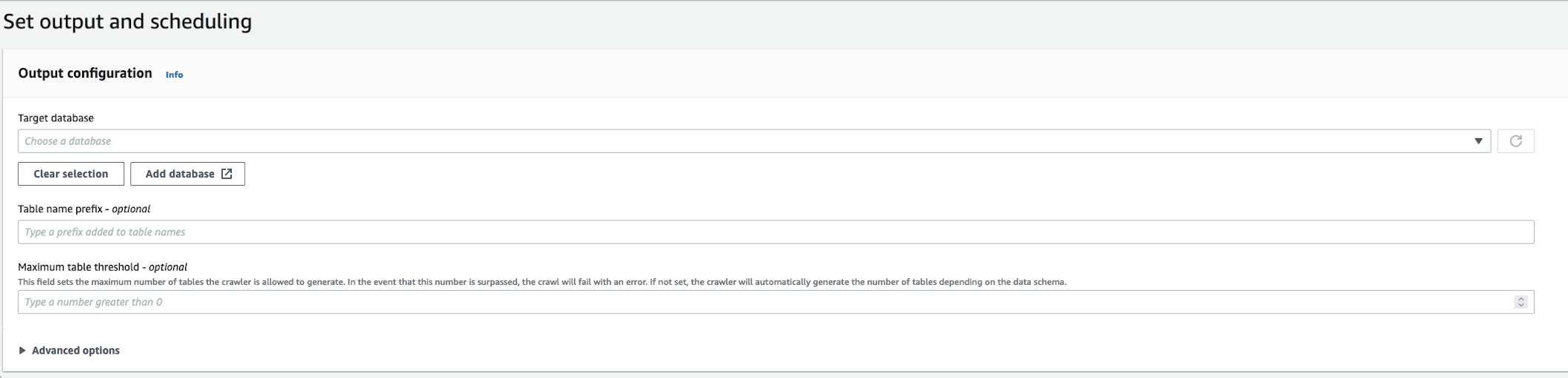
錯誤訊息會記錄下來,以協助您識別資料表路徑並清理資料。在爬蟲程式因為資料表計數大於提供的資料表閾值而失敗的情況下,登入帳戶的範例:
Table Threshold value = 28, Tables detected - 29
在 CloudWatch 中,我們會將偵測到的所有資料表位置記錄為 INFO 訊息。將錯誤記錄為失敗原因。
ERROR com.amazonaws.services.glue.customerLogs.CustomerLogService - CustomerLogService received CustomerFacingException with message
The number of tables detected by crawler: 29 is greater than the table threshold value provided: 28. Failing crawler without writing to Data Catalog.
com.amazonaws.services.glue.exceptions.CustomerFacingInternalException: The number of tables detected by crawler: 29 is greater than the table threshold value provided: 28.
Failing crawler without writing to Data Catalog.
