本文為英文版的機器翻譯版本,如內容有任何歧義或不一致之處,概以英文版為準。
從 Couchbase Server 遷移
簡介
本指南介紹從 Couchbase Server 遷移至 Amazon DocumentDB 時要考量的要點。它說明遷移探索、規劃、執行和驗證階段的考量。它還說明如何執行離線和線上遷移。
與 Amazon DocumentDB 的比較
| Couchbase 伺服器 | Amazon DocumentDB | |
|---|---|---|
| 資料組織 | 在 7.0 版和更新版本中,資料會組織成儲存貯體、範圍和集合。在舊版中,資料會組織成儲存貯體。 | 資料會組織成資料庫和集合。 |
| 相容性 | 每個服務都有不同的 APIs(例如資料、索引、搜尋等)。次要查詢使用 SQL++ (先前稱為 N1QL),這是一種以 ANSI 標準 SQL 為基礎的查詢語言,因此許多開發人員都很熟悉。 | Amazon DocumentDB 與 MongoDB API 相容。 |
| 架構 | 儲存體會連接至每個叢集執行個體。您無法獨立於儲存體擴展運算。 | Amazon DocumentDB 專為雲端而設計,可避免傳統資料庫架構的限制。運算和儲存層在 Amazon DocumentDB 中分開,且運算層可以獨立於儲存體進行擴展。 Amazon DocumentDB |
| 隨需新增讀取容量 | 新增執行個體即可橫向擴展叢集。由於儲存體會連接至服務執行所在的執行個體,因此擴展所需的時間取決於需要移至新執行個體或重新平衡的資料量。 | 您可以在叢集中建立最多 15 個 Amazon DocumentDB 複本,以達成 Amazon DocumentDB 叢集的讀取擴展。 Amazon DocumentDB 不會影響儲存層。 |
| 從節點故障快速復原 | 叢集具有自動容錯移轉功能,但讓叢集恢復完整強度的時間取決於需要移至新執行個體的資料量。 | Amazon DocumentDB 通常可以在 30 秒內容錯移轉主要伺服器,並在 8-10 分鐘內將叢集還原至完整強度,無論叢集中的資料量為何。 |
| 隨著資料成長擴展儲存體 | 對於自我管理叢集,儲存體和 IOs 不會自動擴展。 | Amazon DocumentDB 儲存體和 IOs會自動擴展。 |
| 在不影響效能的情況下備份資料 | 備份是由備份服務執行,預設不會啟用。由於儲存和運算不會分開,因此可能會影響效能。 | Amazon DocumentDB 備份預設為啟用,無法關閉。備份由儲存層處理,因此對運算層沒有影響。Amazon DocumentDB 支援從叢集快照還原,並還原至某個時間點。 |
| 資料耐久性 | 叢集中最多可以有 3 個資料複本,總共 4 個複本。執行資料服務的每個執行個體都會有作用中的資料複本和 1、2 或 3 個複本。 | Amazon DocumentDB 會維護 6 個資料副本,無論有多少個運算執行個體的寫入規定人數為 4 且持續為 true。儲存層保留 4 個資料副本後,用戶端會收到確認。 |
| 一致性 | 支援 K/V 操作的立即一致性。Couchbase SDK 會將 K/V 請求路由到包含資料作用中複本的特定執行個體,因此一旦確認更新,用戶端保證會讀取該更新。複寫其他 服務的更新 (索引、搜尋、分析、事件) 最終一致。 | Amazon DocumentDB 複本最終一致。如果需要立即一致性讀取,用戶端可以從主要執行個體讀取。 |
| 複寫 | 跨資料中心複寫 (XDCR) 提供篩選、主動-被動/主動-主動複寫許多拓撲中的資料。 | Amazon DocumentDB 全域叢集在 1:many (最多 10 個) 拓撲中提供主動-被動複寫。 |
探索
遷移至 Amazon DocumentDB 需要徹底了解現有的資料庫工作負載。工作負載探索是分析 Couchbase 叢集組態和操作特性的程序,包括資料集、索引和工作負載,以協助確保無縫轉換,並將中斷降至最低。
叢集組態
Couchbase 使用以服務為中心的架構,其中每個功能對應至服務。針對您的 Couchbase 叢集執行下列命令,以判斷正在使用哪些服務 (請參閱取得節點資訊
curl -v -u <administrator>:<password> \
  http://<ip-address-or-hostname>:<port>/pools/nodes | \
  jq '[.nodes[].services[]] | unique'
輸出範例:
[
  "backup",
  "cbas",
  "eventing",
  "fts",
  "index",
  "kv",
  "n1ql"
]
Couchbase 服務包括下列項目:
資料服務 (kv)
資料服務提供對記憶體和磁碟上資料的讀取/寫入存取權。
Amazon DocumentDB 透過 MongoDB API 支援 JSON 資料的 K/V 操作。
查詢服務 (n1ql)
查詢服務支援透過 SQL++ 查詢 JSON 資料。
Amazon DocumentDB 支援透過 MongoDB API 查詢 JSON 資料。
索引服務 (索引)
索引服務會建立和維護資料索引,從而加快查詢速度。
Amazon DocumentDB 支援預設主要索引,並透過 MongoDB API 在 JSON 資料上建立次要索引。
搜尋服務 (英尺)
搜尋服務支援建立索引以進行全文搜尋。
Amazon DocumentDB 的原生全文搜尋功能可讓您透過 MongoDB API,使用特殊用途文字索引對大型文字資料集執行文字搜尋。對於進階搜尋使用案例,Amazon DocumentDB 與 Amazon OpenSearch Service 的零 ETL 整合
Analytics 服務 (cbas)
分析服務支援近乎即時地分析 JSON 資料。
Amazon DocumentDB 透過 MongoDB API 支援對 JSON 資料進行臨機操作查詢。您也可以使用在 Amazon EMR 上執行的 Apache Spark,在 Amazon DocumentDB 中對 JSON 資料執行複雜的查詢
事件服務 (事件)
事件服務會執行使用者定義的商業邏輯,以回應資料變更。
每次資料隨 Amazon DocumentDB 叢集變更時,Amazon DocumentDB 都會叫用 函數,以自動化事件驅動的工作負載。 AWS Lambda Amazon DocumentDB
備份服務 (備份)
備份服務會排程完整和增量資料備份,以及先前資料備份的合併。
Amazon DocumentDB 會持續將資料備份至 Amazon S3,保留期間為 1–35 天,讓您可以快速還原至備份保留期間內的任何時間點。Amazon DocumentDB 也會擷取資料的自動快照,做為此持續備份程序的一部分。您也可以使用 管理 Amazon DocumentDB 的備份和還原 AWS Backup。
操作特性
使用適用於 Couchbase 的 Discovery Tool
資料集
此工具會擷取下列儲存貯體、範圍和集合資訊:
儲存貯體名稱
儲存貯體類型
範圍名稱
集合名稱
總大小 (位元組)
項目總數
項目大小 (位元組)
索引
此工具會擷取所有儲存貯體的下列索引統計資料和所有索引定義。請注意,主要索引會被排除,因為 Amazon DocumentDB 會自動為每個集合建立主要索引。
儲存貯體名稱
範圍名稱
集合名稱
索引名稱
索引大小 (位元組)
工作負載
工具會擷取 K/V 和 N1QL 查詢指標。K/V 指標值會在儲存貯體層級收集,SQL++ 指標則會在叢集層級收集。
工具命令列選項如下所示:
python3 discovery.py \
  --username <source cluster username> \
  --password <source cluster password> \
  --data_node <data node IP address or DNS name> \
  --admin_port <administration http REST port> \
  --kv_zoom <get bucket statistics for specified interval> \
  --tools_path <full path to Couchbase tools> \
  --index_metrics <gather index definitions and SQL++ metrics> \
  --indexer_port <indexer service http REST port> \
  --n1ql_start <start time for sampling> \
  --n1ql_step <sample interval over the sample period>
以下為範例命令:
python3 discovery.py \
  --username username \
  --password ******** \
  --data_node "http://10.0.0.1" \
  --admin_port 8091 \
  --kv_zoom week \
  --tools_path "/opt/couchbase/bin" \
  --index_metrics true \
  --indexer_port 9102 \
  --n1ql_start -60000 \
  --n1ql_step 1000
K/V 指標值將以過去一週每 10 分鐘的樣本為基礎 (請參閱 HTTP 方法和 URI
collection-stats.csv – 儲存貯體、範圍和集合資訊
bucket,bucket_type,scope_name,collection_name,total_size,total_items,document_size
beer-sample,membase,_default,_default,2796956,7303,383
gamesim-sample,membase,_default,_default,114275,586,196
pillowfight,membase,_default,_default,1901907769,1000006,1902
travel-sample,membase,inventory,airport,547914,1968,279
travel-sample,membase,inventory,airline,117261,187,628
travel-sample,membase,inventory,route,13402503,24024,558
travel-sample,membase,inventory,landmark,3072746,4495,684
travel-sample,membase,inventory,hotel,4086989,917,4457
...
index-stats.csv – 索引名稱和大小
bucket,scope,collection,index-name,index-size
beer-sample,_default,_default,beer_primary,468144
gamesim-sample,_default,_default,gamesim_primary,87081
travel-sample,inventory,airline,def_inventory_airline_primary,198290
travel-sample,inventory,airport,def_inventory_airport_airportname,513805
travel-sample,inventory,airport,def_inventory_airport_city,487289
travel-sample,inventory,airport,def_inventory_airport_faa,526343
travel-sample,inventory,airport,def_inventory_airport_primary,287475
travel-sample,inventory,hotel,def_inventory_hotel_city,497125
...
kv-stats.csv – 取得、設定和刪除所有儲存貯體的指標
bucket,gets,sets,deletes
beer-sample,0,0,0
gamesim-sample,0,0,0
pillowfight,369,521,194
travel-sample,0,0,0
n1ql-stats.csv – SQL++ 選取、刪除和插入叢集的指標
selects,deletes,inserts
0,132,87
indexes-<bucket-name>.txt – 儲存貯體中所有索引的索引定義。請注意,主要索引會被排除,因為 Amazon DocumentDB 會自動為每個集合建立主要索引。
CREATE INDEX `def_airportname` ON `travel-sample`(`airportname`)
CREATE INDEX `def_city` ON `travel-sample`(`city`)
CREATE INDEX `def_faa` ON `travel-sample`(`faa`)
CREATE INDEX `def_icao` ON `travel-sample`(`icao`)
CREATE INDEX `def_inventory_airport_city` ON `travel-sample`.`inventory`.`airport`(`city`)
CREATE INDEX `def_inventory_airport_faa` ON `travel-sample`.`inventory`.`airport`(`faa`)
CREATE INDEX `def_inventory_hotel_city` ON `travel-sample`.`inventory`.`hotel`(`city`)
CREATE INDEX `def_inventory_landmark_city` ON `travel-sample`.`inventory`.`landmark`(`city`)
CREATE INDEX `def_sourceairport` ON `travel-sample`(`sourceairport`)
...
規劃
在規劃階段,您將判斷 Amazon DocumentDB 叢集需求,並將 Couchbase 儲存貯體、範圍和集合映射至 Amazon DocumentDB 資料庫和集合。
Amazon DocumentDB 叢集需求
使用探索階段中收集的資料來調整 Amazon DocumentDB 叢集的大小。如需調整 Amazon DocumentDB 叢集大小的詳細資訊,請參閱執行個體大小。 Amazon DocumentDB
將儲存貯體、範圍和集合映射至資料庫和集合
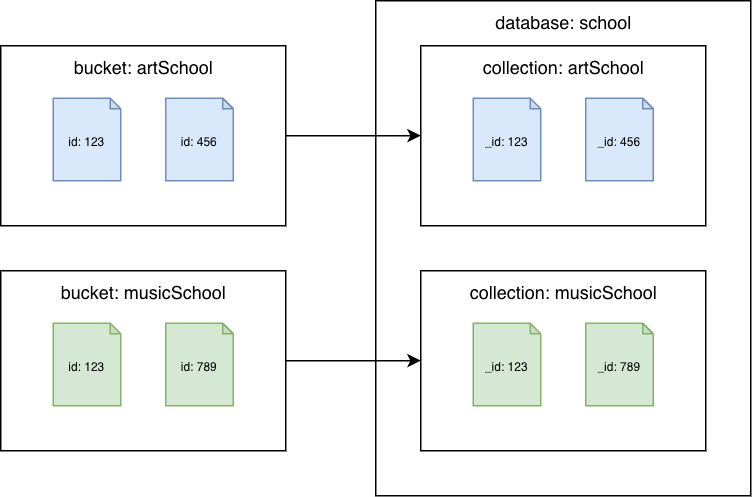
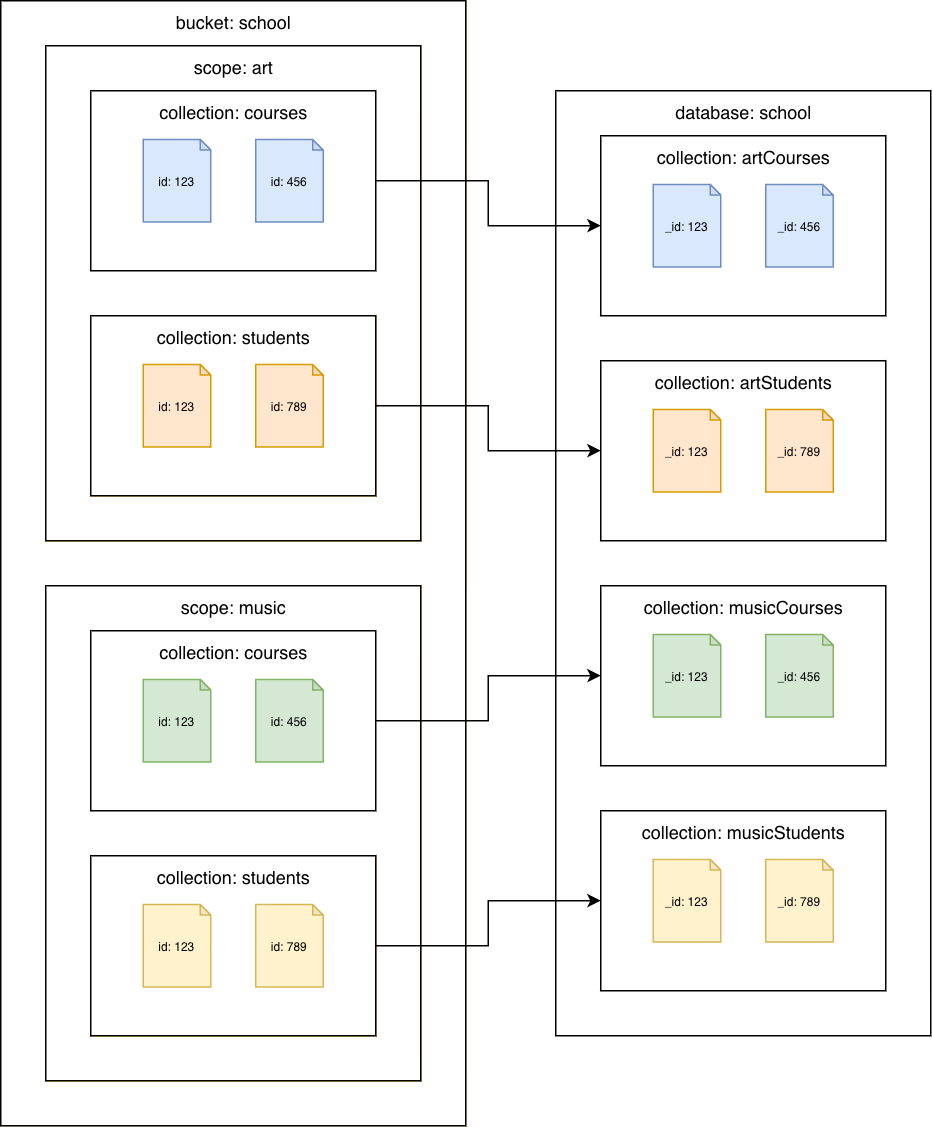
判斷 Amazon DocumentDB 叢集中將存在的資料庫和集合 (Amazon DocumentDB)。根據資料在 Couchbase 叢集中的組織方式,考慮下列選項。這些並非唯一的選項,而是提供起點供您考慮。
Couchbase Server 6.x 或更早版本
Amazon DocumentDB 集合的 Couchbase 儲存貯體
將每個儲存貯體遷移至不同的 Amazon DocumentDB 集合。在此案例中,Couchbase 文件id值將用作 Amazon DocumentDB _id值。
Couchbase Server 7.0 或更新版本
Amazon DocumentDB 集合的 Couchbase 集合
將每個集合遷移至不同的 Amazon DocumentDB 集合。在此案例中,Couchbase 文件id值將用作 Amazon DocumentDB _id值。
移轉
索引遷移
遷移至 Amazon DocumentDB 不僅需要傳輸資料,還需要建立索引,以維持查詢效能並最佳化資料庫操作。本節概述將索引遷移至 Amazon DocumentDB 時的詳細step-by-step程序,同時確保相容性和效率。
使用 Amazon Q 將 SQL++ CREATE INDEX陳述式轉換為 Amazon DocumentDB createIndex()命令。
上傳 Discovery Tool for Couchbase 建立的 indexes-<bucket name>.txt 檔案 (s)。
輸入下列提示:
Convert the Couchbase CREATE INDEX statements to Amazon DocumentDB createIndex commands
Amazon Q 將產生同等的 Amazon DocumentDB createIndex()命令。請注意,您可能需要根據您將 Couchbase 儲存貯體、範圍和集合映射至 Amazon DocumentDB 集合的方式更新集合名稱。
例如:
indexes-beer-sample.txt
CREATE INDEX `beerType` ON `beer-sample`(`type`)
CREATE INDEX `code` ON `beer-sample`(`code`) WHERE (`type` = "brewery")
範例 Amazon Q 輸出 (摘錄):
db.beerSample.createIndex(
  { "type": 1 },
  {
    "name": "beerType",
    "background": true
  }
)

db.beerSample.createIndex(
  { "code": 1 },
  {
    "name": "code",
    "background": true,
    "partialFilterExpression": { "type": "brewery" }
  }
)
如需 Amazon Q 無法轉換的任何索引,請參閱管理 Amazon DocumentDB 索引和索引和索引屬性以取得詳細資訊。
重構程式碼以使用 MongoDB APIs
用戶端使用 Couchbase SDKs連線至 Couchbase Server。Amazon DocumentDB 用戶端使用 MongoDB 驅動程式連線至 Amazon DocumentDB。MongoDB 驅動程式也支援 Couchbase SDKs支援的所有語言。如需您語言驅動程式的詳細資訊,請參閱 MongoDB
由於 Couchbase Server 和 Amazon DocumentDB 之間的 APIs 不同,因此您需要重構程式碼,才能使用適當的 MongoDB APIs。您可以使用 Amazon Q 將 K/V API 呼叫和 SQL++ 查詢轉換為同等的 MongoDB APIs:
上傳原始程式碼檔案 (s)。
輸入下列提示:
Convert the Couchbase API code to Amazon DocumentDB API code
使用 Hello Couchbase
from datetime import timedelta
from pymongo import MongoClient

# Connection parameters
database_name = "travel-sample"

# Connect to Amazon DocumentDB cluster
client = MongoClient('<Amazon DocumentDB connection string>')

# Get reference to database and collection
db = client['travel-sample']
airline_collection = db['airline']

# upsert document function
def upsert_document(doc):
    print("\nUpsert Result: ")
    try:
        # key will equal: "airline_8091"
        key = doc["type"] + "_" + str(doc["id"])
        doc['_id'] = key # Amazon DocumentDB uses _id as primary key
        result = airline_collection.update_one(
            {'_id': key},
            {'$set': doc},
            upsert=True
        )
        print(f"Modified count: {result.modified_count}")
    except Exception as e:
        print(e)

# get document function
def get_airline_by_key(key):
    print("\nGet Result: ")
    try:
        result = airline_collection.find_one({'_id': key})
        print(result)
    except Exception as e:
        print(e)

# query for document by callsign
def lookup_by_callsign(cs):
    print("\nLookup Result: ")
    try:
        result = airline_collection.find(
            {'callsign': cs},
            {'name': 1, '_id': 0}
        )
        for doc in result:
            print(doc['name'])
    except Exception as e:
        print(e)

# Test document
airline = {
    "type": "airline",
    "id": 8091,
    "callsign": "CBS",
    "iata": None,
    "icao": None,
    "name": "Couchbase Airways",
}

upsert_document(airline)
get_airline_by_key("airline_8091")
lookup_by_callsign("CBS")
如需在 Python、Node.js、PHP、Go、Java、C#/ 中連線至 Amazon DocumentDB 的範例,請參閱以程式設計方式連線至 Amazon DocumentDB。NET、R 和 Ruby。
選取遷移方法
將資料遷移至 Amazon DocumentDB 時,有兩個選項:
離線移轉
在下列情況下,請考慮離線遷移:
可接受停機時間:離線遷移涉及停止對來源資料庫的寫入操作、匯出資料,然後將其匯入 Amazon DocumentDB。此程序會為您的應用程式造成停機時間。如果您的應用程式或工作負載可以容忍這段時間無法使用,離線遷移是可行的選項。
遷移較小的資料集或執行概念驗證:對於較小的資料集,匯出和匯入程序所需的時間相對較短,使離線遷移成為快速簡單的方法。它也非常適合停機時間較不重要的開發、測試和proof-of-concept環境。
簡易性是優先順序:離線方法使用 cbexport 和 mongoimport,通常是遷移資料最直接的方法。它可避免線上遷移方法中涉及的變更資料擷取 (CDC) 的複雜性。
不需要複寫正在進行的變更:如果來源資料庫在遷移期間未主動接收變更,或在遷移過程中擷取和套用這些變更到目標並不重要,則離線方法是適當的。
Couchbase Server 6.x 或更早版本
Couchbase 儲存貯體到 Amazon DocumentDB 集合
使用 cbexport json--format選項,您可以使用 lines或 list。
cbexport json \
  --cluster <source cluster endpoint> \
  --bucket <bucket name> \
  --format <lines | list> \
  --username <username> \
  --password <password> \
  --output export.json \
  --include-key _id
使用 mongoimport 搭配匯入行或清單的適當選項,將資料匯入 Amazon DocumentDB 集合:
行:
mongoimport \
  --db <database> \
  --collection <collection> \
  --uri "<Amazon DocumentDB cluster connection string>" \
  --file export.json
清單:
mongoimport \
  --db <database> \
  --collection <collection> \
  --uri "<Amazon DocumentDB cluster connection string>" \
  --jsonArray \
  --file export.json
Couchbase Server 7.0 或更新版本
若要執行離線遷移,請使用 cbexport 和 mongoimport 工具:
具有預設範圍和預設集合的 Couchbase 儲存貯體
使用 cbexport json--format選項,您可以使用 lines或 list。
cbexport json \
  --cluster <source cluster endpoint> \
  --bucket <bucket name> \
  --format <lines | list> \
  --username <username> \
  --password <password> \
  --output export.json \
  --include-key _id
使用 mongoimport 搭配匯入行或清單的適當選項,將資料匯入 Amazon DocumentDB 集合:
行:
mongoimport \
  --db <database> \
  --collection <collection> \
  --uri "<Amazon DocumentDB cluster connection string>" \
  --file export.json
清單:
mongoimport \
  --db <database> \
  --collection <collection> \
  --uri "<Amazon DocumentDB cluster connection string>" \
  --jsonArray \
  --file export.json
Amazon DocumentDB 集合的 Couchbase 集合
使用 cbexport json--include-data選項匯出每個集合。對於 --format選項,您可以使用 lines或 list。使用 --scope-field和 --collection-field選項,將範圍和集合的名稱存放在每個 JSON 文件的指定欄位中。
cbexport json \
  --cluster <source cluster endpoint> \
  --bucket <bucket name> \
  --include-data <scope name>.<collection name> \
  --format <lines | list> \
  --username <username> \
  --password <password> \
  --output export.json \
  --include-key _id \
  --scope-field "_scope" \
  --collection-field "_collection"
由於 cbexport 將 _scope和 _collection 欄位新增至每個匯出的文件,因此您可以透過搜尋和取代sed、 或任何您偏好的方法,從匯出檔案中的每個文件中移除它們。
使用 mongoimport 搭配匯入行或清單的適當選項,將每個集合的資料匯入 Amazon DocumentDB 集合:
行:
mongoimport \
--db <database> \
--collection <collection> \
--uri "<Amazon DocumentDB cluster connection string>" \
--file export.json
清單:
mongoimport \
--db <database> \
--collection <collection> \
--uri "<Amazon DocumentDB cluster connection string>" \
--jsonArray \
--file export.json
線上遷移
當您需要將停機時間降至最低,且持續的變更需要近乎即時地複寫至 Amazon DocumentDB 時,請考慮線上遷移。
請參閱如何從 Couchbase 執行即時遷移至 Amazon DocumentDB
Couchbase Server 6.x 或更早版本
Couchbase 儲存貯體到 Amazon DocumentDB 集合
Couchbase 的遷移公用程式document.id.strategy 參數設定為使用訊息金鑰值作為_id欄位值 (請參閱接收器連接器 ID 策略屬性
ConnectorConfiguration:
  document.id.strategy: 'com.mongodb.kafka.connect.sink.processor.id.strategy.ProvidedInKeyStrategy'
Couchbase Server 7.0 或更新版本
具有預設範圍和預設集合的 Couchbase 儲存貯體
Couchbase 的遷移公用程式document.id.strategy 參數設定為使用訊息金鑰值作為_id欄位值 (請參閱接收器連接器 ID 策略屬性
ConnectorConfiguration:
  document.id.strategy: 'com.mongodb.kafka.connect.sink.processor.id.strategy.ProvidedInKeyStrategy'
Amazon DocumentDB 集合的 Couchbase 集合
設定來源連接器
ConnectorConfiguration:
  # add couchbase.collections configuration
  couchbase.collections: '<scope 1>.<collection 1>, <scope 1>.<collection 2>, ...'
將接收器連接器
ConnectorConfiguration:
  # remove collection configuration
  #collection: 'test'

  # modify topics configuration
  topics: '<bucket>.<scope 1>.<collection 1>, <bucket>.<scope 1>.<collection 2>, ...'

  # add topic.override.%s.%s configurations for each topic
  topic.override.<bucket>.<scope 1>.<collection 1>.collection: '<collection>'
  topic.override.<bucket>.<scope 1>.<collection 2>.collection: '<collection>'
驗證
本節提供詳細的驗證程序,以在遷移至 Amazon DocumentDB 後驗證資料一致性和完整性。無論遷移方法為何,驗證步驟都適用。
確認目標中存在所有集合
Couchbase 來源
選項 1:查詢工作台
SELECT RAW `path`
  FROM system:keyspaces
  WHERE `bucket` = '<bucket>'
選項 2:cbq
cbq \
  -e <source cluster endpoint> \
  -u <username> \
  -p <password> \
  -q "SELECT RAW `path`
       FROM system:keyspaces
       WHERE `bucket` = '<bucket>'"
Amazon DocumentDB 目標
mongosh (請參閱連線至 Amazon DocumentDB 叢集):
db.getSiblingDB('<database>')
db.getCollectionNames()
驗證 souce 和目標叢集之間的文件計數
Couchbase 來源
Couchbase Server 6.x 或更早版本
選項 1:查詢工作台
SELECT COUNT(*)
FROM `<bucket>`
選項 2:cbq
cbq \
  -e <source cluster endpoint> \
  -u <username> \
  -p <password> \
  -q "SELECT COUNT(*)
       FROM `<bucket:>`"
Couchbase Server 7.0 或更新版本
選項 1:查詢工作台
SELECT COUNT(*)
FROM `<bucket>`.`<scope>`.`<collection>`
選項 2:cbq
cbq \
  -e <source cluster endpoint> \
  -u <username> \
  -p <password> \
  -q "SELECT COUNT(*)
       FROM `<bucket:>`.`<scope>`.`<collection>`"
Amazon DocumentDB 目標
mongosh (請參閱連線至 Amazon DocumentDB 叢集):
db = db.getSiblingDB('<database>')
db.getCollection('<collection>').countDocuments()
比較來源和目標叢集之間的文件
Couchbase 來源
Couchbase Server 6.x 或更早版本
選項 1:查詢工作台
SELECT META().id as _id, *
FROM `<bucket>`
LIMIT 5
選項 2:cbq
cbq \
  -e <source cluster endpoint>
  -u <username> \
  -p <password> \
  -q "SELECT META().id as _id, *
       FROM `<bucket>` \
       LIMIT 5"
Couchbase Server 7.0 或更新版本
選項 1:查詢工作台
SELECT COUNT(*)
FROM `<bucket>`.`<scope>`.`<collection>`
選項 2:cbq
cbq \
  -e <source cluster endpoint> \
  -u <username> \
  -p <password> \
  -q "SELECT COUNT(*)
       FROM `<bucket:>`.`<scope>`.`<collection>`"
Amazon DocumentDB 目標
mongosh (請參閱連線至 Amazon DocumentDB 叢集):
db = db.getSiblingDB('<database>')
db.getCollection('<collection>').find({
  _id: {
    $in: [
      <_id 1>, <_id 2>, <_id 3>, <_id 4>, <_id 5>
    ]
  }
})
