本文為英文版的機器翻譯版本,如內容有任何歧義或不一致之處,概以英文版為準。
使用 Appium 與裝置互動
建立遠端存取工作階段後,裝置將可用於 Appium 測試。在整個遠端存取工作階段期間,您可以在裝置上執行任意數量的 Appium 工作階段,而不會限制您使用的用戶端。例如,您可以從 IDE 使用本機 Appium 程式碼執行測試,然後切換到使用 Appium Inspector 來疑難排解您遇到的任何問題。工作階段最多可持續 150 分鐘,不過,如果超過 5 分鐘沒有活動 (透過互動式主控台或透過 Appium 端點),工作階段將會逾時。
使用應用程式搭配 Appium 工作階段進行測試
提供應用程式以搭配 Appium 工作階段使用的方式有數種:
-
將應用程式上傳至 Device Farm,並在工作階段中安裝它。
-
指定 HTTPS URL 或 Amazon S3 URI 做為 appium:app功能。
-
依套件名稱參考已安裝的應用程式 (appium:appPackage在 Android 或 iOS appium:bundleId 上使用)。
-
透過指定 browserName功能來測試 Web 應用程式 (Chrome在 Android 上,在 iOS Safari上)。
標準應用程式大小限制 (4 GB) 適用於所有應用程式來源。
Device Farm 不支援在遠端存取工作階段appium:app期間在 中傳遞本機檔案系統路徑。
上傳、安裝和使用應用程式
若要搭配 Appium 工作階段使用上傳的應用程式,請遵循下列步驟:
-
上傳並安裝您的應用程式
有兩種方式可將應用程式上傳並安裝到待測的裝置上:
-
使用已安裝的應用程式
安裝後,應用程式會自動插入為任何後續 Appium 工作階段的預設appium:app功能。如果您包含輔助應用程式,則會將其設定為 appium:otherApps功能。
例如,如果您使用 com.aws.devicefarm.sample做為您的應用程式建立遠端存取工作階段,並com.aws.devicefarm.other.sample做為其中一個輔助應用程式,則當您前往建立 Appium 工作階段時,它將具有類似以下的功能:
{
    "value":
    {
        "sessionId": "abcdef123456-1234-5678-abcd-abcdef123456",
        "capabilities":
        {
            "app": "/tmp/com.aws.devicefarm.sample.apk",
            "otherApps": "[\"/tmp/com.aws.devicefarm.other.sample.apk\"]",
            ...
        }
    }
}
如果您在工作階段期間安裝新的應用程式,它會取代目前的appium:app功能。如果先前安裝的應用程式具有不同的套件名稱,它會保留在裝置上並移至 appium:otherApps功能。
例如,如果您最初在建立遠端存取工作階段com.aws.devicefarm.sample時使用 ,但在工作階段com.aws.devicefarm.other.sample期間安裝 ,則您的 Appium 工作階段將具有類似下列的功能:
{
    "value":
    {
        "sessionId": "abcdef123456-1234-5678-abcd-abcdef123456",
        "capabilities":
        {
            "app": "/tmp/com.aws.devicefarm.other.sample.apk",
            "otherApps": "[\"/tmp/com.aws.devicefarm.sample.apk\"]",
            ...
        }
    }
}
使用 HTTPS URL
您可以在建立 Appium 工作階段時,將可公開存取的 HTTPS URL 指定為appium:app所需的功能。URL 必須直接指向可下載的應用程式檔案 (例如, .apk或 .ipa 檔案)。Device Farm 會從指定的 URL 下載應用程式,並將其安裝到待測的裝置。
僅支援 HTTPS URLs。純 HTTP URLs會遭到拒絕。
例如,下列 Appium 工作階段建立請求會從 HTTPS URL 下載應用程式:
{
    "capabilities":
    {
        "alwaysMatch": {},
        "firstMatch":
        [
            {
                "appium:app": "https://example.com/path/to/MyApp.apk"
            }
        ]
    }
}
使用 Amazon S3 URI
您可以在建立 Appium 工作階段時,將 Amazon S3 URI (例如 s3://my-bucket/path/to/MyApp.ipa) 指定為appium:app所需的功能。Device Farm 從指定的 S3 位置下載應用程式,並將其安裝到待測裝置。
若要使用 S3 URI,必須符合下列要求:
-
遠端存取工作階段必須從已設定 IAM 執行角色的專案啟動。
-
IAM 執行角色的工作階段持續時間上限必須至少為 150 分鐘,因為該角色是在遠端存取工作階段期間擔任。
-
IAM 執行角色必須具有在 URI 中指定的 S3 物件s3:GetObject上呼叫 的許可。我們也建議授予相同物件的s3:HeadObject許可,允許 Device Farm 在嘗試下載之前驗證物件的存在。
例如,下列 Appium 工作階段建立請求會從 S3 URI 下載應用程式:
{
    "capabilities":
    {
        "alwaysMatch": {},
        "firstMatch":
        [
            {
                "appium:app": "s3://my-test-bucket/apps/MyApp.ipa"
            }
        ]
    }
}
以下是範例 IAM 許可政策,授予從 Amazon S3 下載應用程式的建議存取權,包括選用的s3:HeadObject許可。如需設定 IAM 執行角色的詳細資訊,請參閱 使用 IAM 執行角色存取 AWS 資源。
範例
{
  "Version": "2012-10-17",
  "Statement": [
    {
      "Effect": "Allow",
      "Action": [
        "s3:GetObject",
        "s3:HeadObject"
      ],
      "Resource": "arn:aws:s3:::my-test-bucket/apps/*"
    }
  ]
}
使用已安裝的應用程式
如果您想要測試的應用程式已安裝在裝置上,您可以依其套件名稱直接參考它,而不是上傳它。在 Android 上使用 appium:appPackage和 appium:appActivity功能,或在 iOS 上使用 appium:bundleId功能。
例如,下列 Appium 工作階段建立請求會啟動已安裝的 Android 應用程式:
{
    "capabilities":
    {
        "alwaysMatch": {},
        "firstMatch":
        [
            {
                "appium:appPackage": "com.example.myapp",
                "appium:appActivity": "com.example.myapp.MainActivity"
            }
        ]
    }
}
在 iOS 上,請appium:bundleId改用 :
{
    "capabilities":
    {
        "alwaysMatch": {},
        "firstMatch":
        [
            {
                "appium:bundleId": "com.example.myapp"
            }
        ]
    }
}
測試 Web 應用程式
若要測試 Web 應用程式,請在 Appium 工作階段建立請求中指定 browserName功能。Chrome 在 Android 裝置或 iOS Safari裝置上使用 。
例如,以下請求會在 Android 裝置上開啟 Chrome:
{
    "capabilities":
    {
        "alwaysMatch": {},
        "firstMatch":
        [
            {
                "browserName": "Chrome"
            }
        ]
    }
}
如何使用 Appium 端點
以下是從主控台 AWS CLI、 和 AWS SDKs 存取工作階段 Appium 端點的步驟。這些步驟包括如何使用各種 Appium 用戶端測試架構開始執行測試:
- Console
-
-
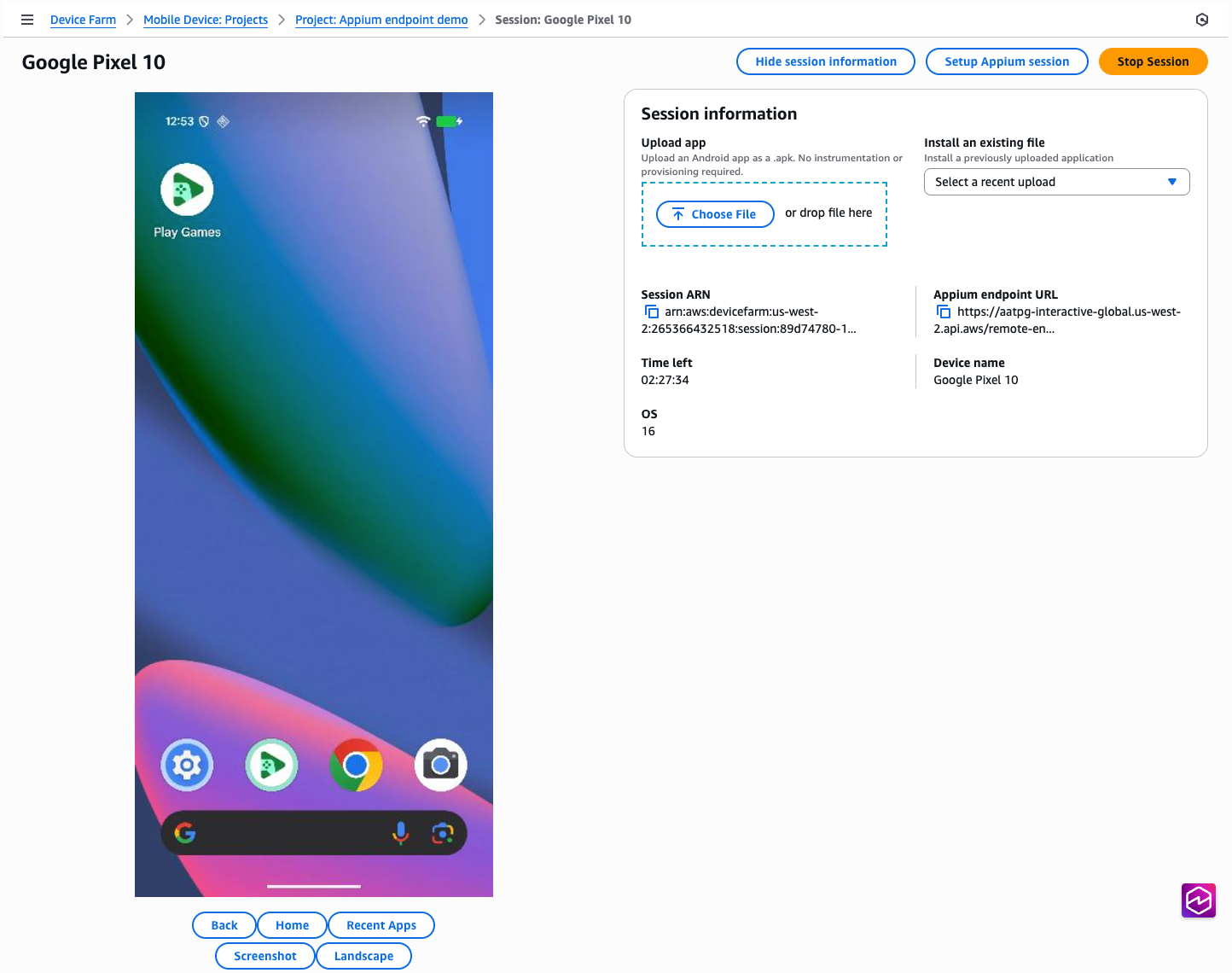
在 Web 瀏覽器中開啟遠端存取工作階段頁面:
-
若要使用 Appium Inspector 執行工作階段,請執行下列動作:
-
按一下按鈕設定 Appium 工作階段
-
遵循頁面上的指示,了解如何使用 Appium Inspector 啟動工作階段。
-
若要從本機 IDE 執行 Appium 測試,請執行下列動作:
-
按一下文字 Appium 端點 URL 旁的「複製」圖示
-
將此 URL 貼到您的本機 Appium 程式碼,無論您目前指定遠端地址或命令執行器。如需特定語言的範例,請按一下此範例視窗中您所選語言的其中一個標籤。
- AWS CLI
-
首先,下載並安裝最新版本,以確認您的 AWS CLI 版本是up-to-date。
Appium 端點欄位不適用於舊版的 AWS CLI。
一旦您的工作階段啟動並執行,Appium 端點 URL 將透過 GetRemoteAccessSession API 呼叫回應remoteDriverEndpoint中名為 的欄位提供:
$ aws devicefarm get-remote-access-session \
    --arn "arn:aws:devicefarm:us-west-2:123456789876:session:abcdef123456-1234-5678-abcd-abcdef123456/abcdef123456-1234-5678-abcd-abcdef123456/00000"
這會顯示如下所示的輸出:
{
    "remoteAccessSession": {
        "arn": "arn:aws:devicefarm:us-west-2:111122223333:session:abcdef123456-1234-5678-abcd-abcdef123456/abcdef123456-1234-5678-abcd-abcdef123456/00000",
        "name": "Google Pixel 8",
        "status": "RUNNING",
        "endpoints": {
            "remoteDriverEndpoint": "https://devicefarm-interactive-global.us-west-2.api.aws/remote-endpoint/ABCD1234...",
        ...
}
無論您目前在何處指定遠端地址或命令執行器,都可以在本機 Appium 程式碼中使用此 URL。如需特定語言的範例,請按一下此範例視窗中您所選語言的其中一個標籤。
如需如何直接從命令列與端點互動的範例,您可以使用命令列工具 curl 直接呼叫 WebDriver 端點:
$ curl "https://devicefarm-interactive-global.us-west-2.api.aws/remote-endpoint/ABCD1234.../status"
這會顯示如下所示的輸出:
{
    "value":
    {
        "ready": true,
        "message": "The server is ready to accept new connections",
        "build":
        {
            "version": "2.5.1"
        }
    }
}
- Python
-
一旦您的工作階段啟動並執行,Appium 端點 URL 將透過 GetRemoteAccessSession API 呼叫回應remoteDriverEndpoint中名為 的欄位提供:
# To get the URL
import sys
import boto3
from botocore.exceptions import ClientError

def get_appium_endpoint() -> str:
    session_arn = "arn:aws:devicefarm:us-west-2:111122223333:session:abcdef123456-1234-5678-abcd-abcdef123456/abcdef123456-1234-5678-abcd-abcdef123456/00000"
    device_farm_client = boto3.client("devicefarm", region_name="us-west-2")

    try:
        resp = device_farm_client.get_remote_access_session(arn=session_arn)
    except ClientError as exc:
        sys.exit(f"Failed to call Device Farm: {exc}")

    remote_access_session = resp.get("remoteAccessSession", {})
    endpoints = remote_access_session.get("endpoints", {})
    endpoint = endpoints.get("remoteDriverEndpoint")

    if not endpoint:
        sys.exit("Device Farm response did not include endpoints.remoteDriverEndpoint")

    return endpoint

# To use the URL
from appium import webdriver
from appium.options.android import UiAutomator2Options

opts = UiAutomator2Options()
driver = webdriver.Remote(get_appium_endpoint(), options=opts)
# ...
driver.quit()
- Java
-
注意:此範例使用適用於 Java v2 的 AWS 開發套件,並與 JDK 第 11 版及更高版本相容。
一旦您的工作階段啟動並執行,Appium 端點 URL 將透過 GetRemoteAccessSession API 呼叫回應remoteDriverEndpoint中名為 的欄位提供:
// To get the URL
import software.amazon.awssdk.auth.credentials.DefaultCredentialsProvider;
import software.amazon.awssdk.regions.Region;
import software.amazon.awssdk.services.devicefarm.DeviceFarmClient;
import software.amazon.awssdk.services.devicefarm.model.GetRemoteAccessSessionRequest;
import software.amazon.awssdk.services.devicefarm.model.GetRemoteAccessSessionResponse;

public class AppiumEndpointBuilder {
    public static String getAppiumEndpoint() throws Exception {
        String session_arn = "arn:aws:devicefarm:us-west-2:111122223333:session:abcdef123456-1234-5678-abcd-abcdef123456/abcdef123456-1234-5678-abcd-abcdef123456/00000";

        try (DeviceFarmClient client = DeviceFarmClient.builder()
                .region(Region.US_WEST_2)
                .credentialsProvider(DefaultCredentialsProvider.create())
                .build()) {

            GetRemoteAccessSessionResponse resp = client.getRemoteAccessSession(
                    GetRemoteAccessSessionRequest.builder().arn(session_arn).build()
            );

            String endpoint = resp.remoteAccessSession().endpoints().remoteDriverEndpoint();
            if (endpoint == null || endpoint.isEmpty()) {
                throw new IllegalStateException("remoteDriverEndpoint missing from response");
            }
            return endpoint;
        }
    }
}

// To use the URL
import io.appium.java_client.android.AndroidDriver;
import io.appium.java_client.android.options.UiAutomator2Options;

import java.net.URL;

public class ExampleTest {
    public static void main(String[] args) throws Exception {
        String endpoint = AppiumEndpointBuilder.getAppiumEndpoint();
        UiAutomator2Options options = new UiAutomator2Options();
        AndroidDriver driver = new AndroidDriver(new URL(endpoint), options);

        try {
            // ... your test ...
        } finally {
            driver.quit();
        }
    }
}
- JavaScript
-
注意:此範例使用適用於 JavaScript v3 的 AWS SDK,以及使用 Node 18+ 的 WebdriverIO v8+。
一旦您的工作階段啟動並執行,Appium 端點 URL 將透過 GetRemoteAccessSession API 呼叫回應remoteDriverEndpoint中名為 的欄位提供:
// To get the URL
import { DeviceFarmClient, GetRemoteAccessSessionCommand } from "@aws-sdk/client-device-farm";

export async function getAppiumEndpoint() {
  const sessionArn = "arn:aws:devicefarm:us-west-2:111122223333:session:abcdef123456-1234-5678-abcd-abcdef123456/abcdef123456-1234-5678-abcd-abcdef123456/00000";

  const client = new DeviceFarmClient({ region: "us-west-2" });
  const resp = await client.send(new GetRemoteAccessSessionCommand({ arn: sessionArn }));

  const endpoint = resp?.remoteAccessSession?.endpoints?.remoteDriverEndpoint;
  if (!endpoint) throw new Error("remoteDriverEndpoint missing from response");
  return endpoint;
}

// To use the URL with WebdriverIO
import { remote } from "webdriverio";

(async () => {
  const endpoint = await getAppiumEndpoint();
  const u = new URL(endpoint);

  const driver = await remote({
    protocol: u.protocol.replace(":", ""),
    hostname: u.hostname,
    port: u.port ? Number(u.port) : (u.protocol === "https:" ? 443 : 80),
    path: u.pathname + u.search,
    capabilities: {
      platformName: "Android",
      "appium:automationName": "UiAutomator2",
      // ...other caps...
    },
  });

  try {
    // ... your test ...
  } finally {
    await driver.deleteSession();
  }
})();
- C#
-
一旦您的工作階段啟動並執行,Appium 端點 URL 將透過 GetRemoteAccessSession API 呼叫回應remoteDriverEndpoint中名為 的欄位提供:
// To get the URL
using System;
using System.Threading.Tasks;
using Amazon;
using Amazon.DeviceFarm;
using Amazon.DeviceFarm.Model;

public static class AppiumEndpointBuilder
{
    public static async Task<string> GetAppiumEndpointAsync()
    {
        var sessionArn = "arn:aws:devicefarm:us-west-2:111122223333:session:abcdef123456-1234-5678-abcd-abcdef123456/abcdef123456-1234-5678-abcd-abcdef123456/00000";

        var config = new AmazonDeviceFarmConfig
        {
            RegionEndpoint = RegionEndpoint.USWest2
        };
        using var client = new AmazonDeviceFarmClient(config);

        var resp = await client.GetRemoteAccessSessionAsync(new GetRemoteAccessSessionRequest { Arn = sessionArn });
        var endpoint = resp?.RemoteAccessSession?.Endpoints?.RemoteDriverEndpoint;

        if (string.IsNullOrWhiteSpace(endpoint))
            throw new InvalidOperationException("RemoteDriverEndpoint missing from response");

        return endpoint;
    }
}

// To use the URL
using OpenQA.Selenium.Appium;
using OpenQA.Selenium.Appium.Android;

class Example
{
    static async Task Main()
    {
        var endpoint = await AppiumEndpointBuilder.GetAppiumEndpointAsync();

        var options = new AppiumOptions();
        options.PlatformName = "Android";
        options.AutomationName = "UiAutomator2";

        using var driver = new AndroidDriver(new Uri(endpoint), options);
        try
        {
            // ... your test ...
        }
        finally
        {
            driver.Quit();
        }
    }
}
- Ruby
-
一旦您的工作階段啟動並執行,Appium 端點 URL 將透過 GetRemoteAccessSession API 呼叫回應remoteDriverEndpoint中名為 的欄位提供:
# To get the URL
require 'aws-sdk-devicefarm'

def get_appium_endpoint
  session_arn = "arn:aws:devicefarm:us-west-2:111122223333:session:abcdef123456-1234-5678-abcd-abcdef123456/abcdef123456-1234-5678-abcd-abcdef123456/00000"

  client = Aws::DeviceFarm::Client.new(region: 'us-west-2')
  resp = client.get_remote_access_session(arn: session_arn)
  endpoint = resp.remote_access_session.endpoints.remote_driver_endpoint
  raise "remote_driver_endpoint missing from response" if endpoint.nil? || endpoint.empty?
  endpoint
end

# To use the URL
require 'appium_lib_core'

endpoint = get_appium_endpoint
opts = {
  server_url: endpoint,
  capabilities: {
    'platformName' => 'Android',
    'appium:automationName' => 'UiAutomator2'
  }
}

driver = Appium::Core.for(opts).start_driver
begin
  # ... your test ...
ensure
  driver.quit
end