本文為英文版的機器翻譯版本,如內容有任何歧義或不一致之處,概以英文版為準。
# 設定自動轉返的階段
您可以設定管道中的階段,以在失敗時自動復原。當階段失敗時,階段會復原至最近的成功執行。只有在目前的管道結構版本中啟動先前的執行時,管道才能轉返至先前的執行。由於自動轉返組態是管道定義的一部分,因此只有在管道階段中成功執行管道之後,您的管道階段才會自動轉返。
## 設定自動轉返的階段 (主控台)
您可以將階段復原至先前成功的指定執行。如需詳細資訊,請參閱 *CodePipeline API 指南*中的 [RollbackStage](https://docs.aws.amazon.com/codepipeline/latest/APIReference/API_RollbackStage.html)。
**設定自動轉返的階段 (主控台)**
1. 登入 AWS 管理主控台 並開啟 CodePipeline 主控台,網址為 https://[http://console.aws.amazon.com/codesuite/codepipeline/home](https://console.aws.amazon.com/codesuite/codepipeline/home)。
與 AWS 您的帳戶相關聯的所有管道的名稱和狀態都會顯示。
1. 在 **Name (名稱)** 中,選擇您想編輯的管道名稱。
1. 在管道詳細資訊頁面上,選擇 **Edit (編輯)**。
1. 在**編輯**頁面上,針對您要編輯的動作,選擇**編輯階段**。
1. 選擇**自動化階段組態:**,然後選擇在**階段失敗時設定自動轉返**。將變更儲存至您的管道。
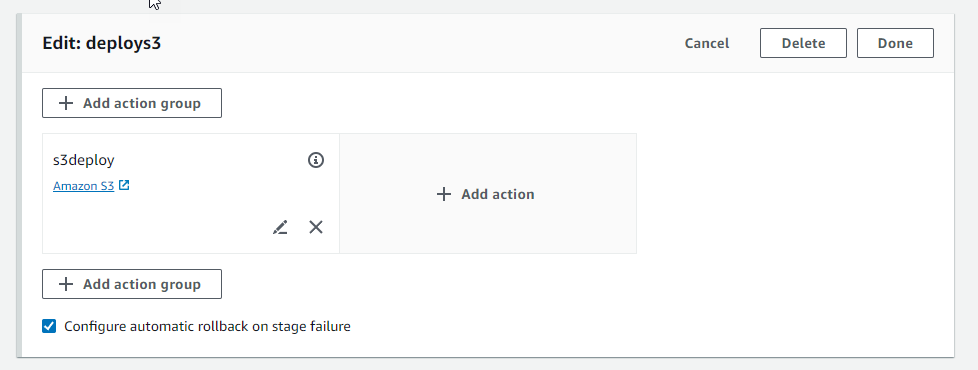
## 設定自動復原的階段 (CLI)
若要使用 AWS CLI 將失敗的階段設定為自動回復至最近的成功執行,請使用 命令來建立或更新管道,如 [建立管道、階段和動作](pipelines-create.md)和 中所述[在 CodePipeline 中編輯管道](pipelines-edit.md)。
+ 開啟終端機 (Linux、macOS 或 Unix) 或命令提示字元 AWS CLI (Windows),然後使用 執行`update-pipeline`命令,在管道結構中指定失敗條件。下列範例會為名為 的階段設定自動轉返`S3Deploy`:
```
{
"name": "S3Deploy",
"actions": [
{
"name": "s3deployaction",
"actionTypeId": {
"category": "Deploy",
"owner": "AWS",
"provider": "S3",
"version": "1"
},
"runOrder": 1,
"configuration": {
"BucketName": "static-website-bucket",
"Extract": "false",
"ObjectKey": "SampleApp.zip"
},
"outputArtifacts": [],
"inputArtifacts": [
{
"name": "SourceArtifact"
}
],
"region": "us-east-1"
}
],
{{"onFailure": {
"result": "ROLLBACK"}}
}
}
```
如需設定階段復原失敗條件的詳細資訊,請參閱 *CodePipeline API 參考*中的 [FailureConditions](https://docs.aws.amazon.com/codepipeline/latest/APIReference/API_FailureConditions.html)。
## 設定自動轉返的階段 (CloudFormation)
若要使用 CloudFormation 將階段設定為在失敗時自動復原,請使用 `OnFailure` 參數。失敗時,階段會自動回復至最近的成功執行。
```
OnFailure:
Result: ROLLBACK
```
+ 更新範本,如下列程式碼片段所示。下列範例會為名為 的階段設定自動轉返`Release`:
```
AppPipeline:
Type: AWS::CodePipeline::Pipeline
Properties:
RoleArn:
Ref: CodePipelineServiceRole
Stages:
-
Name: Source
Actions:
-
Name: SourceAction
ActionTypeId:
Category: Source
Owner: AWS
Version: 1
Provider: S3
OutputArtifacts:
-
Name: SourceOutput
Configuration:
S3Bucket:
Ref: SourceS3Bucket
S3ObjectKey:
Ref: SourceS3ObjectKey
RunOrder: 1
-
Name: Release
Actions:
-
Name: ReleaseAction
InputArtifacts:
-
Name: SourceOutput
ActionTypeId:
Category: Deploy
Owner: AWS
Version: 1
Provider: CodeDeploy
Configuration:
ApplicationName:
Ref: ApplicationName
DeploymentGroupName:
Ref: DeploymentGroupName
RunOrder: 1
OnFailure:
Result: ROLLBACK
ArtifactStore:
Type: S3
Location:
Ref: ArtifactStoreS3Location
EncryptionKey:
Id: arn:aws:kms:useast-1:ACCOUNT-ID:key/KEY-ID
Type: KMS
DisableInboundStageTransitions:
-
StageName: Release
Reason: "Disabling the transition until integration tests are completed"
Tags:
- Key: Project
Value: ProjectA
- Key: IsContainerBased
Value: 'true'
```
如需設定階段復原失敗條件的詳細資訊,請參閱*CloudFormation 《 使用者指南*`StageDeclaration`》中的 [OnFailure](https://docs.aws.amazon.com/AWSCloudFormation/latest/UserGuide/aws-properties-codepipeline-pipeline-stagedeclaration.html#cfn-codepipeline-pipeline-stagedeclaration-onfailure)。