本文為英文版的機器翻譯版本,如內容有任何歧義或不一致之處,概以英文版為準。
新增詞彙實體
您可以使用 InvokeDataAutomationLibraryIngestionJob API 將詞彙新增至程式庫。您可以透過 S3 資訊清單檔案或內嵌承載提供詞彙。
重要
UPSERT 操作在實體層級使用 Clobber 樣式的取代,這表示會取代整個實體,而不是與現有內容合併。
選項 1:使用 S3 資訊清單檔案
步驟 1:建立 JSONL 資訊清單檔案
範例:vocabulary-manifest.json
{"entityId":"medical-en","description":"Medication terms in English language","phrases":[{"text":"paracetamol"},{"text":"ibuprofen"},{"text":"acetaminophen","displayAsText":"acetaminophen"}],"language":"EN"}
{"entityId":"medical-es","description":"Medication terms in Spanish language","phrases":[{"text":"paracetamol"},{"text":"ibuprofen"},{"text":"acetaminophen","displayAsText":"acetaminophen"}],"language":"ES"}
資訊清單檔案需求:
檔案格式:JSONL (JSON 行)
-
實體 JSON:
entityId (必要):唯一識別符 (最多 128 個字元)
描述 (選用):entityId 的描述
語言 (必要):ISO 語言代碼 (支援的語言)
-
片語 (必要):文字物件陣列。每個物件都包含:
text (必要):個別單字或片語
displayAsText (選用):使用此項目取代文字記錄中的實際字詞 (注意:區分大小寫)
步驟 2:將資訊清單上傳至 S3
aws s3 cp vocabulary-manifest.json s3://my-bucket/manifests/
步驟 3:啟動擷取任務
使用 InvokeDataAutomationLibraryIngestionJob 啟動詞彙擷取任務。
AWS CLI 範例:
請求
aws bedrock-data-automation-data-automation invoke-data-automation-library-ingestion-job \
    --library-arn "arn:aws:bedrock:us-east-1:123456789012:data-automation-library/healthcare-vocabulary" \
    --entity-type "VOCABULARY" \
    --operation-type "UPSERT" \
    --input-configuration '{"s3Object":{"s3Uri":"s3://my-bucket/manifests/vocabulary-manifest.json"}}' \
    --output-configuration '{"s3Uri":"s3://my-bucket/outputs/"}'
回應:
{
  "jobArn": "arn:aws:bedrock:us-east-1:123456789012:data-automation-library-ingestion-job/job-12345"
}
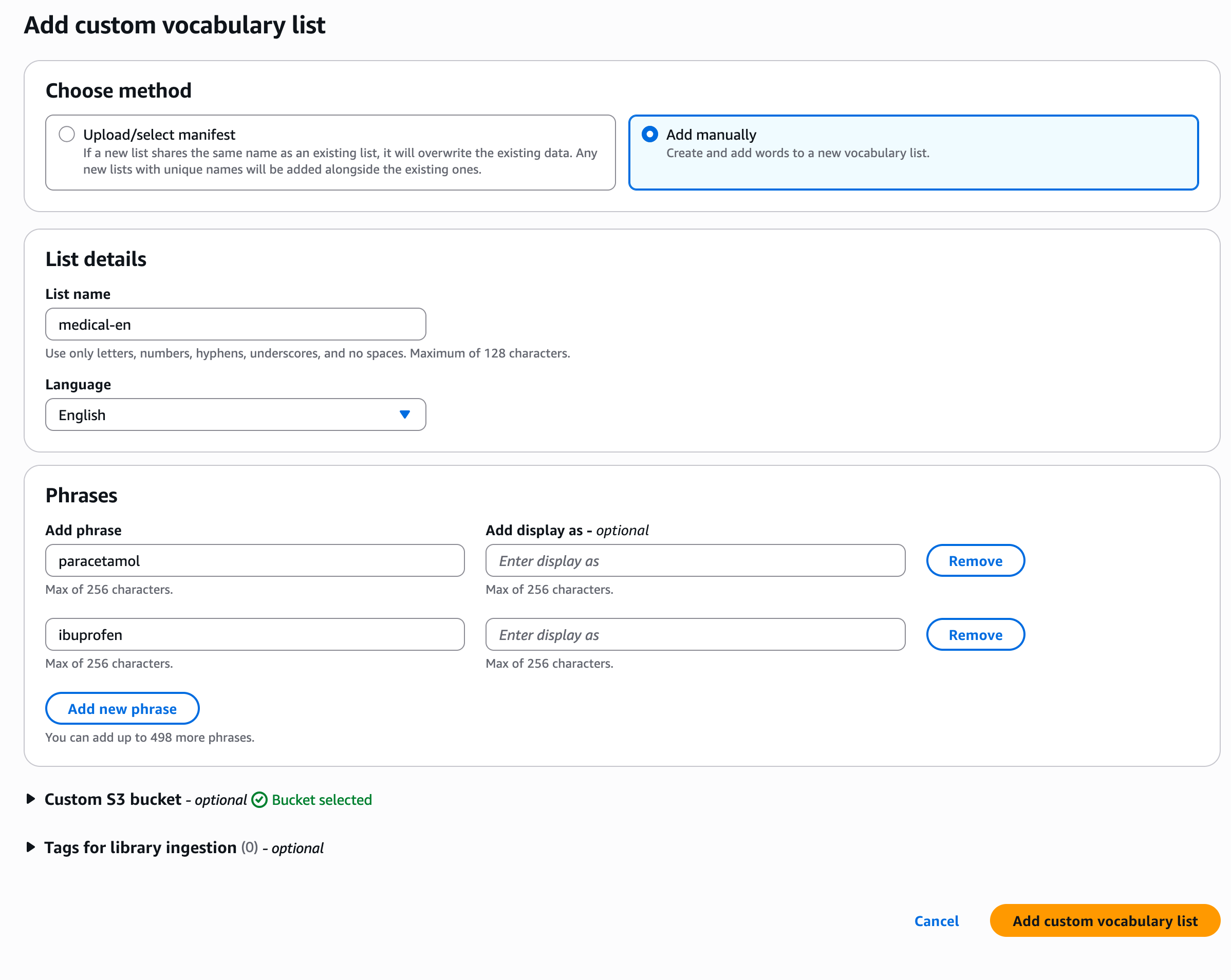
AWS 主控台範例:
導覽至「程式庫詳細資訊」頁面
選擇「新增自訂詞彙清單」
選擇「上傳/選取資訊清單」
選擇是否直接從 S3 位置上傳資訊清單檔案

選項 2:使用內嵌承載
此選項可用於最多 100 個片語的快速更新。
使用 InvokeDataAutomationLibraryIngestionJob 啟動詞彙擷取任務。
AWS CLI 範例:
請求
aws bedrock-data-automation-data-automation invoke-data-automation-library-ingestion-job \
    --library-arn "arn:aws:bedrock:us-east-1:123456789012:data-automation-library/healthcare-vocabulary" \
    --entity-type "VOCABULARY" \
    --operation-type "UPSERT" \
    --input-configuration '{"inlinePayload":{"upsertEntitiesInfo":[{"vocabulary":{"entityId":"medical-en","language":"EN","phrases":[{"text":"paracetamol"},{"text":"ibuprofen"}]}}]}}' \
    --output-configuration '{"s3Uri":"s3://bda-data-bucket/output/"}'
回應:
{
  "jobArn": "arn:aws:bedrock:us-east-1:123456789012:data-automation-library-ingestion-job/job-12345"
}
AWS 主控台範例:
導覽至「程式庫詳細資訊」頁面
選擇「新增自訂詞彙清單」
選擇「手動新增」